
ShipClip
For sales teams: ShipClip auto-polishes screen recordings with zoom, cursor smoothing, and keystroke overlays, so demos look professionally edited instantly.
Built by Ryan S · Productivity · Marketing · Analytics · Paid
In category: #693 of 1443 · Productivity
ShipClip is a Community listing on Launch Llama with 14 total upvotes, founded by Ryan S who joined in May 2026, compared against 3 alternatives.
Community listing
Listing status
14upvotes
Community score
Ryan S (Joined May 2026)
Founder
Compared against 3 alternatives
Market comparison
Launched on Launch Llama May 6, 2026 · #3 of 7 that day
About
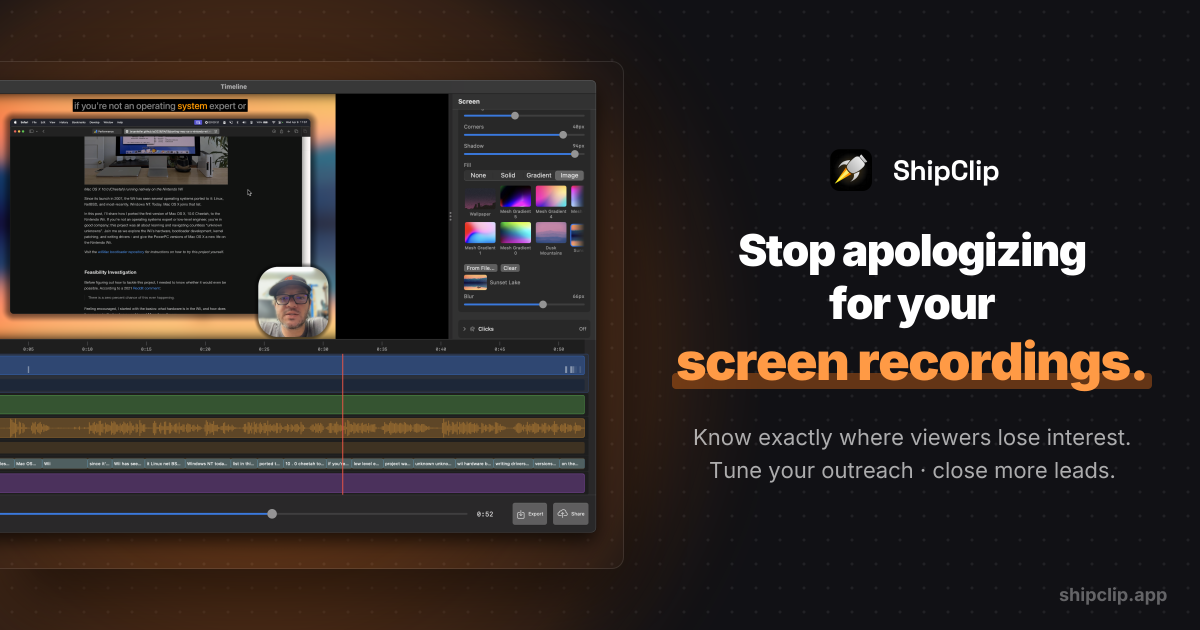
Amateur demos get closed in five seconds. ShipClip is a native macOS screen recorder that auto-polishes every clip: zoom-to-click, cursor smoothing, camera background removal, tactile click and keystroke sounds. Your demo looks like a week of editing. Took none.
Built in Swift with Metal rendering. 6MB. No Electron. A 10-minute 1080p recording exports in 2:48. Screen Studio takes 7:00. That's the difference between two demos before lunch and one.
Share a link and watch where viewers drop off. The prospect who hit 80% is ready to buy. The one who bailed at 0:12 is gone. Skip "just checking in" and call the warm ones.
Multi-track audio means a loud notification doesn't kill the take. Blur annotations cover the password you accidentally showed on screen. Keystroke overlays let viewers follow shortcuts without you narrating every Cmd-K.
$44 one-time for the first 100 buyers, $79 after. The app is yours forever. Cloud sharing is a separate optional subscription. Cancel it and the app keeps recording. Built by a solo developer in Arizona.
Follow ShipClip: X (Twitter) · Facebook
Use Cases
- Recording a product demo for a prospect and sharing a link that shows who watched and where they dropped off
- Turning a 10-minute screen recording into a polished, shareable video with auto-zoom, cursor smoothing, and keystroke overlays
- Recording at home without a studio setup by removing or blurring the camera background on-device
Who it is for
- Sales teams sending prospect demos
- Founders and product teams producing polished product walkthroughs
- Mac users who need fast screen recording exports
Pricing
ShipClip is a one-time purchase of $44 for the Founders License (first 100 buyers, including a free year of Cloud), rising to $79 afterward. The cloud subscription is optional.
FAQ
How much does ShipClip cost?
ShipClip is a one-time purchase: $44 for the Founders License (first 100 buyers) or $79 for the Lifetime License. The Mac app is yours forever. Record, edit, and export local MP4s with no Cloud needed. Both licenses include year 1 of ShipClip Cloud (video hosting + share links) free. After year 1, Cloud renews at $39/year, cancel anytime. The app keeps working either way. 14-day refund guarantee.
Why is Cloud a subscription instead of one-time?
The Mac app is a one-time purchase — yours forever, every future update included. Only ShipClip Cloud (the hosting + share links) is recurring, because R2 storage and bandwidth cost money every month. If you cancel Cloud, your app keeps working; you just lose cloud-hosted share links (existing recordings archive, not delete, and come back if you re-subscribe).
What's your refund policy?
ShipClip has a 14-day, single-click refund on your License purchase. If you're not happy, click "Request a refund" on your account page within 14 days for a full refund — License removed, Cloud cancelled, no emails or questions.
What happens if I cancel Cloud?
The Mac app keeps working exactly the same: record, edit, and export local MP4s. Your License lasts forever. You can still download any of your previously uploaded videos from your account at any time. The only thing that stops is public share links (they show an "unavailable" message). Nothing is deleted, and re-subscribing instantly restores every share link.
Is there a storage limit?
There's a soft cap of about 500 GB — roughly 1,500 typical screen recordings — to keep the system sustainable. Nobody doing normal screen-recording work comes close. If you somehow do, we'll reach out before anything stops working.
Does ShipClip work on Windows or Linux?
ShipClip is a native macOS app and requires macOS 14 or later. It uses Apple's ScreenCaptureKit for high-quality capture, which is only available on Mac.
Can I share recordings the same way I share Loom links?
Yes. ShipClip has built-in web sharing. Click Share, get a link. Your recording is viewable in the browser at shipclip.app. You can also export a local file and share it however you like.
What is zoom-to-click?
ShipClip records your cursor position during capture and automatically generates zoom ranges around your clicks. Each zoom range has an adjustable scale, and you can edit, move, resize, or disable individual ranges in the timeline.
Can I edit recordings in ShipClip?
Yes. ShipClip has a timeline editor where you can cut and trim, mute sections of any audio track, adjust zoom ranges, reposition camera PiP keyframes, and mix audio levels, all before exporting.
Is it really a one-time purchase?
Yes. Pay $44 once for the Founders License and the Mac app is yours forever, with every future feature included. ShipClip Cloud (video hosting plus share links) is delivered as a free-year coupon you can redeem anytime. No subscription unless you opt in at redemption.
Alternatives
 Screenify StudioFor builders: Screenify Studio turns rough screen recordings into polished product demos with cinematic motion so you skip editing.
More in Productivity
New on Launch Llama
Launched this week · This month's launches · All products A–Z
Ask AI about ShipClip
Supporters
12 founders
12 founders supported ShipClip on Launch Llama.


Reviews
5.0 · 1 review
For bots & AI agents
Machine-readable versions of ShipClip and Launch Llama. Fetch these instead of parsing this page.
This listing (.md) llms.txt llms-full.txt ai.txt Full catalog (.md) Endpoint index API docs MCP server MCP manifest Developer docs