Signatoro
Signatoro gives AI agents and automations a REST API to fetch and append email signatures across Gmail, Outlook, Apple Mail and any HTML-capable client. Flat-rate team pricing.
Built by The Signatoro Creator · Artificial Intelligence · Productivity · Marketing · Freemium
In category: #472 of 2046 · Artificial Intelligence
Signatoro is an Instant Launch listing on Launch Llama with 73 total upvotes, founded by The Signatoro Creator who joined in Sep 2026, compared against 5 alternatives.
Instant Launch listing
Listing status
73upvotes
Community score
The Signatoro Creator (Joined Sep 2026)
Founder
Compared against 5 alternatives
Market comparison
Launched on Launch Llama Sep 28, 2026 · #6 of 143 that day
About
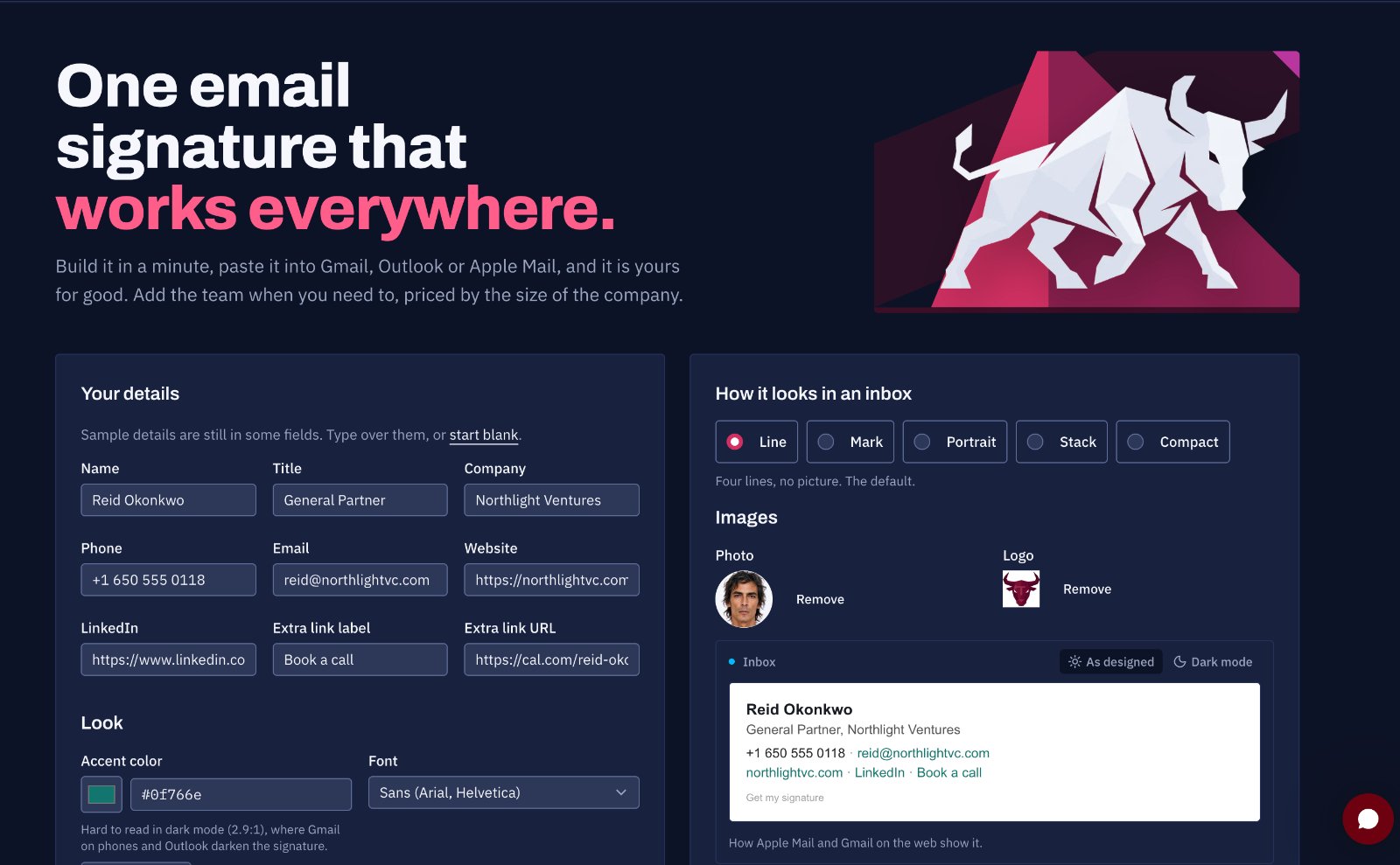
Ever noticed how some email signatures ave endless image attachments or show error instead of an image? Or tried sending mail with an AI agent just to see that the signature did not through? We have. So we built Signatoro. It's a simple and modern email signature that humans and AI can send and read.
Signatoro exposes a per-user REST API that AI agents, CRMs, n8n, Zapier, and Make can call to fetch a saved signature on every send and append it to outgoing messages automatically. The API supports a short cold-outreach mode (name, role, one link) and a full signature mode, so an AI assistant can pick the right format without any mail-server configuration.
The signature builder offers five layouts, one accent colour, and optional photo or logo upload, producing real inline-styled HTML that works when pasted into Gmail, Outlook (new and classic), Apple Mail, Zoho Mail, and iOS Mail. Phone numbers stay selectable, links stay clickable, and screen readers can parse the content because nothing is flattened into an image.
For teams, an owner sets a single logo, colour, and font that propagate to every member's signature. Updating the brand once pushes a new signature to everyone by email. Pricing is flat per company size band (up to 5, 15, or 50 people), with a free tier for a single user that includes one saved signature and 50 API requests per month.
Key Features
- Signature Builder with five layouts, accent colour, and optional photo or logo upload
- REST API and AI Agent Integration via per-user key for n8n, Zapier, Make, and CRMs
- Universal Compatibility with Gmail, Outlook, Apple Mail, Zoho Mail, and iOS Mail
- Company Branding Controls that propagate one logo, colour, and font to every team member
- Flat-Rate Pricing per company size band with a free single-user tier
- Native Zoho integration and more integrations coming
Use Cases
- Adding a consistent, on-brand email signature to messages that AI assistants like Claude or ChatGPT draft and send for you
- Appending one shared company signature via the API or MCP server when automations and AI agents send email on their own
- Keeping one email signature in sync across Gmail, Outlook, Apple Mail and other mail apps for a team
Who it is for
- Founders and teams who use AI assistants or always-on agents that send email on their behalf.
- Developers and automation builders integrating email signatures into n8n, Zapier, or custom agents via REST API.
- Companies that want one brand email signature shared across all employees and mail clients.
Pricing
Signatoro offers flat-rate team pricing, priced by the size of the company.
FAQ
Do I need IT or Active Directory to set this up?
No. Signatoro never sits in your mail path and never talks to Active Directory. You build the signature, paste it into your own mail client, and it's done - no server-side rule, no GPO script, no add-in to install first.
My CRM or an AI assistant sends mail for me. Does the signature go on those?
Not by itself. Signatoro never sits in your mail path, so mail that a CRM or an email assistant sends for you carries no signature unless that tool adds one. Connect it to Signatoro over MCP or with an API key and it fetches your saved signature on every send, or set it up as an AI assistant that signs as you or as itself, with an AI disclosure line - the guide for tools and assistants shows how. A tool that can't connect takes the signature pasted into its settings. If you want every message from a whole company stamped with nothing set up per person, you want a tool that runs on the mail server itself, such as Exclaimer or CodeTwo; Signatoro is deliberately not one.
How is Company different from paying for Exclaimer or CodeTwo?
Those tools run on the mail server and stamp every message on its way out, and they charge per person, usually with a five- or ten-person minimum. Company is a flat monthly price for the size you are - $9 up to 5 people, $19 up to 15 and $49 up to 50 - plus $1.50 a month for each extra member, and when the owner changes the logo, layout, color, font, review badge or booking button, everyone gets an email with their new signature to paste. Nothing runs inside your mail server, so there's nothing to break a delivery. Signatoro vs Exclaimer Signatoro vs CodeTwo
In a company, what can each person still change?
Their own name, title, phone, links and photo. The company name, website, logo, layout, color, font, review badge and booking button come from the company, and only an owner changes them; when that happens everyone gets an email with their updated signature. People keep their own Signatoro account and API key, so an assistant sending for one person fetches that person's signature.
What happens when I stop paying?
A signature you already pasted keeps working exactly as it is: it lives in your own mail app, not on our servers, and any photo or logo you uploaded stays online. New copies go back to the free version, which adds our small "Get my signature" link, and a company with more people than the free version allows can no longer invite anyone until it subscribes again.
Will a fancy signature hurt my deliverability?
A signature with a handful of embedded images and a broken link is exactly what trips a spam filter. Signatoro's layouts default to text with one accent color and no filled backgrounds, use hosted images rather than attachments, and never add a broken link or a tracking pixel.
Do you track when people click links in my signature?
No per-recipient click tracking and no open pixels, ever. We only count first-party views on your own brand and contact pages, not what happens inside someone else's inbox.
Is the signature real text, or is it an image?
Real HTML and real text. Nothing is flattened into a picture, so your phone number stays selectable, your links stay clickable, and a screen reader can still read it.
Why does my signature look different in Outlook than in Gmail?
Every mail client renders HTML email its own way, and Outlook's engine is the strictest of the bunch. Signatoro's layouts are built as inline-styled tables rather than divs, which is what survives Outlook, and are checked against Gmail, Outlook, and Apple Mail. Nobody in email gets pixel parity everywhere, so before you paste, send yourself the test from the generator and open it in each mail app you use, on your phone too.
Should I turn my signature off on replies?
Most people do. Gmail, Outlook, and Zoho Mail all let you set the signature separately for new messages versus replies and forwards, and our install guide for each one shows where that toggle lives. Apple Mail and iOS Mail don't have a separate setting; a signature there applies everywhere.
Alternatives
 AscriptoDetect and fix off-brand email signatures company-wide instantly
 XignDocAdds e-signature collection to Word documents for UK businesses handling contracts, agreements and approvals, with audit trails, encryption, and real-time status alerts for each signer.
More in Artificial Intelligence
New on Launch Llama
Launched this week · This month's launches · All products A–Z
Ask AI about Signatoro
Supporters
51 founders
51 founders supported Signatoro on Launch Llama.





Reviews
5.0 · 3 reviews
Clear value prop and pricing. Would love to try.
Clean concept — a REST API for email signatures across Gmail and Outlook is genuinely useful for AI agents and automation workflows. Flat-rate team pricing makes it easy to adopt.
It solved a big problem for me; I'm going to give it a try.
For bots & AI agents
Machine-readable versions of Signatoro and Launch Llama. Fetch these instead of parsing this page.
This listing (.md) llms.txt llms-full.txt ai.txt Full catalog (.md) Endpoint index API docs MCP server MCP manifest Developer docs