
NestMaxx
Under reviewFree online true-shape nesting for laser, plasma and CNC
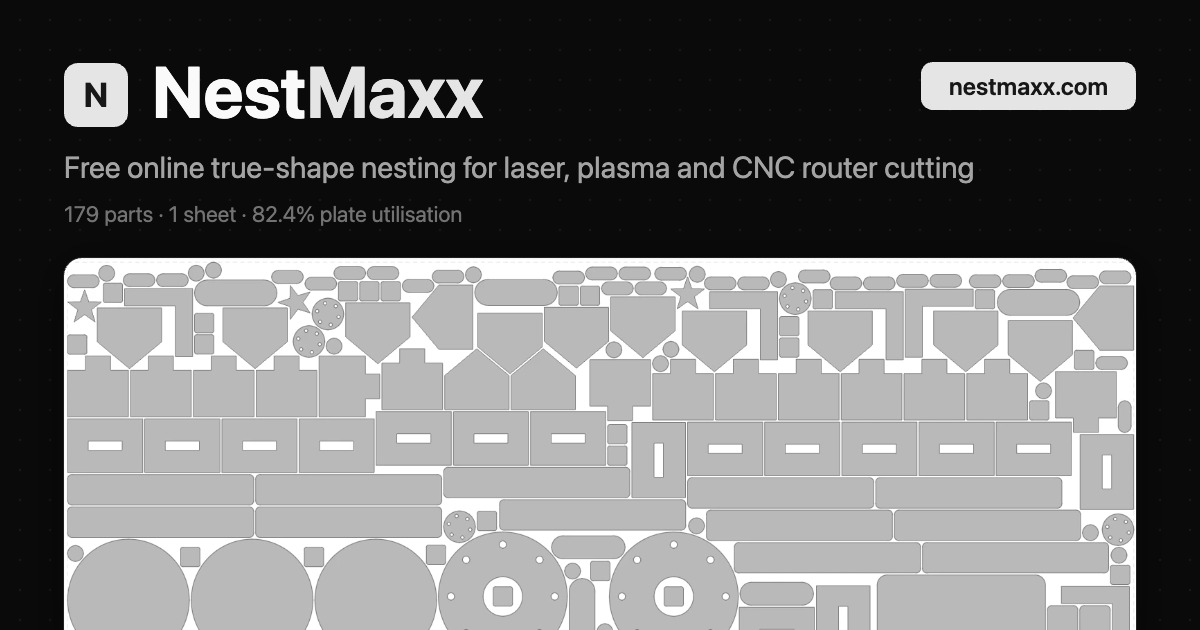
True-shape nesting for plasma, laser and router parts that packs real outlines tight and exports DXF or SVG for CAD/CAM, with no install or subscription.
Built by Nestmaxx Software · Productivity · SaaS · Design Tools · Free
Coming soon on Launch Llama Tools
NestMaxx is a Community listing on Launch Llama with 0 total upvotes, founded by Nestmaxx Software who joined in Nov 2026, compared against 5 alternatives.
Community listing
Listing status
0upvotes
Community score
Nestmaxx Software (Joined Nov 2026)
Founder
Compared against 5 alternatives
Market comparison
True-shape nesting for plasma, laser and router parts that packs real outlines tight and exports DXF or SVG for CAD/CAM, with no install or subscription.
About
NestMaxx uses the No Fit Polygon method to find every position where a part sits against its neighbours without overlapping, so real outlines interlock instead of bounding boxes. Leftover sheet area can be cropped as a reusable offcut, and the layout can fill multiple sheets while flagging parts that did not fit. Parts can be imported from DXF or SVG with layer and unit selection, or drawn in the built-in 2D editor, and rotation can be locked to a grain axis for brushed or rolled stock.
Key Features
- Nests parts by their real outline using the No Fit Polygon method
- Imports DXF and SVG files, including splines, ellipses and arcs
- Exports the nested layout as DXF (R12) or SVG for CAD/CAM
- Crops reusable offcuts from leftover sheet space
- Locks grain direction or sets fixed rotation angles per part
- Provides over 40 parametric shapes and a built-in 2D CAD editor
Use Cases
- Packing brackets and gussets tightly onto a plate before cutting on a plasma, laser or waterjet
- Fitting cabinet parts and cut lists onto a sheet of ply, MDF or melamine for a CNC router or panel saw
- Laying out intricate laser-cut parts in plywood, acrylic, leather or fabric to minimise waste
From the founder
Who it's for
“Small fabrication shops, makers and engineers who cut parts from sheet on a laser, plasma or CNC router and want tighter nests and less scrap without paying for expensive CAM software.”
Why I built it
“I made NestMaxx because true-shape nesting is usually locked inside expensive CAM software, and the free tools I tried were slow or hard to trust with real dimensions. It runs entirely online on your own device, free, with no account.”
Who it is for
- Sheet metal and plasma cutting shops
- Woodworkers running CNC router or panel saw jobs
- Laser cutting workshops working in plywood, acrylic, leather or fabric
Pricing
NestMaxx is free to use. See the website for details.
FAQ
What file formats can I import?
DXF and SVG. Splines, ellipses and arcs come in as true curves, and you can choose which DXF layers to include and set the units per file.
What can I export?
The nested layout as a DXF (R12) or SVG, ready for another CAD/CAM package.
Can I control rotation and grain direction?
Yes. Let parts rotate freely, lock the grain axis so brushed or rolled stock runs one way, or set fixed angles either per part or for the whole sheet.
Can I draw my own parts?
Yes. Pick from over 40 parametric shapes, or draw a part in the built-in 2D editor with lines, arcs, fillets and trims. It checks the outline is cut-ready before you nest.
Does it nest across multiple sheets?
Yes. It fills as many sheets as you allow, flags which parts did not fit, and can crop a reusable offcut from the leftover.
How can I report a bug or request a feature?
Email [email protected]. Bug reports and feature requests are always welcome.
Alternatives
 CADCraftBuilt for architects, engineers and students who want AutoCAD-style drawing with no license fee, plus DWG and DXF support.
 zCAD AIAI 3D that creates real parts, not just shapes
More in Productivity
New on Launch Llama
Launched this week · This month's launches · All products A–Z
Ask AI about NestMaxx
For bots & AI agents
Machine-readable versions of NestMaxx and Launch Llama. Fetch these instead of parsing this page.
This listing (.md) llms.txt llms-full.txt ai.txt Full catalog (.md) Endpoint index API docs MCP server MCP manifest Developer docs