
Side Calendar
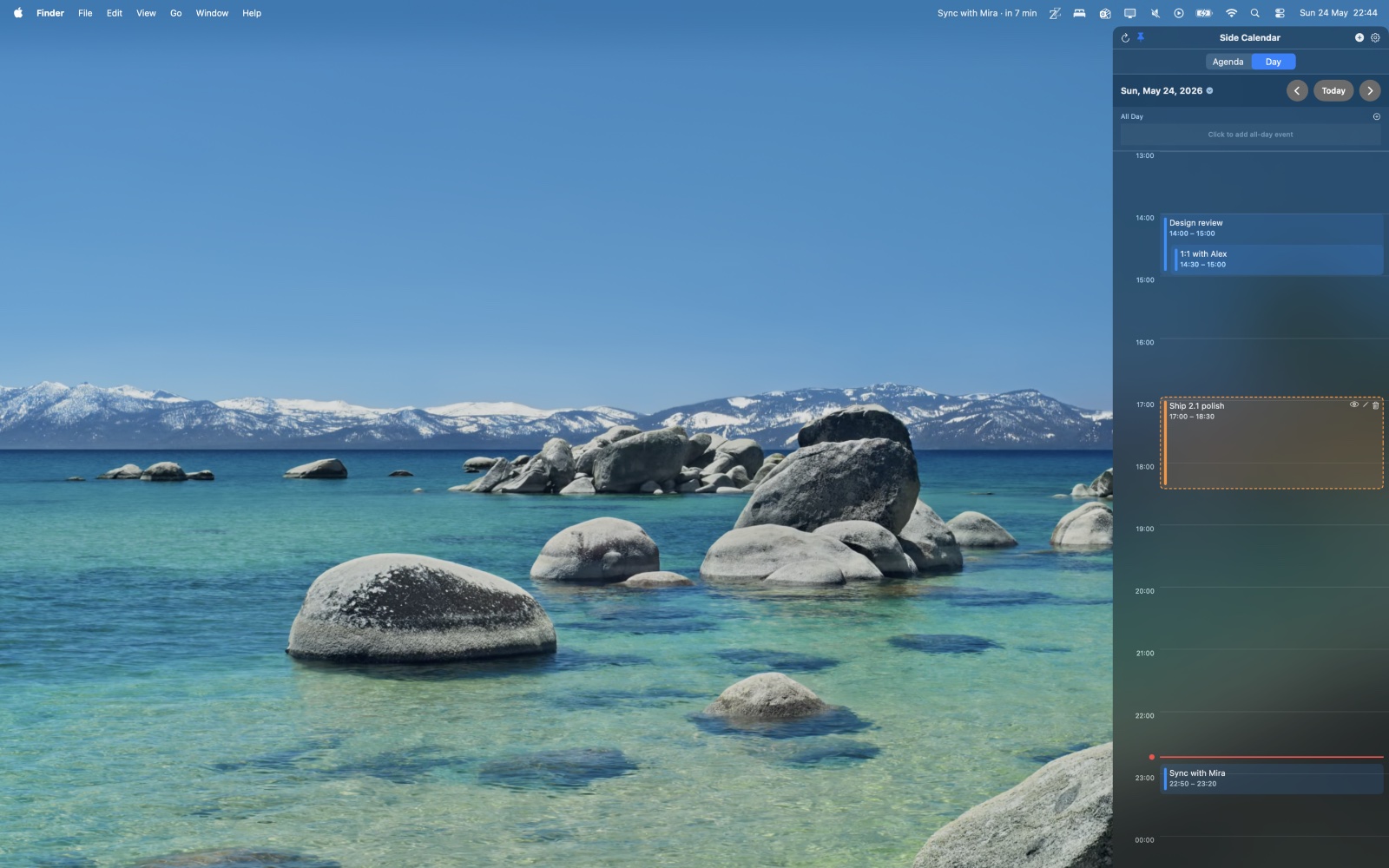
For macOS users: Side Calendar slides out from your screen edge so you access all your calendars instantly without switching apps or tabs.
Built by Creakyhat · Productivity · Paid
In category: #971 of 1428 · Productivity
Side Calendar is an Instant Launch listing on Launch Llama with 3 total upvotes, founded by Creakyhat who joined in May 2026, compared against 6 alternatives.
Instant Launch listing
Listing status
3upvotes
Community score
Creakyhat (Joined May 2026)
Founder
Compared against 6 alternatives
Market comparison
Launched on Launch Llama May 25, 2026 · #46 of 54 that day
About
Hey everyone — just shipped Side Calendar 2.1, and figured I'd share it here.
Side Calendar is a tiny macOS app that slides out from the edge of your screen so your calendar is always one shortcut away — no Cmd-Tabbing to the full Calendar app, no juggling browser tabs. It reads from whatever calendars you've already got connected on your Mac (iCloud, Google, work account, etc.), so there's nothing new to set up.
What's new in 2.1:
Real recurring-event support. Editing, deleting, or dragging a repeating event now prompts you for scope — this event only, this and future, or cancel — the way recurring events are supposed to work.
A proper event editor. Added Location, Alert, and Repeat / End Repeat fields, so you can create a fully-featured event without leaving the sidebar.
Drag-to-reschedule in Day view works on recurring events too, with the same scope prompt.
It's the kind of release that's mostly invisible if you're new to the app, but if you've been using Side Calendar for a while it makes the recurring-event flow feel… normal. Which it should've felt a long time ago, honestly.
One-time purchase on the Mac App Store. Would love feedback from anyone who tries it.
Use Cases
- Glancing at upcoming meetings and a live countdown in the menu bar without switching apps or tabs
- Quickly finding, rescheduling, or creating calendar events in a Day View timeline from a slide-in side panel
- Joining Zoom, Microsoft Teams, Google Meet, or Webex meetings directly from calendar events
Who it is for
- Mac users who want a lightweight menu bar calendar for managing their day
- Professionals juggling many meetings who need a heads-up before their next call
Pricing
Free to download, with a one-time Pro unlock for creating and editing events and reminders. In-app purchases are offered.
Side Calendar at a glance
- 01What it is
- Side Calendar: For macOS users: Side Calendar slides out from your screen edge so you access all your calendars instantly without switching apps or tabs.
- 02Pricing
- Side Calendar pricing: Free to download, with a one-time Pro unlock for creating and editing events and reminders.
- 03Best for
- Side Calendar is best for mac users who want a lightweight menu bar calendar for managing their day and professionals juggling many meetings who need a heads-up before their next call.
- 04Alternatives
- Top Side Calendar alternatives on Launch Llama: Very Good Calendar Sync, Calerto for Mac and QuakPit.
Alternatives
 Very Good Calendar SyncFor Mac users: Very Good Calendar Sync automatically syncs your work and personal calendars in the background with full privacy control and zero cloud storage.
 HejourFor Mac users: Hejour links daily notes with todos and reminders so your thoughts persist across days without relying on cloud servers.
 Apical: Planner, Tasks & EmailFor busy professionals: Apical consolidates tasks, email, notes, and wellness into one dashboard so you start each day organized.
More in Productivity
New on Launch Llama
Launched this week · This month's launches · All products A–Z
Ask AI about Side Calendar
Supporters
2 founders
2 founders supported Side Calendar on Launch Llama.
Reviews
5.0 · 1 review
For bots & AI agents
Machine-readable versions of Side Calendar and Launch Llama. Fetch these instead of parsing this page.
This listing (.md) llms.txt llms-full.txt ai.txt Full catalog (.md) Endpoint index API docs MCP server MCP manifest Developer docs