
FloatText
Under reviewCycle through copied text items without switching apps
Keeps a clipboard overlay above any Android app so anyone pasting repeated text can step through a saved list one item at a time.
Built by Float Text promotion · Productivity · Notes · Freemium
Coming soon on Launch Llama Tools
FloatText is a Community listing on Launch Llama with 0 total upvotes, founded by Float Text promotion who joined in Nov 2026, compared against 6 alternatives.
Community listing
Listing status
0upvotes
Community score
Float Text promotion (Joined Nov 2026)
Founder
Compared against 6 alternatives
Market comparison
Keeps a clipboard overlay above any Android app so anyone pasting repeated text can step through a saved list one item at a time.
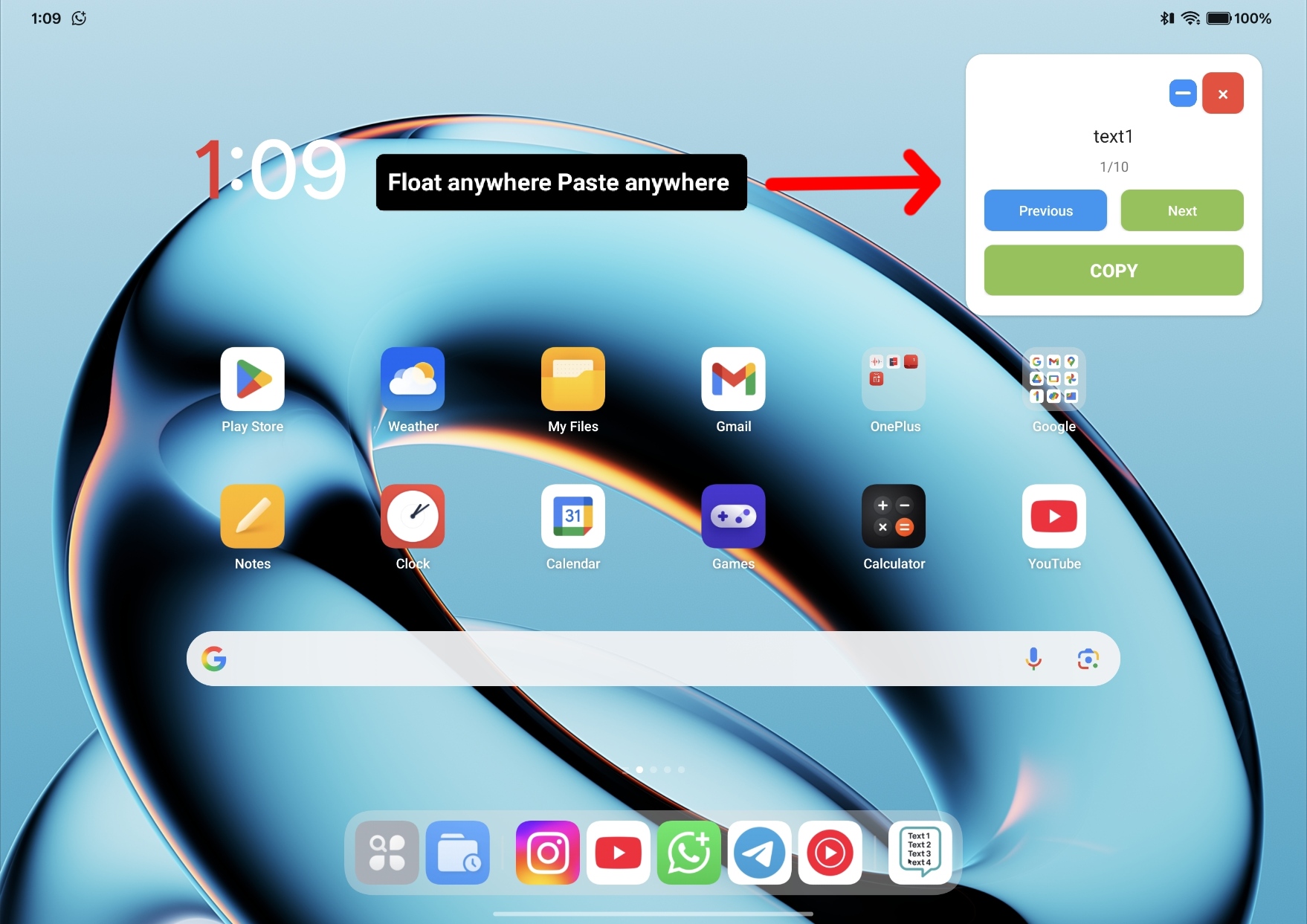
About
Users enter items line by line, paste a list, or import a .txt file, then choose a separator such as newline, space, semicolon, or comma. Tapping Launch Floating Window places the controls on top of other apps, where COPY grabs the current item and advances to the next. The window can collapse into a draggable bubble, and the last 10 inputs are saved so earlier sessions reload without retyping. The page states the app collects no personal data and text stays on the device, with ads served by Google AdMob.
Competitors: clipboard+, windows clipboard
Key Features
- Keeps a floating window above every app for pasting saved items
- Cycles through text items with Previous and Next navigation buttons
- Collapses to a draggable bubble that remembers its position
- Splits text into items by newline, space, semicolon, or comma
- Imports .txt files and restores the last 10 inputs from history
- Sets exact window width and height in pixels, with dark mode
Use Cases
- Pasting several saved snippets, such as a shipping address, promo code, and invoice number, into a browser or chat one at a time
- Copying items from a list typed or imported from a .txt file while working in another app
From the founder
Who it's for
“FloatText is for students, developers, content creators, customer support agents, business professionals, and anyone who frequently copies and pastes text. Whether you're managing study notes, code snippets, repetitive messages, links, or everyday text, FloatText helps you access everything quickly through a convenient floating window.”
Why I built it
“I'm Anand, an independent developer and the founder of FloatText. I started building FloatText because I found myself repeatedly switching between applications just to copy and paste text. I thought there had to be a simpler way to manage frequently used text without interrupting what I was doing. So I decided to build that solution myself. What started as a small idea became a real Android application, eventually reaching over 6,500 downloads. I've handled the development, debugging, publishing, and marketing while learning everything along the way. Today, FloatText is also available on Windows. My goal is to keep improving it and build practical productivity tools that genuinely make people's everyday work easier.”
Who it is for
- Android users who repeatedly copy and paste text between apps
- Office workers who manage lots of data or notes on their phone
Pricing
0.4$
FAQ
Is FloatText free? expand_more
Yes! FloatText is free to download and use. An optional ad-free upgrade is available via a rewarded video — no subscriptions, no hidden fees.
What is the "Draw over apps" permission? expand_more
FloatText needs the Display over other apps permission to show the floating window above your active app. This is the only special permission required.
Does FloatText collect any data? expand_more
No. FloatText does not collect, store, or transmit any personal data. Your text stays on your device. Ads are served by Google AdMob under their privacy policy.
Alternatives
 YapsFor knowledge workers: Yaps transcribes speech to text on-device across apps and organizes notes in Markdown so you capture ideas offline.
More in Productivity
New on Launch Llama
- Dynamite Docs - AI Powered Document Extraction
- MyWiFiQR
- Mentra
- CodexFuse
- Tipe.me
- ResLeap
- MarketPing
- AI Clothes Changer
Launched this week · This month's launches · All products A–Z
Ask AI about FloatText
For bots & AI agents
Machine-readable versions of FloatText and Launch Llama. Fetch these instead of parsing this page.
This listing (.md) llms.txt llms-full.txt ai.txt Full catalog (.md) Endpoint index API docs MCP server MCP manifest Developer docs