On Launch Llama
MakerNotch - Monitor your projects in the MacBook notch
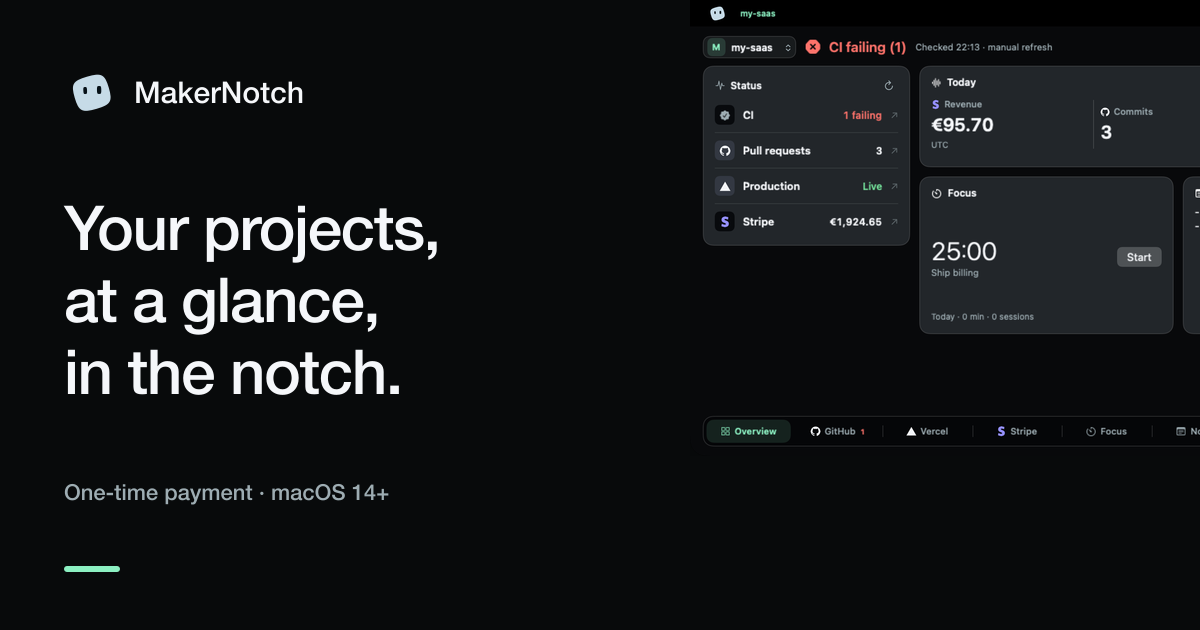
Built for developers and makers, MakerNotch displays pull requests, deploys, revenue, and errors in your MacBook's notch — keeping project status visible without leaving your workflow.
Built by Curro and Alpa
Visit website → Upvotes · 0
In category: #1787 of 1796 · ProductivityTrending this week: #655 of 1796 · Productivity
MakerNotch is a Community listing on Launch Llama with 0 total upvotes, founded by Curro and Alpa who joined in Oct 2026, compared against 6 alternatives.
Community listing
Listing status
0upvotes
Community score
Curro and Alpa (Joined Oct 2026)
Founder
Compared against 6 alternatives
Market comparison
About
MakerNotch is a native macOS app that puts a quiet status panel in your MacBook's notch, displaying real-time data from the tools you already use. Connect read-only API keys for GitHub, Stripe, Vercel, Linear, and eight other services; each integration appears as its own tab with live metrics like open PRs, deployment status, MRR, and unresolved errors. All keys are stored securely in macOS Keychain with no cloud account required.
Ask AI
ChatGPT Claude Perplexity Grok
For agents
llms.txt · llms-full.txt · ai.txt · Live fact sheet · Full catalog (.md) · Endpoint index · API spec · REST access · Agent server · Server manifest · Server discovery
Key Features
- Connect GitHub, GitLab, Vercel, Stripe, Polar, Sentry, and other dev tools with read-only keys
- View pull requests, CI runs, deployments, revenue, and production errors at a glance in the
- Store API credentials securely in macOS Keychain with per-project isolation
- Switch between projects with keyboard shortcuts (⌘1, 9) and access built-in developer utilities
Pricing
MakerNotch is a paid product. See the website for current pricing.
FAQ
What is MakerNotch?
MakerNotch is a native macOS app that puts a quiet status panel in your MacBook's notch, displaying real-time data from the tools you already use. Connect read-only API keys for GitHub, Stripe, Vercel, Linear, and eight other services; each integration appears as its own tab with live metrics like open PRs, deployment status, MRR, and unresolved errors. All keys are stored securely in macOS Keychain with no cloud account required.
What are the key features of MakerNotch?
MakerNotch includes: • Connect GitHub, GitLab, Vercel, Stripe, Polar, Sentry, and other dev tools with read-only keys • View pull requests, CI runs, deployments, revenue, and production errors at a glance in the notch • Store API credentials securely in macOS Keychain with per-project isolation • Switch between projects with keyboard shortcuts (⌘1–9) and access built-in developer utilities • Create rich-text project notes with colors, highlights, and checklists per project • Run local tools (JSON formatter, Base64 encoder, UUID generator, JWT decoder) without sending data t
How much does MakerNotch cost?
MakerNotch is a paid product. See the website for current pricing. You can discover and review MakerNotch for free on Launch Llama.
What category does MakerNotch belong to?
MakerNotch is listed under Developer Tools, Productivity, Automation on Launch Llama.
How do I get started with MakerNotch?
Click the "Visit Website" button on this page to go directly to MakerNotch. You can also upvote and leave a review to help other founders discover it.
Reviews
1 comment
Hey, love seeing this here! 👋 What inspired you to build this? Would love to hear the story behind it.
Alternatives
- BuildNotch
A notch for Windows builders. Music, tasks, a timer, Github commits and your AI apps sit at the top of your screen.
- Drain
Drain helps Mac users see resource usage—battery, memory, storage, data, and AI coding limits—always visible in the notch, with one-click controls to stop power-hungry processes.
- CodeBreak
For macOS developers: CodeBreak monitors Claude Code across all windows and alerts you when tasks complete, so you stay productive.
- Mac Notch App
Twenty tools in your MacBook notch — Ask Omni, now playing, clipboard, weather, stocks and more. Native macOS utility, lifetime license.
- CrewTower
For developers: CrewTower monitors AI coding agents in your MacBook notch, showing permission requests with full context so you approve changes without touching terminal.
- Dayflow
For professionals: Dayflow auto-journals your workday from screen data so you prove accomplishments in standups, 1:1s, and performance reviews.