On Launch Llama
Drain - Track everything that runs out on your MacBook
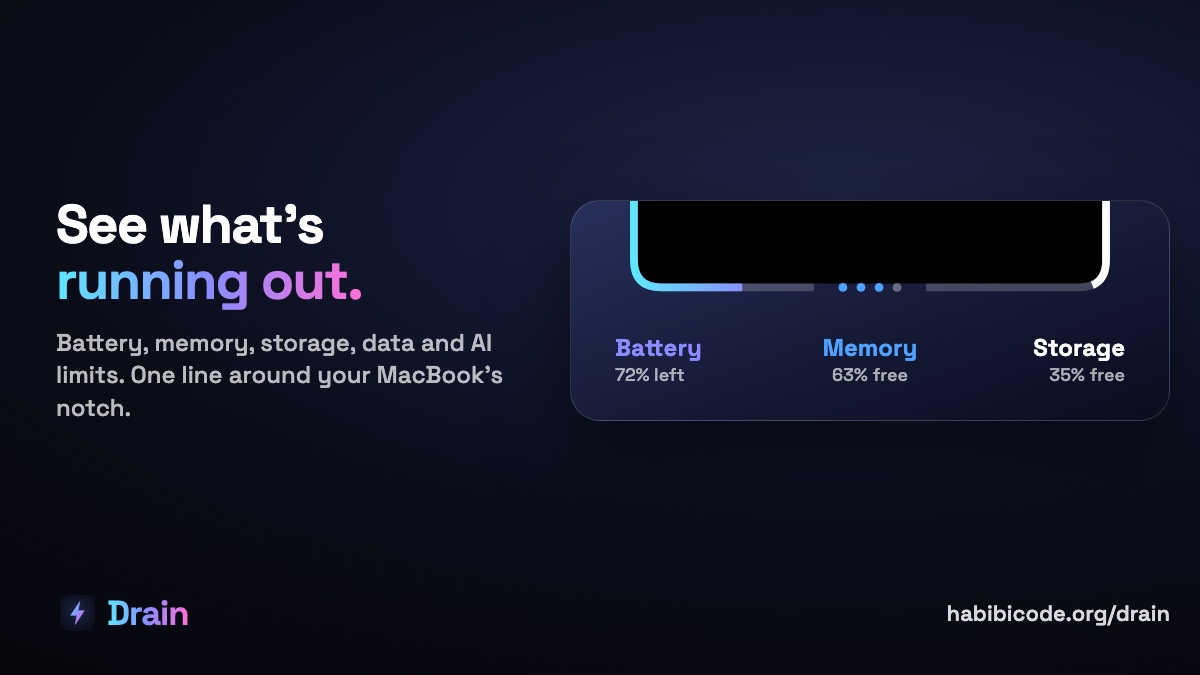
Drain helps Mac users see resource usage—battery, memory, storage, data, and AI coding limits—always visible in the notch, with one-click controls to stop power-hungry processes.
Built by Nicolas and Nicolas Carteron
Visit website → Upvotes · 0
In category: #1796 of 1796 · ProductivityTrending this week: #1687 of 1796 · Productivity
Drain is a Community listing on Launch Llama with 0 total upvotes, founded by Nicolas and Nicolas Carteron who joined in Oct 2026, compared against 6 alternatives.
Community listing
Listing status
0upvotes
Community score
Nicolas and Nicolas Carteron (Joined Oct 2026)
Founder
Compared against 6 alternatives
Market comparison
About
Drain repurposes your MacBook's notch into a single resource gauge showing what's running out in real time. Hover to inspect what each app consumes (battery drain per hour, memory kept vs. parked, storage, network speed, and Claude/Codex weekly limits), then stop it directly. The app displays human-readable names instead of process lists, catches hidden battery drains like paused videos keeping speakers on, and works on non-notch MacBooks via a menu bar ring.
Ask AI
ChatGPT Claude Perplexity Grok
For agents
llms.txt · llms-full.txt · ai.txt · Live fact sheet · Full catalog (.md) · Endpoint index · API spec · REST access · Agent server · Server manifest · Server discovery
Key Features
- Visualize battery, memory, storage, data usage, and AI coding limits in your MacBook notch or
- Hover any gauge to see which apps and processes are consuming resources and stop them in one
- Track real-time battery drain rates, memory pressure, storage depletion, and network speeds by
- Monitor Claude Code and Codex weekly/monthly API limits before hitting limits mid-task
Pricing
Drain is a paid product. See the website for current pricing.
FAQ
What is Drain?
Drain repurposes your MacBook's notch into a single resource gauge showing what's running out in real time. Hover to inspect what each app consumes (battery drain per hour, memory kept vs. parked, storage, network speed, and Claude/Codex weekly limits), then stop it directly. The app displays human-readable names instead of process lists, catches hidden battery drains like paused videos keeping speakers on, and works on non-notch MacBooks via a menu bar ring.
What are the key features of Drain?
Drain includes: • Visualize battery, memory, storage, data usage, and AI coding limits in your MacBook notch or menu b • Hover any gauge to see which apps and processes are consuming resources and stop them in one click • Track real-time battery drain rates, memory pressure, storage depletion, and network speeds by app • Monitor Claude Code and Codex weekly/monthly API limits before hitting limits mid-task • Identify hidden power drains (e.g., paused browser videos keeping speakers active) with plain-langua
How much does Drain cost?
Drain is a paid product. See the website for current pricing. You can discover and review Drain for free on Launch Llama.
What category does Drain belong to?
Drain is listed under Productivity, Developer Tools on Launch Llama.
How do I get started with Drain?
Click the "Visit Website" button on this page to go directly to Drain. You can also upvote and leave a review to help other founders discover it.
Reviews
1 comment
Hey, love seeing this here! 👋 What inspired you to build this? Would love to hear the story behind it.
Alternatives
- Better Resource Monitor
For Mac developers: Better Resource Monitor displays CPU, memory, GPU, and network usage in your menu bar so you catch performance issues before they slow your work.
- MakerNotch
Built for developers and makers, MakerNotch displays pull requests, deploys, revenue, and errors in your MacBook's notch — keeping project status visible without leaving your workflow.
- Notchling
For Mac users: Notchling is a tiny creature in your notch that watches your cursor and carries dragged files so your Mac feels alive and helpful.
- Perked
For developers: Perked keeps your Mac awake while AI coding agents run so you don't lose work to sleep mode Perked keeps the workflow clear so you ship outcomes with less busywork.
- MacMint
Storage Cleaner & Optimizer. Reclaim gigabytes. Visualize disk space. Optimize system health.
- Fetchy: AI Usage Menu Bar
For developers: Fetchy tracks AI API usage in your Mac menu bar with custom limits and alerts, so you see spending at a glance without interrupting your workflow.