BuildNotch
A notch for Windows builders. Music, tasks, a timer, Github commits and your AI apps sit at the top of your screen.
Built by Tudor Pop · Artificial Intelligence · Productivity · Developer Tools · Freemium
In category: #1094 of 2048 · Artificial Intelligence
BuildNotch is a Community listing on Launch Llama with 11 total upvotes, founded by Tudor Pop who joined in Sep 2026, compared against 3 alternatives.
Community listing
Listing status
11upvotes
Community score
Tudor Pop (Joined Sep 2026)
Founder
Compared against 3 alternatives
Market comparison
Launched on Launch Llama Sep 28, 2026 · #68 of 143 that day
About
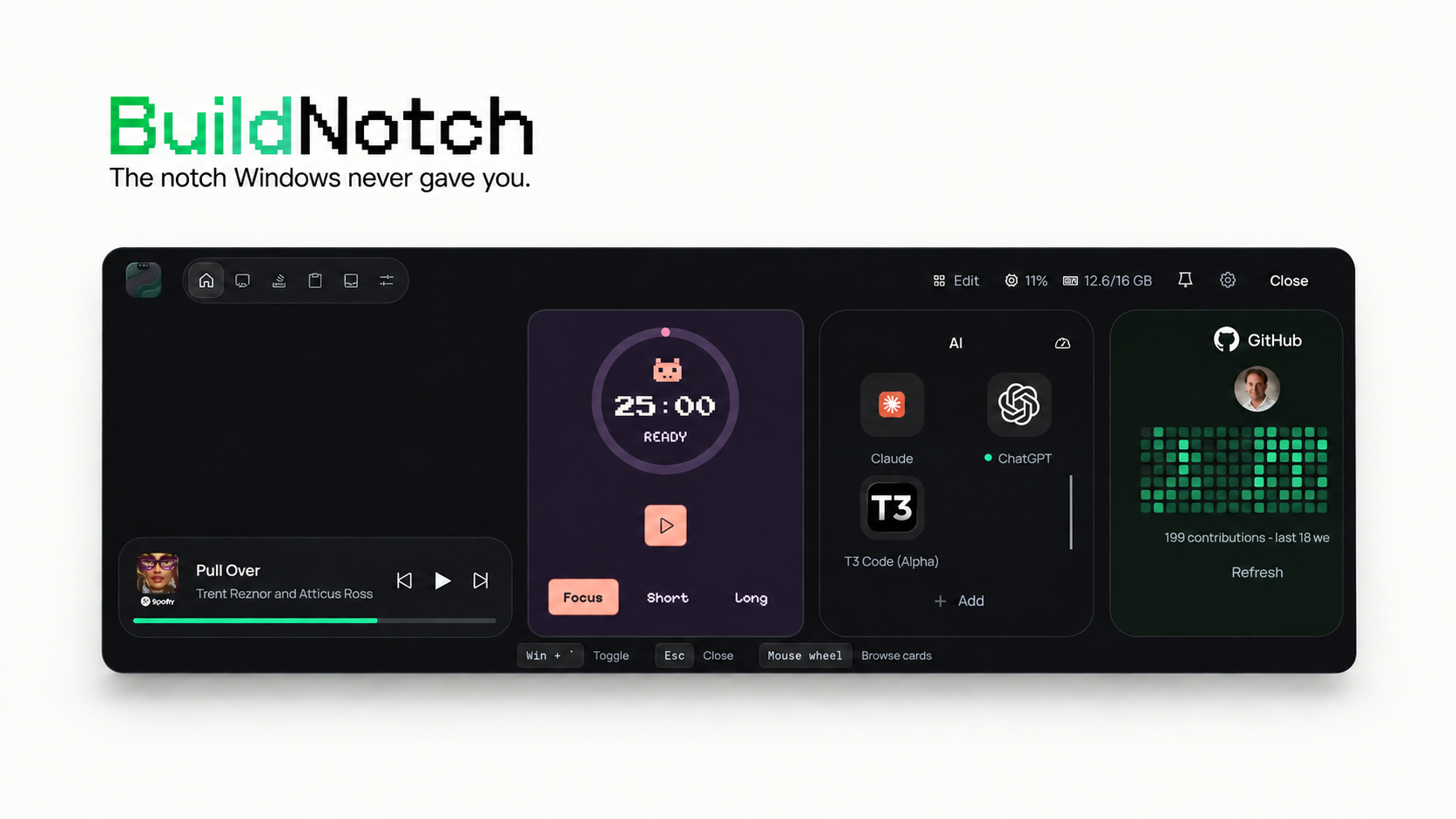
BuildNotch is a bar that hangs off the top of Windows, like a Mac notch that actually holds tools.
Hover it, or hit Win + `. You get:
Spotify / media controls
Tasks and a couple of projects
A Pomodoro with a few skins (clean, pixel, retro, terminal, and the rest)
Clipboard history
A tiny playground and a real terminal
GitHub on the rail if you want it (this is for developers)
AI apps it finds on disk, so you are not digging through the Start menu for Claude or Cursor
It stays out of Chrome tabs unless you pin it.
I built it because I was tired of Alt-Tabbing for a timer and a to-do list. Windows 10 and 11. $2.99 on the Microsoft Store.
Competitors: Alfred, Raycast, Wox, Notion, Microsoft To Do
Key Features
- Access Spotify and media controls from a top-bar interface without switching windows
- Manage tasks and projects from a compact overlay that appears on command
- Run a Pomodoro timer with multiple visual themes from the top bar
- View clipboard history and quickly access previous copied items
- Launch AI applications like Claude and Cursor directly from the bar instead of the Start menu
- Use an embedded terminal and code playground without leaving your current window
Use Cases
- Pause music or skip tracks while coding without alt-tabbing away from your IDE
- Track time on work sprints using the Pomodoro timer visible during development sessions
- Quickly launch GitHub or AI tools from the top bar while working on a project
- Reference task lists and project notes without minimizing your active window
- Access recent clipboard items while writing code or documentation
Who it is for
- Solo founders and indie developers building projects on Windows
- Developers and makers who work on several client or personal projects and want focus tools at hand
- Windows users who use AI coding or chat apps daily and want quick access to them
Pricing
BuildNotch for Windows is $3 one-time for the first 50 customers, then $4.99 one-time, with lifetime updates included.
FAQ
What can BuildNotch do?
Music controls: See what is playing and pause or skip without leaving your work. Focus timers: Give a task a clear block of time, with a timer style you actually want to keep on screen. Tasks and quick notes: Keep the next step and stray ideas close instead of opening another tab. Projects and app shortcuts: Jump back into the work and tools you use most. AI app detection: Find supported AI apps on your PC and open them from the notch. GitHub activity: Glance at your contributions without visiting your profile. Code playground: Draft and save a small idea while it is fresh. Clipboard history: Reuse something you copied earlier without searching for it again. Short quotes: A small nudge to reset your attention when you need one. They are there when you need them, then out of the way when you do not.
Does BuildNotch work on Windows 11?
Yes. BuildNotch is built for Windows 11 and also targets Windows 10 version 2004 or newer. The current installer is for x64 PCs.
Which AI apps does it detect?
BuildNotch detects supported AI apps installed on your PC and puts them within easy reach. You can also add your own shortcuts, so your setup stays yours.
Why might Windows SmartScreen show a warning?
BuildNotch is not code-signed yet. That means Windows may show an unrecognized-app warning when you first run the installer. Download it only from your Polar order, check that the file is named BuildNotch-Setup.exe , then choose More info and Run anyway if you want to continue. If the source or filename is different, cancel the install.
Where do I get the installer after buying?
Polar gives you access to the download through your order benefits. Open the customer portal using the email you checked out with, then download the BuildNotch installer from your order.
What is BuildNotch?
A notch for Windows builders. Music, tasks, a timer, Github commits and your AI apps sit at the top of your screen.
Alternatives
 ToolcraftBuild custom design apps with AI. Open-source. 100% Free.
More in Artificial Intelligence
New on Launch Llama
Launched this week · This month's launches · All products A–Z
Ask AI about BuildNotch
Supporters
7 founders
7 founders supported BuildNotch on Launch Llama.


Reviews
5.0 · 1 review
Bought this a few days ago and it's been great! I've seen what's coming in the next version and I think this is a terrific app for everyone.
For bots & AI agents
Machine-readable versions of BuildNotch and Launch Llama. Fetch these instead of parsing this page.
This listing (.md) llms.txt llms-full.txt ai.txt Full catalog (.md) Endpoint index API docs MCP server MCP manifest Developer docs