On Launch Llama

The Text Tool - In-browser text utilities
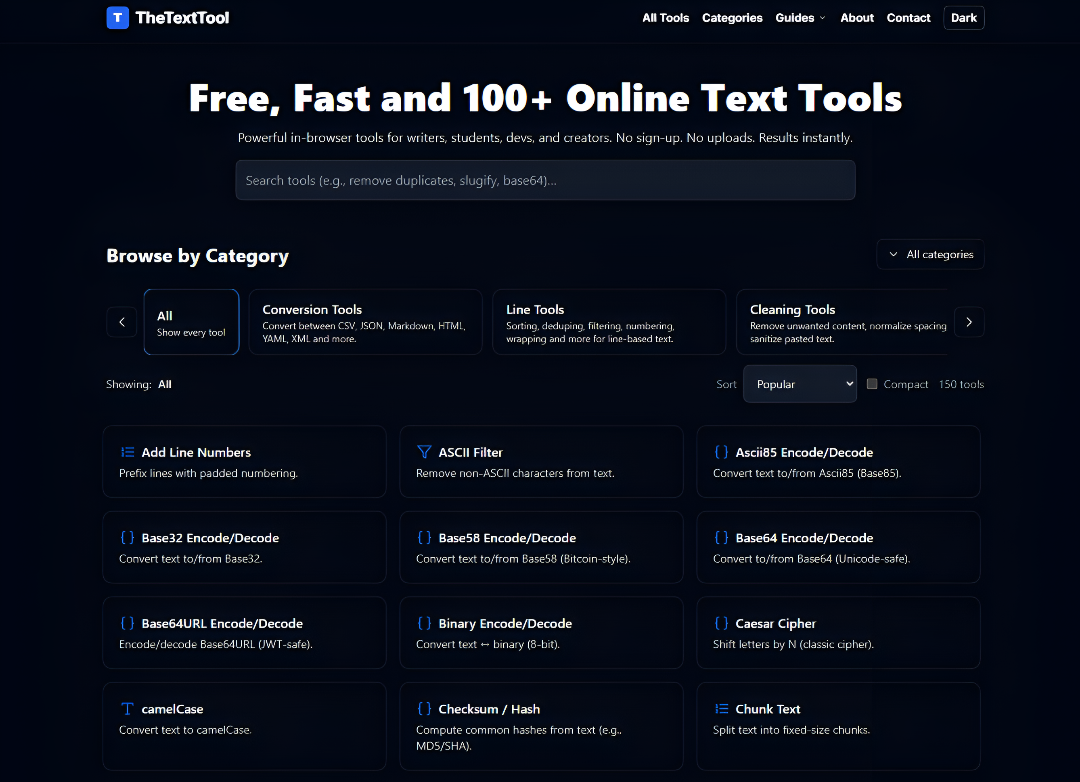
For developers and writers: The Text Tool offers fast, privacy-first utilities for cleaning, converting, and debugging text entirely in-browser.
Built by text tool
Visit website → Upvotes · 8
In category: #1265 of 1797 · Productivity
The Text Tool is a Instant Launch listing on Launch Llama with 8 total upvotes across 2 founder supporters, founded by text tool who joined in May 2026, compared against 6 alternatives.
Instant Launch listing
Listing status
8upvotes
Community score
text tool (Joined May 2026)
Founder
Compared against 6 alternatives
Market comparison
Key Features
- Privacy-first design that processes all text data locally within your web browser
- Broad utility library to clean, convert, compare, and debug various text formats
- Support for technical data types including URLs, logs, CSV, and JSON
- No-registration required to access and use the full suite of online tools
- Specialized workflows for developers, SEO teams, and data professionals
- Fast browser-based performance without the need to upload files to any server
About
The Text Tool is your online text toolbox, a growing library of fast, privacy-first utilities that run entirely in your browser. Clean, convert, compare, and debug text, URLs, logs, CSV/JSON data, and more without creating an account or uploading files to a server. It's designed for developers, DevOps, SRE, security, data, writers, and SEO teams who work with messy text every day and need reliable, repeatable tools that just work.
Who it is for
It's designed for developers, DevOps, SRE, security, data, writers, and SEO teams
- Software engineers debugging JSON or CSV data logs
- Technical writers cleaning up messy copy or formatting text
- SEO specialists converting URLs and auditing web content
- DevOps and SRE teams comparing configuration files in-browser
- Data analysts sanitizing raw text files without server uploads
Use Cases
- Clean and reformat messy CSV or JSON data exports before importing them into your production database or internal dashboard
- Compare versions of legal documents or code snippets side-by-side to identify changes without uploading sensitive files to a server
- Debug and decode complex URLs, server logs, or SEO metadata locally in your browser to maintain privacy
- Standardize text formatting for blog posts, documentation, or investor updates to ensure consistent styling across your team
Pricing
Verdict
In the competitive developer tools space, The Text Tool stands out as a solid option. It's gaining traction among founders who value simplicity and results. The Text Tool is your online text toolbox, a growing library of fast, privacy-first utilities that run entirely in your browser. If for developers and writers: the text tool offers fast, privacy-first utilities for cleaning, converting, and debugging text entirely in-browser is a priority for your team, it's worth giving The Text Tool a closer look.
FAQ
What is The Text Tool?
The Text Tool is your online text toolbox, a growing library of fast, privacy-first utilities that run entirely in your browser. Clean, convert, compare, and debug text, URLs, logs, CSV/JSON data, and more without creating an account or uploading files to a server. It's designed for developers, DevOps, SRE, security, data, writers, and SEO teams who work with messy text every day and need reliable, repeatable tools that just work.
Who is The Text Tool for?
It's designed for developers, DevOps, SRE, security, data, writers, and SEO teams • Software engineers debugging JSON or CSV data logs • Technical writers cleaning up messy copy or formatting text • SEO specialists converting URLs and auditing web content • DevOps and SRE teams comparing configuration files in-browser • Data analysts sanitizing raw text files without server uploads
What are the key features of The Text Tool?
The Text Tool includes: • Privacy-first design that processes all text data locally within your web browser. • Broad utility library to clean, convert, compare, and debug various text formats. • Support for technical data types including URLs, logs, CSV, and JSON. • No-registration required to access and use the full suite of online tools. • Specialized workflows for developers, SEO teams, and data professionals. • Fast browser-based performance without the need to upload files to any server.
What can I use The Text Tool for?
• Clean and reformat messy CSV or JSON data exports before importing them into your production database or internal dashboard. • Compare versions of legal documents or code snippets side-by-side to identify changes without uploading sensitive files to a server. • Debug and decode complex URLs, server logs, or SEO metadata locally in your browser to maintain privacy. • Standardize text formatting for blog posts, documentation, or investor updates to ensure consistent styling across your team.
How much does The Text Tool cost?
Free
What category does The Text Tool belong to?
The Text Tool is listed under Developer Tools, Productivity on Launch Llama.
How do I get started with The Text Tool?
Click the "Visit Website" button on this page to go directly to The Text Tool. You can also upvote and leave a review to help other founders discover it.
Alternatives
- ToolKitText
For developers: ToolKitText runs text and code tools in your browser so you format, clean, and convert without sending data to servers.
- QuickTextTools
For writers and marketers: QuickTextTools offers 76+ free browser tools for text formatting, SEO, and content creation so you work faster without subscriptions.
- All Tools Verse
For developers: All Tools Verse provides 1,000+ free browser tools for file conversion, text processing, and data formatting so you skip software installation.
- The Tool Empire
For developers, designers, writers & students: The Tool Empire provides free browser-based utilities for JSON, text, and data work so you stay private and productive without signups.
- JavaScript Tools
For developers: JavaScript Tools provides privacy-first utilities for code formatting, JSON inspection, and test fixture generation so you work faster locally.
- ToolSphare
For developers: ToolSphare provides 432 free browser-based utilities for PDFs, images, and text so you process files instantly without signup or installation.
Supporters
2 founders2 founders contributed 8 upvotes to The Text Tool on Launch Llama.

Reviews
1 comment
Hey, love seeing this here! 👋 What inspired you to build this? Would love to hear the story behind it.
Ask AI
ChatGPT Claude Perplexity Grok
For agents
llms.txt · llms-full.txt · ai.txt · Live fact sheet · Full catalog (.md) · Endpoint index · API spec · REST access · Agent server · Server manifest · Server discovery