ImageToImageAI.app
Blend up to 5 images with 5 top AI image models
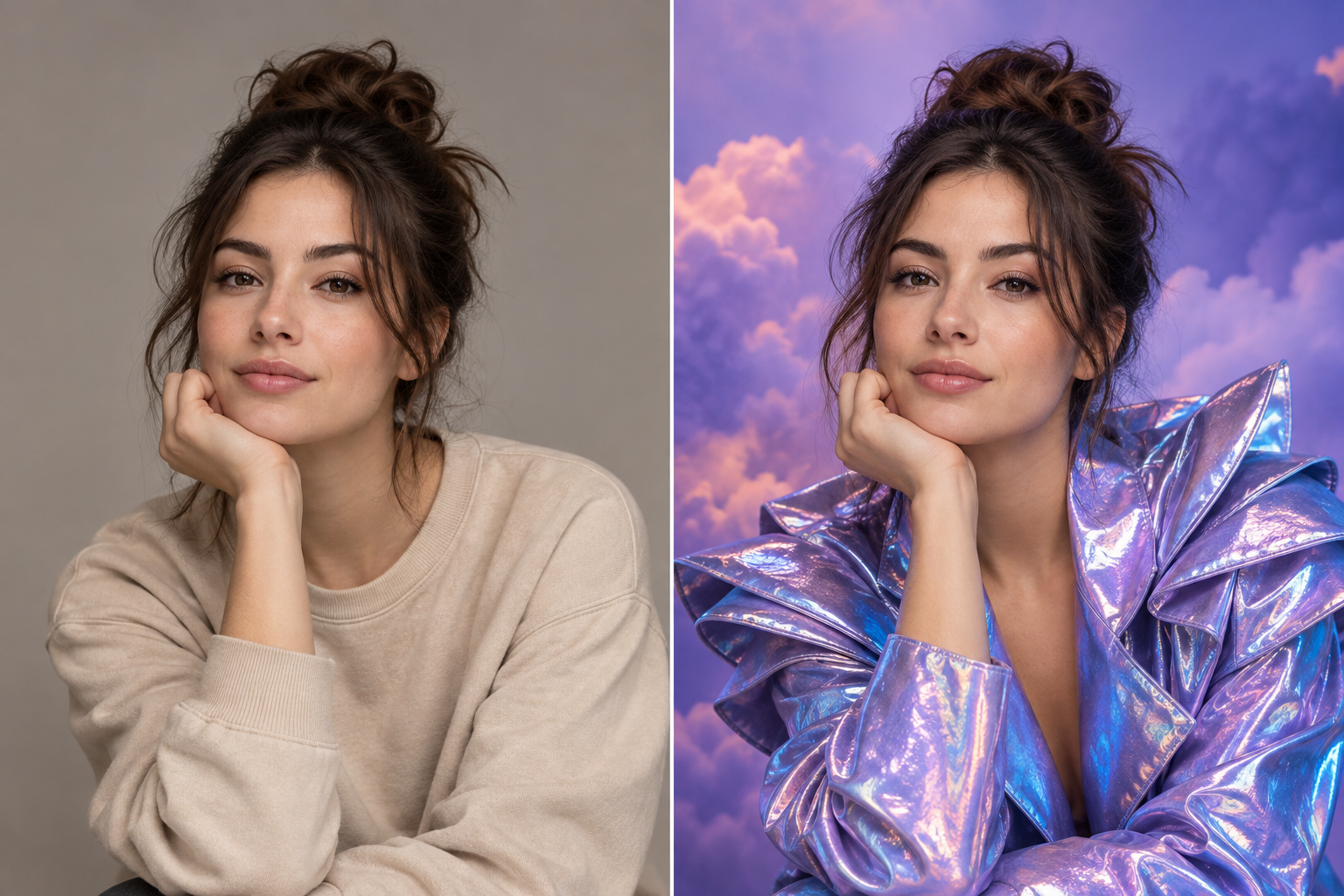
Restyles uploaded photos, swaps backgrounds, and changes outfits from a text prompt for creators and marketers needing fast visual variations, typically in about a minute.
Built by zhifen zhu · Freemium
ImageToImageAI.app is a Community listing on Launch Llama with 0 total upvotes, founded by zhifen zhu who joined in Nov 2026, compared against 4 alternatives.
Community listing
Listing status
0upvotes
Community score
zhifen zhu (Joined Nov 2026)
Founder
Compared against 4 alternatives
Market comparison
Launched on Launch Llama Nov 16, 2026 · #41 of 98 that day
About
You upload up to five reference images, write what to change and what to keep, and pick a model such as GPT Image 2, Nano Banana PRO, or Ideogram 4.5. Presets like Restyle, Background Replace, and Hair Changer, plus aspect ratio and 1K resolution controls, shape the output, which typically arrives in about a minute. Signing up with Google or email includes 10 free credits, and the page states that outputs have no watermarks and can be used commercially.
Key Features
- Upload up to 5 JPG, PNG, or WEBP reference images at 10 MB each
- Describe what to change and what to keep in a written prompt
- Choose between GPT Image 2, Nano Banana models, or Ideogram 4.5
- Blend subjects, products, and settings from multiple reference images
- Set aspect ratio and resolution, then start from presets like Restyle or Hair Changer
- Download generated images with no watermarks and commercial use allowed
Use Cases
- Restyling a portrait with a new hairstyle, outfit, or lighting while keeping the same face, pose, and expression
- Turning one product photo into several campaign-ready ad scenes while keeping the packaging and design unchanged
- Redesigning a room in different interior styles while keeping the layout, windows, and camera angle
Who it is for
- Marketers who need multiple campaign-ready ad visuals from a single product shot
- Interior designers and architects previewing room redesigns or rendering sketches
- Social media users who want portrait restyles, action figure or pet portrait looks
Pricing
Sign up with Google or email to get 10 free credits, enough for up to 5 images. Full plan and credit pricing is listed on the pricing page.
FAQ
What is Image to Image AI?
Image-to-image AI, also known as img2img, uses an existing photo or reference image together with your text instructions to generate a new image. Unlike text-only image generation, it can follow visual information from the original image—such as the subject, face, pose, composition, colors, or product shape—while transforming the details you describe.
How is Image-to-Image AI different from Text-to-Image AI?
Text-to-image starts with a written prompt and creates an image from scratch. Image-to-image starts with an existing photo or reference image, giving the AI visual information to follow. This makes it useful when you want to preserve a person, product, pose, composition, or other details while creating a new version of the image.
What is the difference between an Image to Image AI Generator and an AI Image Editor?
An Image to Image AI Generator is designed to create a new image from an existing image or reference. It is ideal for restyling, recreating, generating variations, or combining multiple references. An AI Image Editor is better when you want to make a specific change to an existing image, such as removing an object, replacing a background, adding an element, or modifying a particular detail. Need a precise edit? Try our AI Image Editor
Is this Image to Image AI generator free?
New accounts get 10 free credits after signing up with Google or email. GPT Image 2 at 1K uses 2 credits per image, so 10 credits cover up to 5 images; other models and higher resolutions use more credits. View current pricing.
Do I need to sign up before I try it?
Yes. Sign up with Google or email before generating to receive your 10 free credits and keep your creations in your account.
Can I upload my own photos or reference images?
Yes. Upload up to 5 JPG, PNG, or WEBP reference images per generation, up to 10 MB each. Only upload images you own or have permission to use.
Can I blend multiple images with AI?
Yes. Use up to 5 reference images and ask the AI to combine selected subjects, products, outfits, styles, or settings into one new composition. The first image is included in the model price; each additional image adds 2 credits.
Which AI models are supported?
Five: GPT Image 2, Nano Banana 2, Nano Banana 2.1, Nano Banana PRO, and Ideogram 4.5. GPT Image 2 at 1K is the lowest-cost option at 2 credits per image; Nano Banana 2 and 2.1 use 10–20 credits, Nano Banana PRO uses 20–40, and Ideogram 4.5 uses 5–35 depending on resolution or quality.
Alternatives
 PicGensHelps creators and marketers pull working AI image and photo prompts for ChatGPT, Nano Banana and Midjourney, each shown with its result and creator credit.
 AI Photo EditorFor creators: AI Photo Editor transforms images via text prompts, editing JPG, PNG, WebP instantly without design skills or software.
 PromptImageFree AI image & video studio with a prompt library. Signup credits, Nano Banana, Flux, Veo — no card needed.
New on Launch Llama
Launched this week · This month's launches · All products A–Z
Ask AI about ImageToImageAI.app
For bots & AI agents
Machine-readable versions of ImageToImageAI.app and Launch Llama. Fetch these instead of parsing this page.
This listing (.md) llms.txt llms-full.txt ai.txt Full catalog (.md) Endpoint index API docs MCP server MCP manifest Developer docs