Staged
Under reviewYour game, OBS and chat on one monitor
Staged puts your game in a movable window, with OBS and chat beside it on one monitor. Full-feature demo: 2 hours of Stage use. Windows 11 24H2+, x64.
Built by Staged Team · Productivity · Paid
Coming soon on Launch Llama Tools
Staged is a Community listing on Launch Llama with 0 total upvotes, founded by Staged Team who joined in Nov 2026, compared against 6 alternatives.
Community listing
Listing status
0upvotes
Community score
Staged Team (Joined Nov 2026)
Founder
Compared against 6 alternatives
Market comparison
Staged puts your game in a movable window, with OBS and chat beside it on one monitor. Full-feature demo: 2 hours of Stage use. Windows 11 24H2+, x64.
About
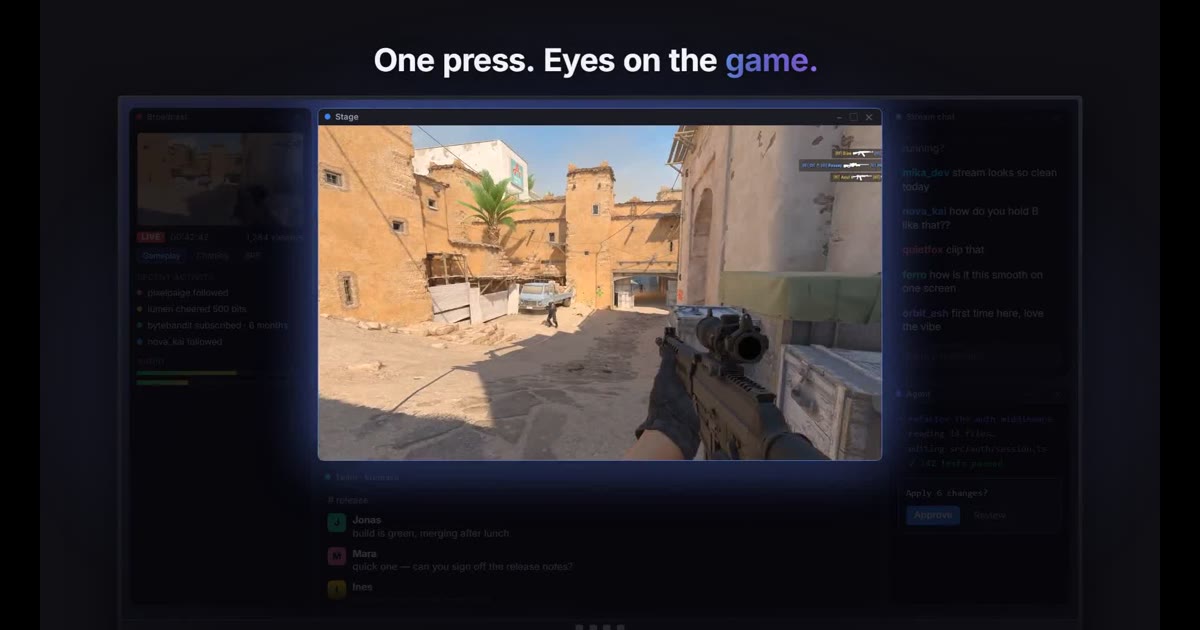
Staged is a Windows app for gaming and streaming on one monitor. Your game sits in a normal movable, resizable window. Arrange OBS, chat and other apps around it and keep them visible while you play.
The game runs on a virtual monitor inside the PC. You choose the game render resolution independently of the physical screen. Content keeps its aspect ratio when the window is resized. Staged is not a game, an OBS plugin, or a web service.
Windows 11 24H2 or later, x64. Setup asks once for administrator approval to install a signed virtual display driver.
Staged is paid shareware at EUR 14.99. The free demo includes all features and gives two hours of actual Stage running time, not two hours from installation. Demo: https://staged.gg/download. Buy direct: https://staged.gg/buy. Official purchases have a 14-day refund policy. Publisher: Staged; this listing is submitted by the Staged Team.
Key Features
- Movable and resizable game window on your physical screen
- Game render resolution independent of the physical monitor
- Keep OBS, chat and desktop apps visible around your game
- Uniform scaling preserves the game aspect ratio
- Full-feature demo for two hours of actual Stage running time
Use Cases
- Keeping OBS scenes and Discord chat visible while playing a game on a single monitor
- Playing at 1080p on a 1440p or 4K screen to gain FPS without losing access to desktop apps
- Keeping an AI coding agent in view alongside a game without alt-tabbing
From the founder
Who it's for
“Single-monitor gamers, streamers and video creators who want to see their game, OBS and chat together. Staged is paid Windows 11 24H2+ x64 shareware (EUR 14.99), with a full-feature demo for two hours of actual Stage use, not time since installation.”
About me
“We are the official Staged product team, not an independent reviewer. Staged addresses a practical single-monitor setup problem: a fullscreen game can hide OBS and chat. We give the game a virtual monitor and show it in a movable window, so the surrounding apps stay visible. The game render resolution is independent of the physical screen. Setup asks once for administrator approval for the virtual display driver. Demo: https://staged.gg/download. Buy: https://staged.gg/buy, with a 14-day refund policy. Published by Staged.”
Who it is for
- Streamers who play games and run OBS on one monitor
- Gamers who play on a single screen and want chat or Discord visible
- Developers who game and keep an AI coding agent open on the same screen
Pricing
EUR 14.99 one-time. Full-feature demo: 2 hours of Stage running time.
FAQ
Where can I get Staged?
Right here on staged.gg. Download the free demo with full features, then buy a license key when you’re ready. Staged runs on 64-bit Windows 11 (24H2 or later) and installs a signed virtual display driver once during setup.
Is it safe to install?
Yes. Staged uses Microsoft's IddCx framework—the same technology Windows uses for display management. The driver runs in user-mode (not kernel), is pre-signed, and fully reversible. Uninstall anytime.
Will it affect my game performance?
Performance depends on the game and chosen render resolution. Staged adds under 0.2 ms of measured processing overhead; choosing a lower Stage resolution can reduce rendering work, with up to 2× measured in one GPU-bound A/B.
What about anti-cheat games?
Most games work perfectly, including VAC-protected titles. Some aggressive kernel-level anti-cheat (Vanguard, certain EAC games) may detect virtual displays. Single-player and most multiplayer games are unaffected.
What are the system requirements?
64-bit Windows 11 24H2+. DirectX 11+ GPU. NVIDIA, AMD, or Intel Arc graphics. 4GB RAM minimum. That's it.
Does it support G-Sync / FreeSync?
VRR isn't supported on virtual displays—this is a Windows limitation. However, you get native refresh rates up to 240 Hz with excellent performance.
Can I use DLSS / FSR / XeSS?
Yes! These are game-side features and work exactly as expected.
How much does it cost?
Staged is a paid app. The free demo has every feature with a limited amount of Stage time; after that, you buy a license key on the Buy page, where the current price is shown.
Alternatives
 BackDrop_For Windows users: BackDrop_ layers any video as a transparent overlay so you watch tutorials while working without fullscreen limits.
 screenRIGFree, easy, powerful digital signage your AI agent runs. Tell your AI agent what a screen should show, and it builds the content and puts it on the screen. Free, with unlimited screens.
More in Productivity
New on Launch Llama
Launched this week · This month's launches · All products A–Z
Ask AI about Staged
For bots & AI agents
Machine-readable versions of Staged and Launch Llama. Fetch these instead of parsing this page.
This listing (.md) llms.txt llms-full.txt ai.txt Full catalog (.md) Endpoint index API docs MCP server MCP manifest Developer docs