
Standmo
For desk workers: Standmo tracks sit/stand sessions and sends timely notifications so you actually use your standing desk and build a sustainable healthy habit.
Built by Peter Sloboda · Productivity · Developer Tools · SaaS · Paid
In category: #1044 of 1442 · Productivity
Standmo is an Instant Launch listing on Launch Llama with 2 upvotes from 2 founders, founded by Peter Sloboda who joined in Jun 2026, compared against 6 alternatives.
Instant Launch listing
Listing status
2upvotes
Community score
Peter Sloboda (Joined Jun 2026)
Founder
Compared against 6 alternatives
Market comparison
Launched on Launch Llama Jun 12, 2026 · #12 of 23 that day
About
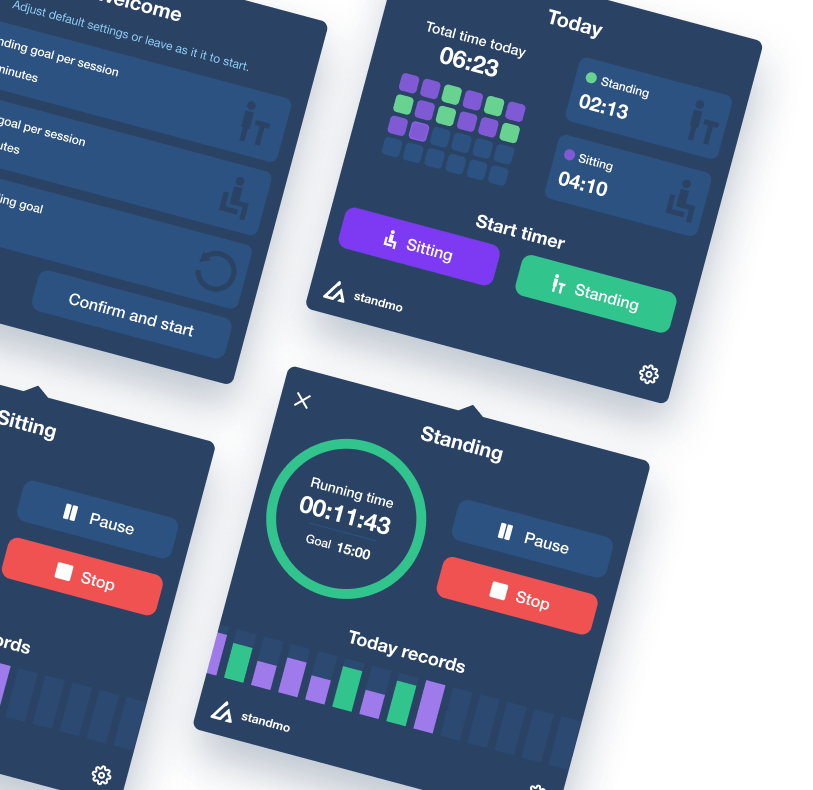
Standmo lives in your Mac menu bar, tracks your sit / stand sessions, and sends a notification when it's time to switch — so you finally build the standing habit you paid for.
Most standing desk owners use their desk as an expensive regular desk. Standmo fixes that. It tracks your sit / stand sessions automatically, keeps you motivated with streaks and achievements, and nudges you at exactly the right moment — all from the Mac menu bar.
Follow Standmo: X (Twitter)
Use Cases
- Tracking sit and stand sessions on a Mac so a standing desk actually gets used during the workday
- Getting timely macOS notifications to switch between sitting and standing at set intervals
- Reviewing daily and weekly standing-versus-sitting statistics to build a consistent ergonomic routine
Who it is for
- Desk workers who own a standing desk but mostly use it as a regular desk
- Mac users who want a menu bar timer for sit/stand intervals without extra hardware
Pricing
Standmo is a one-time purchase on the Mac App Store with no subscription.
FAQ
What is Standmo?
Standmo is a macOS menu bar app that tracks your sit and stand sessions throughout the workday. It counts down your configured intervals and sends a macOS notification when it's time to switch between sitting and standing — helping you build a consistent standing desk habit automatically.
Does Standmo work with any standing desk?
Yes. Standmo works with any standing desk, regardless of brand or model. It doesn't connect to your desk electronically — it simply tracks time and sends reminders, so it works whether you have a motorized IKEA Idasen, Uplift, Flexispot, or a manual desk.
Is Standmo free?
Standmo is a paid app available on the Mac App Store as a one-time purchase. There is no subscription, no recurring fee, and no hidden in-app purchases — you pay once and own it forever.
Which macOS version do I need?
Standmo requires macOS 11 Big Sur or later. It runs natively on both Apple Silicon (M1, M2, M3, M4) and Intel Macs.
Can I customize how long I sit and stand?
Yes. You can set your preferred sitting and standing durations independently. Whether you follow the popular 20/40 rule, prefer 30-minute intervals, or have your own routine, Standmo adapts to your schedule.
What happens when I lock my Mac or go on a break?
Standmo automatically pauses your current session when your screen locks or the screen saver activates, and resumes when you return. This keeps your daily statistics accurate and prevents phantom standing time from being recorded.
How do streaks and achievements work?
Standmo automatically tracks your daily standing streak — any day you complete at least one full sit/stand cycle counts as an active day. You can earn 18 achievements across three categories: Streak (3 days to 100 days in a row), Standing Time (1 hour to 100 hours total), and Milestones (completed cycles). Your progress is shown on a dedicated Achievements screen with colorful badges.
Can I share my standing statistics?
Yes. Standmo lets you generate a beautiful stats card with your daily or weekly standing data — including total time, sit vs. stand breakdown, and completed cycles. You can save the card as an image and share it with friends, coworkers, or on social media.
Will Standmo drain my battery?
No. Standmo is a lightweight menu bar app that uses minimal CPU and memory. It was designed specifically to run quietly in the background without impacting performance or battery life on your Mac.
Alternatives
 FocusOSFor professionals: FocusOS blocks distractions and tracks time locally on Mac so you stay focused and understand where your hours actually go.
More in Productivity
New on Launch Llama
Launched this week · This month's launches · All products A–Z
Ask AI about Standmo
Supporters
2 founders
2 founders contributed 2 upvotes to Standmo on Launch Llama.

Reviews
1 comment
Haha thanks. Built it because my standing desk had turned into a very expensive place to put coffee. Wanted something that got me standing without being annoying about it. Lives in the menu bar, tracks sit/stand on its own, nudges at the right time. The streaks are what actually made it stick for me.
For bots & AI agents
Machine-readable versions of Standmo and Launch Llama. Fetch these instead of parsing this page.
This listing (.md) llms.txt llms-full.txt ai.txt Full catalog (.md) Endpoint index API docs MCP server MCP manifest Developer docs