
BackDrop_
For Windows users: BackDrop_ layers any video as a transparent overlay so you watch tutorials while working without fullscreen limits.
Built by Patrick Chen · Productivity · Developer Tools · Freemium
In category: #813 of 1396 · Productivity
BackDrop_ is a Community listing on Launch Llama with 6 total upvotes, founded by Patrick Chen who joined in Jul 2026, compared against 6 alternatives.
Community listing
Listing status
6upvotes
Community score
Patrick Chen (Joined Jul 2026)
Founder
Compared against 6 alternatives
Market comparison
Launched on Launch Llama Jul 27, 2026 · #103 of 128 that day
About
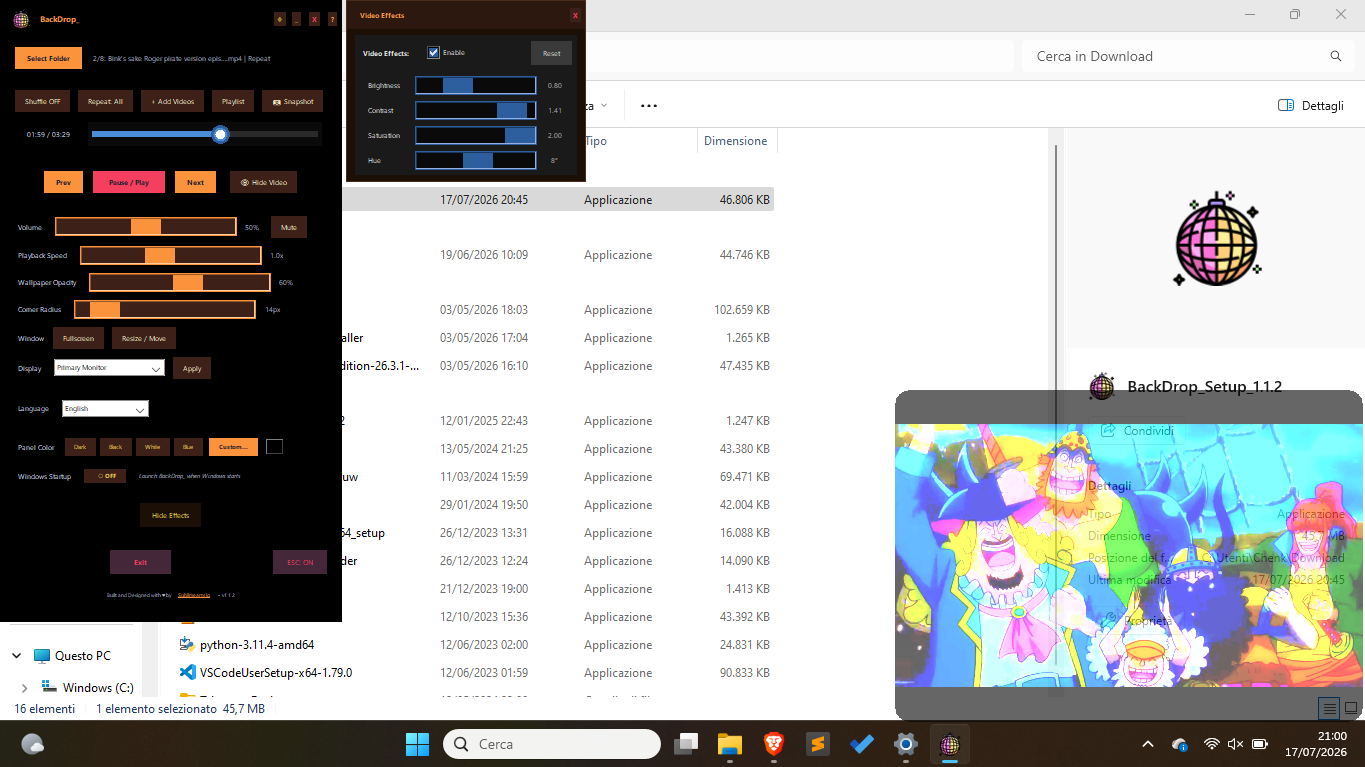
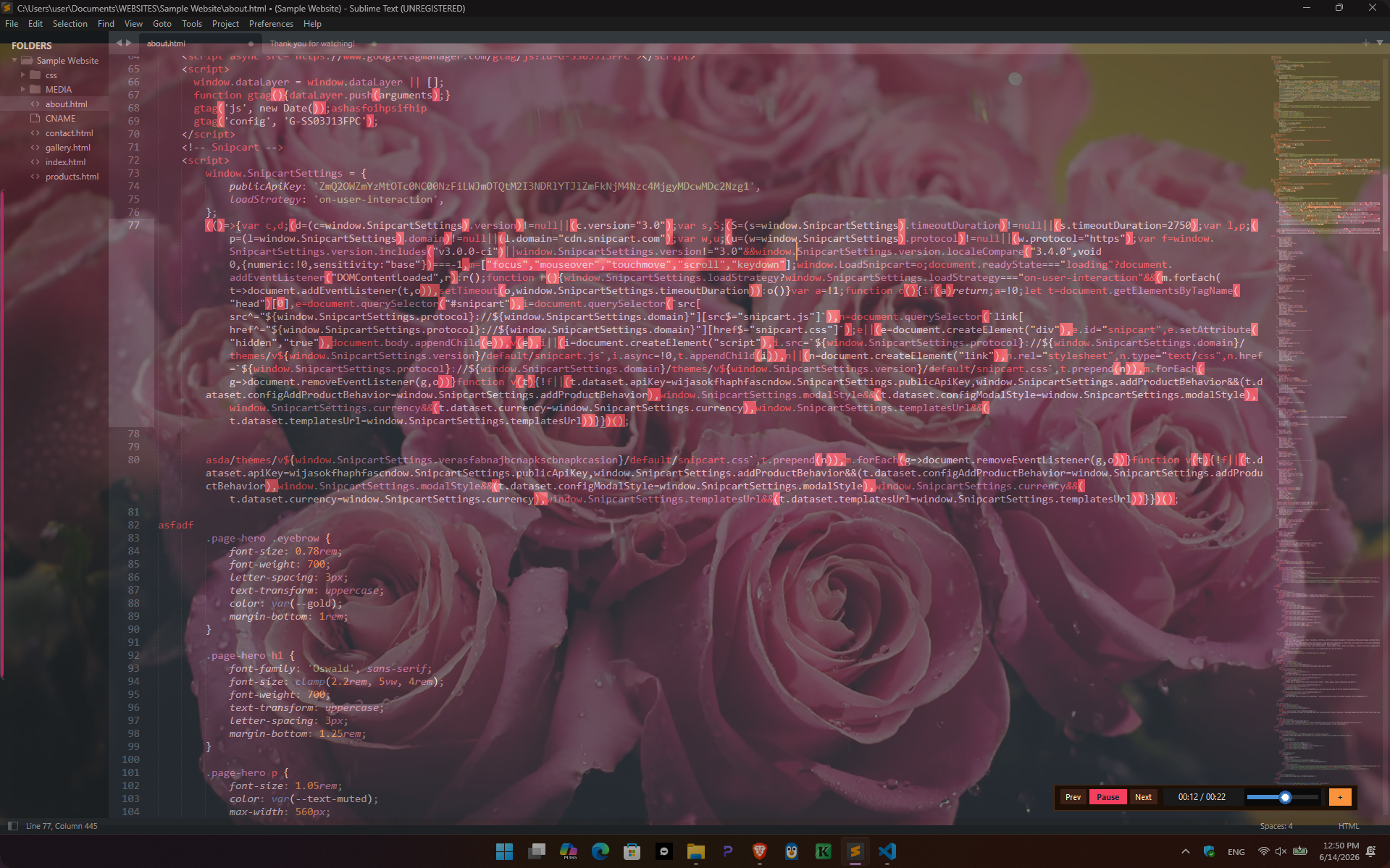
Turn any local MP4, MKV, or AVI file into a transparent, click-through video overlay or live wallpaper on Windows 11/10. Watch tutorials, anime, or reference footage while you actually work — no PiP limitations, no forced fullscreen. 100% offline, no account, no subscription. 7-day free trial, then a one-time lifetime license.
Follow BackDrop_: X (Twitter)
Key Features
- Delivers ghost overlay, video floats above all your apps, not behind them
- Delivers true click-through, mouse and keyboard pass straight through the video layer
- Delivers adjustable opacity from 5, 100%, in real time Real-time brightness, contrast, and
- Supports MP4, MKV, AVI, MOV, WMV, FLV, WEBM Playlist engine with shuffle and repeat
- Delivers 7 color themes (Catppuccin, Midnight, Forest, Ocean, Sunset) Global hotkeys, instantly
- Runs from the system tray only, no taskbar clutter 100% offline, no account, no cloud, no
Use Cases
- Watch tutorials or courses in the background while coding, writing, or designing
- Keep reference footage visible without covering your other windows
- Run anime or shows and/or private content on a low-opacity overlay during repetitive tasks
- Use it as a live wallpaper for streaming setups or ambient background video
- Hide it instantly (under 0.2s) the moment a call or screen share starts
Who it is for
BackDrop_ is for anyone who'd enjoy a cozy workplace with something playing in background — but always visible :P
- Anyone who watches tutorials, anime, or reference videos while working
- Remote workers and students who multitask with video content
- Streamers and creators who want an always-on-top video layer
- Windows users tired of Picture-in-Picture's size limits
- People who enjoys watching local videos and rest or browse in the meanwhile
Pricing
7-day free trial, no credit card required. After that, a one-time payment of €14.90 for a lifetime license — no subscription, no recurring charges.
Verdict
BackDrop_ solves a genuinely specific problem: watching your own local video files while you work, without Picture-in-Picture's size limits or fullscreen's all-or-nothing tradeoff. It's a ghost overlay that floats above every app, fully click-through, 100% offline. If you've got a backlog of tutorials, anime, or reference footage you never get around to watching, BackDrop_ is built exactly for that.
FAQ
Is BackDrop_ a good Wallpaper Engine alternative?
BackDrop_ is the best alternative to Wallpaper Engine if you want to use your own local video files as a live wallpaper or transparent overlay. Unlike Wallpaper Engine, BackDrop_ requires no Steam account, works 100% offline, and has a unique ghost overlay mode that floats video above your apps rather than behind them.
Will Windows Defender flag BackDrop_?
No. The installer is fully signed with a DigiCert Extended Validation (EV) certificate issued to Sublimearts.io. Windows SmartScreen trusts and runs it instantly — no bypass required.
Can I use BackDrop_ during video calls?
Absolutely, and it will prevent you from getting bored from 'em. Or, iff you feel like, just press ESC to instantly hide BackDrop_. Use Ctrl+Shift+H to silently recall it. The shortcut works from any active app — Zoom, Teams, Google Meet — without switching windows.
Is my video content private with BackDrop_?
Completely. BackDrop_ reads all video files locally on your hardware. There are zero cloud uploads, no user accounts, no telemetry, and no network connections after the one-time license activation.
Does BackDrop_ slow down my computer?
VLC handles playback with minimal CPU overhead. 1080p works comfortably on any mid-range setup from 2018 or newer. 4K files require more processing because hardware-level decodes are temporarily disabled to calculate custom opacity controls.
Alternatives
Ask AI about BackDrop_
Supporters
4 founders
4 founders supported BackDrop_ on Launch Llama.


Reviews
1 comment
Thank you! 🙏 Honestly, it came from a very personal annoyance — I had 300+ hours of videos (tutorials, anime, stuff I actually wanted to watch) just sitting there because I never had a good way to watch them while working. Picture-in-picture felt too limited, fullscreen meant stopping work entirely. So I built a click-through ghost overlay that floats above everything, and finally started actually watching my backlog without losing productivity. Turns out a lot of people had the exact same problem 😄