Photo Stream Assistant
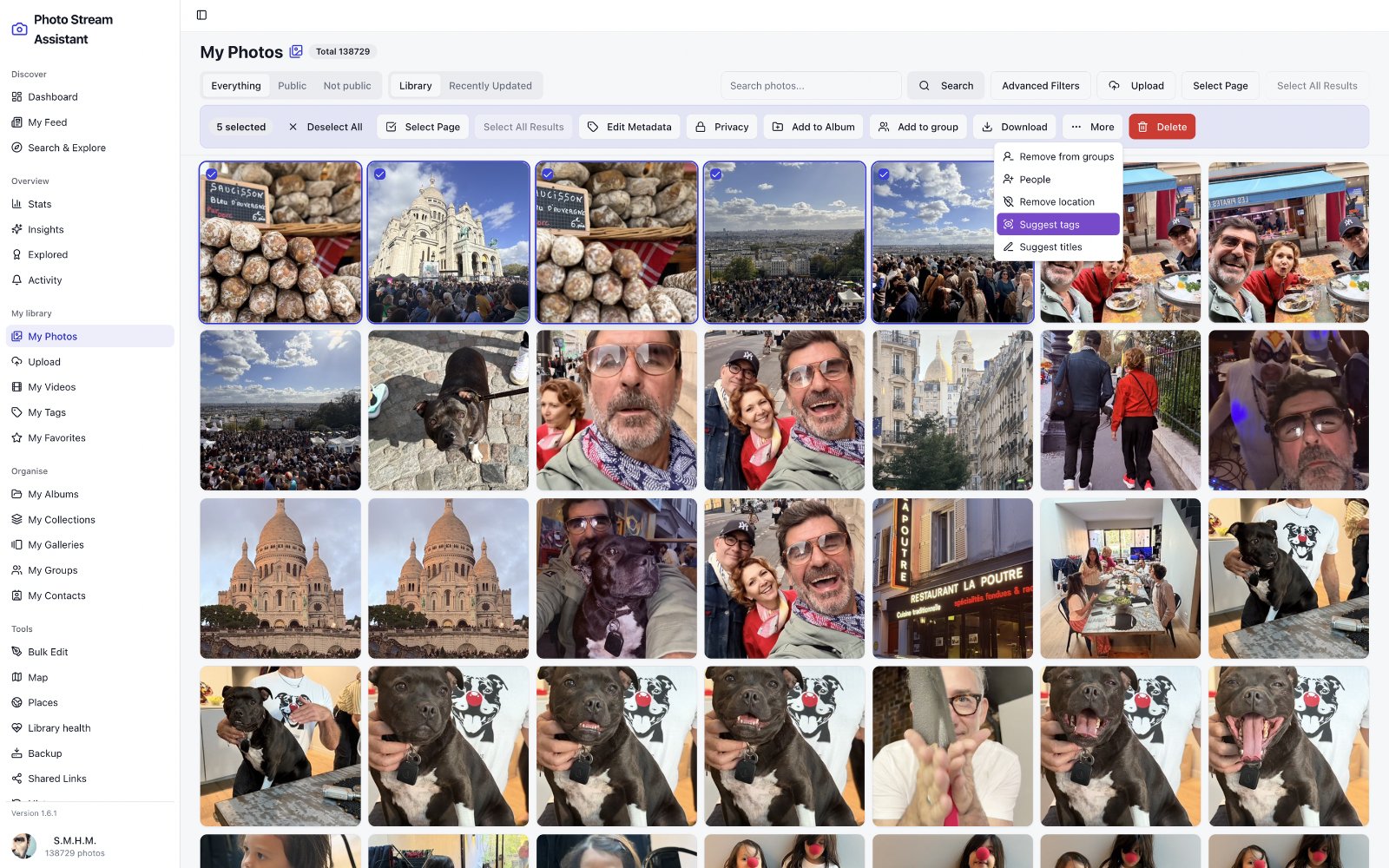
Under reviewDesktop app for Flickr Pro owners on Mac and Windows to batch-edit tags, titles, privacy and dates, manage albums, and review stats in one window.
Built by Stephane Monier · Productivity · Desktop Apps · Photo & Video · Freemium
Coming soon on Launch Llama Tools
Photo Stream Assistant is a Community listing on Launch Llama with 0 total upvotes, founded by Stephane Monier who joined in Nov 2026, compared against 6 alternatives.
Community listing
Listing status
0upvotes
Community score
Stephane Monier (Joined Nov 2026)
Founder
Compared against 6 alternatives
Market comparison
Desktop app for Flickr Pro owners on Mac and Windows to batch-edit tags, titles, privacy and dates, manage albums, and review stats in one window.
Photo Stream Assistant demo video
About
Browsing the whole library, the contacts feed and the map is free, and bulk edits work on 10 photos at a time until a one-time Pro Unlock removes that limit. The Pro Unlock adds Insights with trends over Flickr's 28-day window and the referrers behind them, plus look-alike and screenshot detection in library health. On Mac, photo analysis runs privately on the device with Apple's Vision framework to suggest tags, and the app is available in eight languages.
Key Features
- Bulk edit titles, tags, privacy, licenses and dates across large photo selections
- Manage Flickr albums by reordering, setting covers and filing photos into several albums
- Suggest tags from what the photo shows, with analysis that stays on your computer
- Find look-alike photos, duplicate uploads and screenshots in your library health view
- Show Flickr stats trends and referrers over a 28-day window with Pro Unlock
Use Cases
- Batch-editing titles, tags, privacy, licenses and dates across large Flickr photo selections in one pass
- Reviewing an album's full contents, selecting photos that need work, and launching bulk updates from the album view
- Finding and removing duplicate or near-identical uploads and screenshots from a Flickr photostream using library health checks
From the founder
Who it's for
“Flickr Pro members on a Mac who look after a big photo stream and want to keep it in order: bulk edits, tags, albums, groups, a map and real stats, in a fast native-feeling app instead of a web browser.”
About me
“I've been in digital photography and software engineering for 30 years, I accumulated over 130k photos on Flickr, and I needed to sort 20 years of pictures and their web interface didn't do it for me. So I built my own tool, and thought that others could benefit from it. And then was born Photo Stream Assistant, a photo library manager for Flickr Pros.”
Who it is for
- Flickr Pro account owners managing large photo libraries on Mac or Windows.
- Photographers who maintain many albums and need consistent metadata across their Flickr photostream.
Pricing
Free + one-time Pro Unlock (12,99 EUR)
FAQ
Is Photo Stream Assistant free?
Yes. The free app browses your whole library, reads your contacts feed and activity, shows the map and basic stats, searches and explores, renames albums and galleries, backs up 25 photos per run to a folder on your computer, applies bulk edits and tag changes 10 photos at a time, and suggests tags on your computer for 10 photos at a time (and titles too on a Mac with Apple silicon and macOS 27). Pro Unlock is a one-time purchase in the Mac App Store or the Microsoft Store, not a subscription, and adds Insights, Library health, Places, Shared Links, album and gallery curation and unlimited batches.
What platform is supported?
Photo Stream Assistant is available for Mac (macOS 12 or later, Apple silicon or Intel) on the Mac App Store, and for Windows (Windows 10 or 11, x64 or Arm) on the Microsoft Store.
What does Pro Unlock add?
Pro Unlock adds Insights with view trends, referrers, top fans and per-album figures, Explored (which of your photos Flickr picked for Explore), Places browsing with bulk geotagging, the Guest Pass share register, unlimited backups of your library to your own disk, album and gallery curation, library-wide tag rename and merge, and bulk editing and group submissions with no per-batch limit.
Can I restore my Pro purchase?
Yes. Restore Purchases in the app settings brings it back on your other Macs with the same Apple Account, or your other PCs with the same Microsoft account. The two stores are separate: a purchase on the Mac does not unlock the Windows app, or the other way round.
How does Photo Stream Assistant work?
Browsing the whole library, the contacts feed and the map is free, and bulk edits work on 10 photos at a time until a one-time Pro Unlock removes that limit. The Pro Unlock adds Insights with trends over Flickr's 28-day window and the referrers behind them, plus look-alike and screenshot detection in library health.
Who is Photo Stream Assistant for?
Photo Stream Assistant is designed for a range of users, including: • Flickr Pro account owners managing large photo libraries on Mac or Windows. • Photographers who maintain many albums and need consistent metadata across their Flickr photostream.
Alternatives
 RyluxRylux extracts a look from reference photos or a Lightroom Classic catalog and develops your RAW files on your Mac, with no upload or cloud.
More in Productivity
New on Launch Llama
Launched this week · This month's launches · All products A–Z
Launch Llama stats
- Verified
Ask AI about Photo Stream Assistant
For bots & AI agents
Machine-readable versions of Photo Stream Assistant and Launch Llama. Fetch these instead of parsing this page.
This listing (.md) llms.txt llms-full.txt ai.txt Full catalog (.md) Endpoint index API docs MCP server MCP manifest Developer docs