
zCAD AI
AI 3D that creates real parts, not just shapes
Built by gzzeaon · SaaS · Design Tools · Freemium
In category: #32 of 1121 · SaaS
zCAD AI is a Product Hunt listing on Launch Llama with 322 total upvotes, founded by gzzeaon who joined in Nov 2026, compared against 4 alternatives.
Product Hunt listing
Listing status
322upvotes
Community score
gzzeaon (Joined Nov 2026)
Founder
Compared against 4 alternatives
Market comparison
Launched on Launch Llama Nov 1, 2026 · #6 of 25 that day
About
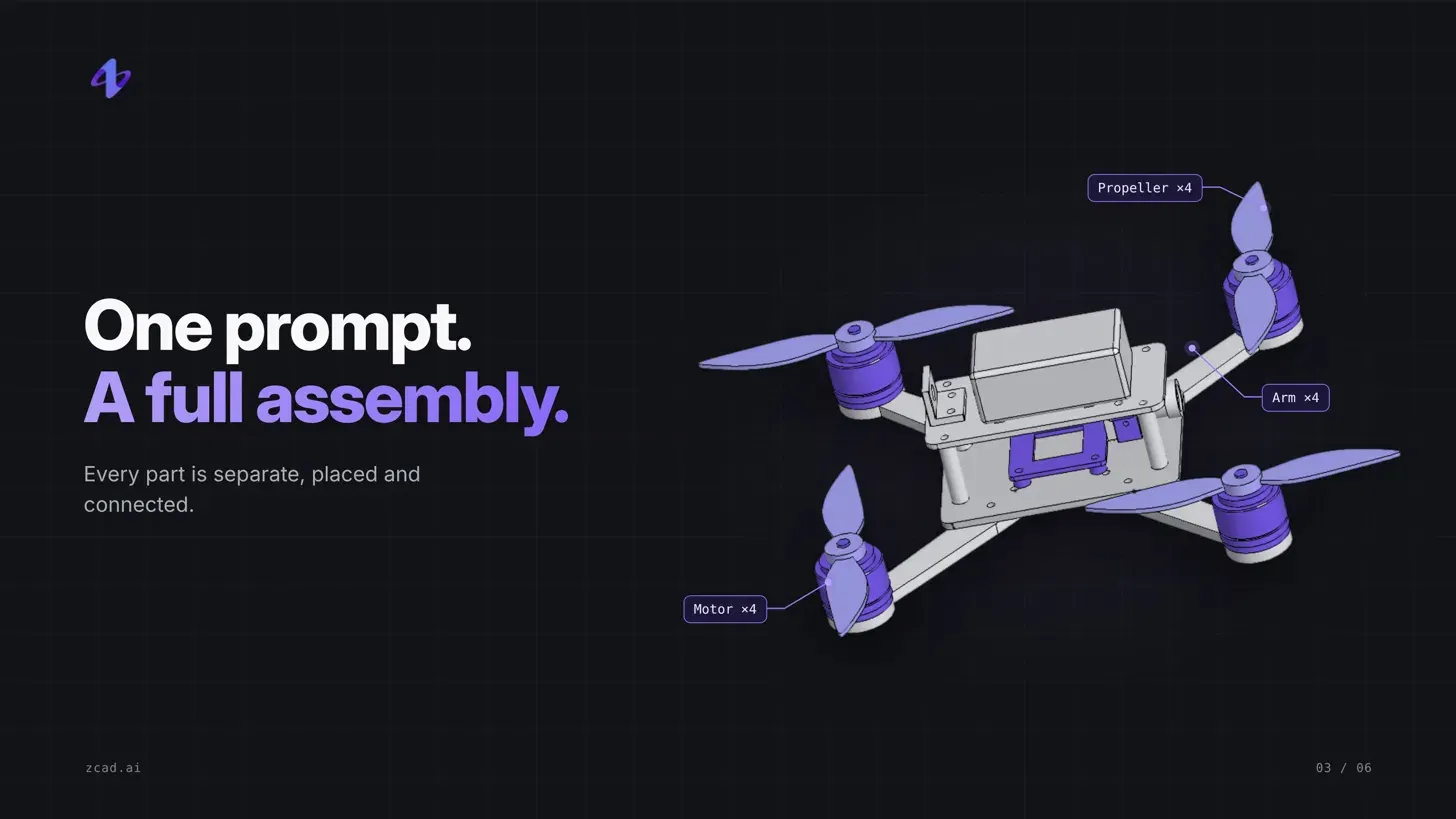
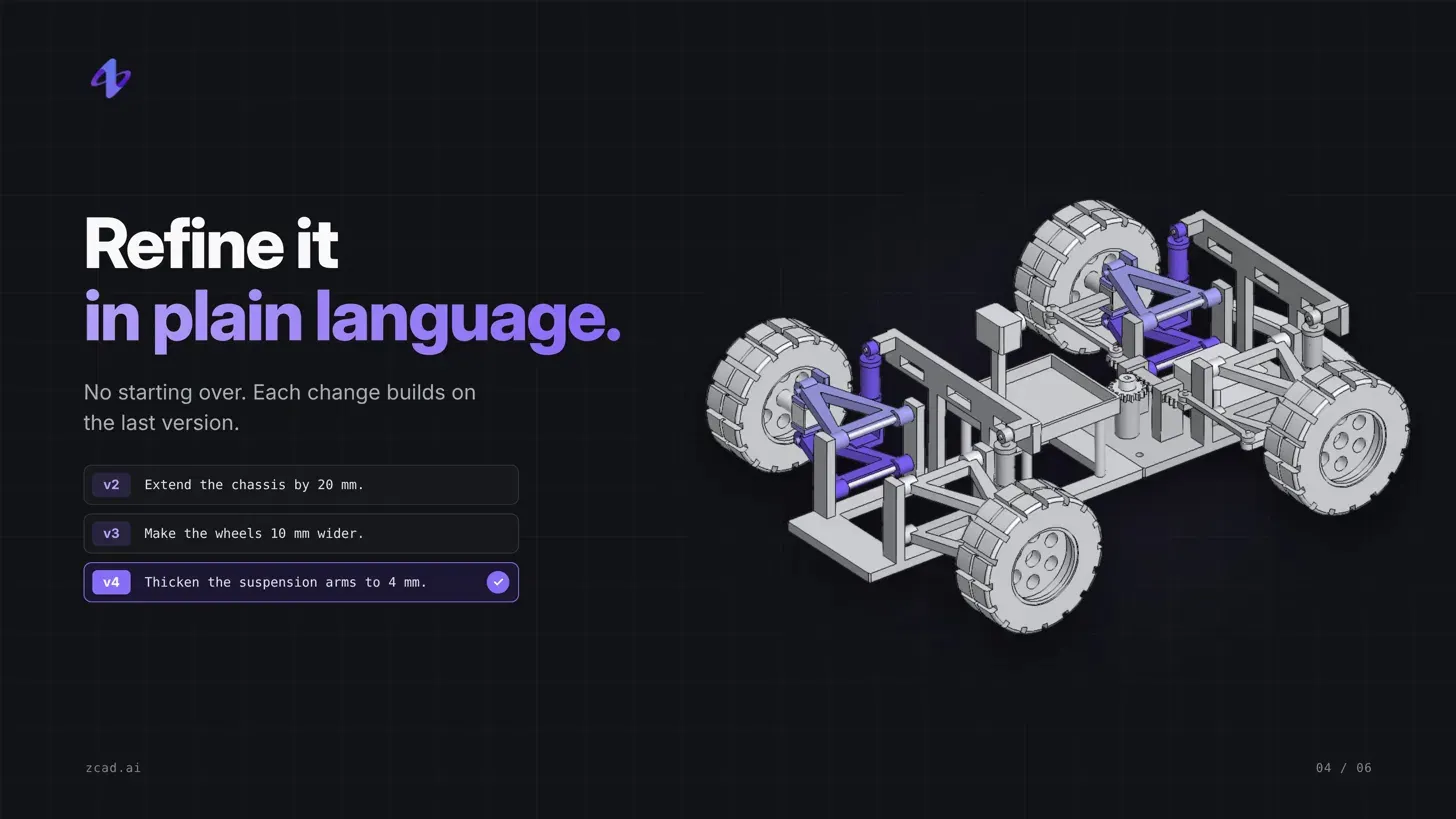
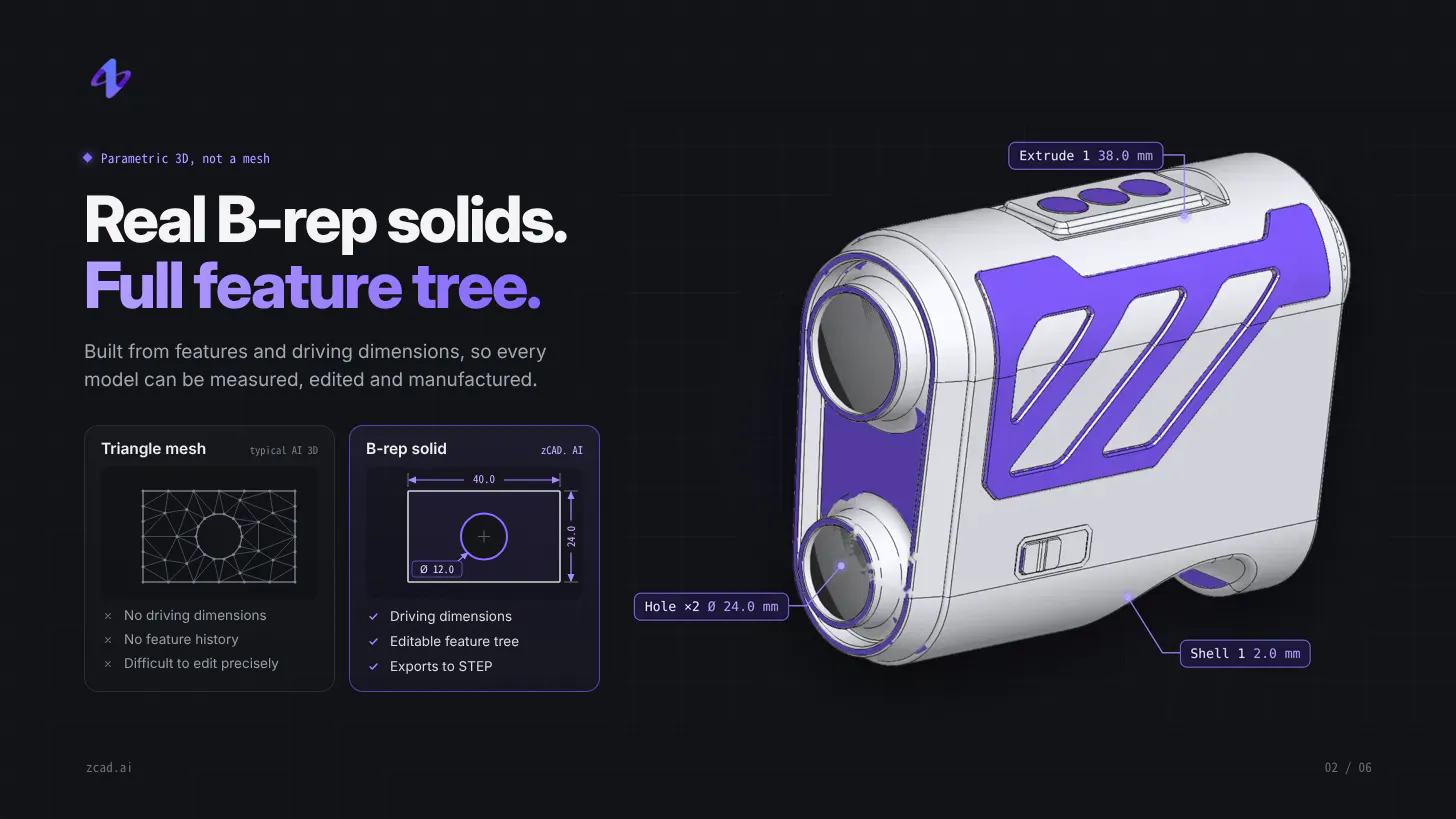
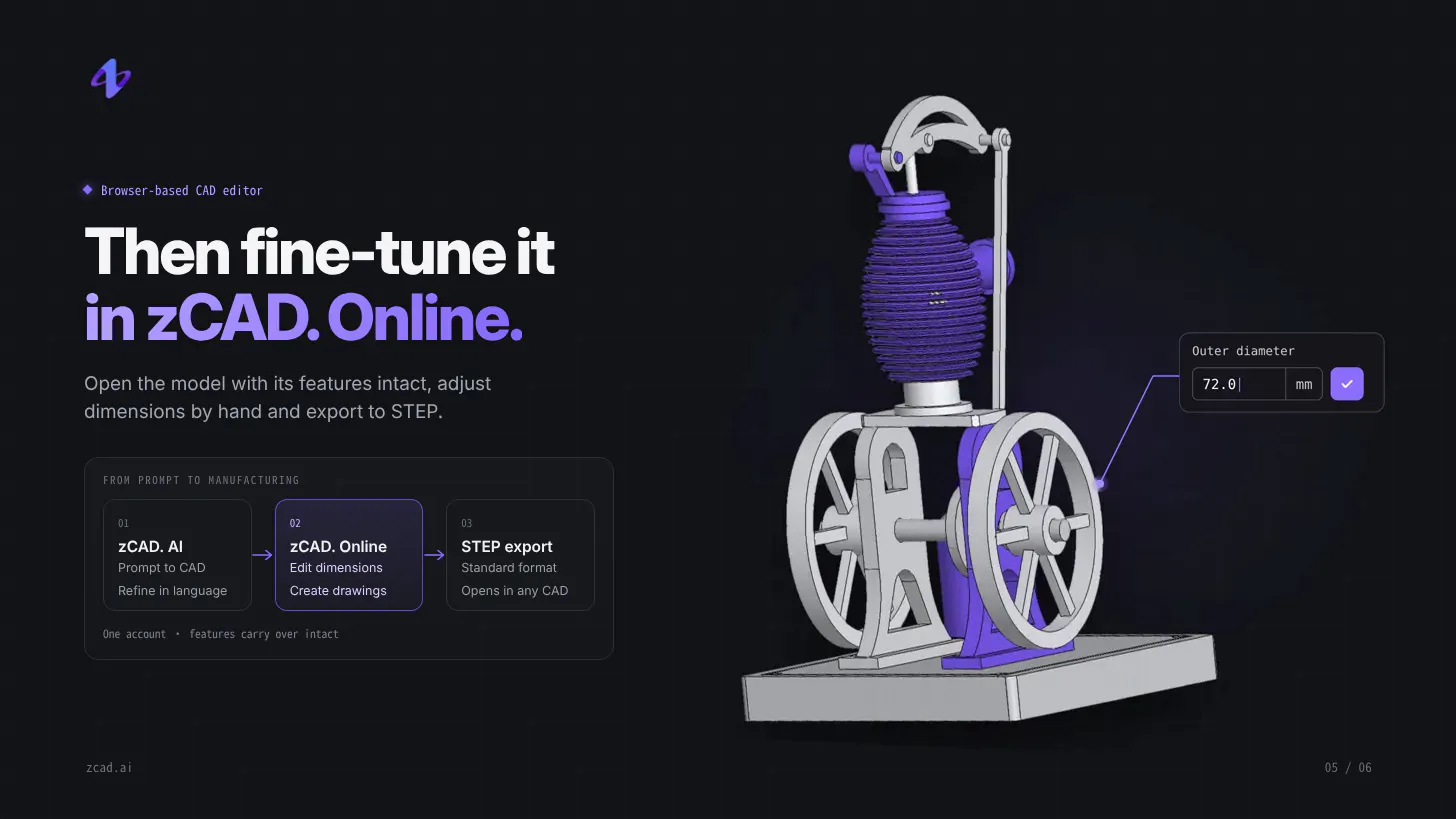
zCAD. AI is an AI-native platform for generating parametric 3D models, built for designers, makers and engineers. Describe a part or assembly in plain language, and zCAD. AI generates an editable, dimension-driven 3D model built on real CAD geometry, not a static mesh. • Complete assemblies from a single prompt, with mates between parts • Refine in plain language, or edit dimensions in a browser-based CAD editor • Export to STEP for use in any CAD tool
Launch Llama's Take
Based on Launch Llama data as of
zCAD AI has 322 upvotes, including the votes it received on Product Hunt, which ranks it #32 of 1,121 SaaS tools on Launch Llama by upvotes, in the top 10%. It has been listed on Launch Llama since November 2026. No Launch Llama members have upvoted it yet and it has no reviews yet.
zCAD AI generates editable, dimension-driven models from plain-language descriptions and is built for designers, makers and engineers. Unlike Adam CAD Copilot, which works inside Onshape and Autodesk Fusion, zCAD AI is its own AI-native platform that exports to STEP for use in other CAD tools.
zCAD AI vs Adam CAD Copilot
zCAD AI generates editable, dimension-driven models from plain-language descriptions and is built for designers, makers and engineers. Unlike Adam CAD Copilot, which works inside Onshape and Autodesk Fusion, zCAD AI is its own AI-native platform that exports to STEP for use in other CAD tools.
| zCAD AI | Adam CAD Copilot | ai 3d model generator | Next3D AI 3D Model Generator | |
|---|---|---|---|---|
| What it does | AI 3D that creates real parts, not just shapes | For mechanical engineers: Adam CAD Copilot creates and edits parts with prompts inside Onshape and Fusion so designs stay editable and wo… | For 3D creators: Generate textured 3D models from images or text prompts, preview in-browser, export ready-to-use assets. | For 3D creators: Next3D AI generates usable 3D models from ideas in your browser so you build product visuals and game assets without man… |
| Pricing | Freemium | Freemium | Freemium | Freemium |
| Free plan | Yes, free plan | Yes, free plan | Yes, free plan | Yes, free plan |
| Category | Design Tools | Design Tools | Not stated | Not stated |
| Upvotes on Launch Llama | 322 | 321 | 32 | 2 |
| Listed on Launch Llama | November 2026 | July 2026 | March 2026 | June 2026 |
Key Features
- Generates editable, dimension-driven 3D models from plain-language descriptions
- Creates complete assemblies from a single prompt, with mates between parts
- Delivers refines models through plain-language instructions or direct dimension edits
- Exports models to STEP files for use in other CAD tools
Use Cases
- Designers, makers and engineers who want to generate parametric 3D models from text descriptions
- Teams who need to move finished models into other CAD software via STEP export
Pricing
A free plan is available. zCAD AI Plus costs $49.99/month and Pro costs $89.99/month, billed monthly in USD. Business pricing is through sales.
FAQ
What does zCAD.AI generate?
zCAD.AI generates B-rep CAD geometry from text, with support for reference images. The workflow supports parts, assemblies and assembly mates. Review the generated features, dimensions and relationships before using the model in a design.
Can I take the result into another CAD tool?
Yes. Every AI plan supports all available export formats, including STEP. STEP carries solid geometry, but generally does not preserve the original feature history or assembly constraints. You can continue editing the geometry in a compatible CAD tool, or continue the native model in zCAD.Online.
Is the output ready for manufacturing?
The output is engineering geometry, not manufacturing approval. Check dimensions, fits, tolerances, material, loads and process requirements before making a part. For complex assemblies, build the main structure first, then add and verify details in stages.
What is free during Beta?
Free includes 200 credits each month and a one-time 600-credit Beta gift. Available generation features, assembly generation and all export formats are included. All AI plans use the same generation model during Beta. Free is for non-commercial use; accounts without a paid subscription have public models and generation data is used for training.
Are my models private, and can I use them commercially?
Any active paid AI or Online subscription makes models private across both products and excludes them from training. Commercial-use and export rights follow the product where a model version was last saved: AI Plus and above allow commercial use of AI-generated versions; Online Standard and above allow commercial use after editing in Online. AI Pro includes Online Standard. AI Plus includes Online Personal, with private models.
How are zCAD AI and zCAD Online connected?
Both products use one account, shared model data and shared credits. They can also be used independently: export an AI-generated STEP file for another CAD tool, or use Online without AI generation.
Which plans make my models private?
Any active paid subscription makes models private across both products, outside the public library and excluded from model training. Accounts without a paid subscription have public models and their generation data is used for training. Privacy does not grant additional CAD features, export rights or commercial-use rights.
How do credits reset and expire?
AI Free includes 200 credits per month and a one-time 600-credit Beta gift. Plus includes 1650 monthly credits and Pro includes 3,000. Monthly allowances reset each month. The Beta gift remains until used; new gifts stop when Beta ends.
How do Online Standard's included AI credits work?
Annual billing includes 3,000 credits issued once and valid with the subscription. Monthly billing includes 200 credits each month. Standard also includes AI Plus-level priority and model access. Included credits are shared across AI and Online.
What happens when I edit an AI model in Online?
Export and commercial-use rights follow the product where that model version was last saved. AI-generated versions can be exported in all formats, including STEP; Plus and above allow commercial use. After saving edits in Online, Personal is non-commercial and, after Beta, exports only STL, 3MF and OBJ. Online Standard and above allow commercial use and all supported export formats. Pro includes Online Standard.
Alternatives
 ai 3d model generatorFor 3D creators: Generate textured 3D models from images or text prompts, preview in-browser, export ready-to-use assets.
New on Launch Llama
Launched this week · This month's launches · All products A–Z
Ask AI about zCAD AI
For bots & AI agents
Machine-readable versions of zCAD AI and Launch Llama. Fetch these instead of parsing this page.
This listing (.md) llms.txt llms-full.txt ai.txt Full catalog (.md) Endpoint index API docs MCP server MCP manifest Developer docs