On Launch Llama

MDViewer - Fast, Native Markdown Viewer for macOS - MDViewer – Fast n…
For macOS users: MDViewer renders Markdown instantly with syntax highlighting, Mermaid diagrams, LaTeX math, and JSON tree view—no lag.
Built by Victor Denisov
Visit website → Upvotes · 35
In category: #1535 of 2697 · Artificial IntelligenceTrending this week: #1555 of 2697 · Artificial Intelligence
MDViewer - Fast, Native Markdown Viewer for macOS is a Instant Launch listing on Launch Llama with 35 total upvotes across 2 founder supporters, founded by Victor Denisov who joined in May 2026, compared against 6 alternatives.
Instant Launch listing
Listing status
35upvotes
Community score
Victor Denisov (Joined May 2026)
Founder
Compared against 6 alternatives
Market comparison
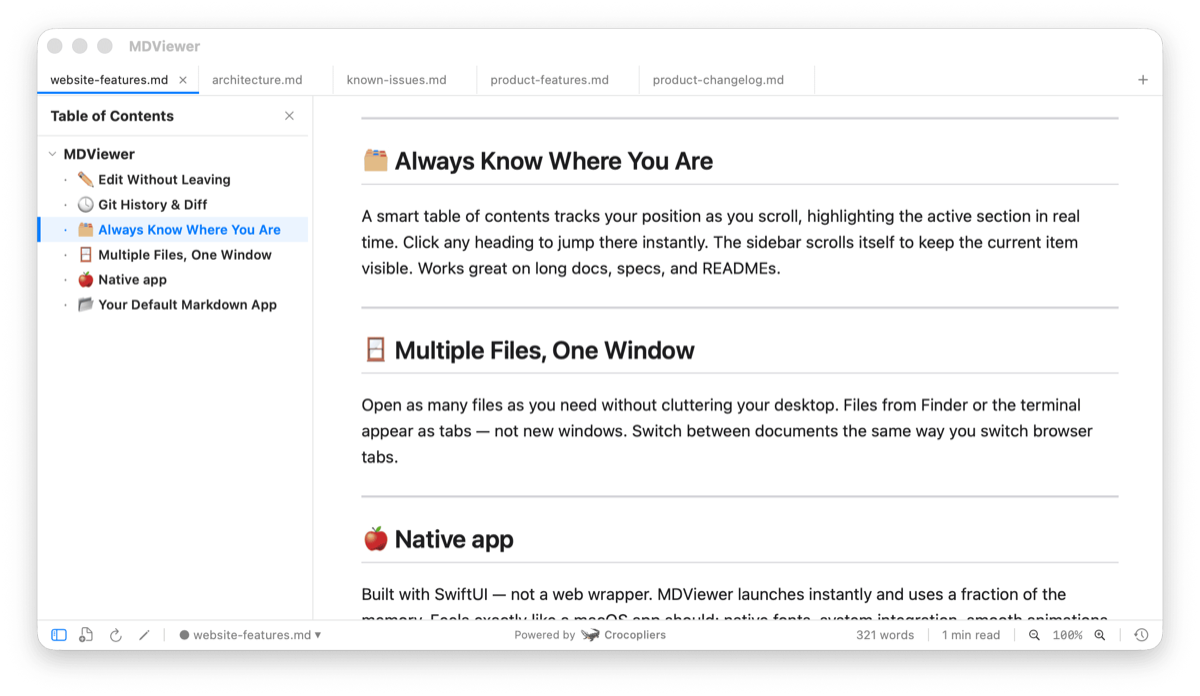
About
MDViewer is a lightweight, beautifully designed Markdown viewer built with SwiftUI. Open any .md file and see it instantly rendered — with syntax highlighting, diagrams, and math support. Key Features Beautiful Markdown Rendering - Full GitHub Flavored Markdown (GFM) support — tables, task lists, code blocks, links, images, and more. Syntax Highlighting - 180+ languages with a GitHub-style theme. Automatically adapts to light and dark mode. Table of Contents - Auto-generated from headings with smooth scroll sync and collapsible sections. Mermaid Diagrams - Render flowcharts, sequence diagrams, ER diagrams, Gantt charts, and more — with fullscreen zoom. Math Formulas - LaTeX-powered rendering via KaTeX — supports inline and block equations, matrices, integrals, and symbols. JSON Viewer - Open .json files as an interactive, collapsible tree with formatting tools. Find in Document - Instant search with highlighting and quick navigation (Cmd+F). QuickLook Integration - Preview .md, .json, and .mermaid files directly in Finder with the Space bar. Work with Projects - Multi-Tab Interface Open multiple files at once - Drag & drop files and folders. File Tree Navigation - Browse your project from the sidebar and quickly open files. Git History & Diffs - View commit history, switch versions, and compare changes with line-by-line diffs. Inline Editor - Edit Markdown with syntax highlighting — jump to position and start typing instantly. Designed for macOS - Native SwiftUI App. Fast, responsive, and memory-efficient. Light & Dark Mode - Seamless adaptation to system appearance. Keyboard Shortcuts - Powerful shortcuts like Cmd+F, Cmd+S, Cmd+R, and more. Default Markdown App - Set MDViewer as your default .md viewer for instant access. Status Bar - Word count, reading time, and zoom controls at a glance. Export to PDF - with paginated pages and beautiful margins.
Ask AI
ChatGPT Claude Perplexity Grok
For agents
llms.txt · llms-full.txt · ai.txt · Live fact sheet · Full catalog (.md) · Endpoint index · API spec · REST access · Agent server · Server manifest · Server discovery
Pricing
MDViewer - Fast, Native Markdown Viewer for macOS is a paid product. See the website for current pricing.
View MDViewer - Fast, Native Markdown Viewer for macOS pricing →
FAQ
What is MDViewer - Fast, Native Markdown Viewer for macOS?
MDViewer is a lightweight, beautifully designed Markdown viewer built with SwiftUI. Open any .md file and see it instantly rendered — with syntax highlighting, diagrams, and math support. Key Features Beautiful Markdown Rendering - Full GitHub Flavored Markdown (GFM) support — tables, task lists, code blocks, links, images, and more. Syntax Highlighting - 180+ languages with a GitHub-style theme. Automatically adapts to light and dark mode. Table of Contents - Auto-generated from headings with smooth scroll sync and collapsible sections. Mermaid Diagrams - Render flowcharts, sequence diagrams, ER diagrams, Gantt charts, and more — with fullscreen zoom. Math Formulas - LaTeX-powered rendering via KaTeX — supports inline and block equations, matrices, integrals, and symbols. JSON Viewer - Open .json files as an interactive, collapsible tree with formatting tools. Find in Document - Instant search with highlighting and quick navigation (Cmd+F). QuickLook Integration - Preview .md, .json, and .mermaid files directly in Finder with the Space bar. Work with Projects - Multi-Tab Interface Open multiple files at once - Drag & drop files and folders. File Tree Navigation - Browse your project from the sidebar and quickly open files. Git History & Diffs - View commit history, switch versions, and compare changes with line-by-line diffs. Inline Editor - Edit Markdown with syntax highlighting — jump to position and start typing instantly. Designed for macOS - Native SwiftUI App. Fast, responsive, and memory-efficient. Light & Dark Mode - Seamless adaptation to system appearance. Keyboard Shortcuts - Powerful shortcuts like Cmd+F, Cmd+S, Cmd+R, and more. Default Markdown App - Set MDViewer as your default .md viewer for instant access. Status Bar - Word count, reading time, and zoom controls at a glance. Export to PDF - with paginated pages and beautiful margins.
How much does MDViewer - Fast, Native Markdown Viewer for macOS cost?
MDViewer - Fast, Native Markdown Viewer for macOS is a paid product. See the website for current pricing. You can discover and review MDViewer - Fast, Native Markdown Viewer for macOS for free on Launch Llama.
What category does MDViewer - Fast, Native Markdown Viewer for macOS belong to?
MDViewer - Fast, Native Markdown Viewer for macOS is listed under Productivity, Developer Tools, Artificial Intelligence on Launch Llama.
How do I get started with MDViewer - Fast, Native Markdown Viewer for macOS?
Click the "Visit Website" button on this page to go directly to MDViewer - Fast, Native Markdown Viewer for macOS. You can also upvote and leave a review to help other founders discover it.
Supporters
2 founders2 founders contributed 35 upvotes to MDViewer - Fast, Native Markdown Viewer for macOS on Launch Llama.

Reviews
1 comment
Hey, love seeing this here! 👋 What inspired you to build this? Would love to hear the story behind it.
Alternatives
- Markdific
For developers: Markdific renders markdown files beautifully with tables, code, and diagrams so you read and edit cleanly without setup.
- Marked QL
For Mac users: Marked QL renders beautiful Markdown previews instantly in Finder with math, Mermaid diagrams, and syntax highlighting.
- Marked 3 - Markdown Preview for Mac
For writers: Marked 3 previews and converts markdown to HTML, PDF, DOCX, EPUB with analysis tools so you publish faster.
- OpenMarkdown
For developers: OpenMarkdown is a fast markdown editor where you and your AI agent co-edit files locally through CLI and MCP without telemetry.
- JsonXmlEditor
For developers: JsonXmlEditor formats and validates JSON/XML payloads with a REST client so you debug API integrations faster offline.
- Flotnote
Floating Markdown notes for Mac. Pay once, own your files