WhitelistVideo
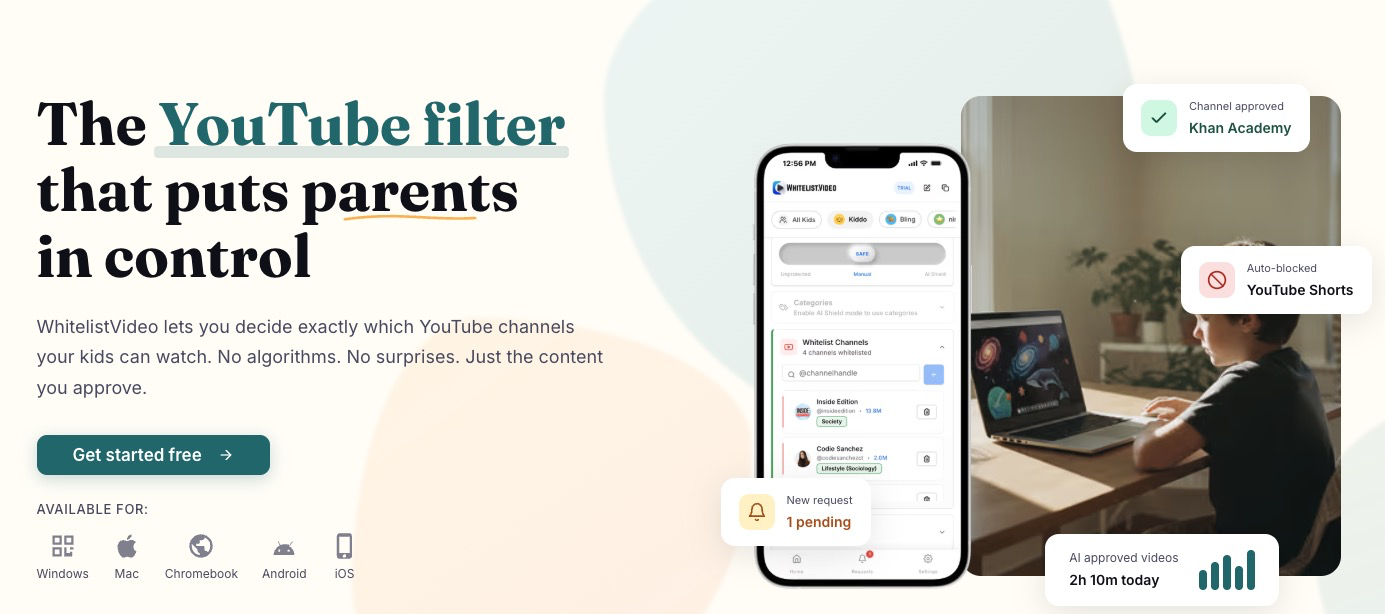
Child only watches parent approved channels on YouTube. YouT
Gives parents of kids aged 8-15 a whitelist-based YouTube filter that blocks all videos until trusted channels are added, with Auto-pilot screening new uploads and Shorts blocked.
Paid
WhitelistVideo is a Community listing on Launch Llama with 1 upvote from 1 founder, compared against 4 alternatives.
Community listing
Listing status
1upvotes
Community score
—
Founder
Compared against 4 alternatives
Market comparison
Launched on Launch Llama Nov 16, 2026 · #8 of 98 that day
About
Kids send a request when they find a blocked channel, and parents approve or deny it with one tap from WhatsApp, Telegram, or the app. Parents can also manage channels, playlists, and safety settings by messaging an AI chat bot, such as asking it to add a channel for a child. Content sensitivity can be set from light filtering to zero tolerance for profanity, and Religion & Faith categories let parents choose which faiths a child's videos may teach. The product runs on Windows, Mac, Chromebook, iPhone, iPad, Android, Android TV, and Google TV.
Follow WhitelistVideo: X (Twitter)
Key Features
- Blocks every YouTube video by default until a parent approves its channel
- Auto-pilot screens new videos from unapproved channels against set rules
- Lets kids send channel requests that parents approve with one tap
- Accepts approval and channel management commands through a WhatsApp or Telegram AI chat
- Filters videos by keywords in titles, descriptions, and tags, and blocks Shorts
- Adjusts language and mature-content strictness, plus Religion & Faith category choices
Use Cases
- Limiting a child aged 8-15 to parent-approved YouTube channels for schoolwork and learning
- Approving or denying a child's request for a blocked channel from WhatsApp or Telegram
- Screening new uploads from unfamiliar channels automatically before a child can watch them
Who it is for
- Parents of children aged 8-15 who want YouTube limited to channels they have approved
- Child psychologists and school staff recommending controlled YouTube use for students
Pricing
Priced per child, with a free 2-hour test period to confirm it works on your device. Auto-pilot is included in the Premium and Lifetime plans.
FAQ
How is this different from YouTube Kids?
YouTube Kids is designed for toddlers (ages 3-8) with limited, algorithm-selected content. WhitelistVideo is for school-age kids (8-15) who need real educational content—but with you deciding exactly which channels are appropriate, not YouTube's algorithm.
Can my tech-savvy kid bypass this?
Not without your password. Every control that lives inside an app can be switched off by the child using it, so WhitelistVideo runs on top of the parental control you already use (Screen Time, Family Link, Family Safety) and lets that layer hold the lock. Judge the pairing, not the app alone. On Windows and Mac the extension is enforced by administrator-only browser policy. On iPhone and iPad it runs on Apple Family Controls tied to your Apple Account. On Android, Family Link blocks the YouTube apps and every browser except Chrome, blocks youtube.com in Chrome, and WhitelistVideo verifies it on the device. Once setup is complete, WhitelistVideo plus that native control cannot be removed without the parent's credentials, and if anything breaks it blocks YouTube rather than opening it.
What about YouTube Shorts?
YouTube Shorts are blocked by default. While YouTube now offers Shorts time limits through Family Link (Jan 2026), WhitelistVideo goes further — Shorts are blocked entirely out of the box, and you also control which channels your child can access. Parents can toggle Shorts blocking on or off from the dashboard if needed.
Does it work on tablets and phones?
Yes! Our iOS Child App is available now for iPhone and iPad. Android Child App is available now on Google Play. For desktops and Chromebooks, use our browser extension. Parents can manage everything from the Android or iOS Parent App, or use the web dashboard.
What if my child needs a new channel approved?
They simply click "Request" when they encounter a blocked channel. You get a notification on WhatsApp, Telegram, or the app and can approve or deny with one tap. You can also message the AI bot anytime to add channels, manage playlists, block keywords, or change any setting — all from a chat conversation. Approvals sync instantly—no waiting.
Should I use YouTube Kids, a supervised account, or WhitelistVideo?
YouTube Kids works for under-8s; supervised accounts keep older kids on the main app but filter by broad tiers — an algorithm still picks what appears, and the Shorts limit (which can be zero) applies only while your child is signed in. WhitelistVideo is the only option where you approve the exact channels: everything else stays blocked, on the real YouTube app, for kids 8–15. It also works alongside a supervised account.
Alternatives
 FovelyFor anyone who studies or builds with YouTube open: type your goal, and Fovely hides the videos and posts that don't fit it during a focus session. Free for Chrome and Firefox.
New on Launch Llama
Launched this week · This month's launches · All products A–Z
Featured in
Ask AI about WhitelistVideo
Supporters
1 founder
1 founder contributed 1 upvote to WhitelistVideo on Launch Llama.
For bots & AI agents
Machine-readable versions of WhitelistVideo and Launch Llama. Fetch these instead of parsing this page.
This listing (.md) llms.txt llms-full.txt ai.txt Full catalog (.md) Endpoint index API docs MCP server MCP manifest Developer docs