On Launch Llama
Jotted
For meeting professionals: Jotted records calls from your desktop without joining them, so no bot appears and your recordings stay private on your machine.
Built by Jotted
Productivity SaaS Freemium
Visit website → Upvotes · 5
In category: #1335 of 1801 · Productivity
Jotted is a Community listing on Launch Llama with 5 total upvotes across 2 founder supporters, founded by Jotted who joined in Aug 2026, compared against 6 alternatives.
Community listing
Listing status
5upvotes
Community score
Jotted (Joined Aug 2026)
Founder
Compared against 6 alternatives
Market comparison
Key Features
- Is a Windows desktop app that records your online meetings without joining them
- Most meeting notetakers work by sending a bot into your call
- Some IT departments block it outright
- And the recording lives on someone else's servers, so if you stop paying, it goes with them
About
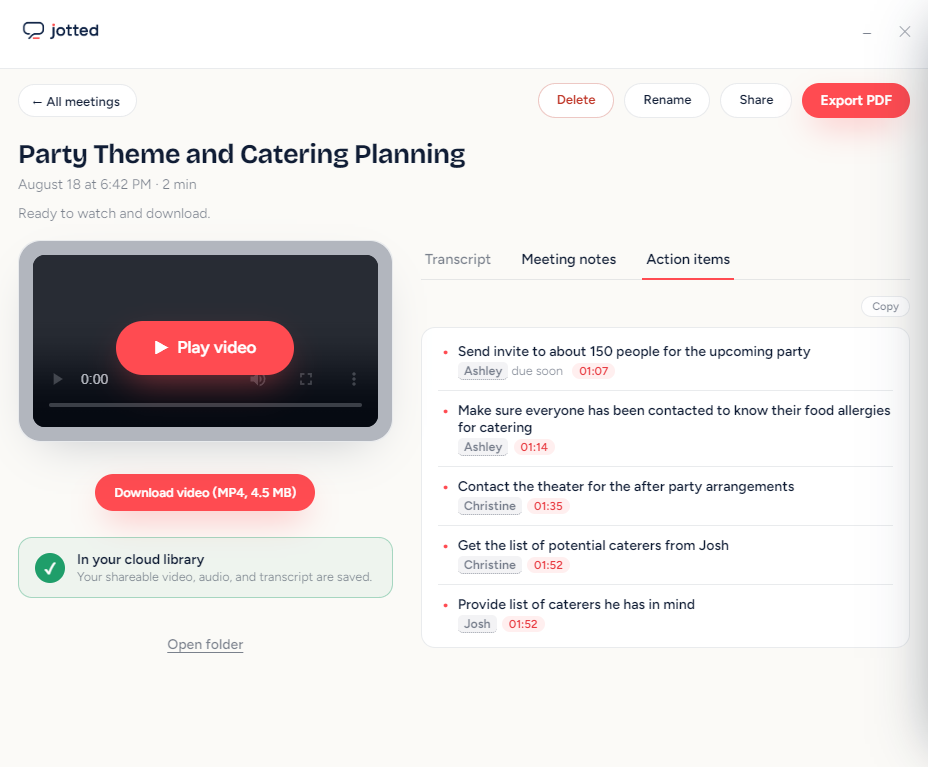
Jotted is a Windows desktop app that records your online meetings without joining them. Most meeting notetakers work by sending a bot into your call. It appears in the participant list with a name like "Notetaker", everyone sees it, and the conversation changes shape. Clients ask what it is. Some IT departments block it outright. And the recording lives on someone else's servers, so if you stop paying, it goes with them. Jotted takes a different approach. It records from your desktop, the same way a screen recorder does. Nothing joins the call, nothing announces itself, and the meeting looks exactly as it always does to everyone else. The second thing that sets it apart is the video. Most bot-free tools transcribe your call and then delete the recording, which leaves you holding a summary with no way to check it. When your memory and the summary disagree, there is nothing to go back to. Jotted keeps the full meeting in HD, so you can find the moment and play it. After every call you get four things: the video saved as a file you own, a word-for-word transcript with timestamps and speaker labels, a summary you can paste into an email, and a list of action items with owners and deadlines. You can share any recording with a link that works without an account. Because Jotted records your desktop rather than integrating with a specific platform, it works with Zoom, Google Meet, Microsoft Teams, Webex, Slack huddles, Discord, and anything else that happens on your screen. There is no compatibility list and nothing to connect. The free plan is free forever. Unlimited recordings, no time caps, no watermarks, and every word transcribed on your own computer using Whisper. Nothing is uploaded. Pro is $14 a month and adds AI summaries, action items, encrypted cloud backup, sharing, and Quill, an assistant that reads across all your recordings and answers questions with a timestamp you can click. Recording laws differ by country and state. Jotted reminds you before each recording starts, and getting consent where the law requires it is your responsibility. Jotted is available for Windows. macOS is in development.
Use Cases
- Eliminate context-switching by centralizing your daily workflow
- Ship faster by automating status updates and task management
- Create professional designs and prototypes without hiring a designer
- Create product demos and explainer videos that convert visitors into users
- Keep your remote team in sync without adding another daily standup
Pricing
Jotted offers a free plan plus paid tiers. See the website for current pricing.
Verdict
In the competitive saas space, Jotted stands out as a solid option. It's gaining traction among founders who value simplicity and results. Jotted is a Windows desktop app that records your online meetings without joining them. If for meeting professionals: jotted records calls from your desktop without joining them, so no bot appears and your recordings stay private on your machine is a priority for your team, it's worth giving Jotted a closer look.
FAQ
What is Jotted?
Jotted is a Windows desktop app that records your online meetings without joining them. Most meeting notetakers work by sending a bot into your call. It appears in the participant list with a name like "Notetaker", everyone sees it, and the conversation changes shape. Clients ask what it is. Some IT departments block it outright. And the recording lives on someone else's servers, so if you stop paying, it goes with them. Jotted takes a different approach. It records from your desktop, the same way a screen recorder does. Nothing joins the call, nothing announces itself, and the meeting looks exactly as it always does to everyone else. The second thing that sets it apart is the video. Most bot-free tools transcribe your call and then delete the recording, which leaves you holding a summary with no way to check it. When your memory and the summary disagree, there is nothing to go back to. Jotted keeps the full meeting in HD, so you can find the moment and play it. After every call you get four things: the video saved as a file you own, a word-for-word transcript with timestamps and speaker labels, a summary you can paste into an email, and a list of action items with owners and deadlines. You can share any recording with a link that works without an account. Because Jotted records your desktop rather than integrating with a specific platform, it works with Zoom, Google Meet, Microsoft Teams, Webex, Slack huddles, Discord, and anything else that happens on your screen. There is no compatibility list and nothing to connect. The free plan is free forever. Unlimited recordings, no time caps, no watermarks, and every word transcribed on your own computer using Whisper. Nothing is uploaded. Pro is $14 a month and adds AI summaries, action items, encrypted cloud backup, sharing, and Quill, an assistant that reads across all your recordings and answers questions with a timestamp you can click. Recording laws differ by country and state. Jotted reminds you before each recording starts, and getting consent where the law requires it is your responsibility. Jotted is available for Windows. macOS is in development.
Who should use Jotted?
Jotted is a strong fit if you are one of: • SaaS founders and subscription-based businesses • busy founders and teams looking to do more with less If that does not sound like you, skim the features and site before committing time.
What problem does Jotted solve?
Jotted is built around this outcome: For meeting professionals: Jotted records calls from your desktop without joining them, so no bot appears and your recordings stay private on your machine. Use the site demo or docs to confirm it matches the bottleneck you are trying to remove.
Is Jotted free to start?
Jotted offers a free plan plus paid tiers. See the website for current pricing. Check the official site before you buy so you see current plans, trials, and limits. Most freemium tools let you validate the workflow before upgrading — check what the free tier unlocks for your use case.
How much does Jotted cost?
Jotted offers a free plan plus paid tiers. See the website for current pricing. Check the official site before you buy so you see current plans, trials, and limits.
Do I need an account to use Jotted?
Jotted highlights getting started without a heavy signup funnel. Confirm on the website whether advanced features still require an account.
How does Jotted use AI?
Jotted uses AI as part of its workflow. Before relying on it for customer-facing or confidential work, confirm what data is sent to models, whether outputs are editable, and how you can review results.
Is Jotted worth trying?
It promises: For meeting professionals: Jotted records calls from your desktop without joining them, so no bot appears and your recordings stay private on your machine. Worth trying if that problem is painful for you this week; skip it if you only need a one-off workaround you already have.
How do I try Jotted?
Open the official Jotted website from this page, run the smallest real task you care about (not a toy demo), and decide in one session whether it removes friction. Check pricing and data/privacy terms before you put production work into it.
Alternatives
- RecordMeeting
For professionals: RecordMeeting captures and transcribes calls across Zoom, Teams, Meet, and more with automatic summaries and searchable notes.
- Humla
For remote teams: Humla transcribes and summarizes meetings locally on Mac with zero privacy concerns—100% free, no cloud uploads.
- Fellow.ai
For professionals: Fellow.ai transcribes and summarizes in-person meetings on your phone, then organizes notes and action items automatically.
- QuietRecap
For founders: QuietRecap captures meeting audio locally without a visible bot so you get transcripts, summaries, and action items with zero distraction.
- Mumble AI
For Mac users: Mumble AI combines meeting recording, transcription, note-taking, and dictation in one app with local and cloud AI modes.
- Oats
For meeting attendees: Oats captures meeting notes locally and free with no bots or subscriptions, so you focus on the conversation.
Supporters
2 founders2 founders contributed 5 upvotes to Jotted on Launch Llama.
Reviews
1 comment
Hey, love seeing this here! 👋 What inspired you to build this? Would love to hear the story behind it.
Ask AI
ChatGPT Claude Perplexity Grok
For agents
llms.txt · llms-full.txt · ai.txt · Live fact sheet · Full catalog (.md) · Endpoint index · API spec · REST access · Agent server · Server manifest · Server discovery