ImageToImage AI
Under reviewFree image to image AI: restyle photos, swap backgrounds
Transform existing photos with text prompts, creative styles and browser-based image editing.
Built by LIXUN · Photo & Video · Freemium
Coming soon on Launch Llama Tools
ImageToImage AI is a Community listing on Launch Llama with 0 total upvotes, founded by LIXUN who joined in Nov 2026, compared against 5 alternatives.
Community listing
Listing status
0upvotes
Community score
LIXUN (Joined Nov 2026)
Founder
Compared against 5 alternatives
Market comparison
Transform existing photos with text prompts, creative styles and browser-based image editing.
About
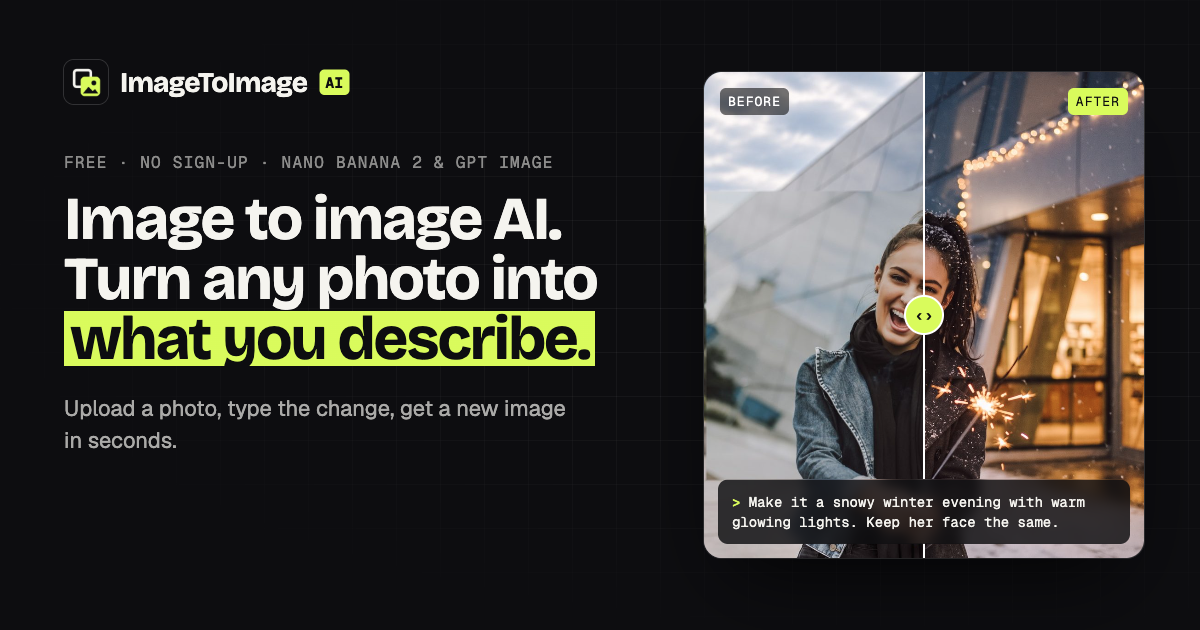
ImageToImage AI is a web-based tool for transforming existing images. Start with a reference photo, describe the changes you want, and review the result before downloading. Creators, designers and marketers can use it to restyle photos, change backgrounds, and explore cartoon or sketch effects. The workflow keeps the original image as the starting point, making it useful for adapting existing visuals for websites, social posts and creative projects. Available models and usage limits depend on the selected tool and plan.
Key Features
- Restyle a photo into anime, watercolor, oil paint, pixel art or pencil sketch
- Swap backgrounds or change outfits while keeping the subject recognizable
- Choose the model and aspect ratio for your image editing task
- Review the generated result before downloading
- Start from an existing image and guide changes with a text prompt
Use Cases
- Placing a product photo on a new studio backdrop or boutique table with matching light and shadows
- Turning a casual snapshot into a navy-suit LinkedIn-style headshot against a light-grey backdrop
- Restyling a living room in a new décor style while keeping the same layout, stairs and windows
From the founder
Who it's for
“For creators, designers and marketers who want to transform existing photos and prepare visual content without starting from a blank canvas.”
Why I built it
“ImageToImage AI is built around a simple idea: start with the image you already have, describe the change you need, and review the result before downloading. Our focus is making that workflow accessible in a web browser.”
Who it is for
- Ecommerce sellers who need product shots on new backgrounds
- People who want a professional headshot made from a casual photo
- Interior design hobbyists testing new room styles from their own photos
Pricing
Free tier available; paid options and usage limits are listed on the website.
FAQ
Is this image to image AI free?
Yes, to try. Without an account you can generate one Standard image a day, and two a day after you sign in. Free results are JPGs up to 2048 px with a small watermark. For full-size, watermark-free images or the Pro and HD models, buy a credit pack (no account needed) or subscribe to Pro.
Do I need to sign up?
No. Upload an image, write a prompt and press Generate. Signing in only adds a second free run each day and keeps your results in History for 7 days.
What is image to image AI?
It's an AI image generator that starts from your picture. You upload a reference image and describe the change; the model generates a new image that follows the prompt while keeping the subject, layout and details you asked it to keep.
How is image to image different from text to image?
Text to image invents a whole new picture from words. Image to image keeps your upload as the starting point, so the same person, product or room shows up in the result. It's the right choice when you want your own photo, changed.
Which AI models do you use?
Standard and HD run Google's Nano Banana 2 (Gemini 3.1 Flash Image) at 2K and 4K. Pro runs OpenAI's GPT Image. Standard is fast and keeps faces well; Pro is often better at text, typography and complex scene changes; HD gives you a 4K file.
How do I write a good prompt?
Say what to change and what to keep, in one or two sentences: "Change the background to a snowy forest. Keep her face, hair and coat the same." Name a style if you want one (watercolor, anime, 3D render), and mention lighting or mood. If the first result is close, adjust one thing and run it again.
Will it keep my face the same?
Usually, yes. Nano Banana 2 and GPT Image are built to keep identity consistent, and adding "keep the face exactly the same" to the prompt helps. Big changes in pose, angle or age can still shift features a little.
Can I change the aspect ratio?
Yes. Keep the original ratio (Auto) or pick 1:1, 3:2, 2:3, 4:3, 3:4, 16:9 or 9:16. The model recomposes the scene to fill the new frame.
Alternatives
 AI Photo EditorFor creators: AI Photo Editor transforms images via text prompts, editing JPG, PNG, WebP instantly without design skills or software.
 PromptImageFree AI image & video studio with a prompt library. Signup credits, Nano Banana, Flux, Veo — no card needed.
More in Photo & Video
New on Launch Llama
Launched this week · This month's launches · All products A–Z
Ask AI about ImageToImage AI
For bots & AI agents
Machine-readable versions of ImageToImage AI and Launch Llama. Fetch these instead of parsing this page.
This listing (.md) llms.txt llms-full.txt ai.txt Full catalog (.md) Endpoint index API docs MCP server MCP manifest Developer docs