ImageText Tools
Edit text in any photo, keep the original style
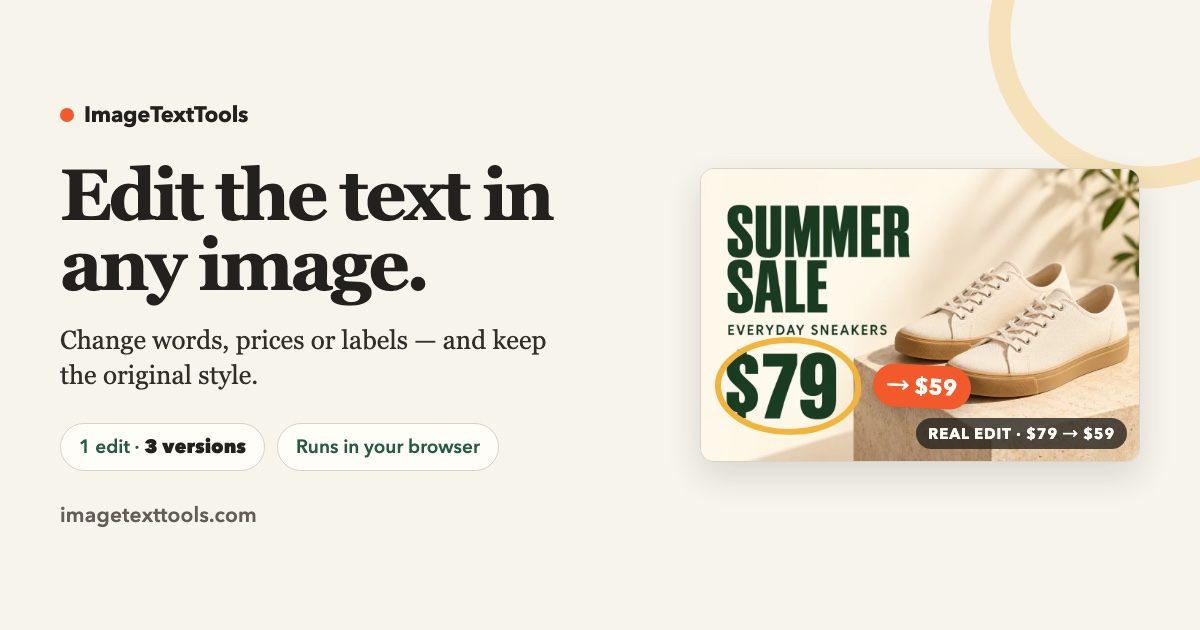
Built for marketers and shop owners: swap prices, dates or words in a photo and get three AI-generated versions matching the original lettering.
Built by 赵元杰 · Photo & Video · Freemium
In category: #13 of 15 · Photo & Video
ImageText Tools is a Community listing on Launch Llama with 0 total upvotes, founded by 赵元杰 who joined in Nov 2026, compared against 4 alternatives.
Community listing
Listing status
0upvotes
Community score
赵元杰 (Joined Nov 2026)
Founder
Compared against 4 alternatives
Market comparison
Launched on Launch Llama Nov 9, 2026 · #95 of 96 that day
About
You upload a JPG, PNG or WebP image, and the editor detects the text lines in it. You retype the lines you want changed, and the AI generates three versions of the edited image to compare before you choose one. The tool uses your image as a visual reference for lettering, colour and texture, so no Photoshop, design file or font file is needed. Results may not match the original pixels exactly, so the page recommends checking all three versions for unwanted changes.
Key Features
- Detects text lines in your image so you can choose which to change
- Replaces words, prices, and dates in photos, signs and posters
- Generates three versions per edit to compare before downloading
- Handles printed prices, handwriting, decorative lettering and busy menus
- Downloads HD results after Google sign-in, with no design software needed
- Accepts JPG, PNG or WebP uploads up to 10 MB
Use Cases
- Changing a sale price like 20% to 30% on a photographed sign without Photoshop or source design files
- Updating an event date on a poster, such as changing 18 JULY 2026 to 25 JULY 2026
- Editing a price on a busy menu photo, such as changing a cappuccino price from 430 to 450
From the founder
Who it's for
“Sellers, small shops and event organisers who need to correct a price, date or label that is already printed in a photo, without re-shooting or rebuilding the design.”
Why I built it
“Because every product photo edit turned into an hour of font hunting. We wanted to redraw only the words that changed and keep the surface they sit on intact.”
Who it is for
- Marketers who need to swap prices, dates or words in existing promotional images.
- Shop owners updating signs, menus or opening hours in photos they already have.
Pricing
Free HD download; extra edits from $4.99
FAQ
How do I edit text in an image online?
Upload your image, select a detected line and type its replacement — that is the whole image text edit. You can change several lines before generating one set of three versions. Compare the previews, then sign in with Google to download an eligible HD result. You do not need Photoshop, a source design file or a font file.
Can I keep the original font and background?
The editor uses your image as a visual reference to redraw text in a similar style, including colour and texture. It does not identify a font or match it to a font library. Exact lettering and unchanged background pixels are not guaranteed; compare all three versions for unwanted changes.
What images and languages work best?
Start with sharp, readable text and enough surrounding detail. Short price labels, poster dates and shop signs are good starting points. Small or blurry letters, long paragraphs, dense menus, curved surfaces and strong perspective can be harder. Recognition and generation quality vary by language and script, so check spelling carefully; we do not guarantee a fixed list of supported languages.
Which image formats and file sizes can I upload?
Upload JPG, PNG or WebP files up to 10 MB. Each side must be between 32 and 6000 pixels; WebP files must also be no larger than 4 million pixels. PDFs, SVGs and editable design files are not supported. Export them as a supported image first.
What if the text is detected incorrectly or a line is missing?
Check the detected text before generating and enter the wording you want for each available line. Use Restore original to undo a change. If a line is missing, try a clearer image or crop around the relevant area before uploading again. The current editor does not let you draw a new text region manually.
Can I erase text or add a new text box?
The current editor replaces text in detected regions. It does not yet offer a dedicated text eraser or a tool for adding text in an empty area. Clearing a line restores its original text; it does not erase that line from the image.
Can I edit text in a photo on my phone?
Yes. Open the site in your mobile browser and choose a photo from your device. You can edit detected lines, generate three versions, compare them and sign in to download. No app installation is needed. If your phone photo is HEIC, export or convert it to JPG, PNG or WebP first.
Is it free, and do I need an account?
You can try an eligible free edit before signing in: it produces three previews, and you can download one selected HD version after Google sign-in. The free allowance is one-time per eligible device, not a daily allowance. Repeated viewing of existing previews is free while the files are available; generating new sets requires another available allowance or paid credit. Sign-in is also required to buy credits.
What does one credit include?
One credit covers one image edit with three generated versions. You can replace several detected lines in that image within the same edit. A paid edit includes individual HD downloads of all three versions without another credit charge. Three versions are alternatives for one image, not three separate image edits. See credit packs and pricing.
What if I do not like the results? Can I generate again?
Compare all three previews before choosing a result. If you want a different set, start a new edit with an available credit or allowance. There is no automatic free redo for a completed edit. If the service failed to work as described, contact support for review under the Refund Policy.
Alternatives
 ImageTextEditFor marketers: ImageTextEdit replaces text in finished images while keeping style intact, so you fix typos and update prices without redesigning.
 Edit Text in Image Online FreeFor marketers: Edit Text in Image Online Free changes text in screenshots and product images with AI so you fix details without Photoshop.
More in Photo & Video
New on Launch Llama
Launched this week · This month's launches · All products A–Z
Featured in
- The 6 Best Graphic Design Tools in 2026 (Compared) — ranked #6
- The 14 Best Photo Editing Tools in 2026 (Compared) — ranked #11
- The 14 Best Photo & Video Tools in 2026 (Compared) — ranked #13
Ask AI about ImageText Tools
For bots & AI agents
Machine-readable versions of ImageText Tools and Launch Llama. Fetch these instead of parsing this page.
This listing (.md) llms.txt llms-full.txt ai.txt Full catalog (.md) Endpoint index API docs MCP server MCP manifest Developer docs