On Launch Llama
Sidebridge
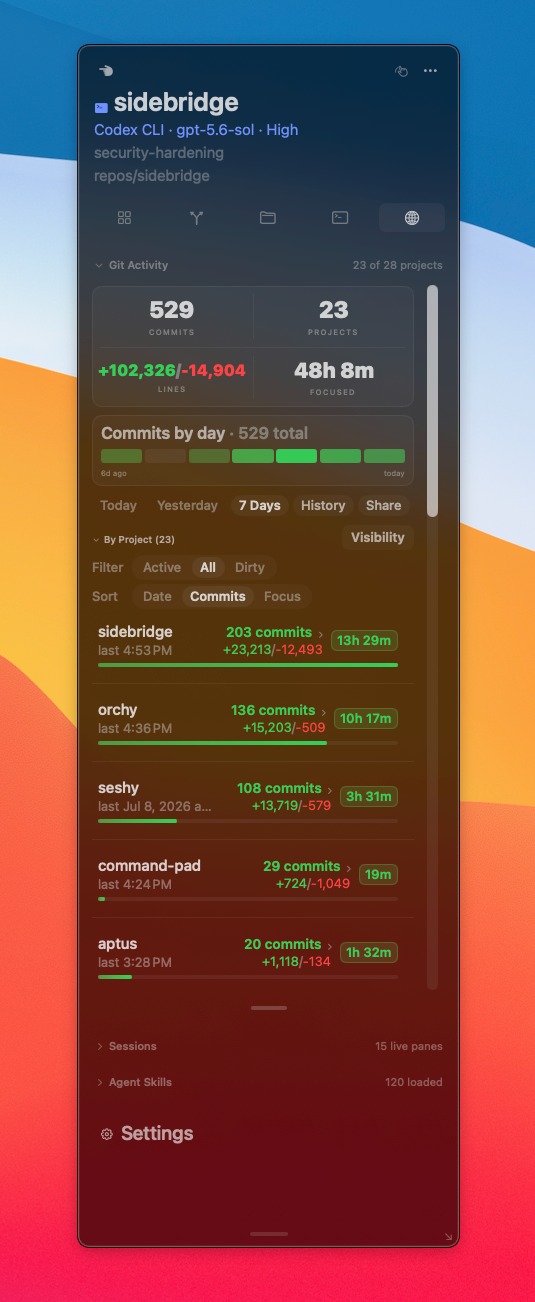
For terminal-first developers: Sidebridge keeps project context like git status and diffs visible in your macOS sidebar so you stay focused without manual switching.
Built by Buddy Hadry
Artificial Intelligence Productivity Developer Tools Freemium
Visit website → Upvotes · 36
In category: #1499 of 2811 · Artificial Intelligence
Sidebridge is a Instant Launch listing on Launch Llama with 36 total upvotes across 1 founder supporter, founded by Buddy Hadry who joined in Jul 2026, compared against 6 alternatives.
Instant Launch listing
Listing status
36upvotes
Community score
Buddy Hadry (Joined Jul 2026)
Founder
Compared against 6 alternatives
Market comparison
Real numbers
90d
-
42
Views
-
13
Visitors
-
0
Clicks
Public Launch Llama traffic for this listing.
Key Features
- Display git status and diffs in a persistent macOS sidebar
- Auto-sync sidebar context to your active terminal pane or IDE window
- Show file trees and project structure without breaking focus
- Support tmux and CLI-based development workflows
- Track context across multiple active windows and agent tools
About
A floating macOS sidebar that automatically follows your active terminal pane, IDE, or agent window to surface project context like git status, diffs, and file trees. Built for terminal-first developers working with tmux, Claude Code, and other CLI tools, Sidebridge eliminates manual project switching and keeps awareness visible without leaving your workflow.
Use Cases
- Keep git status and diffs visible in the macOS sidebar while working in tmux, eliminating context loss when switching between terminal panes
- Surface file trees and project context automatically in the sidebar while using Claude Code or other CLI agents without manual window switching
- Monitor project state changes in real-time through the sidebar while focused on terminal commands, reducing need to run status checks manually
- View multiple git diffs side-by-side in the sidebar context panel while editing in your terminal-first workflow without interrupting focus
- Track active project context across IDE windows and agent tools through the floating sidebar that follows your active pane automatically
Pricing
Sidebridge offers a free plan plus paid tiers. See the website for current pricing.
Alternatives
- Sider Omni Sidebar
Give every Mac app an Agent Sidebar
- CodeBreak
For macOS developers: CodeBreak monitors Claude Code across all windows and alerts you when tasks complete, so you stay productive.
- GraphCode
For developers: GraphCode runs multiple AI coding agents as nodes on macOS so you orchestrate parallel work and ship faster.
- crystl
For developers: crystl is a macOS terminal for managing multiple CLI agents like Claude Code across projects without tab switching.
- Claude by Anthropic
For presenters: Claude in PowerPoint builds, edits, and iterates slides in real time while respecting your layouts, fonts, and brand templates.
- Treebar
For developers: Treebar tracks all active Git worktrees in your notch so you never lose track of where Codex or agents are working.
Supporters
1 founder1 founder contributed 36 upvotes to Sidebridge on Launch Llama.
Ask AI
ChatGPT Claude Perplexity Grok
For agents
llms.txt · llms-full.txt · ai.txt · Live fact sheet · Full catalog (.md) · Endpoint index · API spec · REST access · Agent server · Server manifest · Server discovery