
Portlivo
Under reviewMac menu bar app to manage local dev ports
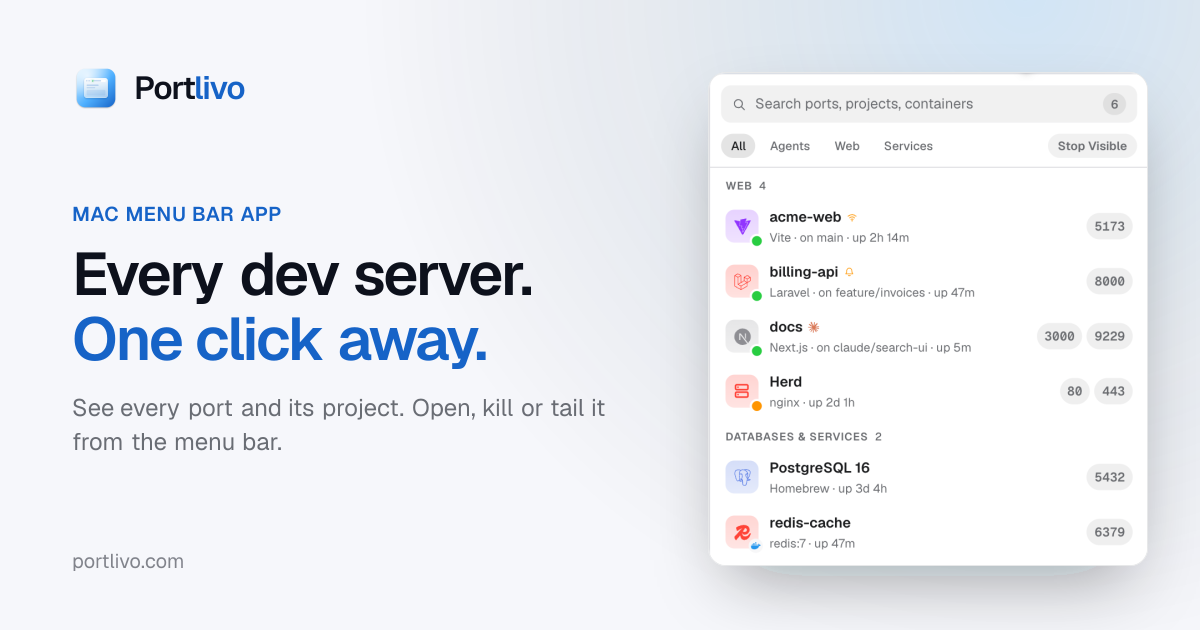
Lets macOS developers spot every running Vite, Laravel or Next.js server and its port, then stop, restart or share it with a click instead of running lsof.
Built by Anmol Sethi · Productivity · Developer Tools · Desktop Apps · Paid
Coming soon on Launch Llama Tools
Portlivo is a Community listing on Launch Llama with 0 total upvotes, founded by Anmol Sethi who joined in Nov 2026, compared against 4 alternatives.
Community listing
Listing status
0upvotes
Community score
Anmol Sethi (Joined Nov 2026)
Founder
Compared against 4 alternatives
Market comparison
Lets macOS developers spot every running Vite, Laravel or Next.js server and its port, then stop, restart or share it with a click instead of running lsof.
About
Portlivo scans listening ports every two seconds and labels each one with its project folder, command, PID and uptime, so a Docker container or Vite server shows up by name instead of as a generic node process. Web servers are probed and colored by HTTP status and response time, and Stacks start a project's full set of commands, such as composer run dev or docker compose up, from one folder. When a dev server fails with address already in use, a notification offers Kill Holder & Retry, and the kill step re-checks the PID before stopping anything. The app is native SwiftUI, notarized by Apple, and requires no account.
Follow Portlivo: X (Twitter) · LinkedIn
Key Features
- Lists every listening port with its project folder, command, PID and uptime
- Probes web servers and colors responses by HTTP status and latency
- Kills, restarts or tails any server after re-checking the PID
- Starts a whole project's commands as one stack from a folder
- Shares a local server by QR code on LAN or via Cloudflare or ngrok link
Use Cases
- Clearing an EADDRINUSE error by killing the old process on port 5173 and retrying npm run dev
- Sharing a local Next.js or Laravel site with a phone on the same Wi-Fi or through a temporary public HTTPS link
- Tailing laravel.log or docker logs for a running dev server without opening a separate terminal window
From the founder
Who it's for
“Developers on a Mac who run several local projects at once, like a Next.js front end, an API, a database in Docker and maybe an AI agent starting servers of its own. Before Portlivo, they hit "port 3000 is already in use", run `lsof -i :3000` and `kill -9` from memory, and lose track of which terminal tab started which server. Portlivo shows every dev server and port in the menu bar, and you can open, kill, restart, tail or share any of them in one click.”
About me
“I'm Anmol, and I build small, focused Mac apps for everyone. I usually had four or five projects running at once, and every few days something would already be holding a port. I'd look up the same lsof command again, kill the wron process, or find a server an AI agent had started and left running. I wanted one place that showed what was running and let me deal with it right away, so I built Portlivo. It's a native SwiftUI menu bar app, and the portlivo CLI comes in the same binary”
Who it is for
- Mac developers running several local servers such as Vite, Laravel, Next.js
- Developers who need to open sites on a phone over Wi-Fi or a public HTTPS link
Pricing
$8.99
FAQ
What does Portlivo actually do?
It watches which processes are listening on TCP ports on your Mac — every two seconds — and shows them as named servers with their project, command, health and resource use. From there you can open, copy, restart, kill, tail, watch or share any of them.
Which tools does it recognise?
Node (Vite, Next.js, Nuxt, Astro, Express…), Bun, Deno, PHP and Laravel (artisan serve, Herd, Valet), Rails, Django, Flask, FastAPI, Go, Elixir, Java and more — plus Docker containers and Homebrew or launchd services like Postgres, MySQL and Redis. Anything else still shows up with its process name.
Is it safe to kill processes from it?
Yes. Portlivo re-checks the PID right before stopping anything, so a recycled PID can’t take down the wrong app. It sends a polite SIGTERM first, and the command palette asks for ↩ twice. Root-owned processes are left alone.
Does anything leave my Mac?
No. Scanning, health checks and previews run locally against localhost. No account, no analytics. The only outbound connections are update checks, the license check with Dodo Payments (your key and this Mac’s name) and, when you choose to share a server, the cloudflared or ngrok tunnel you started.
Which macOS versions are supported?
macOS 14 Sonoma or later · Apple silicon & Intel. It’s a native SwiftUI app, signed and notarized by Apple.
How does pricing work?
Try everything free for 7 days. After that it’s a one-time license with free updates: $8.99 for one Mac right now, rising to $19.99 as early-bird spots sell out, or $39.99 for 3 Macs and $59.99 for 5 Macs. No subscription.
Alternatives
 RambackBuilt for developers on macOS: a menu bar panel that finds simulators, emulators, Gradle daemons, containers and dev servers using memory, then stops them in one click.
More in Productivity
New on Launch Llama
- OCD SensAI
- OpenQodex
- Calorie API
- UncensoredLabs
- Audio to Text
- AI Rap Video Generator
- Playable Notes
- Fighter Ready
Launched this week · This month's launches · All products A–Z
Launch Llama stats
- Verified
Ask AI about Portlivo
For bots & AI agents
Machine-readable versions of Portlivo and Launch Llama. Fetch these instead of parsing this page.
This listing (.md) llms.txt llms-full.txt ai.txt Full catalog (.md) Endpoint index API docs MCP server MCP manifest Developer docs