
Printery - Print for Figma
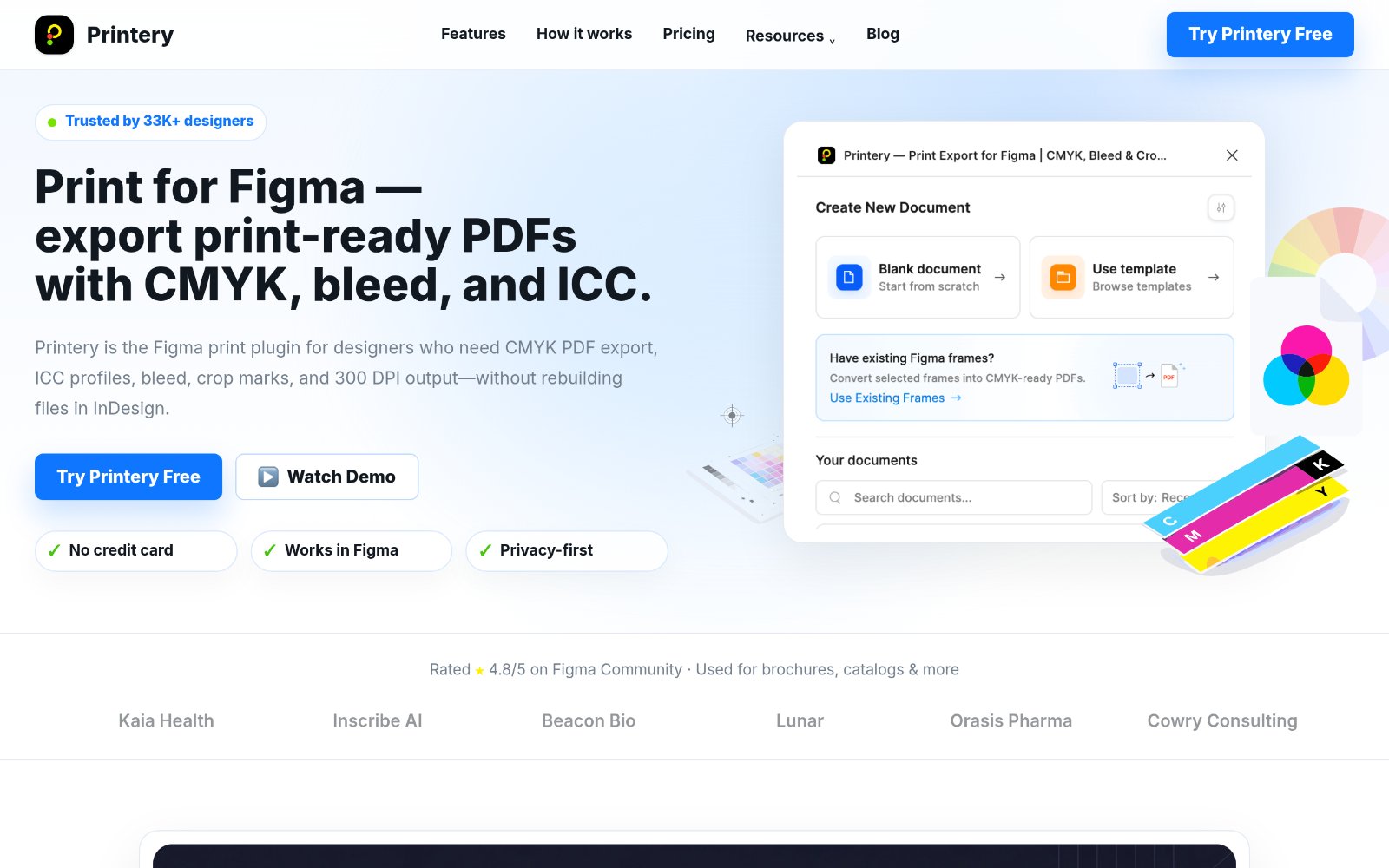
For designers: Printery converts Figma files to print-ready PDFs with CMYK, bleed, and crop marks so you skip rebuilding in InDesign.
Built by Printery - Print for Figma and xingliang1 z · Productivity · Design Tools · Freemium
In category: #1005 of 1397 · Productivity
Printery - Print for Figma is a Instant Launch listing on Launch Llama with 2 upvotes from 2 founders, founded by Printery - Print for Figma and xingliang1 z who joined in May 2026, compared against 6 alternatives.
Instant Launch listing
Listing status
2upvotes
Community score
Printery - Print for Figma and xingliang1 z (Joined May 2026)
Founder
Compared against 6 alternatives
Market comparison
Launched on Launch Llama May 29, 2026 · #8 of 16 that day
About
Printery - Print for Figma Plugin
Printery helps designers turn Figma files into print-ready PDFs without rebuilding artwork in InDesign or another prepress tool. It adds the print production controls Figma teams often need before sending files to a printer: CMYK conversion, ICC profiles, bleed, crop marks, DPI settings, and multi-page PDF export.
Key Features
CMYK PDF export - Export print-ready PDFs from Figma with CMYK color conversion.
ICC profile support - Embed profiles such as ISO Coated v2, FOGRA39, SWOP, and printer-required profiles.
Bleed and crop marks - Add standard or custom bleed with crop marks for commercial print handoff.
DPI control - Export artwork at 72, 150, 300 DPI, or higher depending on production needs.
Multi-page export - Export brochures, catalogs, documents, frames, and spreads in one workflow.
Who Uses Printery
Printery is built for designers, agencies, marketing teams, freelancers, and print shops that need cleaner print handoff from Figma. It works well for brochures, posters, business cards, packaging, catalogs, flyers, and other commercial print materials.
Why It Matters
Figma is excellent for design and collaboration, but print production usually needs extra export controls. Printery brings those controls into the Figma workflow, so teams can move from design to press-ready PDF faster.
Use Printery when you need to print from Figma, export a CMYK PDF, add bleed and crop marks, or prepare a multi-page PDF for commercial printing.
Follow Printery - Print for Figma: X (Twitter)
Use Cases
- Exporting Figma designs as CMYK PDFs with bleed and crop marks for brochures, catalogs, and packaging without rebuilding in InDesign
- Preparing multi-page documents and spreads from Figma as 300 DPI print-ready PDFs with ICC profiles and Pantone spot colors for press handoff
Who it is for
- Designers who need to deliver print-ready brochures, posters, and packaging from Figma
- Print shops, agencies, and marketing teams preparing print files with correct bleed, crop marks, and color profiles
Pricing
Printery - Print for Figma offers a free plan plus paid tiers. See the website for current pricing.
FAQ
Do I get a license key?
It depends on what you purchased: 1) Direct Subscription: no key — Pro is activated automatically for the current account. 2) Team License: license keys are provided for distributing to teammates. Team license info: https://docs.printery.app/licensing/team-licenses
How do I cancel my subscription / stop auto-renewal?
Subscriptions are managed via PayPro Global. Use the Customer Panel / Manage Subscription link in your PayPro confirmation email to cancel. If you can’t find the email, contact us with your Order ID and we can help.
Can you transfer my access to a teammate?
Yes. We’ll need the target person’s Figma User ID (email alone isn’t enough). They can find it in the plugin: Settings → Account → User ID. Send it to us and we’ll transfer it.
I need an invoice update (Company details / VAT ID)?
Invoice details are handled by PayPro Global. Please update them via the PayPro Customer Panel (Support section), or reply to your PayPro receipt email and request an invoice update.
I set 300 DPI but the image “gets bigger”?
That’s expected. In Figma, print DPI is achieved by increasing pixel resolution (upscaling). More pixels may look larger on canvas, but it improves print clarity at the same physical print size.
I can’t find Export / “Your Documents” is missing?
Printery only detects documents whose frame names start with [Print]. If you renamed frames and removed [Print], add it back and Export/Your Documents will appear.
Alternatives
 PictoSTLFor makers and designers: AI-powered JPG to STL converter that transforms 2D images into 3D printable models with adjustable quality levels and interactive preview.
 PDFtoMDFor developers: PDFtoMD converts PDFs to clean Markdown in seconds so you can edit and repurpose content without manual reformatting.
Ask AI about Printery - Print for Figma
Supporters
2 founders
2 founders contributed 2 upvotes to Printery - Print for Figma on Launch Llama.
