Ramback
Find and stop the simulators, emulators and dev servers usin
Built for developers on macOS: a menu bar panel that finds simulators, emulators, Gradle daemons, containers and dev servers using memory, then stops them in one click.
Built by Kadir Projects · Developer Tools · Freemium
In category: #940 of 947 · Developer Tools
Ramback is a Community listing on Launch Llama with 0 total upvotes, founded by Kadir Projects who joined in Oct 2026, compared against 6 alternatives.
Community listing
Listing status
0upvotes
Community score
Kadir Projects (Joined Oct 2026)
Founder
Compared against 6 alternatives
Market comparison
Launched on Launch Llama Oct 26, 2026 · #92 of 111 that day
About
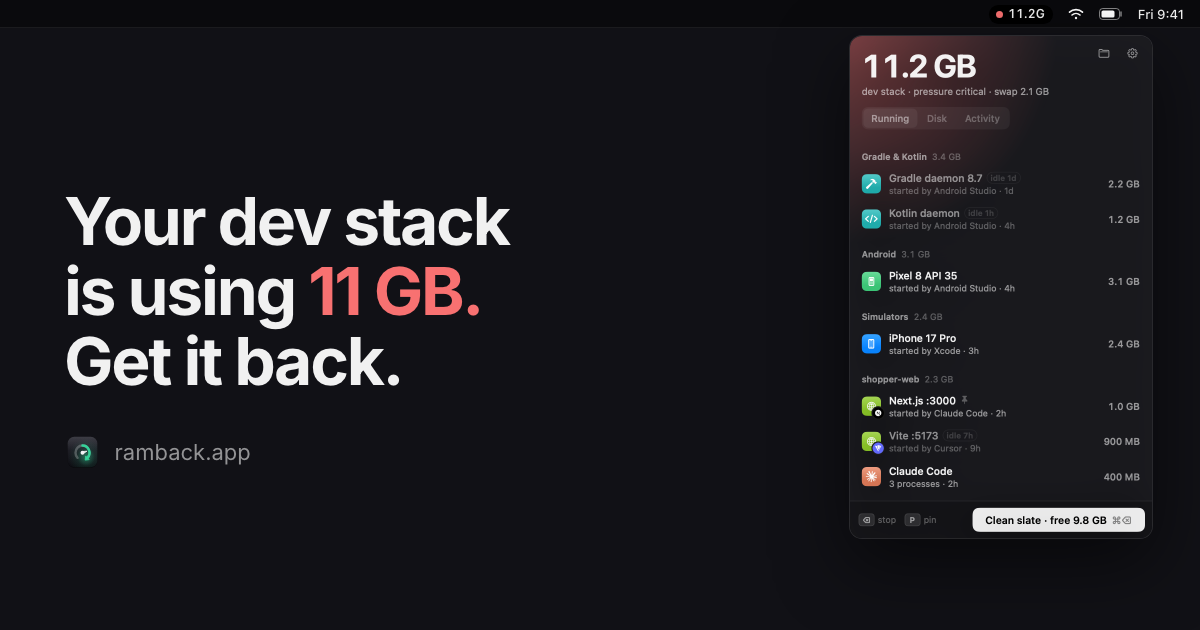
Ramback makes one pass over the process table and reports each simulator, emulator, daemon, container and server with its memory use, counted the way Activity Monitor counts it. Each type is stopped with its own tool, such as xcrun simctl for iOS simulators, adb for Android emulators and docker stop for containers, and anything still running after 5 seconds gets a prompt instead of a force quit. Rules are optional: the dev server rules are free, while Pro adds automatic shutdown for simulators, emulators and daemons, with Undo for stopped items.
Key Features
- Delivers lists every simulator, emulator, Gradle daemon, container and dev server with its RAM
- Delivers stops iOS simulators with xcrun simctl and Android emulators with adb, not a force
- Runs Clean slate to free dev stack memory in one click, skipping pinned and mid-build processes
- Delivers pin rows to protect them and lock databases so they keep running until you stop them
- Delivers shows which tool started each process, such as Claude Code, Xcode or Android Studio
- Delivers stops dev servers idle for a set time automatically on the free plan, and logs every
Use Cases
- Freeing RAM on a 16 GB Mac after Xcode and Android Studio leave simulators and Gradle daemons running
- Stopping dev servers that Claude Code or Cursor started during a session and never shut down
- Clearing memory before a heavy build or when macOS starts swapping, using one Clean slate click
Who it is for
- Mobile developers running iOS simulators and Android emulators on a Mac
- Developers using AI coding agents that leave dev servers running in the background
- Developers running Docker containers, Gradle builds and local dev servers on macOS
Pricing
FAQ
Is Ramback free?
Yes. The list, stopping, Clean slate, the dev server and agent rules, the disk scan, the CLI and the MCP server are free for as long as you use them, with no account. Every install starts with 14 days of Pro so you can try the rest; when they end, Ramback goes back to Free on its own. There's nothing to cancel. Pro is $19 once.
How is it different from Activity Monitor?
Activity Monitor lists processes. Ramback groups them by what they are (simulators, emulators, Gradle daemons, containers, dev servers, agent sessions), shows which tool started each one and how long it has been idle, and stops them the way their own tools do, with simctl, adb or docker instead of a kill.
Is it safe? What does it never stop?
It stops things gently first: simctl shutdown, adb emu kill, docker stop, or SIGTERM to the process tree. If something is still running after 5 seconds, it asks before forcing it. Databases only stop after you confirm, nothing mid-build is touched, and it never goes near root's processes, other users' processes or anything under /System.
Why isn't it on the Mac App Store?
App Store apps run in a sandbox that can't call simctl, adb or docker, or read ~/Library/Developer. That's most of what Ramback does. A smaller Lite version for ports and dev servers is on its way to the App Store.
What leaves my Mac?
Nothing about your work. Process names, paths and project names stay on your Mac. If you opt in, anonymous counts (what kind of thing was stopped, how often) go to TelemetryDeck. The only other calls are license checks with Polar and update checks with ramback.app.
Does it work with OrbStack, Colima or Podman?
Docker Desktop, OrbStack and Colima, yes. The VM counts toward the total, and containers show their share of it, grouped by Compose project. Podman isn't detected yet.
Does it work on Intel Macs?
Yes, it ships as a universal binary. It needs macOS 14 Sonoma or later.
Does it need Full Disk Access or Accessibility?
No. If your projects live in Desktop or Documents, macOS asks once so Ramback can read folder names to find project roots.
Alternatives
 Agent IslandFor developers: Agent Island monitors Claude, Codex, Grok, and Cursor sessions locally so you track AI coding progress without telemetry.
Ask AI about Ramback