Make Image Clearer
For content creators: Make Image Clearer sharpens blurry photos and enhances low-quality images in seconds using AI, so your visuals look professional instantly.
Built by Junwen Chen · Artificial Intelligence · SaaS · Free
In category: #934 of 2052 · Artificial Intelligence
Make Image Clearer is a Community listing on Launch Llama with 19 total upvotes, founded by Junwen Chen who joined in Aug 2026, compared against 5 alternatives.
Community listing
Listing status
19upvotes
Community score
Junwen Chen (Joined Aug 2026)
Founder
Compared against 5 alternatives
Market comparison
Launched on Launch Llama Aug 24, 2026 · #83 of 120 that day
About
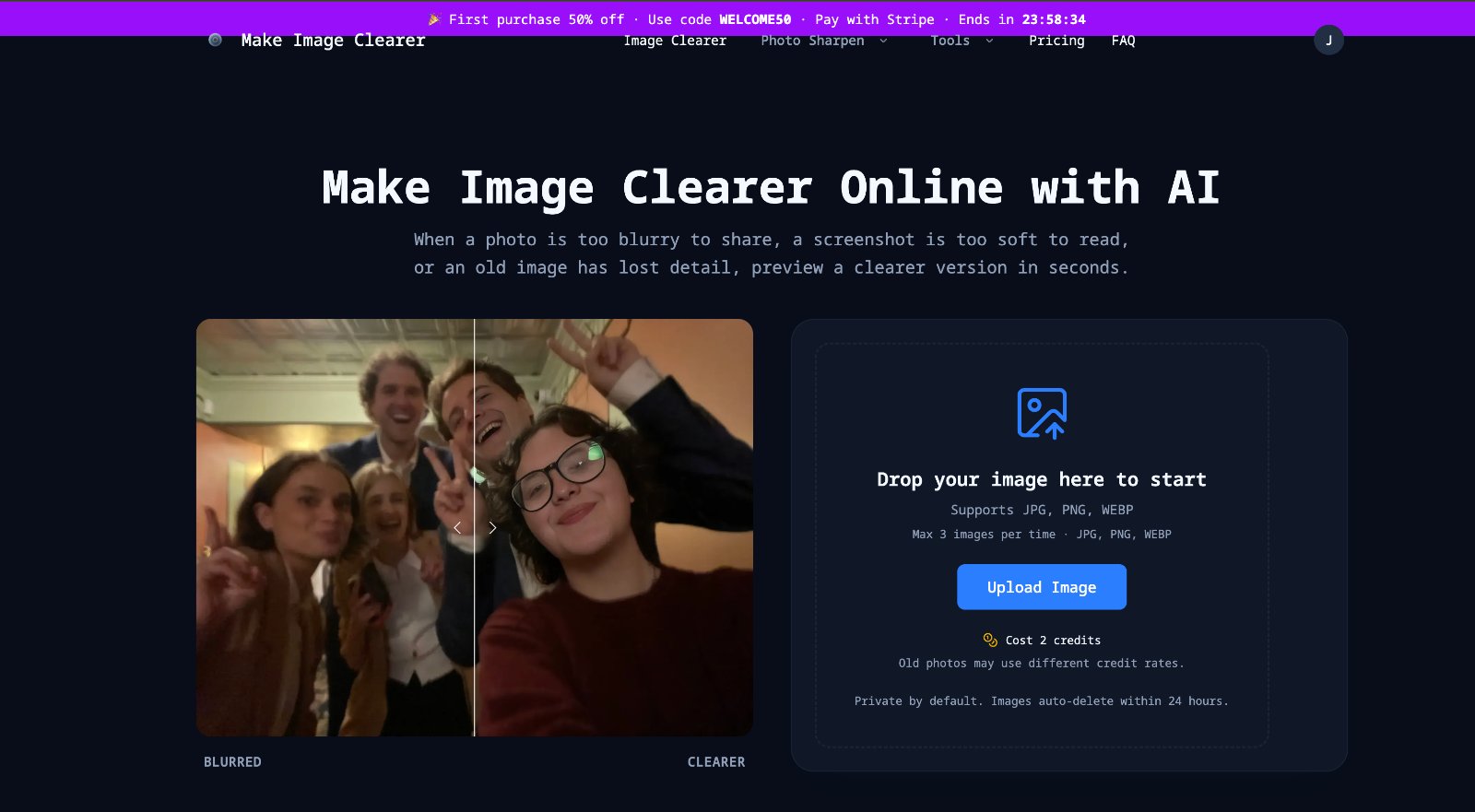
Make Image Clearer is an online Al image enhancement tool that helps users sharpen blurry photos, improve image clarity, enhance details, and make low-quality pictures look cleaner in seconds. It works directly in the browser and is useful for portraits, old photos, product images, social media pictures, and everyday photo cleanup.
Use Cases
- Sharpening a blurry photo so faces and object edges are recognizable before sharing it
- Making a soft or low-resolution screenshot or receipt photo easier to read without transcribing it
- Upscaling a small downloaded image so it no longer looks pixelated in a presentation or profile layout
Who it is for
- Content creators who need visuals to look professional quickly.
- People with blurry camera shots, soft screenshots, or old scanned family photos to improve.
- Sellers preparing product photos with softened labels, seams, or packaging texture.
Pricing
Make Image Clearer is free to use. See the website for details.
FAQ
Can I Make an Image Clearer Online for Free?
Yes. MakeImageClearer lets an eligible visitor create one free watermarked guest preview in the browser. You can upload the image and compare the clearer result without creating an account. Downloading the unlocked result or processing more images requires sign-in and Credits.
How Many Free Guest Previews Do I Get?
You get one free guest preview as an eligible visitor. It is a one-time preview and does not reset each day. If processing fails before producing a result, the free preview becomes available again, so it is not lost on a failed task.
Do I Need to Log In?
You do not need to log in to start your first eligible guest preview. Login is required when you choose a Credit pack, unlock a download, or continue with additional processing after the free preview has been used. Your result remains available through sign-in, so you do not have to begin again.
Can I Compare the Original and Clearer Image?
Yes. Completed results appear in a Before/After comparison so you can inspect the same part of the image on both sides. Check the areas that matter to you, such as a face, a product label, a line of screenshot text, or the edge of a moving subject.
Is the Free Preview Watermarked?
Yes. The processed side of the free guest preview includes a watermark. The preview lets you judge the clarity change before paying, but it is not the unlocked download file. To remove the watermark and download restriction, sign in and use the required Credits.
Can I Make a Photo or Picture Clearer?
Yes. Photo, picture, and image describe the same basic upload workflow here. The tool can work with personal photos, screenshots, scanned prints, small web images, and product shots in JPG, PNG, or WebP format. Choose a focused tool when the main problem is specifically blur, text, resolution, or faces.
What Is the Difference Between Image Clearer, Unblur, Sharpen, and Upscale?
Image Clearer is the general option for balancing blur reduction, noise cleanup, and visible detail. Unblur targets motion blur and missed focus. Sharpen strengthens edges that already exist. Upscale increases pixel dimensions for a larger output. Choose the tool that matches the cause of the problem, not just the result name.
Can I Make Images Clearer on Mobile?
Yes. MakeImageClearer runs in a mobile browser, so you can choose a JPG, PNG, or WebP from your photo library and inspect the result on the same page. The upload and Before/After flow are designed for touch. For iPhone photos stored only as HEIC, use a compatible JPG copy or screenshot.
Alternatives
 AI Photo EditorFor creators: AI Photo Editor transforms images via text prompts, editing JPG, PNG, WebP instantly without design skills or software.
More in Artificial Intelligence
New on Launch Llama
Launched this week · This month's launches · All products A–Z
Ask AI about Make Image Clearer
Supporters
8 founders
8 founders supported Make Image Clearer on Launch Llama.




For bots & AI agents
Machine-readable versions of Make Image Clearer and Launch Llama. Fetch these instead of parsing this page.
This listing (.md) llms.txt llms-full.txt ai.txt Full catalog (.md) Endpoint index API docs MCP server MCP manifest Developer docs