FastCam: Secure PDF & Receipt Scanner
Under review100% offline PDF scanner, vault & daily expense tracker
Built for freelancers and small business owners who need on-device scanning: capture IDs, invoices and receipts, merge or split PDFs, and log expenses with no cloud uploads.
Built by Shivam Solanki · Productivity · Free
Coming soon on Launch Llama Tools
FastCam: Secure PDF & Receipt Scanner is a Community listing on Launch Llama with 0 total upvotes, founded by Shivam Solanki who joined in Nov 2026, compared against 6 alternatives.
Community listing
Listing status
0upvotes
Community score
Shivam Solanki (Joined Nov 2026)
Founder
Compared against 6 alternatives
Market comparison
Built for freelancers and small business owners who need on-device scanning: capture IDs, invoices and receipts, merge or split PDFs, and log expenses with no cloud uploads.
FastCam: Secure PDF & Receipt Scanner demo video
About
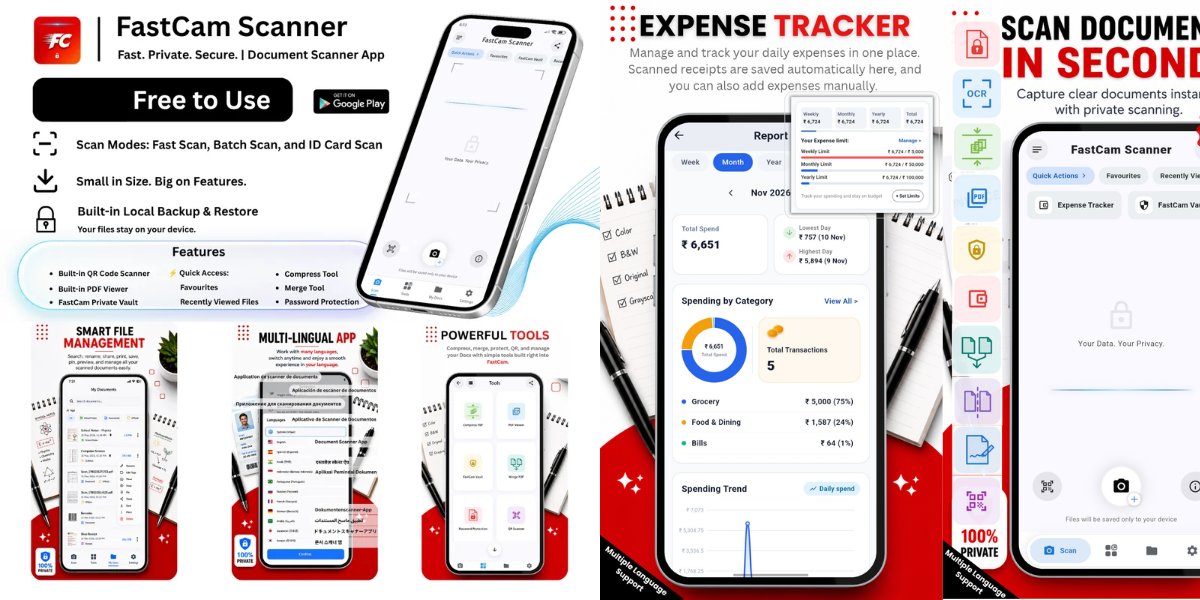
FastCam processes scans on the phone itself, so files are not uploaded to third-party servers and no account or login is required. Its multi-page scanner feeds into OCR, page organization, compression, digital signatures, and password protection. A built-in expense tracker lets users snap photos of paper receipts or type amounts manually, then generate structured monthly expense reports. The app is localized into more than 13 languages and includes a PIN-locked vault, local backup and restore, and Dark and AMOLED themes.
Key Features
- Scan multi-page documents, IDs, and receipts entirely on-device
- Merge, split, compress, and reorder PDFs
- Add digital signatures and password-protect files
- Extract text with built-in OCR and read QR codes
- Log receipts and manual amounts into monthly expense reports
- Store sensitive files in a PIN-locked vault with local backup
Use Cases
- Scanning a bank statement or personal ID without uploading it to a cloud service
- Turning paper receipts into a structured monthly expense report for business records
- Signing and password-locking a contract on an Android phone while on the go
From the founder
Who it's for
“It is build for everyday Android users, freelancers, and students who need to scan IDs, receipts, and bills without uploading sensetive documents to cloud servers or paying recurring subscriptions.”
About me
“I am independent Android developer at Pickon Technologies. I got frustrated with bulky scanner apps that logins and lock basic PDF tools behind paywalls, so I build FastCam to keep documents scanning, OCR, and daily expense tracking fast,free, and 100% offline on your device.”
Who it is for
- Privacy-conscious users who want documents kept off cloud servers
- Freelancers managing invoices, receipts, and tax paperwork
- Small business owners tracking expenses and signing contracts
Pricing
FastCam: Secure PDF & Receipt Scanner is free to use. See the website for details.
FAQ
What is FastCam: Secure PDF & Receipt Scanner?
Built for freelancers and small business owners who need on-device scanning: capture IDs, invoices and receipts, merge or split PDFs, and log expenses with no cloud uploads.
How does FastCam: Secure PDF & Receipt Scanner work?
FastCam processes scans on the phone itself, so files are not uploaded to third-party servers and no account or login is required. Its multi-page scanner feeds into OCR, page organization, compression, digital signatures, and password protection. A built-in expense tracker lets users snap photos of paper receipts or type amounts manually, then generate structured monthly expense reports.
Who is FastCam: Secure PDF & Receipt Scanner for?
FastCam: Secure PDF & Receipt Scanner is designed for a range of users, including: • Privacy-conscious users who want documents kept off cloud servers • Freelancers managing invoices, receipts, and tax paperwork • Small business owners tracking expenses and signing contracts
What can you do with FastCam: Secure PDF & Receipt Scanner?
With FastCam: Secure PDF & Receipt Scanner you can: • Scanning a bank statement or personal ID without uploading it to a cloud service. • Turning paper receipts into a structured monthly expense report for business records. • Signing and password-locking a contract on an Android phone while on the go.
Is FastCam: Secure PDF & Receipt Scanner free?
Yes. FastCam: Secure PDF & Receipt Scanner is free to use. See the website for details.
Alternatives
 Video CompressorFor content creators: Video Compressor reduces video file sizes in-browser using GPU acceleration without uploading to servers.
 RendrflowFor photographers: Rendrflow upscales and restores photos offline on your device so your images stay private while gaining studio-quality results.
 Sealby - Local, Encrypted Photo & Video VaultFor privacy-conscious users: Sealby encrypts photos and files in hidden vaults so your sensitive data stays invisible even if your phone is unlocked.
More in Productivity
New on Launch Llama
Launched this week · This month's launches · All products A–Z
Ask AI about FastCam: Secure PDF & Receipt Scanner
For bots & AI agents
Machine-readable versions of FastCam: Secure PDF & Receipt Scanner and Launch Llama. Fetch these instead of parsing this page.
This listing (.md) llms.txt llms-full.txt ai.txt Full catalog (.md) Endpoint index API docs MCP server MCP manifest Developer docs