Databox
For marketers: Databox runs ready-made AI analytics skills on live data and delivers finished reports in under a minute so you answer business questions instantly.
Built by Peter Caputa · Artificial Intelligence · Marketing · Analytics · Freemium
In category: #94 of 2048 · Artificial Intelligence
Databox is a Product Hunt listing on Launch Llama with 434 total upvotes, founded by Peter Caputa who joined in Jul 2026, compared against 5 alternatives.
Product Hunt listing
Listing status
434upvotes
Community score
Peter Caputa (Joined Jul 2026)
Founder
Compared against 5 alternatives
Market comparison
Launched on Launch Llama Mar 22, 2026 · #8 of 21 that day
About
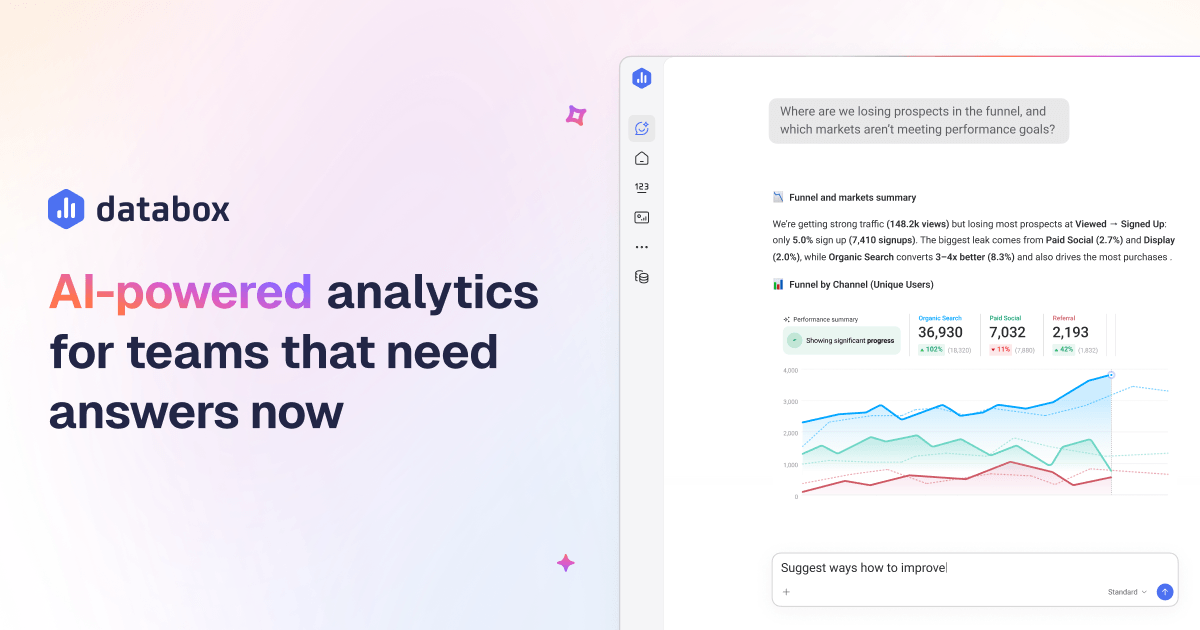
A library of ready-made skills for paid ads, website performance, ecommerce, revenue, and more. Each skill pulls from your live performance data and returns a finished, shareable report in under a minute. Run them in Claude when you want answers in chat, or schedule them in n8n to land in Slack or email automatically. Free to download.
Launch Llama's Take
Based on Launch Llama data as of
Databox has 434 upvotes, including the votes it received on Product Hunt, which ranks it #94 of 2,048 Artificial Intelligence tools on Launch Llama by upvotes, in the top 10%. It has been listed on Launch Llama since July 2026. 1 Launch Llama member has upvoted it and it has no reviews yet.
Databox vs Anomaly AI
Databox is an agentic analytics platform that combines performance data, business context, and AI workflows, while Anomaly AI emphasizes traceable dashboards with reviewable logic.
| Databox | Anomaly AI | Routines by Databox | MindsDB | |
|---|---|---|---|---|
| What it does | For marketers: Databox runs ready-made AI analytics skills on live data and delivers finished reports in under a minute so you answer bus… | For data teams: Anomaly AI connects your spreadsheets and databases to create traceable dashboards with reviewable logic so insights stay… | For analysts: Routines by Databox schedules automated reports and AI insights so teams get trusted answers without complex BI setup. | For analysts: MindsDB's Anton AI discovers data, runs analysis, builds dashboards, and executes actions—turning business questions into a… |
| Pricing | Freemium | Freemium | Freemium | Freemium |
| Free plan | Yes, free plan | Yes, free plan | Yes, free plan | Yes, free plan |
| Category | Analytics | Analytics | Not stated | Open Source |
| Upvotes on Launch Llama | 434 | 2 | 181 | 188 |
| Listed on Launch Llama | July 2026 | June 2026 | September 2026 | April 2026 |
Key Features
- Connect 130+ tools, spreadsheets, databases, and APIs
- Ask questions and get answers from live data
- Build, monitor, and forecast key metrics and KPIs
- Visualize performance and share clear updates with anyone
- Automate recurring analysis and turn insights into action
- Give every metric a shared meaning for trusted AI analysis
Use Cases
- Agencies monitoring multiple client accounts to catch performance changes quickly
- Growing businesses seeking analyst-level performance insights on demand
- Teams automating weekly client reports that distribute automatically
Who it is for
- Marketing agencies catching changes across every client account
- Growing businesses that need analyst-level answers on their performance
- AI implementers building governed AI systems on top of their data
Pricing
Free plan available with 3 data sources and 50 AI credits per month. Paid plans start at $71/month (Analyst) and go up to $199/month (Team Core) billed annually, with a 14-day free trial available.
FAQ
Which Databox plan is right for me?
The right Databox plan depends on how much data you need to connect, how many people need access, and how your team is structured. The Free plan gets you started with agentic analytics grounded in real data: 1 user, 3 data sources, 1 dashboard, 10 custom metrics, 50 AI credits/mo, daily sync. Includes the AI analyst (Genie), performance summaries, governed semantic layer, data lineage, and anomaly detection. The Analyst plan is for solo operators who want an open platform to build, customize, and connect to LLMs: 1 user, 5 data sources, unlimited dashboards and reports, 150 AI credits/mo, hourly sync. Adds custom data integrations, API access, MCP server, and pre-built skills. The Team plan is built for collaborative analytics, in two sizes. Core: 3 users, 10 data sources, 500 AI credits/mo, $249/month. Scale: 10 users, 30 data sources, 1,000 AI credits/mo, $399/month, plus separate accounts for the different parts of your organization. Both add custom skills, Genie in Slack, routines,
Does Databox charge per user?
No. Databox doesn’t charge per seat. Team Core and Team Scale include a set number of users (3 and 10, respectively), while Agency includes unlimited users. Everyone who needs to see the numbers can see them, whether that’s your team, your leadership, or your clients. The Free and Analyst plans are single-user plans built for individual analysis.
Do you offer a free plan?
Yes. The Free plan is built for individuals who want to track key metrics without a financial commitment. You get 1 user, 3 data sources, 1 dashboard, 10 custom metrics, and 50 AI credits a month, plus the AI analyst (Genie), performance summaries, governed semantic layer, and anomaly detection. Paid plans unlock more data sources, more users, unlimited dashboards and reports, and more AI credits to power deeper AI analysis and the MCP server.
Will Databox scale as my team grows?
Yes. Most teams grow in two directions: more people need access, and their use of data becomes more sophisticated. Databox is built to support both. Team Core and Team Scale give you room to grow with more users and data sources, while Agency includes unlimited users so growing your client-facing team doesn’t increase your bill. Moving up the plan ladder also unlocks more advanced capabilities, including more AI credits, faster sync, custom skills, Genie in Slack, routines, and, at the top end, separate accounts for managing different clients, brands, locations, teams, business units, or other parts of your organization.
What counts as a data source in Databox pricing?
A data source is a specific dataset, account, property, or view that you use in Databox. A connection is the integration or authentication layer used to bring data from a service such as Google Analytics, HubSpot, Salesforce, or another tool. One connection can include multiple data sources. For example, one Google Analytics connection can include multiple website properties as separate data sources.
Can I add more data sources without upgrading?
Each plan includes a fixed number of data sources, and adding more means moving up a plan tier. Agency is self-serve, so you can add data sources anytime through account packs at $25/month per pack (1 account, 5 data sources, 50 AI credits). If you’re not sure which plan fits your needs, reach out to our team and we can talk it through.
How do AI credits and AI features work in Databox pricing?
AI credits are how Databox prices AI usage. Every question you ask Genie and every AI-generated insight draws from a monthly credit pool that resets at the start of each month. The right credit allocation depends on how heavily your team uses AI. Free includes 50 credits for light exploration, Analyst includes 150 for solo analysis work, Team Core includes 500, Team Scale includes 1,000 for heavier team-wide use, Agency includes 300 plus 50 per account pack, and Custom offers flexible credits sized to your usage.
What is the difference between Databox Business and Agency pricing?
Both plan types run on the same Databox platform. The difference is what each is built around. Business plans (Free, Analyst, and Team) are built around one company’s performance: connect your tools, track your KPIs, share dashboards with your team, and run goals against your own data. Agency plans are built around managing performance for many clients, locations, franchises, or brands: cross-account reporting via Genie and the MCP server, custom templates, and pricing that scales with the number of clients, locations, franchises, or brands you manage through account packs.
Can Databox replace or complement tools like Looker Studio, Power BI, or Tableau?
Yes. Most teams use Databox in one of two ways. If you don’t have a BI tool today, Databox replaces the spreadsheets, screenshots, and one-off dashboards you’ve been stitching together. You get connected data, automated reports, and AI answers in one place that anyone on the team can use. If you already use Power BI, Tableau, or Looker Studio, Databox sits alongside them. Those tools serve your analysts. Databox serves everyone else with self-serve KPI tracking, scorecards, alerts, automated reporting, and AI-powered summaries built for business teams.
Do I need a data warehouse or ETL tool to use Databox?
No. Databox works with or without a data warehouse. Most teams connect Databox directly to the tools they already use: 130+ native integrations across CRMs, marketing platforms, ad networks, spreadsheets, databases, and warehouses. For teams that do have raw data they want to prepare, datasets handle the prep inside Databox. Clean, merge, filter, and standardize your data, then use it in dashboards, reports, metrics, and AI analysis.
Alternatives
 Anomaly AIFor data teams: Anomaly AI connects your spreadsheets and databases to create traceable dashboards with reviewable logic so insights stay trustworthy.
More in Artificial Intelligence
New on Launch Llama
Launched this week · This month's launches · All products A–Z
Featured in
- The 15 Best Analytics Tools in 2026 (Compared) — ranked #10
- The 15 Best Marketing Tools in 2026 (Compared) — ranked #14
Ask AI about Databox
Supporters
1 founder
1 founder supported Databox on Launch Llama.

Third-party sources
- Visualize Your MySQL Data with Databox
Hacker News · September 15, 2016 · 10 points
- Free KPI dashboard for your cloud services
Hacker News · July 19, 2016 · 18 points
- The Rise of Mobile-First Enterprise Apps
Hacker News · December 19, 2014 · 16 points
For bots & AI agents
Machine-readable versions of Databox and Launch Llama. Fetch these instead of parsing this page.
This listing (.md) llms.txt llms-full.txt ai.txt Full catalog (.md) Endpoint index API docs MCP server MCP manifest Developer docs