
ButterKit
For Apple developers: ButterKit automates App Store publishing—screenshot framing, localization into 50 languages, and direct API uploads via CI/CD pipelines.
Built by Zach · Developer Tools · Freemium
In category: #550 of 988 · Developer Tools
ButterKit is a Community listing on Launch Llama with 8 total upvotes, founded by Zach who joined in May 2026, compared against 5 alternatives.
Community listing
Listing status
8upvotes
Community score
Zach (Joined May 2026)
Founder
Compared against 5 alternatives
Market comparison
Launched on Launch Llama May 13, 2026 · #28 of 54 that day
About
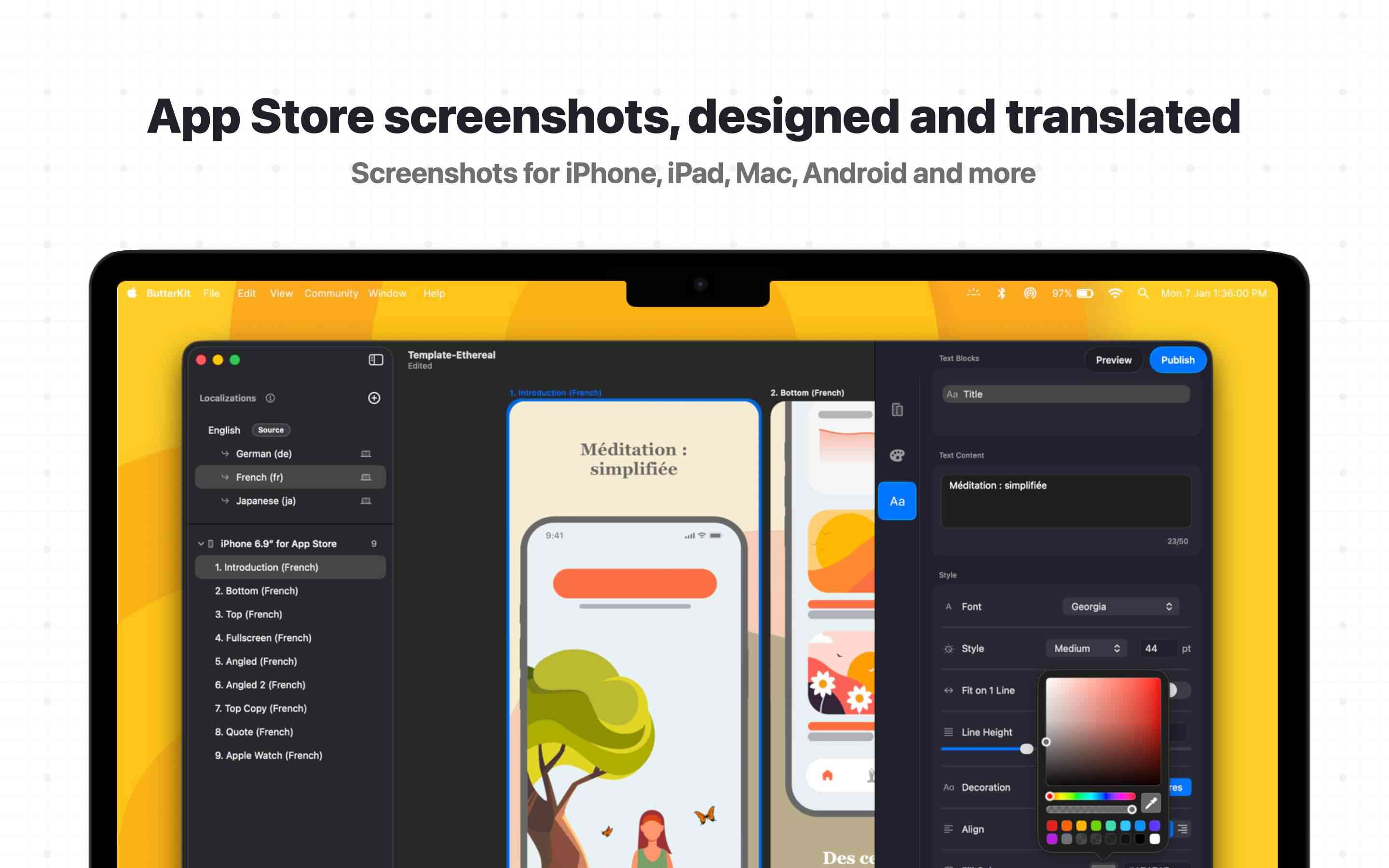
ButterKit is a native macOS app used by thousands of Apple developers to automate the App Store publishing workflow. Capture screenshots from Xcode Simulator directly into photorealistic 3D device frames, translate into all 50 App Store Connect languages using frontier AI models (bring your own key) or 18 languages for free using on-device Apple Silicon. Upload everything directly via the App Store Connect API. Start with professional templates or from scratch. Link entire folders for input and output, making it a natural fit for Fastlane and CI/CD pipelines. Use custom fonts, add 3D callouts, and utilize MCP support so AI coding tools can automate the entire workflow. Most developers skip localization because the manual effort doesn't feel worth it. ButterKit makes it trivial, so your app shows up in native language search results across every market Apple supports. Built by a solo developer for developers who ship. Smooth.
Use Cases
- Capturing App Store screenshots directly from Xcode Simulator and framing them in 3D device mockups
- Translating screenshots and app metadata into all 50 App Store Connect languages and uploading them in order with one click
- Automating App Store screenshot generation from a linked Fastlane or image folder through CI/CD pipelines and AI/MCP agents
Who it is for
- iOS and macOS app developers who publish to the App Store
- Design studios producing App Store screenshots for client apps
- Marketing agencies localizing app store listings for international markets
Pricing
ButterKit offers a free plan plus paid tiers. See the website for current pricing.
FAQ
One-time purchase option? How?
ButterKit runs on your machine with no servers or cloud storage, so costs stay low. That makes sustainable one-time pricing possible. For those who want to support ongoing development (thank you!), subscription options are also available and help me commit more time to improvements. The one-time option isn’t going away (I love one-time purchase options), but the price may increase as more features and value are added.
What does Pro unlock?
ButterKit Pro removes the “Made with ButterKit” watermark on exports and unlocks metadata syncing to App Store Connect (e.g. What’s New, Description, Promotional Text) for all localizations, saving you even more time. View pricing
What are the system requirements?
ButterKit requires macOS 26+ and works best with Apple Silicon M1 or newer. Intel Macs are also supported.
What platforms can ButterKit design for?
ButterKit is designed from the ground up for Apple platforms: iOS, iPadOS, macOS, watchOS, and visionOS. Some Android support is available, including screenshot presets and a Pixel 10 Pro 3D device model.
How does translation work? Do I need an API key?
ButterKit includes two translation engines. On-device (free): 18 languages, fast, offline, and fully private with no API keys needed. Cloud (included in Free and Pro): all 50 App Store languages with customizable creativity, using your own API key billed separately by the provider you choose. Learn more
Can I capture screenshots from Xcode Simulator?
Yes. ButterKit captures directly from Xcode Simulator, and from Device Hub in Xcode 27, with one click and can link to a Fastlane screenshots folder so new captures automatically update your designs. No manual screenshotting or file management. Learn more
Can I upload directly to App Store Connect?
Yes. ButterKit uploads your designed screenshots and translated app metadata like description, what’s new, and promotional text (Pro feature) directly to App Store Connect via the official API. No manual browser uploads needed. Learn more
Does ButterKit work offline?
Yes. ButterKit runs entirely on your Mac with no internet connection required. On-device translation (18 languages), 3D rendering, and screenshot design all work offline. Cloud features like AI translation (50 languages) and App Store Connect uploads require internet, but are optional.
Does ButterKit support AI agent automation?
Yes. ButterKit includes a built-in Model Context Protocol (MCP) server that lets AI coding agents like Claude Code, Cursor, and Codex automate screenshot generation, translation, and App Store Connect publishing.
Any discounts for educators, students, veterans, or first-responders?
Yes! ButterKit offers a 50% discount for teachers, active students, military veterans, and first-responders. Send an email from your .edu or government email address to [email protected] to receive a discount code.
Alternatives
More in Developer Tools
New on Launch Llama
Launched this week · This month's launches · All products A–Z
Ask AI about ButterKit
Supporters
1 founder
1 founder supported ButterKit on Launch Llama.
For bots & AI agents
Machine-readable versions of ButterKit and Launch Llama. Fetch these instead of parsing this page.
This listing (.md) llms.txt llms-full.txt ai.txt Full catalog (.md) Endpoint index API docs MCP server MCP manifest Developer docs