TypeFire
For developers: TypeFire expands text snippets, manages clipboard history, and syncs Obsidian notes so you write faster across any app.
Built by Nav · Productivity · Developer Tools · Freemium
In category: #1038 of 1429 · Productivity
TypeFire is a Community listing on Launch Llama with 2 upvotes from 2 founders, founded by Nav who joined in Sep 2026, compared against 5 alternatives.
Community listing
Listing status
2upvotes
Community score
Nav (Joined Sep 2026)
Founder
Compared against 5 alternatives
Market comparison
Launched on Launch Llama Sep 14, 2026 · #72 of 125 that day
About
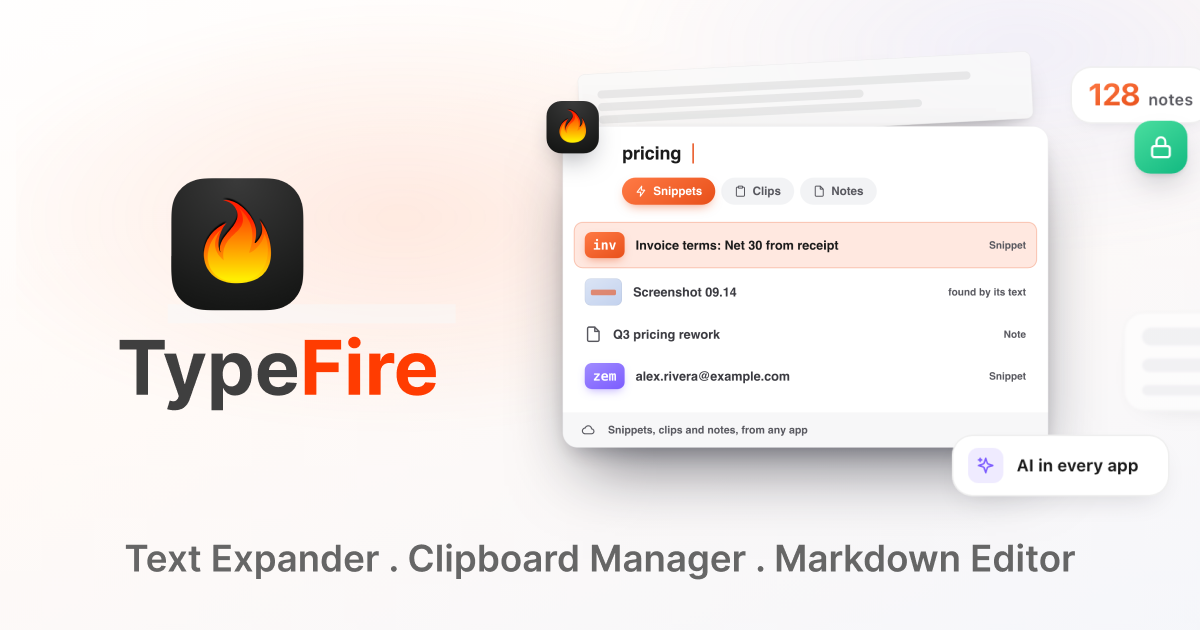
TypeFire is a free Mac and Chrome app combining a text expander, clipboard manager, and markdown notes in one interface. Access snippets, clips, and your existing Obsidian vault with single keystrokes from any app. Includes AI features with an $18 one-time Pro upgrade for advanced capabilities like Selection Prompts and unlimited clips.
Use Cases
- Expanding a payee form's bank details, address and signature from a few saved snippets instead of retyping them
- Turning a blunt message into a polished version without leaving the app you are typing in
- Finding a screenshot or copied item again by searching for a word that appears inside the image
Who it is for
- Developers who want faster writing and reusable prompts across any Mac app and their AI tools.
- Writers and note-takers who keep markdown notes or an Obsidian vault and want quick access to them.
- People who repeatedly retype the same messages, forms or prompts every day.
Pricing
Free to use with no subscription. Pro is $18, currently $12 with a Halloween sale code until October 31, and includes a 7-day free trial with no card required.
TypeFire at a glance
- 01What it is
- TypeFire: For developers: TypeFire expands text snippets, manages clipboard history, and syncs Obsidian notes so you write faster across any app.
- 02Pricing
- TypeFire pricing: Free to use with no subscription.
- 03Best for
- TypeFire is best for developers who want faster writing and reusable prompts across any Mac app and their AI tools., writers and note-takers who keep markdown notes or an Obsidian vault and want quick access to them. and people who repeatedly retype the same messages, forms or prompts every day.
- 04Alternatives
- Top TypeFire alternatives on Launch Llama: Marked 3 - Markdown Preview for Mac, The Text Tool and Flotnote.
FAQ
Who uses a text expander on Mac?
Developers use a text expander for boilerplate: imports, license headers, error handling blocks, git commit prefixes, and the SQL and shell commands they type weekly but never remember exactly. Script snippets extend that further, since a snippet can run JavaScript or AppleScript and paste whatever it returns. Writers and bloggers use it for repeated markup, publication-specific formatting, standard bios, pitch templates, and interview questions. Support teams use it hardest: canned replies, troubleshooting steps, escalation messages, and closing lines, all paste-ready inside any helpdesk. Sales and outreach teams use it for follow-up sequences, pricing explanations, and meeting-booking language, with dynamic tokens keeping dates correct without editing. Marketers use it for UTM patterns, campaign briefs, and social copy variants. Everyone else uses it for the boring things: addresses, phone numbers, bank details, wifi passwords, and the email address you have typed ten thousand times.
How does a text expander work on Mac, step by step?
There are three steps and the whole thing takes about a minute. First, create a snippet: paste in the block of text you keep retyping, whether that is a signature, a support reply, or a chunk of code. Snippets can be plain text, rich text with formatting and inline images, or Markdown that expands as styled HTML. Second, assign a trigger. This is the short abbreviation you will type instead, usually two to four characters with a prefix you would never type by accident, such as "zem" or ";sig". TypeFire warns you if a trigger collides with an existing one. Third, type it anywhere. TypeFire watches for the trigger through the macOS Accessibility API, deletes the characters you typed, and inserts the full content in their place, in under 50 milliseconds. This works in every native Mac app including Mail, Slack, Notes, Xcode and Figma, and in every website through the free Chrome extension. If you would rather not memorize an abbreviation, ⌘⌃1 opens a Spotlight-style search across your who
Why choose TypeFire over other text expanders?
Price is the first reason: the text expander is free with no subscription and no snippet limit, where TextExpander stops at five free snippets and is $60 a year past that, and Typinator is $49.99. TypeFire's only paid tier is $18 once, and it covers unlimited clipboard clips, Selection Prompts and Prompt Chains rather than the expansion itself. It is a native macOS app rather than an Electron wrapper, so it starts fast and stays out of your memory. It works in every single app through the Accessibility API, which is the difference between a real text expander and the built-in macOS text replacement that silently fails in Chrome, VS Code and Slack. Beyond expansion, it does things a text expander normally does not: rich text, Markdown and script snippets, AI inside snippets, a Spotlight-style launcher, a full clipboard manager with OCR search built into the same app, and a free Chrome extension so the same library follows you onto any operating system. That last combination is the real
What is a text expander?
A text expander is a small utility that watches what you type and replaces short triggers with longer text. Type "zem" and it instantly expands to your full email address. Type "zsig" and your complete signature drops in. The point is to stop retyping the same blocks of text dozens of times a day. Most people store between 30 and 200 snippets: email signatures, canned support replies, addresses, common code patterns, meeting templates, slash commands. Power users build libraries of 500 or more. The technical details matter for which apps it works in. macOS has a built-in text replacement feature, but it only works in native Cocoa text fields. It silently fails in Chrome, VS Code, Slack, and most cross-platform apps. Dedicated text expanders like TypeFire monitor keystrokes through the Accessibility API, which works everywhere on macOS.
How does TypeFire work?
TypeFire watches keystrokes through the macOS Accessibility API, the same low-level system that screen readers and voice control use. When you type a registered abbreviation, TypeFire detects the match, deletes the abbreviation characters, and pastes the full snippet content. The whole sequence takes under 50 milliseconds, which is faster than your screen can refresh. You can trigger a snippet three ways. First, by typing an abbreviation like "zem" or "zsig". Second, by pressing a global keyboard shortcut you assigned to a specific snippet (like Cmd+Shift+E). Third, by opening the Spotlight-style launcher with Cmd+Ctrl+1, typing a few letters, and picking the snippet from a fuzzy-search list. The Accessibility permission is granted once during setup. TypeFire never sends your keystrokes anywhere. Detection and replacement happen entirely on your Mac.
Is TypeFire really free?
Yes, for text expansion. The expander is free with no subscription and no feature gates: unlimited snippets, unlimited collections, abbreviation expansion, keyboard shortcuts, the Spotlight-style launcher, rich text editing, Markdown expansion, dynamic tokens, iCloud Sync, JavaScript and AppleScript scripting, AI tokens with five provider options, and the multilingual interface across 8 languages. Pro is $18 once and covers six features: unlimited clipboard clips, Selection Prompts, Prompt Chains, notes sync, note version history and saving from AI apps through MCP. The clipboard manager itself works free for your 10 most recent clips. The cost comparison against paid alternatives is direct. TextExpander is free for five active snippets, then $60 a year on a subscription. aText costs $4.99 a year, or $29.99 for a lifetime license. Typinator is $49.99 as a one-time license, or $29.99 a year for Advanced. TypeFire's text expander is $0 forever, with an optional $18 one-time Pro tier, dis
Does TypeFire work in all apps on my Mac?
Yes. TypeFire works in every Mac app that accepts text input. This includes native apps like Safari, Mail, Notes, Pages, and Numbers, plus Chromium-based browsers (Chrome, Edge, Brave, Arc), Electron apps (VS Code, Slack, Discord, Notion, Figma, Linear), terminal emulators (Terminal, iTerm, Warp), Microsoft Office, JetBrains IDEs, and any other text-input surface. Why this works universally: macOS Accessibility APIs sit underneath the application layer, so they see keystrokes regardless of what framework the app is built on. Apple's built-in text replacement feature, by contrast, only works in native Cocoa text fields and silently fails in everything else. Setup is a one-time grant of the Accessibility permission. No per-app configuration, no extensions to install in browsers, no plugins for editors. The abbreviation you typed, the keyboard shortcut you bound, and the Spotlight-style launcher all work the moment you switch focus to any app.
What are dynamic tokens in TypeFire?
Dynamic tokens are placeholders that resolve to live values when a snippet expands. Eight built-in tokens cover most needs. {{date}} inserts today's date. {{time}} inserts the current time. {{datetime}} inserts both. Each takes an optional format string like {{date:YYYY-MM-DD}} or {{time:HH:mm}} for custom output. {{clipboard}} pastes whatever is currently on your clipboard. {{cursor}} positions the cursor at a specific spot within the expanded snippet, so you can type immediately at the right place. {{snippet:abbr}} nests one snippet inside another, useful for composable templates. {{key:tab}} or {{key:return}} simulates a key press, useful for filling form fields. {{nbsp}} inserts a non-breaking space. Tokens turn static text into context-aware templates. A meeting note template might start with the date filled in, jump the cursor to the attendee list, and end with your sign-off. Without tokens, the same snippet would expand identically every time.
How is TypeFire different from TextExpander?
The biggest difference is the pricing model. TextExpander's free plan caps you at five active snippets; unlimited snippets are $60 a year on a subscription that renews. TypeFire is free forever with unlimited snippets. Over a decade that is $600 against $0 for the same core feature set. Beyond cost, the technical differences favor TypeFire on a Mac specifically. TypeFire is a native macOS app, one small binary. TextExpander is built on Electron and runs a bundled Chromium runtime, so it uses more memory and CPU than a comparable native app. TypeFire also stores snippets as plain Markdown files in a folder you choose, so there is no vendor lock-in. TextExpander stores in its proprietary cloud database. Feature-wise, both handle abbreviation expansion and global shortcuts well. TypeFire adds Markdown expansion (write in Markdown, expand as formatted HTML), AI tokens with five provider integrations, JavaScript and AppleScript scripting, and a Spotlight-style launcher. TextExpander's main
Can I sync snippets across multiple Macs?
Yes. TypeFire has built-in iCloud Sync that keeps your snippet library in sync across every Mac signed into your Apple ID. Turn it on once in Settings and your snippets, collections, and tags sync within seconds whenever you make a change. The sync uses your own iCloud Drive, not a TypeFire-operated server. Sync runs through your own iCloud Drive, protected by your Apple account. TypeFire has no server in the path and never sees the contents of your snippets. This is different from TextExpander, which routes snippet data through its own cloud infrastructure as part of its subscription service. iCloud Sync is free and unlimited. There is no per-snippet cap, no per-device cap, and no separate fee. If you have three Macs at home plus a work laptop, all four stay in sync at no cost. The one limitation is that Sync is Mac to Mac today. An iOS keyboard is in development, with no release date to announce yet. On iOS, text expansion has to run through a custom keyboard rather than system-wide,
Alternatives
 The Text ToolFor developers and writers: The Text Tool offers fast, privacy-first utilities for cleaning, converting, and debugging text entirely in-browser.
More in Productivity
New on Launch Llama
Launched this week · This month's launches · All products A–Z
Ask AI about TypeFire
Supporters
2 founders
2 founders contributed 2 upvotes to TypeFire on Launch Llama.

For bots & AI agents
Machine-readable versions of TypeFire and Launch Llama. Fetch these instead of parsing this page.
This listing (.md) llms.txt llms-full.txt ai.txt Full catalog (.md) Endpoint index API docs MCP server MCP manifest Developer docs