Didon
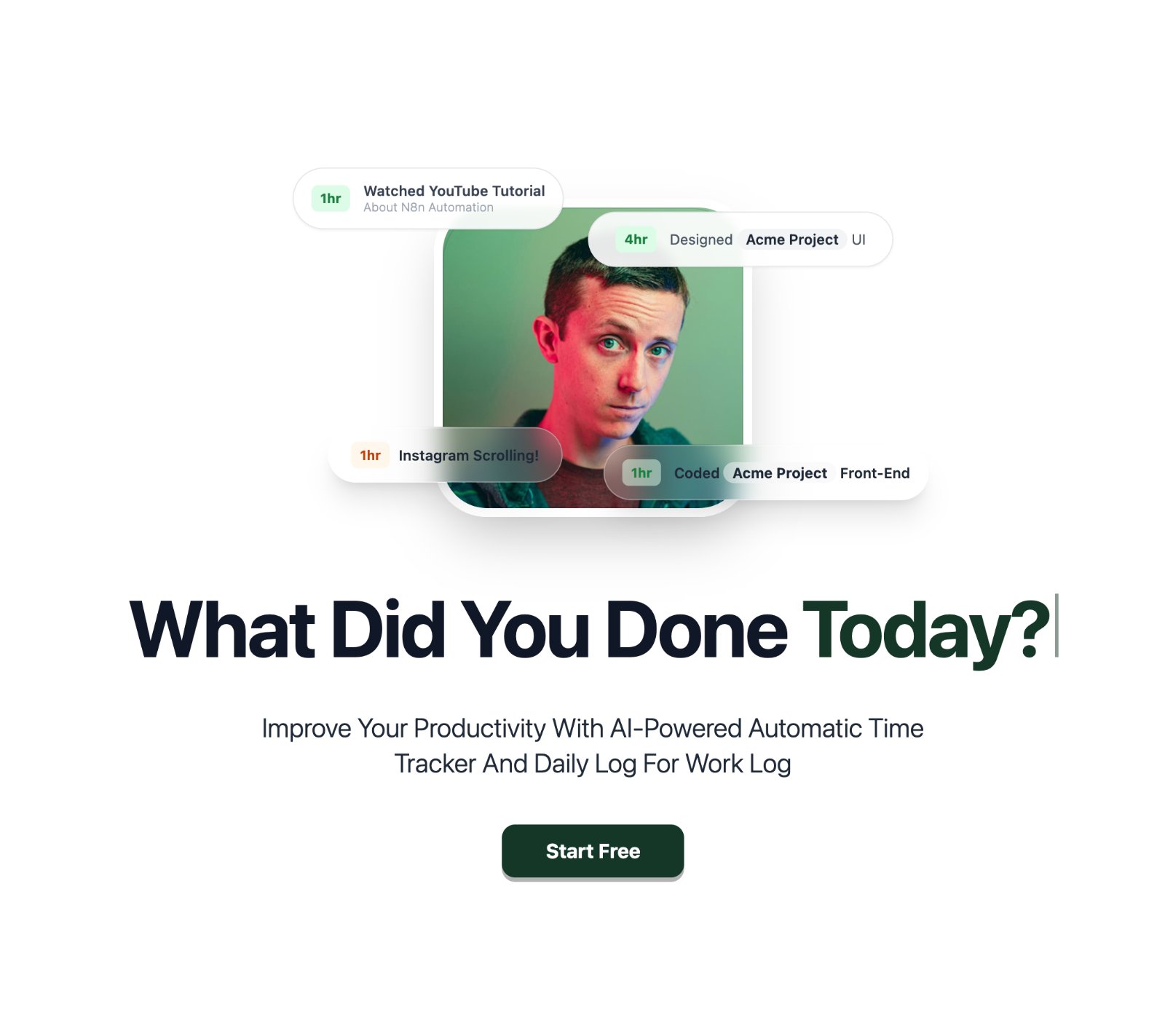
For macOS users: Didon automatically tracks your work in the background, categorizes tasks with AI, and shows where your time actually goes—no manual timers needed.
Built by Babak Sadeghzadeh · Artificial Intelligence · Productivity · Developer Tools · Freemium
In category: #1531 of 2052 · Artificial Intelligence
Didon is a Community listing on Launch Llama with 2 upvotes from 2 founders, founded by Babak Sadeghzadeh who joined in May 2026, compared against 3 alternatives.
Community listing
Listing status
2upvotes
Community score
Babak Sadeghzadeh (Joined May 2026)
Founder
Compared against 3 alternatives
Market comparison
Launched on Launch Llama May 13, 2026 · #52 of 54 that day
About
AI-powered automatic time tracking app for macOS that eliminates manual timers and productivity guesswork. It runs in the background, intelligently understands what you’re working on, and transforms raw activity into structured, meaningful time reports.
Unlike traditional time trackers that require manual start/stop, Didon uses AI to:
- Detect tasks automatically
- Categorize work intelligently
- Help users understand where their time actually goes
Follow Didon: LinkedIn
Use Cases
- Generating automatic daily work logs that break down hours spent on coding, marketing, and research for client billing or reporting
- Reviewing past workdays with AI-categorised activity and project time to see where time actually goes
- Exporting daily work logs to CSV for internal team reporting or personal productivity analysis
Who it is for
- Freelancers and independent builders who need accurate time records for client billing.
- Individual knowledge workers who want feedback on their productivity and work habits.
- Managers and teams looking to understand working hours and project time without invasive monitoring.
Pricing
Free plan includes automatic AI work tracking, daily logs, and 1 week of history with no export option. AI Work Tracker is €9/month with unlimited CSV exports and productivity metrics; AI Work Manager is €20/month and adds Telegram AI management and insights.
FAQ
Is Didon a free time tracker?
Yes. Didon offers a free plan with automatic AI time tracking and daily work logs — no credit card required. The free plan includes one week of history. Upgrade to a paid plan for unlimited history, CSV exports, and productivity metrics.
How does Didon know what I'm working on?
Didon captures a screenshot of your screen every 30 seconds while monitoring is active. Each screenshot is analyzed on your Mac by local AI — nothing is sent to the cloud. The AI reads window titles, visible text, and on-screen context to understand what you're doing.
How does Didon recognize my projects?
In the Configuration tab, enter your active projects as comma-separated names (for example: "Acme Website, Client App, Didon"). When Didon analyzes your screen, it matches what it sees — file names, project names in visible text, and browser tab titles — against your list. Work that doesn't match is labeled "Other."
How can I analyze or improve my productivity?
Open the Report tab in Didon to see statistics about your workday — time by project, category breakdowns, and trends. Didon also saves daily exports locally at ~/Documents/Didon/: detailed work logs in WorkLogs/YYYY-MM-DD.csv and summary reports in Daily-Reports.csv. Review these files to see how much you actually worked and what you focused on in previous days.
How much RAM and CPU does Didon use?
Didon uses very little resources when idle. During each 30-second analysis cycle, the local AI model loads briefly and uses around 2 GB of RAM. After each analysis, the model unloads to keep memory stable over long sessions.
Is my data private and secure?
Yes, privacy is our top priority. All screenshot analysis and data processing happen locally on your Mac. Your screenshots and activity logs never leave your machine or touch our servers.
What do I need to do to get the best tracking results?
To ensure the AI accurately categorizes your work, name your files and projects descriptively. Avoid generic names like "Untitled" or "New Project" so the AI can provide better insights into your daily activity.
What are the system requirements?
Currently, the app is only available for Mac (Apple Silicon, M1+). We are working on a Windows version — join the waitlist to get early access when it launches!
Can I export my work logs?
Absolutely. Didon automatically saves daily work logs and reports to ~/Documents/Didon/. You can also export reports from the app as CSV — perfect for client billing, internal reporting, or personal productivity analysis.
Does Didon track when I'm away from the computer?
The app features "Auto-Pause on Sleep" and intelligently detects inactivity. It only tracks your actual productive time, ensuring your logs are accurate without manual intervention.
Alternatives
 ChronoidChronoid is an automatic time tracker for Mac. It logs the apps, websites and documents you use, sorts them into projects, and keeps your data on your Mac.
More in Artificial Intelligence
New on Launch Llama
Launched this week · This month's launches · All products A–Z
Ask AI about Didon
Supporters
2 founders
2 founders contributed 2 upvotes to Didon on Launch Llama.

Third-party sources
- Token Leaderboards
Hacker News · July 2, 2026 · 2 points
- Know your work personality (test)
Hacker News · July 1, 2026 · 1 point
- Do you know your founder-personality type? (research-bassed)
Hacker News · June 24, 2026 · 2 points
- Show HN: Didon – AI workday reports for productivity analysis
Hacker News · June 21, 2026 · 2 points
For bots & AI agents
Machine-readable versions of Didon and Launch Llama. Fetch these instead of parsing this page.
This listing (.md) llms.txt llms-full.txt ai.txt Full catalog (.md) Endpoint index API docs MCP server MCP manifest Developer docs