On Launch Llama
Spokio - Offline text-to-speech for Mac
For creators: Spokio generates natural speech from text offline on Mac with one-shot voice cloning, no internet required.
Built by byby and Bryan Devlyn
Visit website → Upvotes · 3
In category: #2239 of 2737 · Artificial Intelligence
Spokio is a Instant Launch listing on Launch Llama with 3 total upvotes across 1 founder supporter, founded by byby and Bryan Devlyn who joined in May 2026, compared against 6 alternatives.
Instant Launch listing
Listing status
3upvotes
Community score
byby and Bryan Devlyn (Joined May 2026)
Founder
Compared against 6 alternatives
Market comparison
Key Features
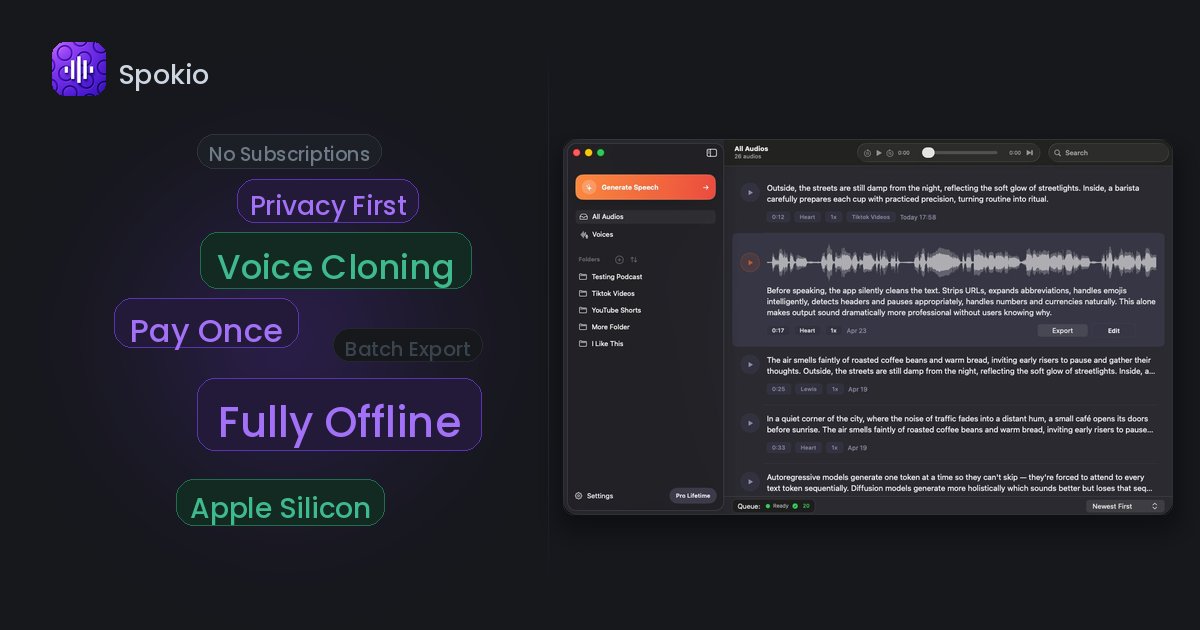
- Turns text into high-quality speech on your Mac, fast, offline, and built for casual creators
- Exports reports you can share with investors or teammates
- Automates repetitive workflows without custom engineering
About
Clone any voice in one shot, generate in the background, and work fully offline. Fast, private TTS built for Mac — no cloud, no waiting. Spokio turns text into high-quality speech on your Mac — fast, offline, and built for casual creators. Perfect for voiceovers, videos, content production, or any workflow that needs natural-sounding audio. Core Features: • One-shot voice cloning — create a custom voice from a single sample • Long text synthesis — generate speech from up to 5,000 characters • Background processing — keep working while audio is generated • Whole folder export — ready for use in videos, podcasts, and more More: • Built-in library of clear, natural-sounding voices • Fast offline TTS — no internet required • Organize projects into unlimited folders • Clean, focused interface built for speed • Export audio formats: WAV, AIFF, M4A, MP3 Performance will scale with your hardware, the stronger your Macs the faster inference. Which means quicker generation, smoother iteration, and a better experience when you are working through lots of revisions or long scripts.
Use Cases
- Automate repetitive tasks so you can focus on strategy and growth
- Use AI-powered insights to make faster, data-driven decisions
- Eliminate context-switching by centralizing your daily workflow
- Ship faster by automating status updates and task management
- Create professional designs and prototypes without hiring a designer
Pricing
Spokio is a paid product. See the website for current pricing.
Verdict
In the competitive artificial intelligence space, Spokio stands out as a solid option. It's gaining traction among founders who value simplicity and results. Clone any voice in one shot, generate in the background, and work fully offline. If for creators: spokio generates natural speech from text offline on mac with one-shot voice cloning, no internet required is a priority for your team, it's worth giving Spokio a closer look.
FAQ
What is Spokio?
Clone any voice in one shot, generate in the background, and work fully offline. Fast, private TTS built for Mac — no cloud, no waiting. Spokio turns text into high-quality speech on your Mac — fast, offline, and built for casual creators. Perfect for voiceovers, videos, content production, or any workflow that needs natural-sounding audio. Core Features: • One-shot voice cloning — create a custom voice from a single sample • Long text synthesis — generate speech from up to 5,000 characters • Background processing — keep working while audio is generated • Whole folder export — ready for use in videos, podcasts, and more More: • Built-in library of clear, natural-sounding voices • Fast offline TTS — no internet required • Organize projects into unlimited folders • Clean, focused interface built for speed • Export audio formats: WAV, AIFF, M4A, MP3 Performance will scale with your hardware, the stronger your Macs the faster inference. Which means quicker generation, smoother iteration, and a better experience when you are working through lots of revisions or long scripts.
How much does Spokio cost?
Spokio is a paid product. See the website for current pricing. You can discover and review Spokio for free on Launch Llama.
What category does Spokio belong to?
Spokio is listed under Artificial Intelligence, Productivity on Launch Llama.
How do I get started with Spokio?
Click the "Visit Website" button on this page to go directly to Spokio. You can also upvote and leave a review to help other founders discover it.
Alternatives
- SpeechGen AI
For content producers: SpeechGen AI converts text to natural speech with voice cloning in multiple languages so you create audio content in minutes.
- LOVO AI
AI voice generator and text-to-speech tool for creating voiceovers, cloning voices, and editing audio with video.
- Speko
For voice app builders: Speko unifies speech-to-text, language models, and text-to-speech in one API so you ship faster with fewer integrations.
- Higgs TTS
For creators and marketers: Higgs TTS generates natural AI voices in 100+ languages so you produce audio content and demos without voice talent.
- AI Kid Voice Generator with Natural Child Voices
For content creators: AI Kid Voice Generator produces natural child and teen voices from text so you create authentic kid-voiced audio without hiring voice actors.
- Vocaldi
For Mac users: Vocaldi enables writing by speaking and reviewing by listening with on-device speech models so you stay private and work offline.
Supporters
1 founder1 founder contributed 3 upvotes to Spokio on Launch Llama.
Reviews
1 comment
Hey, love seeing this here! 👋 What inspired you to build this? Would love to hear the story behind it.
Ask AI
ChatGPT Claude Perplexity Grok
For agents
llms.txt · llms-full.txt · ai.txt · Live fact sheet · Full catalog (.md) · Endpoint index · API spec · REST access · Agent server · Server manifest · Server discovery