On Launch Llama
Image Pipeline - Browser batch image processing tool
For designers: Image Pipeline batch-processes images locally in your browser with a visual editor so you skip cloud uploads and stay private.
Built by Maxim Mitenkov
Productivity Developer Tools Design Tools Freemium
Visit website → Upvotes · 36
In category: #903 of 1797 · Productivity
Image Pipeline is a Instant Launch listing on Launch Llama with 36 total upvotes across 1 founder supporter, founded by Maxim Mitenkov who joined in Jul 2026, compared against 6 alternatives.
Instant Launch listing
Listing status
36upvotes
Community score
Maxim Mitenkov (Joined Jul 2026)
Founder
Compared against 6 alternatives
Market comparison
Key Features
- Batch process multiple images simultaneously in your browser
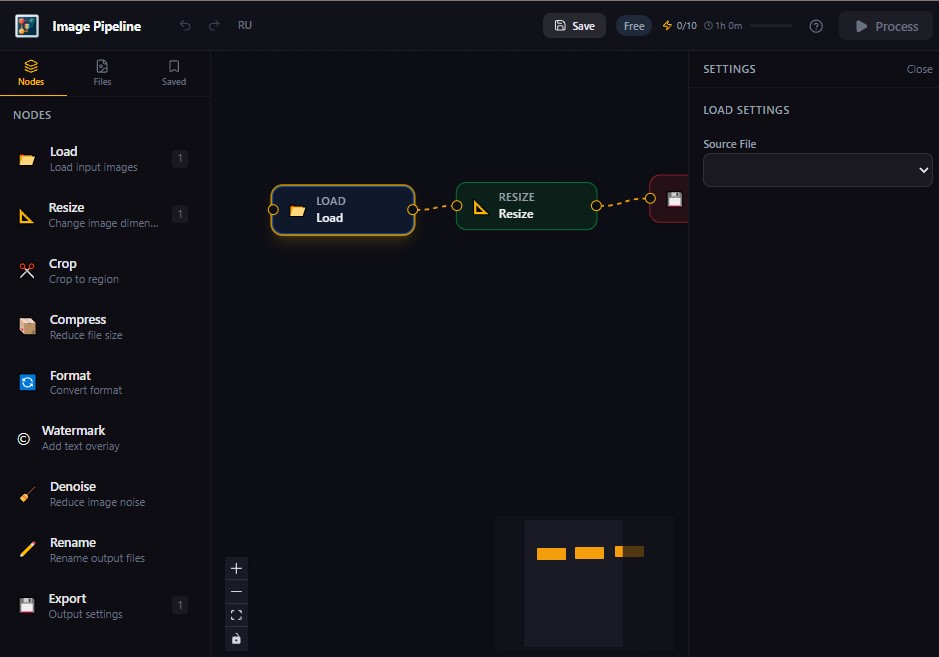
- Resize and crop images with a visual node editor interface
- Compress images locally without uploading to external servers
- Convert images between different formats
- Chain image operations together using visual workflows
- Process sensitive images privately without leaving your device
About
Image Pipeline is a browser-based batch image processing tool that uses a visual node editor interface. It enables users to resize, crop, compress, and convert images all locally in the browser without uploading to external servers.
Use Cases
- Build a batch workflow to resize product photos for your e-commerce site, then export all variants locally without uploading to cloud services
- Create a reusable node pipeline to compress and convert PNG files to WebP format in bulk, keeping all processing on your machine for privacy
- Use the visual editor to chain multiple operations—crop, resize, and adjust—then apply to hundreds of design assets in one batch run
- Process client deliverables through a custom image pipeline, then hand off the entire workflow file so clients can re-run batches independently
- Set up a local batch job to normalize image dimensions and formats across a design system library without syncing raw files to the cloud
Pricing
Image Pipeline offers a free plan plus paid tiers. See the website for current pricing.
Verdict
In the competitive design tools space, Image Pipeline stands out as a solid option. With 36 upvotes from the Launch Llama community, it's clearly resonating with founders. Image Pipeline is a browser-based batch image processing tool that uses a visual node editor interface. If for designers: image pipeline batch-processes images locally in your browser with a visual editor so you skip cloud uploads and stay private is a priority for your team, it's worth giving Image Pipeline a closer look.
FAQ
What is Image Pipeline?
Image Pipeline is a browser-based batch image processing tool that uses a visual node editor interface. It enables users to resize, crop, compress, and convert images all locally in the browser without uploading to external servers.
What are the key features of Image Pipeline?
Image Pipeline includes: • Batch process multiple images simultaneously in your browser • Resize and crop images with a visual node editor interface • Compress images locally without uploading to external servers • Convert images between different formats • Chain image operations together using visual workflows • Process sensitive images privately without leaving your device
What can I use Image Pipeline for?
• Build a batch workflow to resize product photos for your e-commerce site, then export all variants locally without uploading to cloud services. • Create a reusable node pipeline to compress and convert PNG files to WebP format in bulk, keeping all processing on your machine for privacy. • Use the visual editor to chain multiple operations—crop, resize, and adjust—then apply to hundreds of design assets in one batch run. • Process client deliverables through a custom image pipeline, then hand off the entire workflow file so clients can re-run batches independently. • Set up a local batch job to normalize image dimensions and formats across a design system library without syncing raw files to the cloud.
How much does Image Pipeline cost?
Image Pipeline offers a free plan plus paid tiers. See the website for current pricing. You can discover and review Image Pipeline for free on Launch Llama.
What category does Image Pipeline belong to?
Image Pipeline is listed under Design Tools, Developer Tools, Productivity on Launch Llama.
How do I get started with Image Pipeline?
Click the "Visit Website" button on this page to go directly to Image Pipeline. You can also upvote and leave a review to help other founders discover it.
Alternatives
- MyTooslBench
For designers: MyTooslBench converts images between JPG, PNG, WebP, AVIF and more in your browser with no uploads so you work faster offline.
- PDF & Image Tools
For professionals: PDF & Image Tools compresses and converts files in your browser instantly so you skip uploads and keep data private.
- Fotools Online Tools
For developers: Fotools Online Tools provides 200+ free utilities for encoding, encryption, image processing, and data conversion so you skip installation and work instantly online.
- PixDazzle
Transform photos with 15 creative effects and 11 image tools—cartoonize, sketch, mosaic, pixelate, and more—all processed privately in your browser with zero signup required.
- Free Image to Layers Tool
For designers: Free Image to Layers Tool separates images into editable layers with AI so you export layered PSDs or transparent PNGs instantly.
- createimage
For creators: CreateImage generates images, text, and videos in one browser tool so you turn ideas into visuals instantly without software downloads.
Supporters
1 founder1 founder contributed 36 upvotes to Image Pipeline on Launch Llama.
Reviews
5.0 · Based on 1 review
Hey! I'm a book cover illustrator and designer. Every month I prep 50–100 images for Behance, Pinterest, and client deliveries — resizing, cropping, compressing, converting formats. I was either clicking through Photoshop actions or writing ImageMagick scripts I'd forget how to edit three months later. Neither felt right. So I built Image Pipeline — a visual node editor that runs entirely in the browser, no uploads, no signup. Just drag images, connect nodes, hit Process, download ZIP.
Hey, love seeing this here! 👋 What inspired you to build this? Would love to hear the story behind it.
super
Ask AI
ChatGPT Claude Perplexity Grok
For agents
llms.txt · llms-full.txt · ai.txt · Live fact sheet · Full catalog (.md) · Endpoint index · API spec · REST access · Agent server · Server manifest · Server discovery