
Image Combiner
Under reviewAI image combiner that merges photos naturally
Helps couples, pet owners and online sellers blend two photos into one scene with faces kept intact and matched lighting, delivered in 10-60 seconds.
Built by Jerome McMillan · Artificial Intelligence · Free
Coming soon on Launch Llama Tools
Image Combiner is a Community listing on Launch Llama with 0 total upvotes, founded by Jerome McMillan who joined in Nov 2026, compared against 5 alternatives.
Community listing
Listing status
0upvotes
Community score
Jerome McMillan (Joined Nov 2026)
Founder
Compared against 5 alternatives
Market comparison
Helps couples, pet owners and online sellers blend two photos into one scene with faces kept intact and matched lighting, delivered in 10-60 seconds.
About
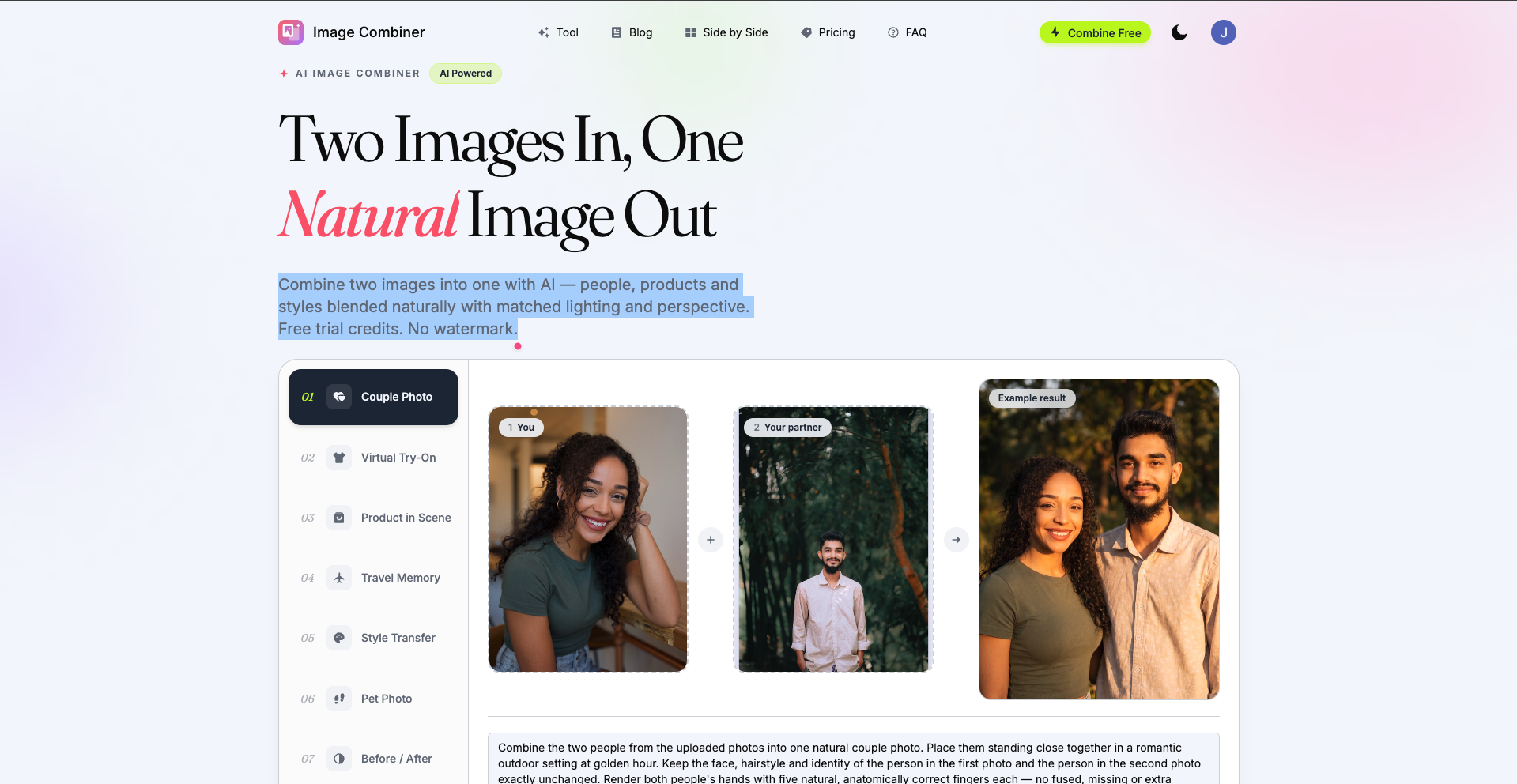
Users upload two JPG, PNG or WebP images, then either describe how to blend them or pick a preset such as Couple Photo, Virtual Try-On or Product in Scene. The AI keeps faces true to the originals while matching lighting, perspective and color, and results typically return in 10 to 60 seconds. A free side-by-side or grid layout is also available without sign-up, and failed generations are refunded automatically.
Follow Image Combiner: X (Twitter)
Key Features
- Blends two uploaded images into one with matched lighting and perspective
- Preserves faces from the original photos in the combined result
- Offers ready-made templates like Couple Photo, Virtual Try-On and Product in Scene
- Creates side-by-side or grid photo layouts for free without sign-up
- Exports combined images without a watermark
- Refunds credits automatically when a generation fails
Use Cases
- Put a couple together in one portrait even when the original photos were taken apart
- Place a product photo into a lifestyle scene with matched lighting and shadows for an online store listing
- Try a clothing item on a person's portrait using the Virtual Try-On preset
From the founder
Who it's for
“Creators, marketers, and e-commerce sellers who need to blend two photos into one natural-looking image without design software.”
Why I built it
“I built Image Combiner because merging two images usually means fighting with layers and masks. It aligns perspective and matches lighting automatically, so anyone can get a clean composite in seconds.”
Who it is for
- Couples who want a shared photo even when they are apart, such as long-distance partners
- E-commerce sellers who need product shots in lifestyle scenes without a photoshoot
- Pet owners who want a portrait of themselves and their pet together
Pricing
Image Combiner is free to use. See the website for details.
FAQ
What is an AI image combiner?
An AI image combiner uses generative AI to merge two images into one brand-new image — the subjects from both images appear together naturally, with matched lighting, shadows and perspective. Unlike a simple collage or stitcher, the AI creates a single cohesive scene.
How do I combine two images into one with AI?
Upload two images, describe how you want them blended (or pick a template), and click Generate. The AI matches lighting, perspective and color and returns one natural image in 10–60 seconds. Prefer a simple layout? Use our free Side by Side Photo Combiner instead — no sign-up needed.
Is this AI image combiner free?
Yes, you can start for free. You get free trial credits when you sign up, so you can try the AI image combiner at no cost. Paid plans and credit packs are available when you need more.
Do I need to sign up?
AI blending requires a free account so we can manage your credits and prevent abuse. If you prefer not to sign up at all, our Side by Side Photo Combiner works without an account.
Will the combined image still look like me?
Yes. Our AI is instructed to keep faces, hairstyles and identity exactly unchanged while matching scale, lighting and color grading between your images. Identity preservation is a top priority — the people in the result stay recognizably themselves.
Is there a watermark on the result?
No — no watermark is added to any image you download, on any plan. What you generate is what you get.
What is the difference between AI blending and side-by-side stitching?
Stitching places images next to each other, horizontally or vertically — like a collage. AI blending generates a brand-new image where the subjects from your images appear together naturally, with matched lighting, shadows and perspective. We offer a dedicated free Side by Side Photo Combiner for stitching.
What image formats are supported?
You can upload JPG, PNG and WebP images. Results are downloaded as high-quality PNG files.
Alternatives
 AI Photo EditorFor creators: AI Photo Editor transforms images via text prompts, editing JPG, PNG, WebP instantly without design skills or software.
 Hotel Lobby AI Video GeneratorCreate short AI-generated duet videos from two photos of consenting adults. Choose video length (4-15s), quality (480p-1080p), and vibe before purchase. Start at $5 per video.
More in Artificial Intelligence
New on Launch Llama
Launched this week · This month's launches · All products A–Z
Ask AI about Image Combiner
For bots & AI agents
Machine-readable versions of Image Combiner and Launch Llama. Fetch these instead of parsing this page.
This listing (.md) llms.txt llms-full.txt ai.txt Full catalog (.md) Endpoint index API docs MCP server MCP manifest Developer docs