Free Image to Layers Tool
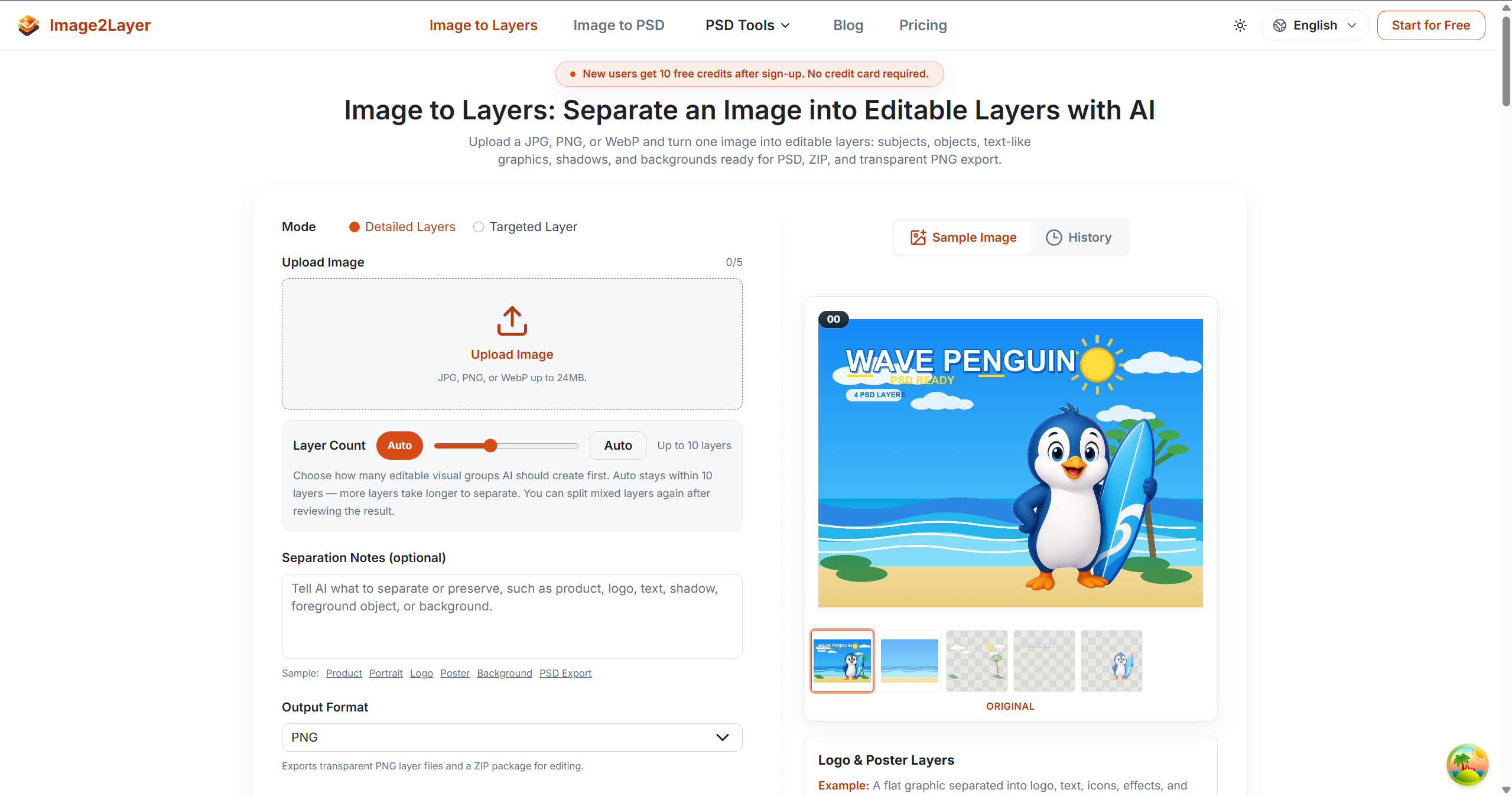
For designers: Free Image to Layers Tool separates images into editable layers with AI so you export layered PSDs or transparent PNGs instantly.
Built by alice and Jesus Lopez · Artificial Intelligence · Freemium
In category: #1513 of 2034 · Artificial Intelligence
Free Image to Layers Tool is a Community listing on Launch Llama with 2 upvotes from 2 founders, founded by alice and Jesus Lopez who joined in Sep 2026, compared against 6 alternatives.
Community listing
Listing status
2upvotes
Community score
alice and Jesus Lopez (Joined Sep 2026)
Founder
Compared against 6 alternatives
Market comparison
Launched on Launch Llama Sep 14, 2026 · #118 of 125 that day
About
Separate an image into editable layers with AI. Upload JPG, PNG, or WebP, get up to 10 layers, and export a layered PSD, transparent PNGs, or ZIP.
Use Cases
- Separating a flat product photo into editable subject, shadow, and background layers for a design revision
- Turning a character illustration into hair, face, and clothing layers for animation or game asset prep
- Exporting a layered PSD or transparent PNG package from an image to hand off to a client or restyle for marketing
Who it is for
- Graphic designers who need to edit flat images in Photoshop, Photopea, GIMP, or Affinity Photo.
- Product marketing teams preparing assets for design revisions and campaign variations.
- Animators and game artists breaking character art or scenes into separate layers.
Pricing
New users get 50 free credits after sign-up with no credit card required. Layer generation costs 8 credits per layer.
Free Image to Layers Tool at a glance
- 01What it is
- Free Image to Layers Tool: For designers: Free Image to Layers Tool separates images into editable layers with AI so you export layered PSDs or transparent PNGs instantly.
- 02Pricing
- Free Image to Layers Tool pricing: New users get 50 free credits after sign-up with no credit card required.
- 03Best for
- Free Image to Layers Tool is best for graphic designers who need to edit flat images in Photoshop, Photopea, GIMP, or Affinity Photo., product marketing teams preparing assets for design revisions and campaign variations. and animators and game artists breaking character art or scenes into separate layers.
- 04Alternatives
- Top Free Image to Layers Tool alternatives on Launch Llama: AI Photo Editor, AIKIZI and Splikit.
FAQ
What does an image to layers tool do?
An image to layers tool turns a flat JPG, PNG, or WebP into editable layer assets. Image2Layer separates subjects, objects, text-like graphics, shadows, and backgrounds into up to 10 layers in 60–120 seconds, then exports them as a layered PSD, transparent PNGs, or a ZIP.
How do I turn a photo into layers?
Upload the photo, leave the layer count on Auto or choose up to 10, and start. In 60–120 seconds each person, object, text-like graphic and the background arrive as separate layers you can hide, move or replace, with hidden areas rebuilt, ready to download as a layered PSD or PNGs.
Can Image2Layer separate an image into real editable layers?
Yes. Depending on the source image, Image2Layer can create separate subject layers, foreground object layers, shadow layers, text or logo layers, and a rebuilt background layer. Every layer is an RGBA image with real transparency, aligned to the original canvas, so stacking them reproduces the picture you started from.
What image formats work with image to layers conversion?
JPG, PNG, and WebP, up to 24 MB and at least 512 × 512 pixels. Exports are a layered PSD, transparent PNG layers, or a structured ZIP. The PSD keeps your image's pixel dimensions, and the AI works at your image's own resolution from about 1 to 4 megapixels (2K), so a very large original keeps its size but gains no extra detail.
How is image to layers different from background removal?
Background removal gives you one cutout and discards the rest. Image to layers separation keeps the whole picture — subjects, shadows, objects, text-like regions — and rebuilds the background hidden behind them, so removing a background becomes something you do after separation rather than settling for a single cutout.
Can I export image to layers results as a PSD file?
Yes. Every run exports as a layered PSD with the stacking order intact, and the file opens in Photoshop, Photopea, GIMP, Affinity Photo, and Krita. The layers are raster, so a headline arrives as an image of text rather than live type, and a logo as pixels rather than vector shapes.
Can I download layered PNG files instead of a PSD?
Yes. Choose PNG output to get every layer as a transparent PNG, together in a ZIP, ready for Figma, Canva, slides or a website. Choose PSD when you want the layers stacked in one file for Photoshop, Photopea or GIMP.
Who uses image to layers workflows?
Designers, marketers, animators, game artists, e-commerce teams, and content creators use it to get editable assets out of flattened images — swapping a background, reworking a poster, pulling foreground and background apart for parallax, prepping character art for animation, or building regional ad variants.
Are image to layers results always perfect?
No. Soft edges are the hard part: hair, fur, glass, smoke, and motion blur all obscure the boundary between one layer and the next. Low-resolution files, heavy compression, tiny text, and elements that share a color with their background also separate less cleanly, and busy collages usually need a manual tidy-up after export.
Will there be an image to layers API?
An API is planned for teams that need automated image to layers processing, PSD export, or batch workflows. You can contact us if you want early access.
Alternatives
 AI Photo EditorFor creators: AI Photo Editor transforms images via text prompts, editing JPG, PNG, WebP instantly without design skills or software.
More in Artificial Intelligence
New on Launch Llama
Launched this week · This month's launches · All products A–Z
Ask AI about Free Image to Layers Tool
Supporters
2 founders
2 founders contributed 2 upvotes to Free Image to Layers Tool on Launch Llama.

For bots & AI agents
Machine-readable versions of Free Image to Layers Tool and Launch Llama. Fetch these instead of parsing this page.
This listing (.md) llms.txt llms-full.txt ai.txt Full catalog (.md) Endpoint index API docs MCP server MCP manifest Developer docs