
Cutscript
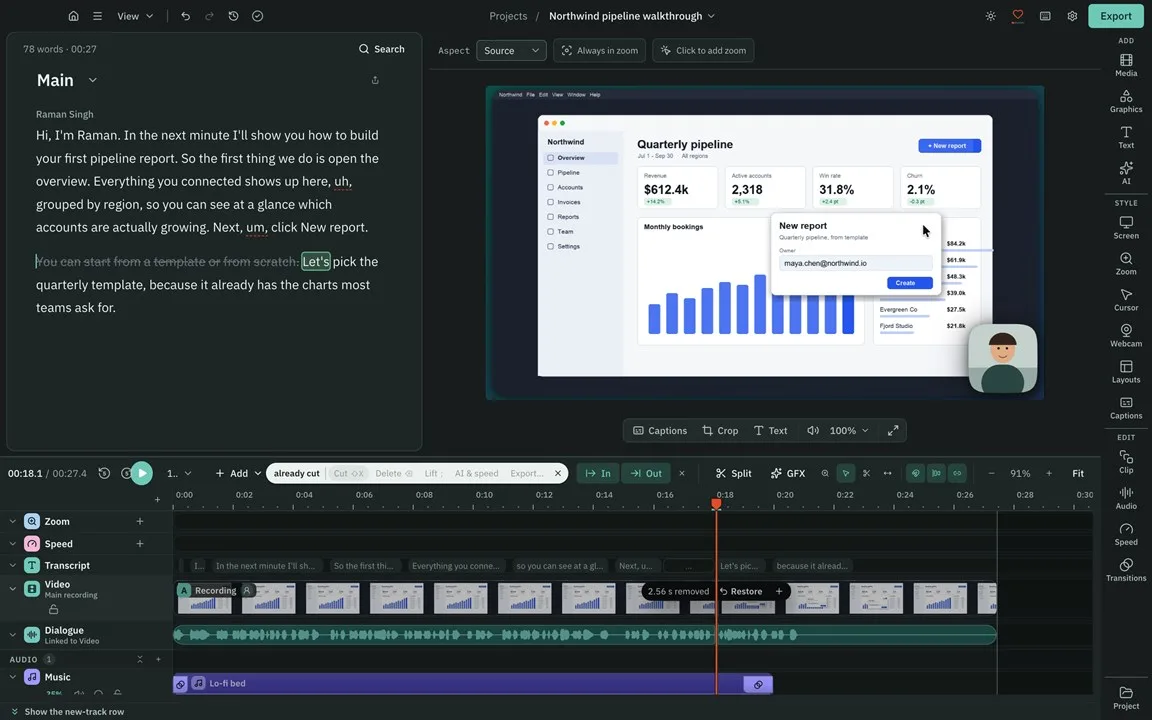
AI screen recorder: cut video by editing script
Screen Recorder & AI Video Editor
Built by Cutscript · Artificial Intelligence · Freemium
In category: #2047 of 2047 · Artificial Intelligence
Cutscript is a Community listing on Launch Llama with 0 total upvotes, founded by Cutscript who joined in Nov 2026, compared against 6 alternatives.
Community listing
Listing status
0upvotes
Community score
Cutscript (Joined Nov 2026)
Founder
Compared against 6 alternatives
Market comparison
Launched on Launch Llama Nov 12, 2026 · #1 of 2 that day
About
Cutscript is an AI-powered video recorder and editor for Mac and Windows that simplifies production by letting you edit videos directly through their transcripts. Capture your screen and camera, then use AI to trim footage seamlessly. Designed for privacy and flexibility, Cutscript allows you to run AI features using your existing ChatGPT or Claude plans or process everything locally on your own computer.
Use Cases
- Recording a screen, camera and voice, then cutting filler words from the transcript so the video matches the edited script before export
- Making a tutorial or walkthrough video by recording a screen and adding zooms that follow clicks and drawn callouts on Mac
- Producing a finished-looking screen recording by applying a Studio look with background, padding, rounded corners and shadow, then exporting a post-ready file
Who it is for
- Creators who record tutorials, demos or talking-head videos and want to edit by deleting words from a transcript.
- Mac and Windows users who need to record their screen with separate camera, microphone and system sound tracks for later editing.
Pricing
Free account with exports that include a watermark. Pro removes the watermark from $4.17 a month, paid yearly.
FAQ
What does the AI cost?
It depends on what you use. A ChatGPT or Claude plan covers the AI chat, Direct my video, short clips and new graphics at no charge in Cutscript. A transcript comes from ElevenLabs, fal.ai or OpenRouter, and you pay them directly: Fish Transcribe 1 on OpenRouter, for example, is $0.36 per hour of audio. On an Apple sil
Can I use it without any AI?
Yes. Recording, the timeline, zooms, cursor effects, blur, the Design pack and export need no AI. To edit by text and add captions you need a transcript, which comes from a provider or from Whisper on an Apple silicon Mac.
Does it post to YouTube or TikTok for me?
No. Cutscript exports a file to your computer, and you upload it yourself. Direct my video can write a YouTube chapter list for you to copy.
Is my video uploaded anywhere?
Not by Cutscript. Recording, editing and export happen on your computer. When you run a cloud AI step, what it needs goes straight from your computer to the provider you chose: for a transcript that is the audio only, not the video. With local models, nothing leaves.
What is Mac only?
Area recording, iPhone and iPad recording, sound from one app, drawing while you record, click tracking and the zooms and click effects that come from it, Blur all faces, Blur all emails, Apple Vision tracking, the Claude plan, local Whisper and local voices (these two also need Apple silicon), Apple Voice Isolation an
Which computers does it run on?
Mac: Apple silicon or Intel, macOS 14 to open the app and macOS 15 to record. Windows: 64-bit Windows 10 (version 1809 or later) or Windows 11, from the Microsoft Store. Linux is in testing and is not ready to download yet.
Alternatives
 Screen Studio 4.0Glass Loupe, Camera Cutout, Edit by Transcript, and more
More in Artificial Intelligence
New on Launch Llama
Launched this week · This month's launches · All products A–Z
Ask AI about Cutscript
For bots & AI agents
Machine-readable versions of Cutscript and Launch Llama. Fetch these instead of parsing this page.
This listing (.md) llms.txt llms-full.txt ai.txt Full catalog (.md) Endpoint index API docs MCP server MCP manifest Developer docs