
Updated 2026-11-20 · 9 of 9 AI presentation makers on Launch Llama compared
Quick answer: The best AI presentation makers in 2026, by Launch Llama community upvotes, are Chronicle, Pandada AI, Kodo. If you want to start free, Pandada AI has a free plan. We compared all 9 AI presentation makers listed on Launch Llama on pricing, features and use cases.
Our picks at a glance
- Best overall: Chronicle — the most upvoted AI presentation maker on Launch Llama
- Best free option: Pandada AI — free plan + paid tiers
- Best to see in action: Presentation to Video — has a demo video you can watch below
- Most features listed: Kodo — 4+ features on its listing
The 9 best AI presentation makers in 2026
1. Chronicle — best for sales teams creating tailored proposals and pitch decks quickly for pipeline updates
Pricing: Free plan + paid tiers · Free plan: Yes · Upvotes: 676
In Chronicle's words
Chronicle is AI presentation software that converts raw notes, documents, and business context into professional, interactive slideshows. It helps teams generate polished, on-brand presentations while maintaining full editing control and design consistency. Chronicle is designed for professional teams working on high-stakes presentations across sales, marketing, product, and leadership.
Key features
- Generate polished slides with professional diagrams and visuals from raw ideas.
- Edit presentations through AI-powered instructions with full customization on a freeform canvas.
- Visualize data through charts, graphs, metrics, tables, and embedded tools.
- Apply brand guidelines automatically to ensure consistent fonts, colors, and visual rules.
Use cases
- Sales teams creating tailored proposals and pitch decks quickly for pipeline updates.
Pricing details: A free trial is offered via a 'Try for free' button, and a Pricing page is linked.
2. Pandada AI — best for researchers analyzing data for academic assignments without programming knowledge
Pricing: Free plan + paid tiers · Free plan: Yes · Upvotes: 617
In Pandada AI's words
Pandada empowers both non-technical operators and data scientists to achieve data wealth. Move beyond "chatting" with data—Pandada turn messy csvs, pdfs, excels files, and even photos into downloadable and shareable McKinsey-level reports and presentations — so you can make better decisions grounded in data.
Key features
- Analyze Excel, PDF, and data files without coding
- Convert messy data into McKinsey-level reports
- Generate downloadable and shareable data presentations
Use cases
- Researchers analyzing data for academic assignments without programming knowledge
- Business users creating data-driven reports for decision making
Pricing details: Free plan available with daily file analysis.
3. Kodo — best for restaurants creating menus from text descriptions quickly
Pricing: Free plan; paid from $12/month · Free plan: Yes · Upvotes: 368
In Kodo's words
Kodo is an AI design tool that generates fully editable posters, slides, menus and social graphics from a simple prompt. Unlike other AI design tools that output flat images, Kodo creates structured, layered designs you can edit instantly - text, colors, layouts, spacing, everything. You can generate, refine, and export in minutes - no templates, no locked layouts.
Key features
- Generate fully editable designs from text prompts
- Export designs to multiple formats
- Edit any element without design experience required
- Enable real-time collaboration on designs
Use cases
- Restaurants creating menus from text descriptions quickly
- Freelancers and small brands generating marketing materials affordably
- Non-designers creating professional-looking social media graphics
Pricing details: Free plan with 30 credits. Starter $12/month with 100 credits. Operator $39/month with 350 credits. Agency $99/month with 1000 credits.
4. WZRD — best for sales teams conducting guided intakes and qualifying leads through voice conversations

Pricing: See website · Upvotes: 331
In WZRD's words
WZRD is for teams and creators working with documents, slides, forms and sheets. Upload existing work or create from a prompt, then turn it into an AI experience users can engage with. Forms collect answers by speaking or typing. Sheets explain numbers out loud. Slides walk people through the story. Documents engage every user. The output stays conversational and responsive.
Key features
- Convert documents, slides, sheets and forms into interactive experiences
- Deploy AI voice agents that qualify leads and capture answers
- Upload files or describe ideas to create content automatically
- Collect form responses through speaking or typing
- Explain spreadsheet data aloud to users
Use cases
- Sales teams conducting guided intakes and qualifying leads through voice conversations
- HR teams managing intake processes without adding new tools
- Support teams answering visitor questions about documents and content
5. Pitch — best for sales teams sharing personalized decks and tracking client engagement

Pricing: Free plan + paid tiers · Free plan: Yes · Upvotes: 327
In Pitch's words
Most AI tools apply your colors to generic layouts and call it “on brand.” Pitch Agent builds from your template, design language, and image style. Generate slides from a prompt and file attachments, then refine them via chat. Agent lives inside Pitch, the workspace where teams collaborate on and deliver presentations.
Key features
- Generate presentations from prompts using AI
- Collaborate with team members in real time
- Share presentations with tracking and analytics
- Upload and embed video, animations, and custom fonts
- Maintain brand consistency across team presentations
Use cases
- Sales teams sharing personalized decks and tracking client engagement
- Executive teams preparing fund raises and board meetings
Pricing details: Free plan available with 100 AI credits. Plus starts at €10/month. Team at €15/month. Business at €20/month. Enterprise with custom pricing.
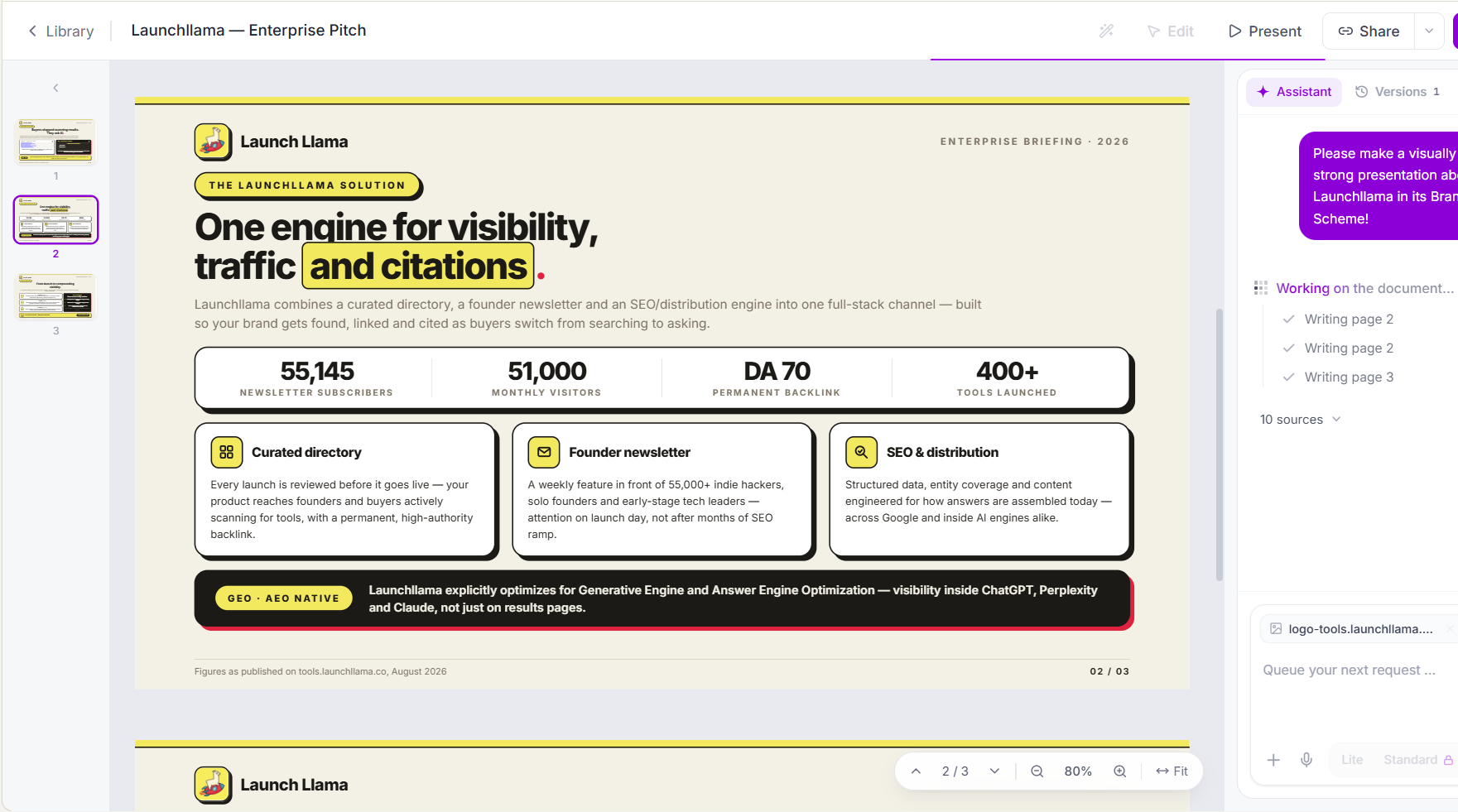
6. Slaide — best for generate branded pitch decks and investor presentations from business plans, financial data, and market research
Pricing: Free plan + paid tiers · Free plan: Yes · Upvotes: 26 · Rating: 5/5 from 47 reviews
In Slaide's words
Slaide is an AI presentation maker and document creation platform for building professional presentations, reports, one-pagers, spreadsheets and other business deliverables from prompts, source files and web research.
Unlike template-based presentation tools, Slaide creates every page from scratch around the actual content, audience and purpose. Users can upload PDFs, Word documents, Excel files, images and notes, combine them with current web research, and turn that information into a complete, professionally designed deliverable.
Key features
- AI presentations built from scratch
- Create reports, documents & spreadsheets
- Use PDFs, Word, Excel & other source files
- Web research for up-to-date information
- Company branding & corporate identity
Use cases
- Generate branded pitch decks and investor presentations from business plans, financial data, and market research
- Create professional client proposals and reports by uploading existing documents and combining them with web research
- Build sales enablement decks and one-pagers that maintain consistent brand identity across multiple presentations
Pricing details: Slaide offers a free plan plus paid plans for regular and professional use.
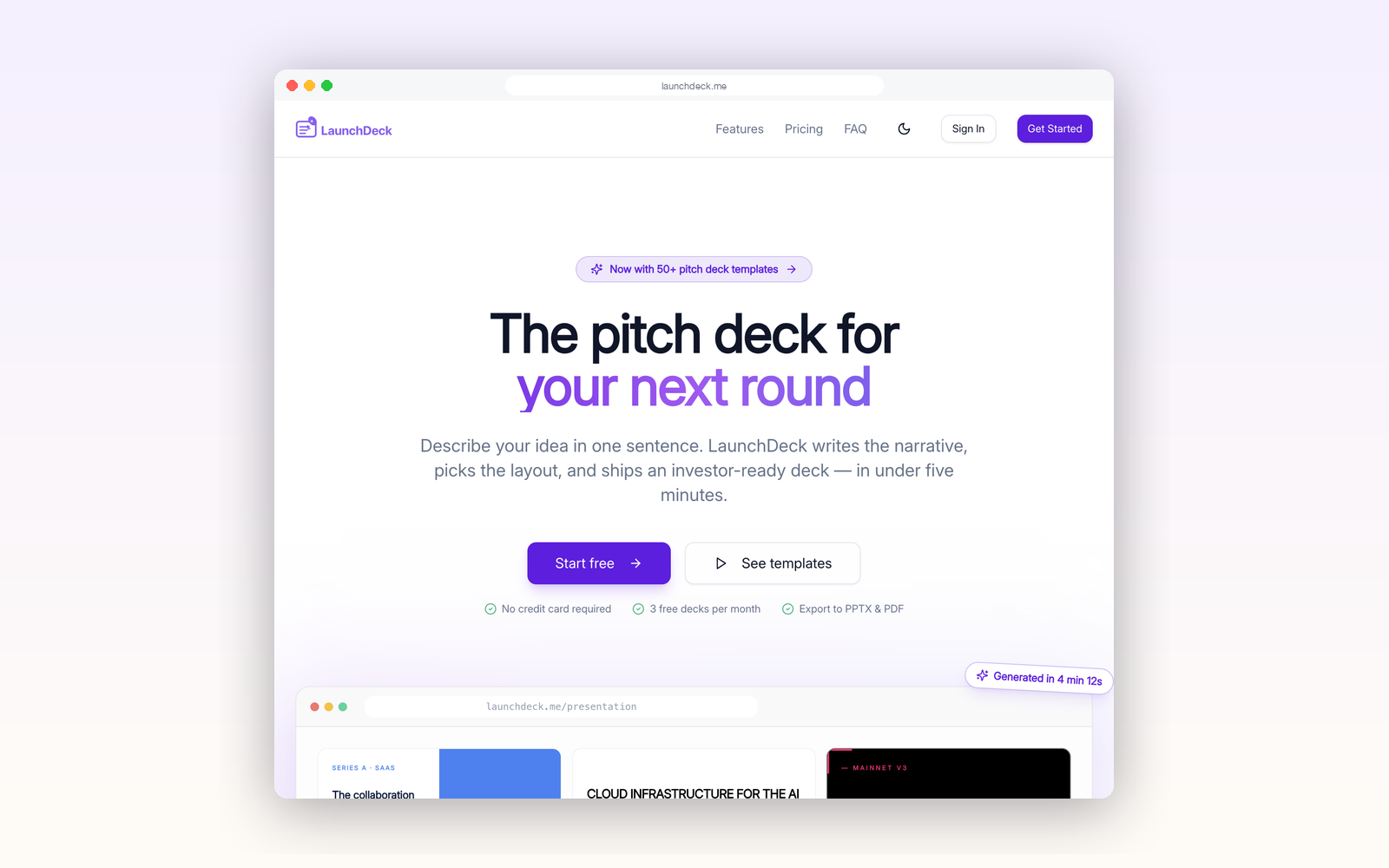
7. LaunchDeck — best for turning a one-sentence startup idea into a 13-slide investor pitch deck with speaker notes
Pricing: Free plan + paid tiers · Free plan: Yes · Upvotes: 12 · Rating: 5/5 from 2 reviews
In LaunchDeck's words
LaunchDeck is an AI pitch deck generator for founders. Describe your company in one sentence and get structured slides with compelling copy—choose from 50+ professional templates, refine every slide in the editor, add speaker notes, and export to editable PPTX or PDF. Optional web research helps ground your story in fresh context. Start free with three decks per month—no credit card required.
Use cases
- Turning a one-sentence startup idea into a 13-slide investor pitch deck with speaker notes.
- Building a sales pitch deck with buyer-aware narrative scaffolds for late-stage enterprise calls.
- Writing a monthly investor update email and recap deck with pre-filled metrics scaffolds.
Pricing details: Start free with 3 free decks per month and no credit card required.
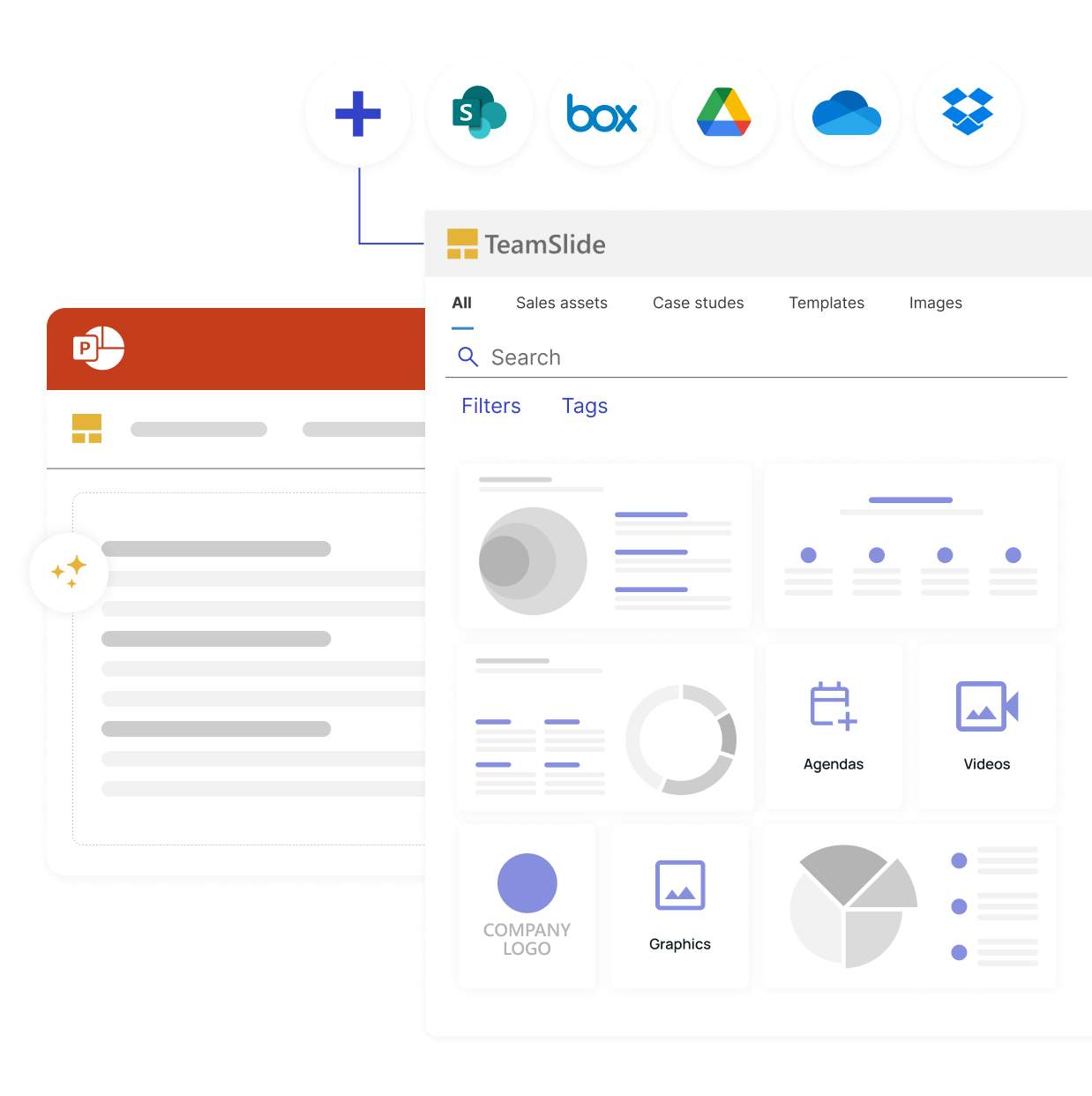
8. TeamSlide — best for finding and reusing approved slides from a managed PowerPoint slide library instead of searching through old decks
Pricing: Free · Free plan: Yes · Upvotes: 4
In TeamSlide's words
TeamSlide is a PowerPoint-native slide library & governance solution. It integrates with cloud storage (e.g., SharePoint), enabling teams to search/reuse approved, full-text searchable content in PowerPoint. It enforces brand compliance via templates, automated checks, and version control. An AI generator crafts brand-approved slides from notes. TeamSlide saves time, ensuring consistent, on-brand presentations for consulting, sales, finance, & marketing teams. Secure cloud/on-prem deployment.
Use cases
- Finding and reusing approved slides from a managed PowerPoint slide library instead of searching through old decks.
- Checking PowerPoint presentations for brand, fonts, colors and layout compliance before they reach an audience.
- Building client-ready proposals and pitches from synced, up-to-date templates and content.
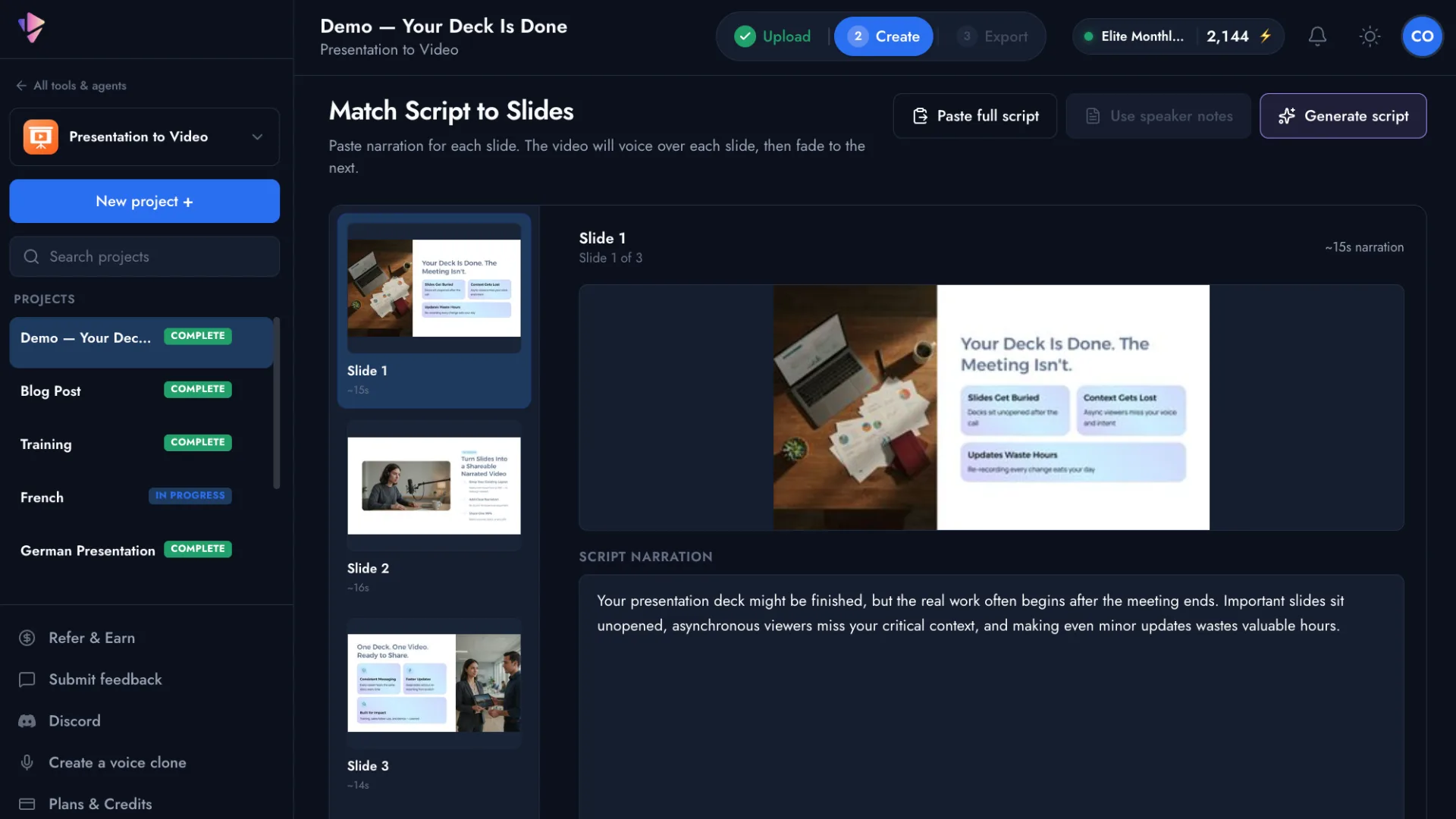
9. Presentation to Video — best for turning a PowerPoint or PDF deck into a narrated MP4 video with AI voiceover for async sales follow-ups after demos
Pricing: Free plan + paid tiers · Free plan: Yes · Upvotes: 2
In Presentation to Video's words
Vidsembly's Presentation to Video tool turns PowerPoint presentations and PDFs into professional narrated videos using AI. Upload your slides, import speaker notes or generate a narration script, choose from natural-sounding AI voices or use your own voice clone, and export a ready-to-share MP4 video.
Designed for educators, HR and training teams, sales professionals, and businesses, Presentation to Video makes it easy to create training videos, tutorials, presentations, and educational content without traditional video editing software. Multiple languages, premium AI voices, and customizable narration options make it simple to turn existing presentations into engaging video content.
Use cases
- Turning a PowerPoint or PDF deck into a narrated MP4 video with AI voiceover for async sales follow-ups after demos.
- Converting policy PDFs and onboarding decks into short narrated explainer videos for HR and training.
- Reusing lesson slides as narrated videos for flipped classrooms, absences, and LMS modules.
Pricing details: Free accounts include 1 voice clone through the end of November and 30 free credits.
See Presentation to Video pricing, reviews and alternatives →
Comparison table
| # | Tool | Rating | Upvotes | Price |
|---|---|---|---|---|
| 1 | Chronicle Sales teams creating tailored proposals and pitch decks quickly for pipeline updates |
No reviews yet | ▲ 676 | Free plan+ paid plans |
| 2 | Pandada AI Researchers analyzing data for academic assignments without programming knowledge |
No reviews yet | ▲ 617 | Free plan+ paid plans |
| 3 | Kodo Restaurants creating menus from text descriptions quickly |
No reviews yet | ▲ 368 | Free planthen from $12/mo |
| 4 | WZRD Sales teams conducting guided intakes and qualifying leads through voice conversations |
No reviews yet | ▲ 331 | See site |
| 5 | Pitch Sales teams sharing personalized decks and tracking client engagement |
No reviews yet | ▲ 327 | Free plan+ paid plans |
| 6 | Slaide Generate branded pitch decks and investor presentations from business plans, financial data, and market research |
Rated 5 out of 5 from 47 reviews5(47) | ▲ 26 | Free plan+ paid plans |
| 7 | LaunchDeck Turning a one-sentence startup idea into a 13-slide investor pitch deck with speaker notes |
Rated 5 out of 5 from 2 reviews5(2) | ▲ 12 | Free plan+ paid plans |
| 8 | TeamSlide Finding and reusing approved slides from a managed PowerPoint slide library instead of searching through old decks |
No reviews yet | ▲ 4 | Free plan |
| 9 | Presentation to Video Turning a PowerPoint or PDF deck into a narrated MP4 video with AI voiceover for async sales follow-ups after demos |
No reviews yet | ▲ 2 | Free plan+ paid plans |
How we compared them
This is a comparison built from listing data, not a hands-on review: we have not tested these tools ourselves. Every product here is listed on Launch Llama, and the ranking uses what founders and their users have put on the record.
We read the Launch Llama listings that mention AI presentation makers and kept only the products whose listing shows that is what they do. They are ordered by community upvotes; duplicate listings are merged, and listings without a real description are left out. Pricing, features and use cases come from each product's listing and can change, so check the product's own site before you buy.
How to choose
- Choose Chronicle for sales teams creating tailored proposals and pitch decks quickly for pipeline updates.
- Choose Pandada AI for researchers analyzing data for academic assignments without programming knowledge.
- Choose Kodo for restaurants creating menus from text descriptions quickly.
- Choose WZRD for sales teams conducting guided intakes and qualifying leads through voice conversations.
- Choose Pitch for sales teams sharing personalized decks and tracking client engagement.
- Choose Slaide for generate branded pitch decks and investor presentations from business plans, financial data, and market research.
Still comparing? Browse every tool in Productivity or see the best tools in other categories.
Frequently asked questions
What is the best AI presentation maker in 2026?
Chronicle is the most upvoted AI presentation maker on Launch Llama. For presenters: Chronicle turns notes and prompts into on-brand slides in minutes using AI, then refines them through conversation. Pandada AI and Kodo round out the top three.
What is an AI presentation maker?
An AI presentation maker turns notes, a prompt, a document or data into a slide deck you can edit. The tools here range from on-brand deck generators for teams and pitch deck builders for founders to tools that keep PowerPoint decks on brand or turn slides into narrated videos.
What should I look for in an AI presentation maker?
Compare how editable the slides are after the AI drafts them; brand controls: your fonts, colours and templates; export to PowerPoint, Google Slides or PDF; and what it can start from: a prompt, a document, a spreadsheet.
Is there a free AI presentation maker?
Yes. 8 of the 9 tools in this comparison list a free plan, including Chronicle, Pandada AI, Kodo.
How were these AI presentation makers ranked?
By community upvotes on Launch Llama, after merging duplicate listings and dropping listings without a real description. We have not tested these tools hands-on; pricing and features come from each product's listing.
How many AI presentation makers are listed on Launch Llama?
9 AI presentation makers with full listings at the time of writing, and this page compares all of them. Browse the Productivity category for related tools.