
Presentation to Video
PPT to video converter: narrated MP4 from slides
Turn slides into a fully narrated video with AI voiceover.
Built by partner:aidirectories and Rielly Milne · Artificial Intelligence · Freemium
In category: #2035 of 2035 · Artificial Intelligence
Presentation to Video is an Instant Launch listing on Launch Llama with 0 total upvotes, founded by partner:aidirectories and Rielly Milne who joined in Nov 2026, compared against 6 alternatives.
Instant Launch listing
Listing status
0upvotes
Community score
partner:aidirectories and Rielly Milne (Joined Nov 2026)
Founder
Compared against 6 alternatives
Market comparison
Launched on Launch Llama Nov 6, 2026 · #3 of 3 that day
Presentation to Video demo video
About
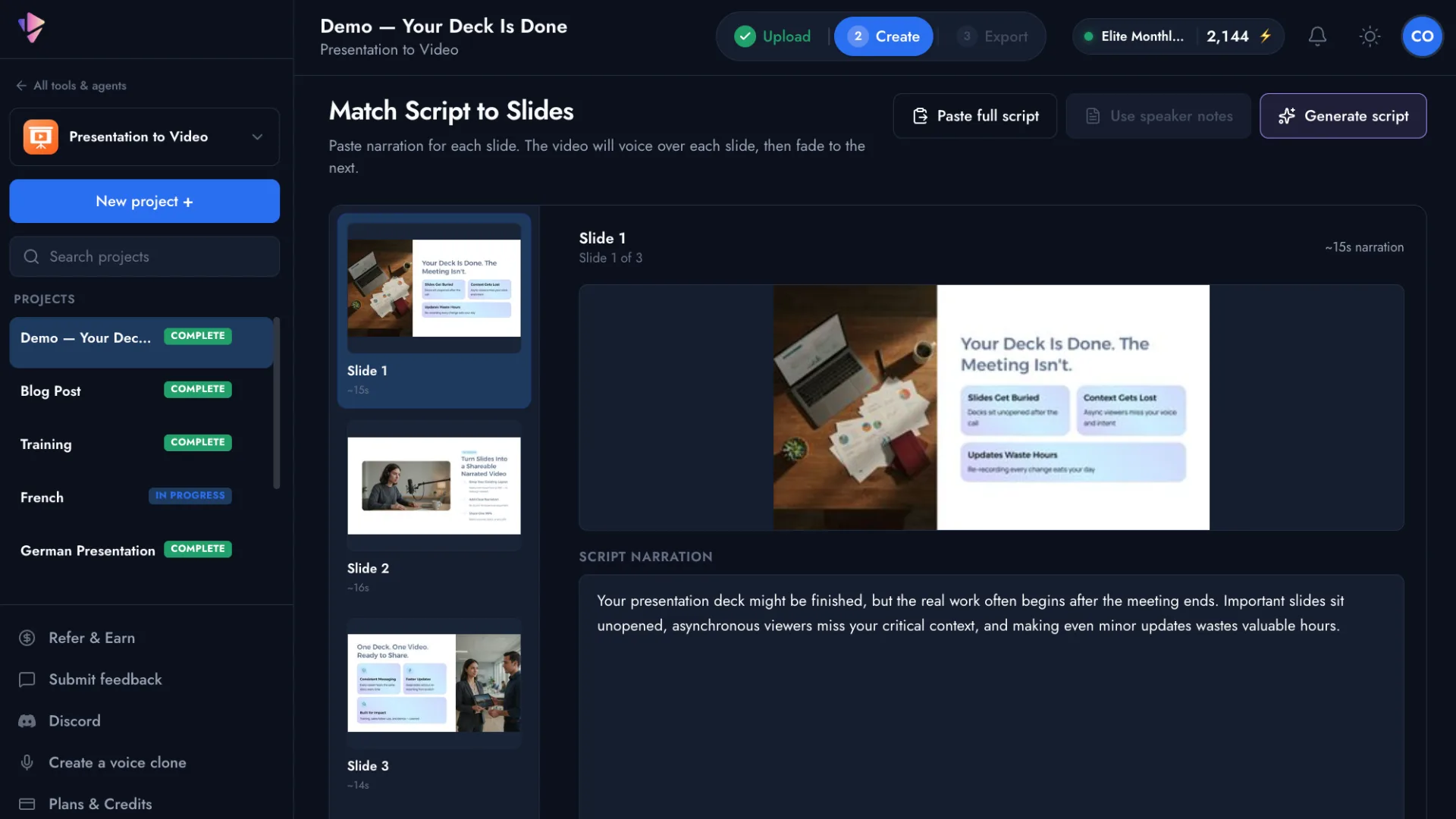
Vidsembly's Presentation to Video tool turns PowerPoint presentations and PDFs into professional narrated videos using AI. Upload your slides, import speaker notes or generate a narration script, choose from natural-sounding AI voices or use your own voice clone, and export a ready-to-share MP4 video.
Designed for educators, HR and training teams, sales professionals, and businesses, Presentation to Video makes it easy to create training videos, tutorials, presentations, and educational content without traditional video editing software. Multiple languages, premium AI voices, and customizable narration options make it simple to turn existing presentations into engaging video content.
Use Cases
- Turning a PowerPoint or PDF deck into a narrated MP4 video with AI voiceover for async sales follow-ups after demos
- Converting policy PDFs and onboarding decks into short narrated explainer videos for HR and training
- Reusing lesson slides as narrated videos for flipped classrooms, absences, and LMS modules
Who it is for
- Sales and enablement teams sending video follow-ups after demos
- HR and training teams creating onboarding and policy explainers
- Teachers and L&D teams building narrated lesson videos
Pricing
Free accounts include 1 voice clone through the end of November and 30 free credits.
Presentation to Video at a glance
- 01What it is
- Presentation to Video: Turn slides into a fully narrated video with AI voiceover.
- 02Pricing
- Presentation to Video pricing: Free accounts include 1 voice clone through the end of November and 30 free credits.
- 03Best for
- Presentation to Video is best for sales and enablement teams sending video follow-ups after demos, hR and training teams creating onboarding and policy explainers and teachers and L&D teams building narrated lesson videos.
- 04Alternatives
- Top Presentation to Video alternatives on Launch Llama: Video Transcriber, vid2vid and ScreenDub.
FAQ
What files can I convert to video?
Upload a PPTX, PPT, or PDF file. On PPTX uploads, you can also import speaker notes as a narration starting point. Presentation to Video turns your existing deck into a professional narrated MP4, no microphone or video editing required.
How can I add a script to my presentation?
Import speaker notes from a PPTX, have Vidsembly generate narration from your slides, or type or paste in your own script. You can review and refine the script before choosing a voice and exporting.
Who should use Presentation to Video?
Anyone who already has slides and needs a narrated video — including trainers, teachers, sales enablement, HR, and business teams.
Do I need to record my own voice?
Not for every project. Choose a library AI voice, or create a voice clone of yourself on a paid plan and reuse it for narration. Preview the voiceover, then let Vidsembly build the video — no live microphone or timeline editing required.
Can I use a clone of my own voice?
Yes. Vidsembly supports AI voice cloning on eligible paid plans. You can create a clone of your own voice and use it to narrate presentations, or choose from the available AI voice library without recording anything yourself.
Which languages are supported?
Presentation to Video supports narration in 12 languages, with regional dialect options for several languages. Choose from a selection of free and premium AI voices to create narrated presentations for audiences around the world.
Is Presentation to Video free to use?
Yes. Vidsembly offers a free plan with starter credits so you can try Presentation to Video without purchasing a subscription. Paid plans provide additional credits, premium AI voices, voice cloning, and higher-resolution video exports without watermarks.
Alternatives
 AIVeed - AI Video GeneratorFor marketers: AIVeed generates cinematic video from ideas using 10+ AI models so you ship ads and social content without juggling separate tools.
 MediaCaptionFor content creators: MediaCaption converts YouTube videos to searchable transcripts with AI speech-to-text so you find clips and repurpose content fast.
More in Artificial Intelligence
New on Launch Llama
Launched this week · This month's launches · All products A–Z
Ask AI about Presentation to Video
For bots & AI agents
Machine-readable versions of Presentation to Video and Launch Llama. Fetch these instead of parsing this page.
This listing (.md) llms.txt llms-full.txt ai.txt Full catalog (.md) Endpoint index API docs MCP server MCP manifest Developer docs