
VidDub
Under reviewTranslate videos into burned-in subtitles
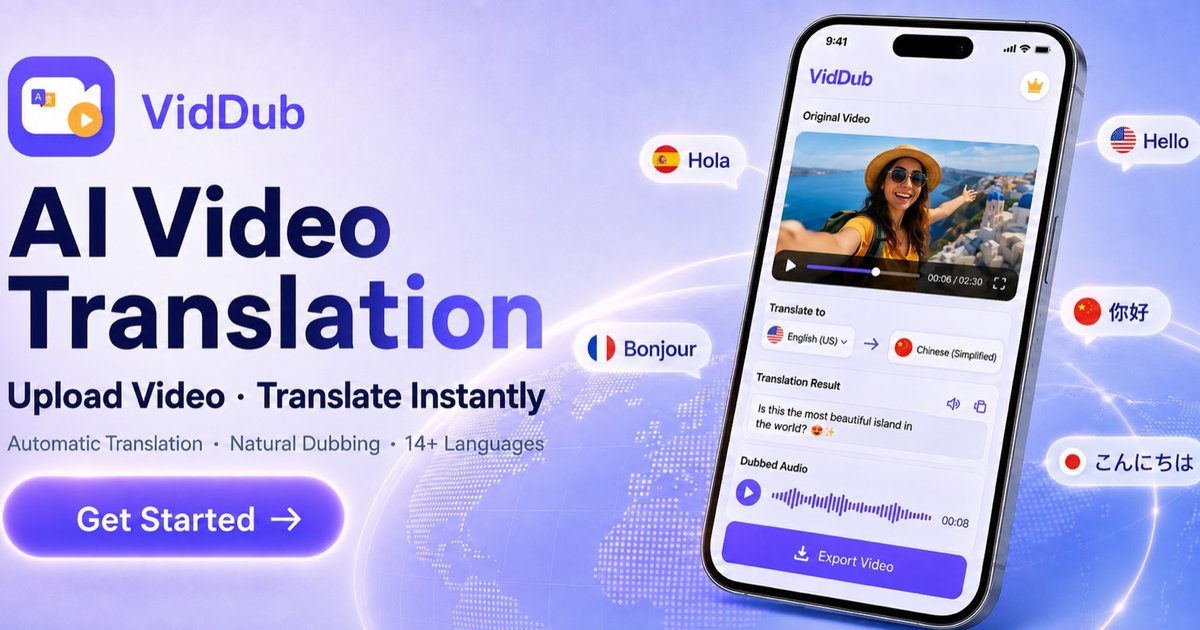
VidDub turns speech into burned-in translated subtitles (exportable) + optional AI voiceover. 17 source / 18 target. In browser.
Built by szsoftwell / Shenzhen Netsoft Information Technology Co., Ltd · Video · Freemium
Coming soon on Launch Llama Tools
VidDub is a Community listing on Launch Llama with 0 total upvotes, founded by szsoftwell / Shenzhen Netsoft Information Technology Co., Ltd who joined in Nov 2026, compared against 3 alternatives.
Community listing
Listing status
0upvotes
Community score
szsoftwell / Shenzhen Netsoft Information Technology Co., Ltd (Joined Nov 2026)
Founder
Compared against 3 alternatives
Market comparison
VidDub turns speech into burned-in translated subtitles (exportable) + optional AI voiceover. 17 source / 18 target. In browser.
About
VidDub is an AI video translation tool from szsoftwell (Shenzhen Netsoft Information Technology Co., Ltd). Upload a video (MP4, MOV, MKV, AVI, FLV or WebM, up to 2 GB), pick the source and target language, and VidDub transcribes the speech, translates it and burns synced subtitles into the video — monolingual or bilingual, with high-level style controls (position, color, size, background). Subtitle files can also be exported when you have minutes. As an optional second step you can add AI voiceover/dubbing: preview voices from the VidDub voice library, generate a track timed to the original speech, and download; you can re-dub with a different voice. Burned-in subtitles stay in the video. It supports 17 source languages and 18 target languages (Traditional Chinese is target-only), runs in any desktop or mobile browser with no install, and also has iOS and Android apps. Sign-in (Google or Apple) is required before uploading. After sign-in, eligible short videos (≤10 minutes) can complete translation as a free preview; full downloads are paid. Basic dubbing is free, with no extra charge; Premium dubbing is paid in the iOS and Android apps.
Key Features
- Transcribes speech, translates it, and burns synced subtitles into the video
- Monolingual or bilingual subtitles with style controls (position, color, size, background)
- Subtitle files can also be exported when you have minutes
- Optional AI voiceover/dubbing from the VidDub voice library, timed to original speech
- Supports 17 source and 18 target languages; runs in the browser with no install
- Also has iOS and Android apps; free preview for eligible short videos (≤10 minutes)
Use Cases
- Publishing one YouTube, TikTok, or Reels video in a viewer's language without rebuilding the edit
- Localizing product and ad videos for each market in cross-border e-commerce
- Making course lessons easier for students who speak another language to follow
From the founder
Who it's for
“Creators, teams, and anyone who needs to turn speech in a video into burned-in translated subtitles (exportable), with optional AI voiceover. It runs in the browser and also has iOS and Android apps.”
About me
“VidDub is an AI video translation tool from szsoftwell (Shenzhen Netsoft Information Technology Co., Ltd). Upload a video, pick the source and target language, and VidDub transcribes the speech, translates it and burns synced subtitles into the video — monolingual or bilingual, with style controls. Subtitle files can also be exported when you have minutes. As an optional second step you can add AI voiceover/dubbing. It supports 17 source and 18 target languages, runs in the browser with no install, and also has iOS and Android apps.”
Who it is for
- YouTubers and TikTokers publishing to viewers in other languages
- Cross-border e-commerce sellers localizing product and ad videos
- Educators and course creators translating lessons for students
Pricing
Free preview + paid full download; basic dubbing free; Premium dubbing paid in the iOS and Android apps.
FAQ
What is VidDub, and how does it translate videos?
VidDub is an AI video translation and dubbing tool. It runs in the browser at viddubapp.com and in the iOS and Android apps. After you sign in and upload a video file, VidDub transcribes the speech, translates it, and burns the translated subtitles into the video. You can add AI dubbing afterward if you need it. VidDub is not a Chrome extension. It does not clone voices or lip-sync, and it does not download videos from YouTube or TikTok. On the web, one-time minute packs start at US$3.90 for 30 minutes.
How many languages does VidDub support?
17 source languages: English, Chinese, Japanese, French, Spanish, German, Russian, Italian, Brazilian Portuguese, Thai, Vietnamese, Indonesian, Korean, Arabic, Hindi, Turkish, and Persian. Traditional Chinese is an extra target (18 targets in total).
Is my video data private?
Finished videos are stored in the cloud and deleted after about 24 hours. Copied links can expire sooner than that. Your content is not used to train third-party AI models. Details are in the privacy policy.
How much does VidDub cost?
After you sign in, one eligible video of up to 10 minutes can use a free preview of about the first third. Exporting the full translation uses credits, rounded up to the next minute: 90 seconds uses 2 minutes. One-time packs on this site start at US$3.90 for 30 minutes. See /en/pricing/.
Can I edit the subtitles?
You can change subtitle style: position, vertical offset, color, size, and single or bilingual display, with a live preview. Line-by-line script rewriting is not offered.
What devices does VidDub run on?
In the browser at viddubapp.com (Google or Sign in with Apple), on Android via Google Play, and on iOS via the App Store.
Alternatives
More in Video
New on Launch Llama
- ProxyForge
- Filevale
- NudgeScout
- Card Maker
- Shadow Card | AI Digital Business Card & Profile
- Bagofa
- VegaReview
- Hairfitai
Launched this week · This month's launches · All products A–Z
Ask AI about VidDub
For bots & AI agents
Machine-readable versions of VidDub and Launch Llama. Fetch these instead of parsing this page.
This listing (.md) llms.txt llms-full.txt ai.txt Full catalog (.md) Endpoint index API docs MCP server MCP manifest Developer docs