WiseTranscript
Under reviewFree transcripts for TikTok, Instagram and YouTube
Turn public TikTok, Instagram and YouTube video links into transcripts you can copy, download and reuse in notes or subtitle workflows.
Built by WiseTranscript · Productivity · Video · Freemium
Coming soon on Launch Llama Tools
WiseTranscript is a Community listing on Launch Llama with 0 total upvotes, founded by WiseTranscript who joined in Nov 2026, compared against 4 alternatives.
Community listing
Listing status
0upvotes
Community score
WiseTranscript (Joined Nov 2026)
Founder
Compared against 4 alternatives
Market comparison
Turn public TikTok, Instagram and YouTube video links into transcripts you can copy, download and reuse in notes or subtitle workflows.
About
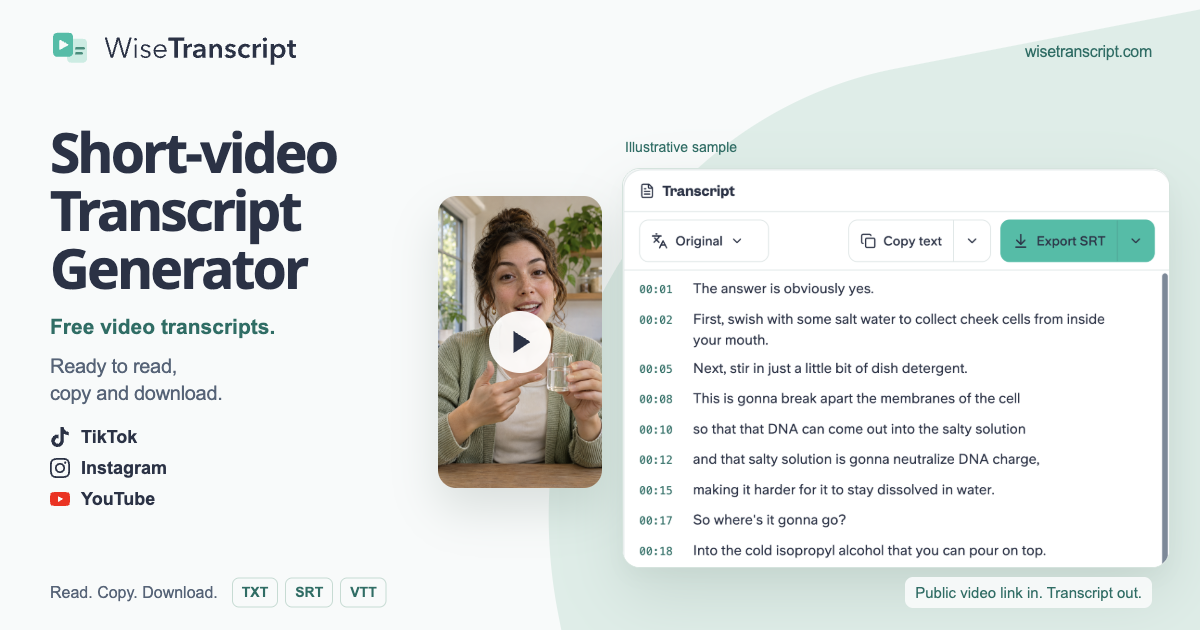
WiseTranscript is a browser-based transcription tool for public TikTok, Instagram Reels and YouTube videos. Start free by pasting a video link, then read the transcript and copy the passages you need. Download TXT for notes and drafts, or export SRT and VTT when usable timestamps are available. Signed-in users can also translate transcripts, process multiple videos and upload audio or video files. It is useful for collecting spoken quotes, studying an explanation or preparing material from your own recordings. Video availability depends on access to the public source.
Key Features
- Transcribe accessible public TikTok, Instagram and YouTube video links
- Read and copy transcript text in the browser
- Download TXT or timed SRT and VTT when usable timestamps are available
- Translate transcripts and process multiple videos when signed in
- Upload audio or video files when signed in
Use Cases
- Turn a reference TikTok into a readable transcript to study its hook, main points and closing lines before drafting your own script
- Export SRT or VTT subtitle files with timestamps for review in a compatible video editor
- Batch-transcribe several creator or campaign videos to compile spoken lines into a client brief
From the founder
Who it's for
“Creators, students and researchers who need spoken quotes, searchable notes or subtitle text from public TikTok, Instagram and YouTube videos.”
About me
“I work on WiseTranscript. The aim is to make spoken content in public videos easier to find and reuse, with readable transcripts, copying and available text or subtitle downloads in one browser workflow.”
Who it is for
- Content creators and UGC writers studying spoken hooks and explanations in reference videos
- Marketers and ad analysts reviewing what TikTok ads and product videos actually say
- Students, educators and researchers revisiting tutorials or collecting quotes from TikTok videos
Pricing
Free access available; optional paid usage.
FAQ
How do I get a transcript from a TikTok video?
Copy a public TikTok video or share link, paste it above and select Get transcript. Read the available transcript on this page, then copy the text or export an available format.
Is this TikTok transcript generator free?
Yes. You get 3 free credits each UTC day. Transcription uses 1 credit per started 5 minutes of each video. Unused daily credits expire at 00:00 UTC. Copying or downloading an available result costs no extra credits. Optional credit packs are one-time purchases, with no subscription or automatic renewal.
Can I get a TikTok transcript without signing up?
Your first successful single-video transcript of the UTC day can be viewed, copied and downloaded without signing up, within your available credits. After that, you can process another video with remaining credits, but need to sign in to unlock its full text and exports. Signing in keeps your existing daily usage; it does not add another free allowance. No TikTok login, app or browser extension is needed.
How long can a TikTok video be?
Videos can be up to 30 minutes long, and your available credits must cover the full video. If you need more credits, add a credit pack or choose a shorter video. The tool does not cut the result down to a free preview.
Does this TikTok transcript extractor work without captions?
It can. If usable captions are unavailable, WiseTranscript attempts to transcribe the video's audio. The audio must be accessible and contain usable speech. Missing visible captions alone does not mean a video cannot be transcribed.
Can it extract text shown on the screen?
The transcript covers spoken words from available captions or audio. It does not read text from video frames. Text shown only on screen and not spoken is not extracted. Photo-only carousel links are not supported.
Can I copy the TikTok transcript without downloading the video?
Yes. Paste the public video link and copy the available transcript in your browser. You do not need to download the video file first.
What format should I use for a TikTok transcript — TXT, SRT or VTT?
Use TXT for reading and notes, SRT for compatible video editors such as CapCut or Premiere, and VTT for compatible web players. SRT and VTT require usable timing. If timing is approximate or unavailable, use TXT or copy the text instead. Subtitle files are separate downloads; WiseTranscript does not burn captions into your video.
Alternatives
 Free Transcription for Audio, Video & YouTubeFor content creators: Free Transcription transcribes audio, video, and YouTube links instantly so you generate transcripts, summaries, and translations without manual work.
 BulkTranscriptsFor researchers: BulkTranscripts downloads entire YouTube channels as transcripts so you extract insights and feed content into AI tools instantly.
More in Productivity
New on Launch Llama
Launched this week · This month's launches · All products A–Z
Ask AI about WiseTranscript
For bots & AI agents
Machine-readable versions of WiseTranscript and Launch Llama. Fetch these instead of parsing this page.
This listing (.md) llms.txt llms-full.txt ai.txt Full catalog (.md) Endpoint index API docs MCP server MCP manifest Developer docs