Spectro
Under reviewFake lossless detector for Mac finds MP3s in disguise
Helps DJs and audiophiles spot MP3s renamed as lossless audio by analyzing each track's frequency content, so they stop paying for files that aren't truly lossless.
Built by Diego G. · Productivity · Audio · Freemium
Coming soon on Launch Llama Tools
Spectro is a Community listing on Launch Llama with 0 total upvotes, founded by Diego G. who joined in Nov 2026, compared against 5 alternatives.
Community listing
Listing status
0upvotes
Community score
Diego G. (Joined Nov 2026)
Founder
Compared against 5 alternatives
Market comparison
Helps DJs and audiophiles spot MP3s renamed as lossless audio by analyzing each track's frequency content, so they stop paying for files that aren't truly lossless.
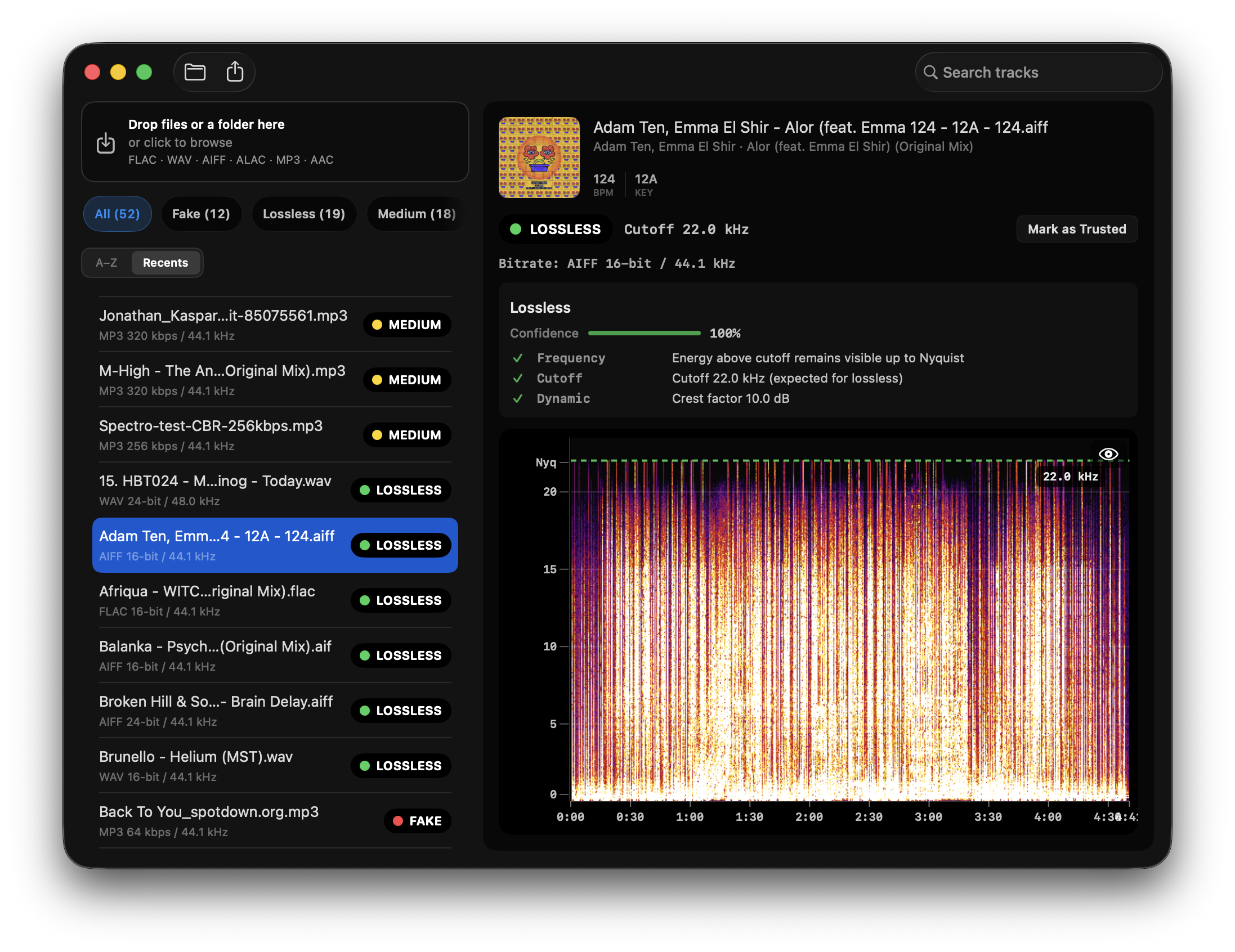
About
Spectro runs a full FFT on each file's audio rather than trusting its extension, then returns a LOSSLESS, MEDIUM or FAKE verdict with the detected cutoff frequency and a one-line diagnosis. It processes everything on the Mac with no uploads, account or internet connection, and can watch a folder so new downloads are checked automatically. Results can be written to Finder as color tags, so problem files stand out the next time you open a folder.
Key Features
- Scans WAV, AIFF, FLAC, ALAC, Ogg Vorbis and Opus locally, checking the audio itself
- Assigns LOSSLESS, MEDIUM or FAKE verdicts with cutoff frequency for each track
- Batch-scans whole folders and exports spectrogram PNGs for multiple results at once
- Writes Finder color tags so problem files are marked red in their folders
- Watches chosen folders and analyzes newly added tracks automatically
- Imports Rekordbox XML and M3U/M3U8 playlists without re-importing your library
Use Cases
- Checking a newly bought DJ pool or Bandcamp download before loading it into a set
- Auditing a large FLAC or WAV library to find upscaled MP3s and move them to Trash
- Scanning a Rekordbox or M3U playlist to flag suspect tracks before replacing them
From the founder
Who it's for
“Spectro is built for DJ, music producers, audiophiles, and music collectors who want to verify the real quality of their audio files. It’s specially useful for anyone working with FLAC, WAV and AIFF who wants to detect fake lossless audio.”
Why I built it
“Im a software engineer and DJ based in Barcelona with passion for electronic music and building useful tools. I built Spectro because as a DJ I wanted a simple and reliable way to verify the actual quality of my music files.”
Who it is for
- DJs maintaining pool, promo and Bandcamp music libraries on macOS
- Audiophiles who buy hi-res and lossless albums and want proof of quality
Pricing
$24,99
FAQ
What is fake lossless audio?
Fake lossless audio is audio that is stored in a lossless container such as WAV, AIFF, or FLAC but was originally created from a lossy source like MP3 or AAC. Converting lossy audio to a lossless format does not recover removed frequencies. It only changes packaging and file size. DJ software, Rekordbox, Serato, and Traktor treat these files as normal lossless tracks because they read the container, not the spectral history of the audio. Fake lossless often enters libraries through store delivery mistakes, label uploads, promo pools, re-encoding workflows, or file sharing. At club volume on a professional PA, the missing high-frequency content can sound dull or smeared compared with a genuine lossless master. The reliable check is spectral analysis: genuine lossless audio usually shows energy approaching the Nyquist limit near 22 kHz for 44.1 kHz files, while fake lossless shows a flat wall where the lossy encoder stopped.
Can I import my Rekordbox library directly into Spectro?
Yes. Spectro supports Rekordbox XML import directly. Go to File → Import from Rekordbox and select your Rekordbox XML export file. Spectro loads your full collection automatically. No drag and drop required.
Does Spectro support ALAC files?
Yes. Spectro 1.3 added full ALAC support. Apple Lossless files (.m4a) are analyzed the same way as WAV and FLAC. Spectral content determines the verdict, not the container.
Is Spectro private and offline?
Yes. Spectro analyzes audio fully on your Mac. Files are not uploaded to a server for scanning, and analysis does not require an internet connection. That matters for unreleased promos, label exclusives, and large local libraries you do not want to send to a browser-based checker. Spectro is a native macOS app with a 100-track free trial and a one-time lifetime license after the trial. Personal $24.99 (1 Mac) or Duo $39 (2 Macs), same features. License activation uses Lemon Squeezy online validation on a schedule, but the audio analysis workflow itself stays on-device. Optional product analytics may be enabled in newer releases, yet the core fake-lossless scan remains local. For privacy-sensitive DJ workflows, offline batch folder scanning is the primary use case: drag in a download folder, get LOSSLESS, FAKE, or MEDIUM results per file, tag suspicious tracks in Finder, and export CSV summaries without exposing your library to a third-party upload service.
How does the free trial work?
Spectro is free for your first 100 tracks. No time limit, no account required.
Can I export my scan results to CSV?
Yes. Use File → Export CSV to save your full batch results with verdict, format, bitrate, cutoff frequency, and confidence score for every track.
Can I export multiple spectrograms at once?
Yes. Spectro supports PNG export for individual spectrograms and bulk export for a batch of analyzed tracks.
Alternatives
More in Productivity
New on Launch Llama
- Hit the Road Dude AI
- Piknova
- Second Read
- CADCraft
- Swimming Pool Volume Calculator
- launch.cab
- PickAI
- DocRedactNow
Launched this week · This month's launches · All products A–Z
Ask AI about Spectro
Third-party sources
- The complexity of vibe coded apps (and why the dismissal is lazy)
Hacker News · May 6, 2026 · 3 points
- Spectro – macOS app to detect fake lossless audio files (FFT spectral analysis)
Hacker News · April 30, 2026 · 1 point
- Spectro – macOS app to detect fake lossless audio files
Hacker News · April 24, 2026 · 4 points
For bots & AI agents
Machine-readable versions of Spectro and Launch Llama. Fetch these instead of parsing this page.
This listing (.md) llms.txt llms-full.txt ai.txt Full catalog (.md) Endpoint index API docs MCP server MCP manifest Developer docs