
Snopiee
Under reviewSearch all your ChatGPT, Claude, Gemini and Grok chats
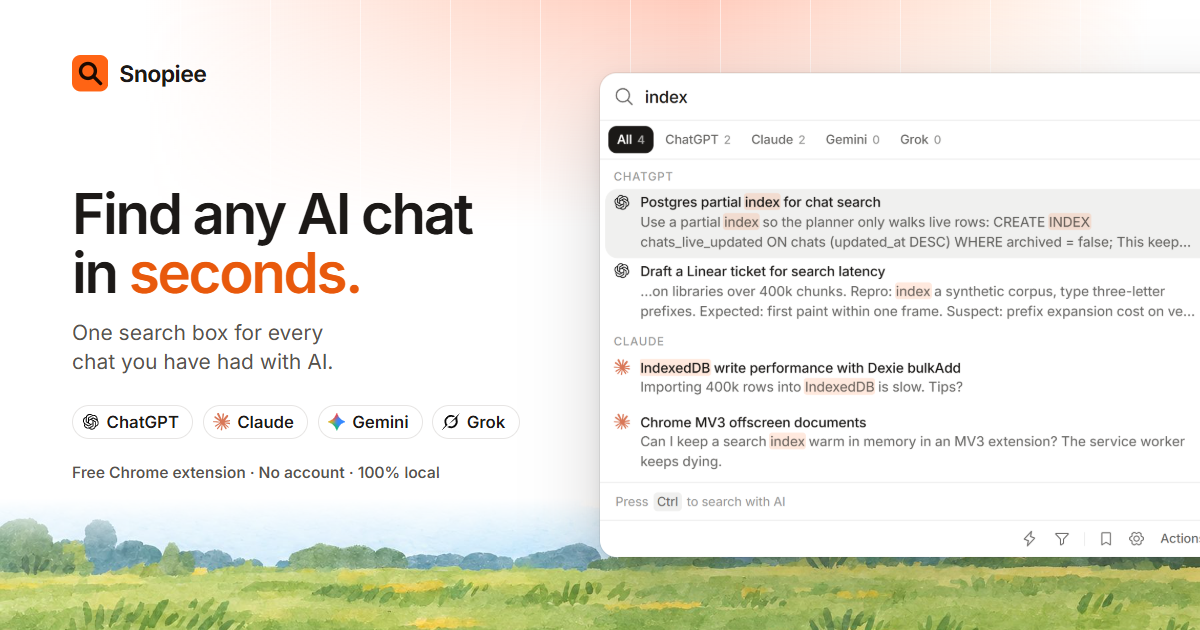
Helps founders, developers, writers and researchers find, reuse and export past ChatGPT, Claude, Gemini and Grok conversations from one fast local search box.
Built by Sai Charan Jogu · Productivity · Chrome Extensions · Free
Coming soon on Launch Llama Tools
Snopiee is a Community listing on Launch Llama with 0 total upvotes, founded by Sai Charan Jogu who joined in Nov 2026, compared against 5 alternatives.
Community listing
Listing status
0upvotes
Community score
Sai Charan Jogu (Joined Nov 2026)
Founder
Compared against 5 alternatives
Market comparison
Helps founders, developers, writers and researchers find, reuse and export past ChatGPT, Claude, Gemini and Grok conversations from one fast local search box.
About
Snopiee installs as a free Chrome extension and reads your existing chats from tabs where you are already signed in, opening any closed AI site in a background tab and closing only the tabs it opened itself. Pressing Space twice in any tab opens search on top of the page, and results come from plain word matching with ranking rather than a language model. The search index stays on your computer, there is no account or tracking, and a Settings button removes all Snopiee data.
Follow Snopiee: X (Twitter)
Key Features
- Searches the words inside every ChatGPT, Claude, Gemini and Grok chat, not just titles
- Opens search with a double Space press and jumps straight to the matching chat
- Exports one chat, a folder, a whole site or everything as a clean document
- Saves reusable prompts and inserts them into any AI with a # shortcut
- Attaches skills to chats so the AI answers like an expert without long setup prompts
- Mentions earlier chats by name to pull their context into a new message
Use Cases
- Finding a decision or idea buried in an AI chat from weeks ago, across several AI sites at once
- Exporting a research or client chat into a document you can keep, share or archive
- Pulling context from an earlier chat into a new conversation by mentioning it by name
From the founder
Who it's for
“People who use ChatGPT, Claude, Gemini or Grok every day and lose good answers because each site only searches itself.”
Why I built it
“I'm Sai, an indie hacker in Hyderabad. I kept losing answers across ChatGPT and Claude, so I built one search box for all of them that runs on my computer.”
Who it is for
- Heavy AI users who use more than one AI site or keep more than about 50 chats
- Founders, developers, writers, researchers, consultants and students
Pricing
Snopiee is free to use. See the website for details.
FAQ
Does Snopiee send my chats anywhere?
No. Snopiee has no server and sends nothing anywhere. Your chats are read from tabs where you're already signed in, and the search copy stays on this computer.
Does it use AI to read my chats?
No. Search is plain word matching with ranking. No language model ever reads your chats.
Which AI sites does it work with?
ChatGPT, Claude, Gemini and Grok. You can turn any of them off in Settings.
Do I need an account?
No. Install it, press Start, and you're done. No sign-up, no email.
Why does it open tabs on its own?
If a site isn't open, Snopiee opens it in a background tab to read your chats quietly. It closes only the tabs it opened.
Which browsers does it work in?
Chrome, Edge, Brave, Opera, Helium and any other Chromium-based browser. You can get it from the Chrome Web Store.
Alternatives
 NavVaultFor AI power users: Search, organize, and export conversations across ChatGPT, Claude, Gemini, and Grok from one sidebar.
More in Productivity
New on Launch Llama
- ADHD+ Routine Planner & Alarm
- ThumbBlitz
- Promptifi
- LaunchShelf
- EachAPI
- ScaleUs
- AI Lead Qualifier
- ProductPost 360
Launched this week · This month's launches · All products A–Z
Ask AI about Snopiee
For bots & AI agents
Machine-readable versions of Snopiee and Launch Llama. Fetch these instead of parsing this page.
This listing (.md) llms.txt llms-full.txt ai.txt Full catalog (.md) Endpoint index API docs MCP server MCP manifest Developer docs