Resurf
Personal Knowledge Base & Bookmark Manager for Mac
Resurf is a Product Hunt listing on Launch Llama with 179 total upvotes, compared against 5 alternatives.
Product Hunt listing
Listing status
179upvotes
Community score
—
Founder
Compared against 5 alternatives
Market comparison
Launched on Launch Llama Nov 23, 2026 · #2 of 107 that day
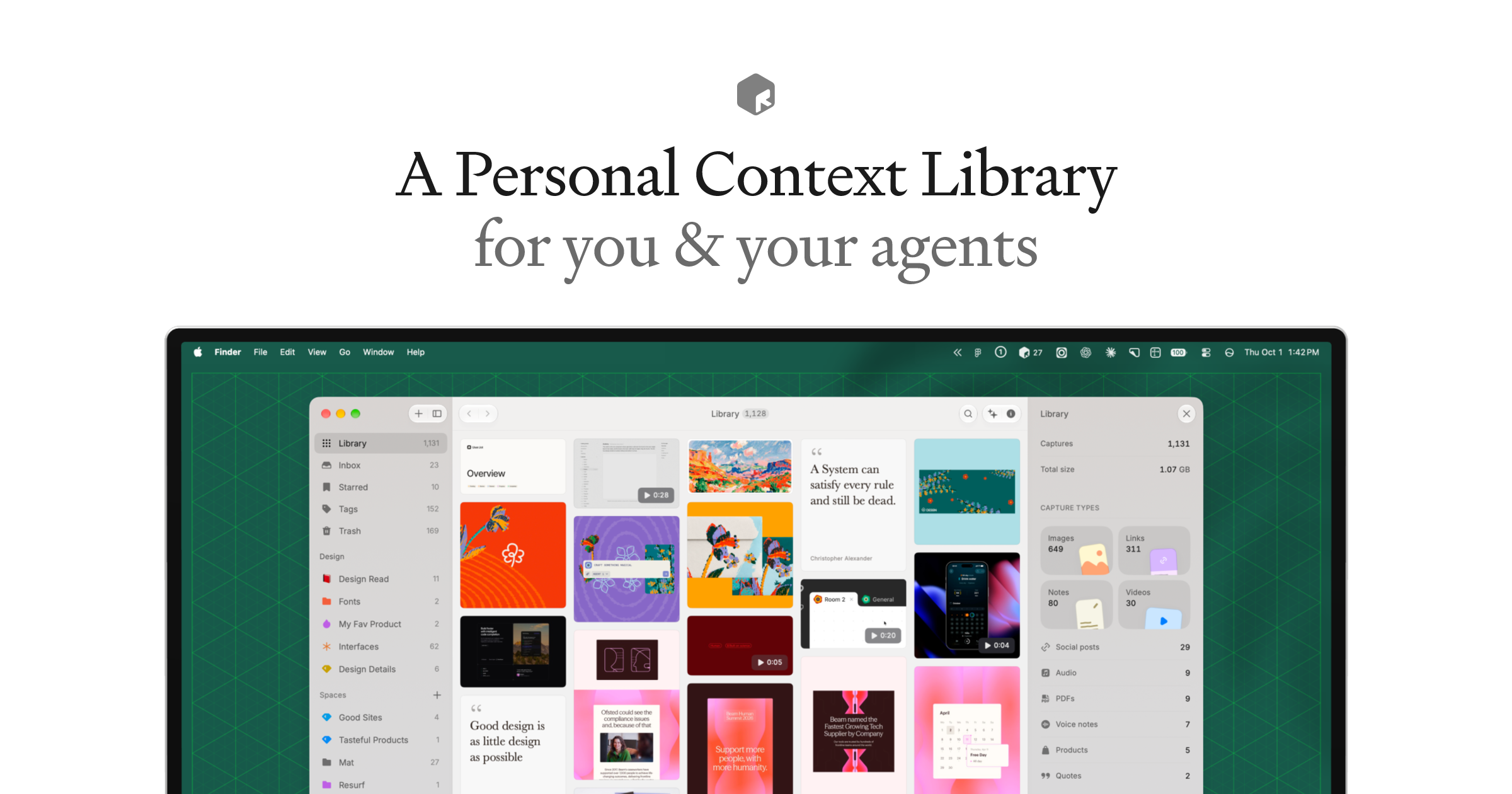
About
Resurf is a personal context app for things you like, care about, and work on. Save notes, links, images, PDFs, and ideas. Find them later or hand that context to AI through MCP and CLI. Native on Mac, iPhone, and iPad, with local storage and private iCloud sync.
Follow Resurf: X (Twitter)
Launch Llama's Take
Based on Launch Llama data as of
Resurf has 179 upvotes, including the votes it received on Product Hunt. It has been listed on Launch Llama since November 2026. No Launch Llama members have upvoted it yet and it has no reviews yet.
Resurf vs Snaggy
Resurf is a personal context app for saving notes, links, images, PDFs, and ideas, while Snaggy centers on keeping one searchable library of links from Mac browsers. Both Resurf and Snaggy let AI tools work with saved material over MCP, with Resurf offering it through MCP and CLI and Snaggy through a built-in MCP server.
| Resurf | Snaggy | Rebrief | Supaste | |
|---|---|---|---|---|
| What it does | Personal Knowledge Base & Bookmark Manager for Mac | Bookmark app for Mac that saves any webpage fast | For researchers and readers: Rebrief turns your X bookmarks into weekly briefings processed locally so you extract insights without cloud… | For Mac users: Supaste saves your clipboard history of text, links, images, and code in a searchable timeline so you find what you copied… |
| Pricing | Not stated | Paid | Freemium | Freemium |
| Free plan | Not stated | No free plan listed | Yes, free plan | Yes, free plan |
| Category | Knowledge base software | Social bookmarking | Productivity | Mac |
| Upvotes on Launch Llama | 179 | 7 | 2 | 302 |
| Listed on Launch Llama | November 2026 | November 2026 | July 2026 | June 2026 |
Key Features
- Saves notes, bookmarks, screenshots, and PDFs in one library
- Searches saved content offline on your devices
- Captures links and notes from Mac, Chrome, and iPhone
- Lets Claude, Cursor, or Codex search and read the library over MCP
- Highlights articles and annotates PDFs beside the source
Use Cases
- Saving articles, notes, and screenshots from Mac, Chrome, and iPhone into one local library to search later by words or meaning
- Gathering visual references and inspiration, such as typography or gradient examples, and reusing them in a design or writing task
- Giving AI agents like Claude, Cursor, or Codex access to your saved research over MCP so they can search and draft from it
Who it is for
- Researchers and writers who collect articles, PDFs, and notes for ongoing projects
- Designers gathering visual references and inspiration for their work
- Mac, iPhone, and iPad users who want a private, offline personal knowledge base
Pricing
Download the Mac app with a 7-day free trial, then buy a license for $39. The app is free on iPhone and iPad.
FAQ
Is either license a subscription?
No. Both are one-time purchases for the Mac app. Your license never expires, and nothing renews automatically. Resurf on iPhone and iPad is free.
What happens when my 7-day trial ends?
Nothing is deleted, ever. Your library stays open: you can browse, search and export everything, and sync keeps running. A license lets you keep adding captures and spaces.
Which license should I choose?
Both unlock the same app and work on up to 2 Macs. Standard costs less and includes 2 years of updates. Lifetime includes every future update, so there is nothing to renew.
Will Standard stop working after two years?
No. You keep using the version you have without paying again. If you want new updates, an optional $29 renewal adds another 2 years. Renew whenever you like; the new window starts the day you renew.
Does a license include AI usage?
Optional AI features use your own OpenAI key, billed by your provider. You can save, organize, and search your whole library without an AI account.
How do I get my license?
Your license key arrives by email right after checkout, and it's shown on the confirmation page too.
How many Macs can I use?
Up to 2 Macs per license, for one person. Switching machines? Deactivate one and activate the other.
Can I get a refund?
Yes, within 14 days of purchase, no questions asked. Email [email protected].
Is there a student discount?
Yes. Email [email protected] from your school or institution address and we'll send you a discount.
Alternatives
 SnaggyLets Mac users who juggle Safari, Chrome and Arc keep one searchable library of links, sorted automatically by on-device AI, without hand-filing every bookmark.
 RebriefFor researchers and readers: Rebrief turns your X bookmarks into weekly briefings processed locally so you extract insights without cloud storage or accounts.
New on Launch Llama
- Calorie API
- UncensoredLabs
- Audio to Text
- AI Rap Video Generator
- Playable Notes
- Fighter Ready
- LuriaLab
- WAV AI
Launched this week · This month's launches · All products A–Z
Launch Llama stats
- 1HN mention
Featured in
Ask AI about Resurf
Third-party sources
- Show HN: Resurf – a local-first quick capture and personal library for Mac
Hacker News · January 25, 2026 · 2 points
For bots & AI agents
Machine-readable versions of Resurf and Launch Llama. Fetch these instead of parsing this page.
This listing (.md) llms.txt llms-full.txt ai.txt Full catalog (.md) Endpoint index API docs MCP server MCP manifest Developer docs