Proloca
For traders: Proloca logs your trades with psychology notes so you spot decision patterns and improve execution daily.
Built by Masum Ayanoglu · Freemium
Proloca is a Community listing on Launch Llama with 46 total upvotes, founded by Masum Ayanoglu who joined in Aug 2026, compared against 6 alternatives.
Community listing
Listing status
46upvotes
Community score
Masum Ayanoglu (Joined Aug 2026)
Founder
Compared against 6 alternatives
Market comparison
Launched on Launch Llama Aug 17, 2026 · #25 of 122 that day
About
Proloca is an iPhone trading journal for traders who want a clearer view of their decisions, habits, and results. Record trades quickly, review your sessions visually, and carry one useful lesson into the next trading day.
Log the details that make a trade worth reviewing, including market, direction, size, entry and exit information, fees, notes, screenshots, execution quality, and psychology. A visual P&L calendar helps you see green days, red days, streaks, goal progress, and recurring patterns without relying on memory.
Go beyond profit and loss. Compare performance by market, session, direction, size, emotion, discipline, and other factors, then inspect the contributing trades behind each result. Proloca turns recorded information into a review system that helps you understand what to repeat, what to stop, and what deserves a closer look.
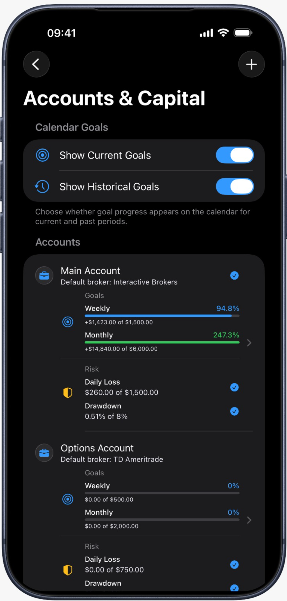
Keep capital in context with separate Trading Accounts for personal capital, funded challenges, prop-firm stages, or other capital pools. Set a Starting Balance, record deposits, withdrawals, payouts, resets, and corrections as Cash Adjustments, and keep those movements separate from Trading P&L. Review Calculated Equity, Trading Return, and Trading Drawdown with the account context attached.
Set weekly or monthly Profit Goals as fixed amounts or percentages. Monitor Daily Loss and Maximum Drawdown limits for each account, and use All Accounts review to understand aggregate active-account performance without losing the connection to the real account behind each trade.
Build a review habit that fits around the trading day. Capture a trade while the context is fresh, add a note or screenshot when it matters, and return later to inspect the pattern across a week or month. Proloca supports stocks, options, futures, forex, crypto, and other markets, so your journal can follow the way you actually trade.
Use the app to ask better process questions: Did a certain session improve execution? Which emotions appeared before avoidable losses? Are goals and risk limits attached to the right account? Which trades contributed to a drawdown? The answers come from the records you create, giving your next review a concrete starting point.
Proloca works alongside your broker and does not place trades, connect to brokerage accounts, provide signals, or promise results. Use manual entry or CSV workflows to keep your journal portable. Your records stay under your control with on-device storage, optional private iCloud or CloudKit
Competitors: TraderSync, Edgewonk, Trademetria, DayTradeToWin, TradeBrains
Key Features
- Log trade details including market, direction, size, entry/exit, fees, and psychology notes for pattern analysis
- Review trading sessions visually with P&L calendar to identify green days, red days, streaks, and recurring patterns
- Compare performance across markets, sessions, direction, size, and emotional factors to spot what works and what doesn't
- Manage multiple trading accounts separately for personal capital, funded challenges, prop-firm stages, and other capital pools
- Track capital movements with cash adjustments for deposits, withdrawals, payouts, and resets distinct from trading P&L
- Set profit goals and monitor daily loss and maximum drawdown limits to maintain risk parameters across accounts
Use Cases
- Log trades with execution quality and psychology notes via iPhone to build a decision journal and identify behavioral patterns affecting performance
- Review trades visually in P&L calendar to spot green/red streaks and goal progress, then drill into trades to understand what to repeat or stop
- Compare performance across markets, session types, direction, size, and emotion to isolate conditions and decisions driving best and worst results
- Manage multiple capital pools separately with distinct starting balances and cash adjustments to keep returns in proper context
- Set weekly/monthly profit goals and daily loss/drawdown limits per account, then review aggregate performance across all active accounts
Who it is for
- Active retail traders who want to review their own trading performance and execution habits.
- Traders who use a broker and want a separate journal for logging trades and reviewing psychology alongside results.
- Traders focused on risk management who want daily loss and drawdown limits kept visible during review.
Pricing
Proloca is free to download on the App Store.
FAQ
Is Proloca a broker or trading platform?
No. Proloca is a trading journal and review app. It does not place trades, provide market access, connect to a brokerage account or offer trade signals.
Does Proloca automatically import trades from my broker?
No live broker sync is available. You can log trades manually, import a Proloca CSV, or map the date, symbol and P&L columns from a generic CSV.
Which markets can I journal?
Proloca supports stocks, options, futures, forex, crypto and an Other category. You can filter calendar and statistics views by market.
What can I use for free?
Proloca is free to download and includes core trade journaling. Journal completes your manual trading record. Pro adds analysis, capital, goals, risk, and automation.
How much does Proloca Pro cost?
Journal completes your manual trading record. Pro adds analysis, capital, goals, risk, and automation. Apple shows the current local price and any eligible introductory offer before you subscribe.
Can Proloca guarantee that I will become profitable?
No. Proloca is a review tool, not financial advice or a prediction service. It helps you examine recorded trades, risk and behavior so you can make more informed process decisions.
Where is my trading journal stored?
Journal records are stored on your device and sync through private iCloud/CloudKit when available. If iCloud is unavailable, the app continues to store data on your device.
Can I protect, export or delete my data?
Yes. Proloca supports optional Face ID or Touch ID access protection, CSV export and granular deletion controls. Synced deletion affects connected devices when iCloud sync is active.
Is Proloca available on Android or the web?
The functional app is currently designed for iPhone. The website explains the product and provides support; it is not a web trading journal.
Alternatives
 StonkJournalFor active traders: StonkJournal logs your trades instantly and uses AI coaching to analyze your PnL so you refine strategies faster.
 ForexLog - Forex Trading JournalFor forex traders: ForexLog tracks trades with pattern analysis and performance insights, helping you identify winning conditions and improve profitability.
 WealthBeeFor options traders: WealthBee tracks multi-leg positions and strategy performance with auto-synced broker data so you analyze wins and refine your trading approach.
New on Launch Llama
Launched this week · This month's launches · All products A–Z
Ask AI about Proloca
Supporters
12 founders
12 founders supported Proloca on Launch Llama.





For bots & AI agents
Machine-readable versions of Proloca and Launch Llama. Fetch these instead of parsing this page.
This listing (.md) llms.txt llms-full.txt ai.txt Full catalog (.md) Endpoint index API docs MCP server MCP manifest Developer docs