
Coming soon on Launch Llama Tools
Orfeo Piano is a Community listing on Launch Llama with 0 total upvotes, founded by SquareBow who joined in Nov 2026, compared against 6 alternatives.
Community listing
Listing status
0upvotes
Community score
SquareBow (Joined Nov 2026)
Founder
Compared against 6 alternatives
Market comparison
Desktop app for self-taught pianists that detects chords as you play and slows down or loops any MIDI file, so you can practice at your own pace on Windows, Mac and Linux.
About
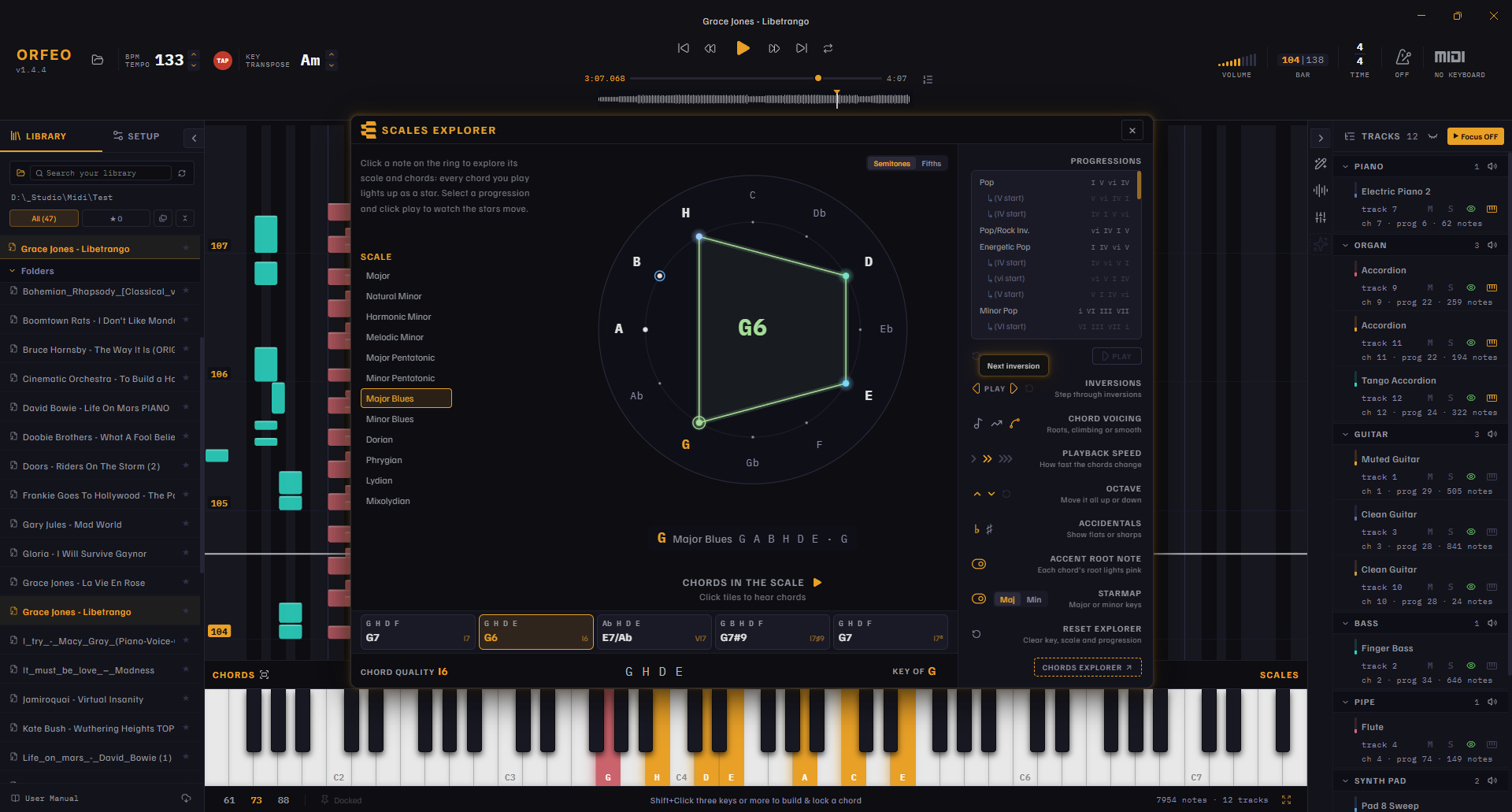
Orfeo helps you turn any song you have into a proper piano lesson you can see, hear, and play. Follow falling piano notes, understand the chords displayed live, slow down tricky passages, and practise at your own pace. It loads MIDI files and plays them back as a stream of notes scrolling toward the keyboard, so you can follow along as each key approaches. Live chord detection names the chords you are playing in real time, and slow-down and loop controls let you isolate and repeat difficult passages.
It was built for casual, enthusiastic adult beginners learning songs from their own MIDI collection, for hobbyist jazz pianists studying harmony and learning progressions by ear, for home producers and musicians cleaning up MIDI arrangements before practising or reusing them, for returning piano players who want independent, self-paced practice without subscriptions, and for piano tutors, professionals, and piano teachers looking for a visual teaching aid for lessons, music theory, and independent student practice.
Download it from the official site.
It is free, open-source software available for Windows, Mac and Linux.
Competitors: Synthesia
Key Features
- Shows notes scrolling toward the keyboard to guide you through any MIDI file
- Detects and names chords live as you play
- Slows down playback so you can learn difficult passages at a comfortable tempo
- Loops selected sections of a MIDI file for focused repetition
- Runs as free, open-source software on Windows, Mac and Linux
Use Cases
- Practicing a difficult passage by looping and slowing down a section of a MIDI file
- Learning a new song by following the scrolling notes while the app detects the chords you play
From the founder
Who it's for
“Orfeo is a free, open-source, cross-platform desktop app that helps you turn any MIDI file into a piano lesson you can see, hear, and play. Follow falling piano notes, understand chords displayed live, slow down tricky passages, and practice at your own pace. It was built for casual, enthusiastic adult beginners, learning songs from their MIDI collection, and for piano tutors, professionals, and piano teachers looking for a visual teaching aid for lessons, music theory, and independent student pratice.”
About me
“I built Orfeo out of frustration that I had to use five different apps to do one job without using a DAW. The idea was simple: find a MIDI file, load it, dissect every note, and learn the song by looking at it on the keyboard, at your own tempo. When nothing came close, I decided to build Orfeo. It is a spiritual to Rondo, a tiny little app for Mac that existed long before Synthesia became a word. it rests on one belief: with the right tool, every MIDI file is a piano lesson.”
Who it is for
- Self-taught pianists practicing from MIDI files on Windows, Mac or Linux
Pricing
Orfeo Piano is free to use. See the website for details.
FAQ
What is Orfeo Piano?
Desktop app for self-taught pianists that detects chords as you play and slows down or loops any MIDI file, so you can practice at your own pace on Windows, Mac and Linux.
How does Orfeo Piano work?
Orfeo helps you turn any song you have into a proper piano lesson you can see, hear, and play. Follow falling piano notes, understand the chords displayed live, slow down tricky passages, and practise at your own pace. It loads MIDI files and plays them back as a stream of notes scrolling toward the keyboard, so you can follow along as each key approaches.
Who is Orfeo Piano for?
Orfeo Piano is designed for a range of users, including: • Self-taught pianists practicing from MIDI files on Windows, Mac or Linux
What can you do with Orfeo Piano?
With Orfeo Piano you can: • Practicing a difficult passage by looping and slowing down a section of a MIDI file. • Learning a new song by following the scrolling notes while the app detects the chords you play.
Is Orfeo Piano free?
Yes. Orfeo Piano is free to use. See the website for details.
What are the best Orfeo Piano alternatives?
Orfeo Piano positions itself as an alternative to Synthesia. In its own words: "Desktop app for self-taught pianists that detects chords as you play and slows down or loops any MIDI file, so you can practice at your own pace on Windows, Mac and Linux."
Alternatives
More in Audio
New on Launch Llama
- VegaReview
- Hairfitai
- CupidWish
- Architecture Client Intake Kit
- Todowing
- IA Photo by Pixfan
- m.ai.ne
- AI Rap Video.cc
Launched this week · This month's launches · All products A–Z
Ask AI about Orfeo Piano
For bots & AI agents
Machine-readable versions of Orfeo Piano and Launch Llama. Fetch these instead of parsing this page.
This listing (.md) llms.txt llms-full.txt ai.txt Full catalog (.md) Endpoint index API docs MCP server MCP manifest Developer docs