OffCode Web remote control system
For IT teams: OffCode Web remote control system manages Windows devices from any browser with AES-256 encryption, real-time monitoring, and zero-configuration deployment.
Built by Off Crypt · Productivity · Developer Tools · Free
In category: #711 of 1429 · Productivity
OffCode Web remote control system is an Instant Launch listing on Launch Llama with 13 total upvotes, founded by Off Crypt who joined in May 2026, compared against 5 alternatives.
Instant Launch listing
Listing status
13upvotes
Community score
Off Crypt (Joined May 2026)
Founder
Compared against 5 alternatives
Market comparison
Launched on Launch Llama May 14, 2026 · #16 of 38 that day
About
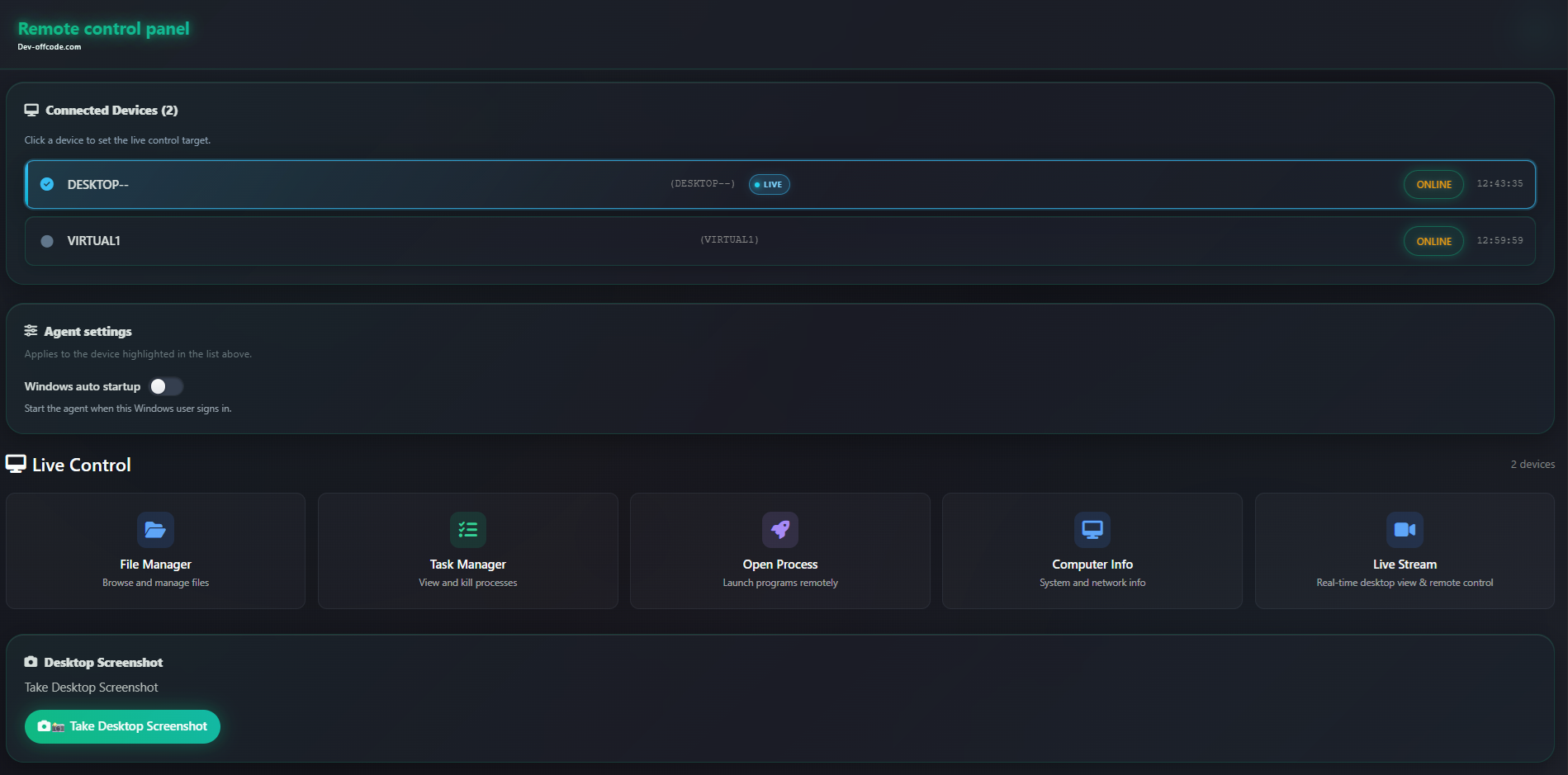
The Web Remote Control System is a high-performance, completely free, and self-hosted platform that lets you manage Windows devices directly from any web browser. Combining a lightweight Windows Agent with a Blazor-based control panel, you can monitor and control remote computers in real time without being physically present.
AES-256 GCM Encryption: The system is built with security as its absolute foundation. All sensitive payloads and communication between the Agent and the Backend are encrypted end-to-end using AES-256 GCM. This guarantees that even if your connection is intercepted using packet sniffers like Wireshark, the data remains completely unreadable and protected. A dedicated Server Manager tool securely generates cryptographic Master Keys and directly embeds them into the Agent executables, ensuring zero-configuration deployment without compromising security.
Live Stream & Interactive Control: Experience a high-performance, real-time visual feed of the remote desktop directly inside your web browser. Send precision mouse clicks, inputs, and movements instantly to the target device via an optimized SignalR connection, granting you seamless, interactive control as if you were sitting right in front of the monitor.
Follow OffCode Web remote control system: X (Twitter)
Use Cases
- Live-stream a Windows desktop in the browser and send mouse and keyboard input to troubleshoot a remote machine
- Move files to and from a remote Windows device, open a remote terminal, and manage its processes from any browser
- Block unwanted applications on managed Windows devices and remotely uninstall software during maintenance windows
Who it is for
- IT teams managing Windows devices they administer
- Self-hosting administrators who want to run their own remote Windows management backend
Pricing
OffCode Web remote control system is free to use. See the website for details.
OffCode Web remote control system at a glance
- 01What it is
- OffCode Web remote control system: For IT teams: OffCode Web remote control system manages Windows devices from any browser with AES-256 encryption, real-time monitoring, and zero-configuration deployment.
- 02Pricing
- OffCode Web remote control system pricing: Free.
- 03Best for
- OffCode Web remote control system is best for iT teams managing Windows devices they administer and self-hosting administrators who want to run their own remote Windows management backend.
- 04Alternatives
- Top OffCode Web remote control system alternatives on Launch Llama: Antigravity Remote Control, IcyZip and ChatView.
FAQ
What is Web Remote Control System?
Web Remote Control System is a self-hosted, web-based remote control for Windows. From the browser you get a live desktop stream, mouse and keyboard input, process management, streaming file transfer, remote terminal, and an optional Dashboard lock password on the control panel.
Does it work remotely over the internet?
The system uses ASP.NET Core backend with SignalR for real-time communication. A lightweight Windows agent runs on the target device to execute commands. The connection is established through the web interface.
Can I view and control the remote screen?
Yes, the Live Stream feature provides a real-time feed of the remote desktop directly to your web browser. You can interact with the machine by sending mouse clicks and inputs instantly over a highly optimized SignalR connection.
Can I transfer files securely?
Yes! The system includes a high-performance streaming file manager. You can browse directories, and reliably upload or download massive files without hitting memory limits. Progress is displayed in real time.
What technologies does it use?
The system stack includes ASP.NET Core (API + SignalR) for backend, Blazor Server for the web UI, SQLite via EF Core for storage, and a Windows agent (C#/.NET) that executes commands on the target device.
Is the connection secure against packet sniffing?
Absolutely. The system implements AES-256 GCM encryption for all sensitive data transfers. Even if traffic is intercepted by tools like Wireshark, the data is completely unreadable. A Server Manager securely generates and embeds the Master Keys directly into the Agent stub.
Alternatives
 IcyZipFor remote workers: IcyZip pairs browsers with QR codes so you transfer files and text between devices instantly without apps or accounts.
More in Productivity
New on Launch Llama
Launched this week · This month's launches · All products A–Z
Ask AI about OffCode Web remote control system
Supporters
1 founder
1 founder supported OffCode Web remote control system on Launch Llama.
Reviews
1 comment
@launch Llama I’ve always been interested in remote management software and how it works. I started this project mainly because I need a convenient way to remotely manage my VPS server directly through a website, especially from my phone. That’s why I decided to build this web-based remote management system.
For bots & AI agents
Machine-readable versions of OffCode Web remote control system and Launch Llama. Fetch these instead of parsing this page.
This listing (.md) llms.txt llms-full.txt ai.txt Full catalog (.md) Endpoint index API docs MCP server MCP manifest Developer docs