kovvid ai
For creators: Kovvid AI generates high-quality images and videos from text, comparing Sora, Veo, Kling, and other models side-by-side.
Built by linmo · Artificial Intelligence · Freemium
In category: #1123 of 2051 · Artificial Intelligence
kovvid ai is a Community listing on Launch Llama with 10 total upvotes, founded by linmo who joined in May 2026, compared against 5 alternatives.
Community listing
Listing status
10upvotes
Community score
linmo (Joined May 2026)
Founder
Compared against 5 alternatives
Market comparison
Launched on Launch Llama May 11, 2026 · #14 of 26 that day
About
hello大家好,今天给大家推荐一款我本人自研的产品——Kovid AI
访问链接:https://kovvid.com
tpis:我给新用户提供了免费试用的积分,不好用不收费!
描述:
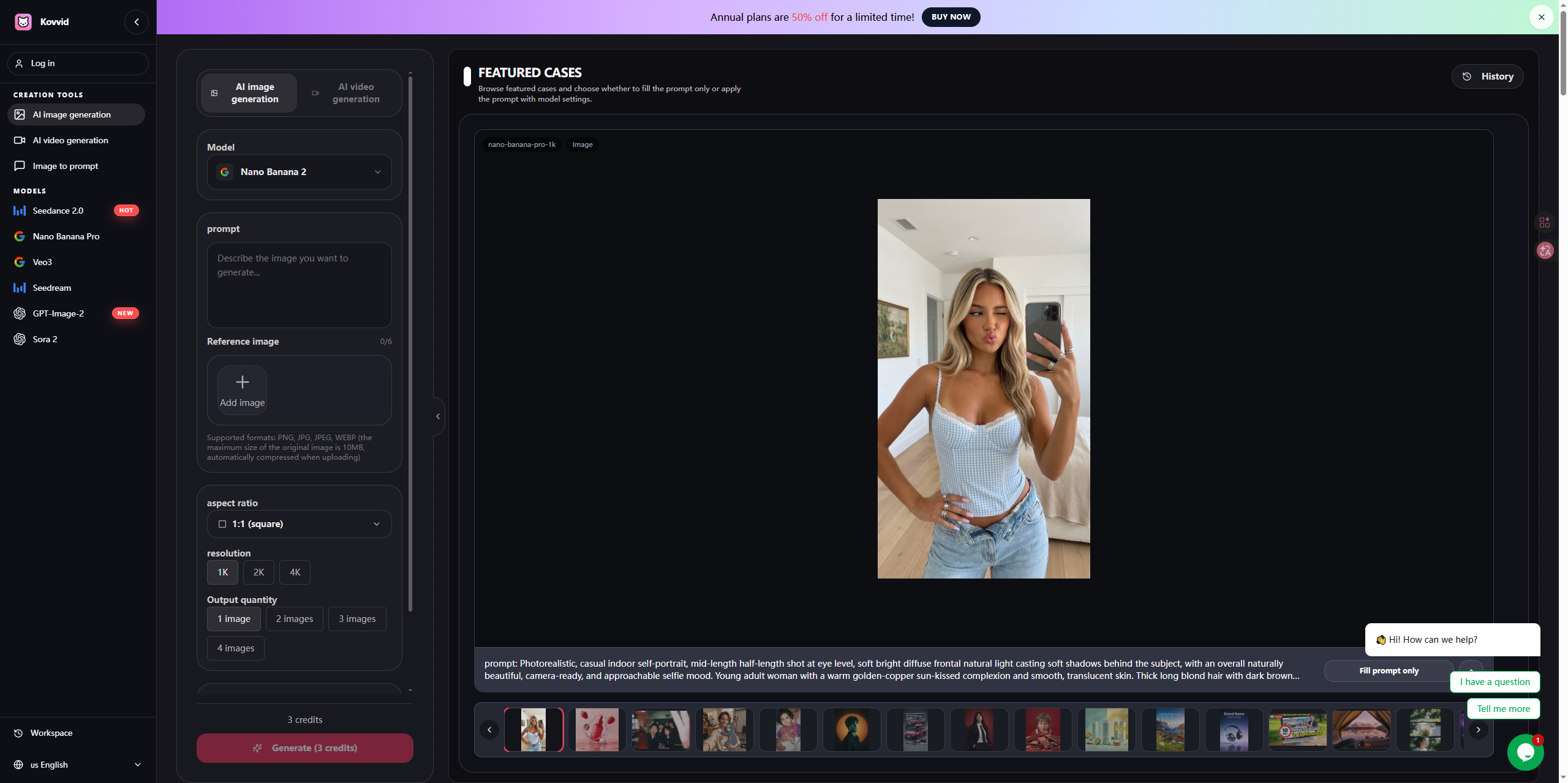
Kovvid AI 是一款生成质量超高的AI图像与视频生成工具,它支持用户根据文本描述或上传的参考图像来生成高质量的创意内容。其独特的工作区功能允许用户同时对比Sora 2、Veo 3、Kling AI、Seedream 4.5和Nano Banana Pro等多种前沿AI模型,直观评估不同模型的效果。这款工具非常适合用于创建产品图、海报、社交媒体广告、YouTube短片等视觉内容,极大地提升了创意工作者的效率与灵活性。
Use Cases
- Creating product shots, posters, and social ads from text prompts or reference images
- Generating short-form videos and YouTube clips, including image-to-video and frames-to-video workflows
- Comparing outputs from Sora 2, Veo 3, Kling AI, and other image and video models side by side before downloading
Who it is for
- Creators making social media content and short-form videos.
- Marketers producing product visuals, posters, and social ad creative.
- Designers and content teams who need text-heavy or layout-sensitive visuals and team-friendly privacy controls.
Pricing
Kovvid AI offers free credits after signup and a free start.
FAQ
What is Kovvid AI? How does it work?
Kovvid AI is an all-in-one platform for AI image and video creation. It supports text-to-image, image-to-image, text-to-video, image-to-video, and frames workflows, so you can create and compare outputs from Sora 2, Veo 3, Nano Banana Pro, Seedream 4.5, and Kling AI in one place.
Is Kovvid AI really free? Are there any hidden fees?
You can start with free credits and try the core workflows first. Pricing is shown through plans and credits, with no hidden fees. If you need more volume, you can upgrade later. Failed generations do not consume credits.
Can I use Kovvid AI without registering an account?
For saved history, fuller access, and free credits, you should create a free account. You can sign in quickly with Google and start creating after signup.
Can images and videos generated with Kovvid AI be used commercially?
Paid plans are a better fit for commercial workflows because they include features like watermark-free exports and stronger privacy controls. You can use Kovvid AI for ads, social content, product marketing, and YouTube videos, but you should still review the terms of the model you choose before commercial use.
Which AI video model should I choose between Sora 2 and Veo 3?
Start with Sora 2 if you care more about narrative motion, shot continuity, or physics-like behavior. Start with Veo 3 if you want punchier short-form clips with stronger visual energy. If you need a frames to video workflow with tighter transition control, Kling AI is also worth testing.
What is the difference between text-to-image and image-to-image?
Text-to-image creates a new image from a written prompt alone. Image-to-image transforms style or content based on an existing reference image. Nano Banana Pro and Seedream 4.5 support both workflows on Kovvid AI.
What is frames to video?
Frames to video lets you define both the starting image and the ending image, then fills in the motion between them. It is especially useful for transitions, before-and-after shots, product reveals, and scene changes.
What is the difference between Kovvid AI and Midjourney and DALL-E?
Midjourney and DALL-E are mostly image-focused. Kovvid AI covers both image and video workflows, including text-to-image, image-to-image, text-to-video, image-to-video, and frames to video, while also letting you compare multiple newer models in one workspace.
What types of images and videos can Kovvid AI generate?
You can create product shots, posters, illustrations, background images, social graphics, ad creatives, product demos, YouTube clips, and short-form videos. Styles can range from photoreal and cinematic to anime, retro, and illustration-based looks.
Can Kovvid AI be used on mobile phones?
Yes. Kovvid AI is a web platform that supports mobile phones, tablets, and computer browsers. There is no need to install an app, and you can start AI image generation and AI video generation at any time.
Alternatives
 Sora2 HubFor creators and marketers: Sora2 Hub generates AI videos and images from text or images using Sora 2, Veo, and Kling in one workspace.
 Image to Video AIFor marketers: Image to Video AI converts static images into cinematic videos so you create engaging content in seconds.
 Veo 4 For content creators: Veo 4 transforms text prompts and images into cinematic videos with realistic motion, fast rendering, and storytelling tools for social and ads.
More in Artificial Intelligence
New on Launch Llama
Launched this week · This month's launches · All products A–Z
Ask AI about kovvid ai
Supporters
1 founder
1 founder supported kovvid ai on Launch Llama.
For bots & AI agents
Machine-readable versions of kovvid ai and Launch Llama. Fetch these instead of parsing this page.
This listing (.md) llms.txt llms-full.txt ai.txt Full catalog (.md) Endpoint index API docs MCP server MCP manifest Developer docs