On Launch Llama
GitDesktop
For developers: GitDesktop unifies staging, branches, pull requests, and CI in one desktop app so you stop switching between Git clients.
Built by theBGuy
Visit website → Upvotes · 20
In category: #1750 of 2739 · Artificial Intelligence
GitDesktop is a Community listing on Launch Llama with 20 total upvotes across 11 founder supporters, founded by theBGuy who joined in Aug 2026, compared against 6 alternatives.
Community listing
Listing status
20upvotes
Community score
theBGuy (Joined Aug 2026)
Founder
Compared against 6 alternatives
Market comparison
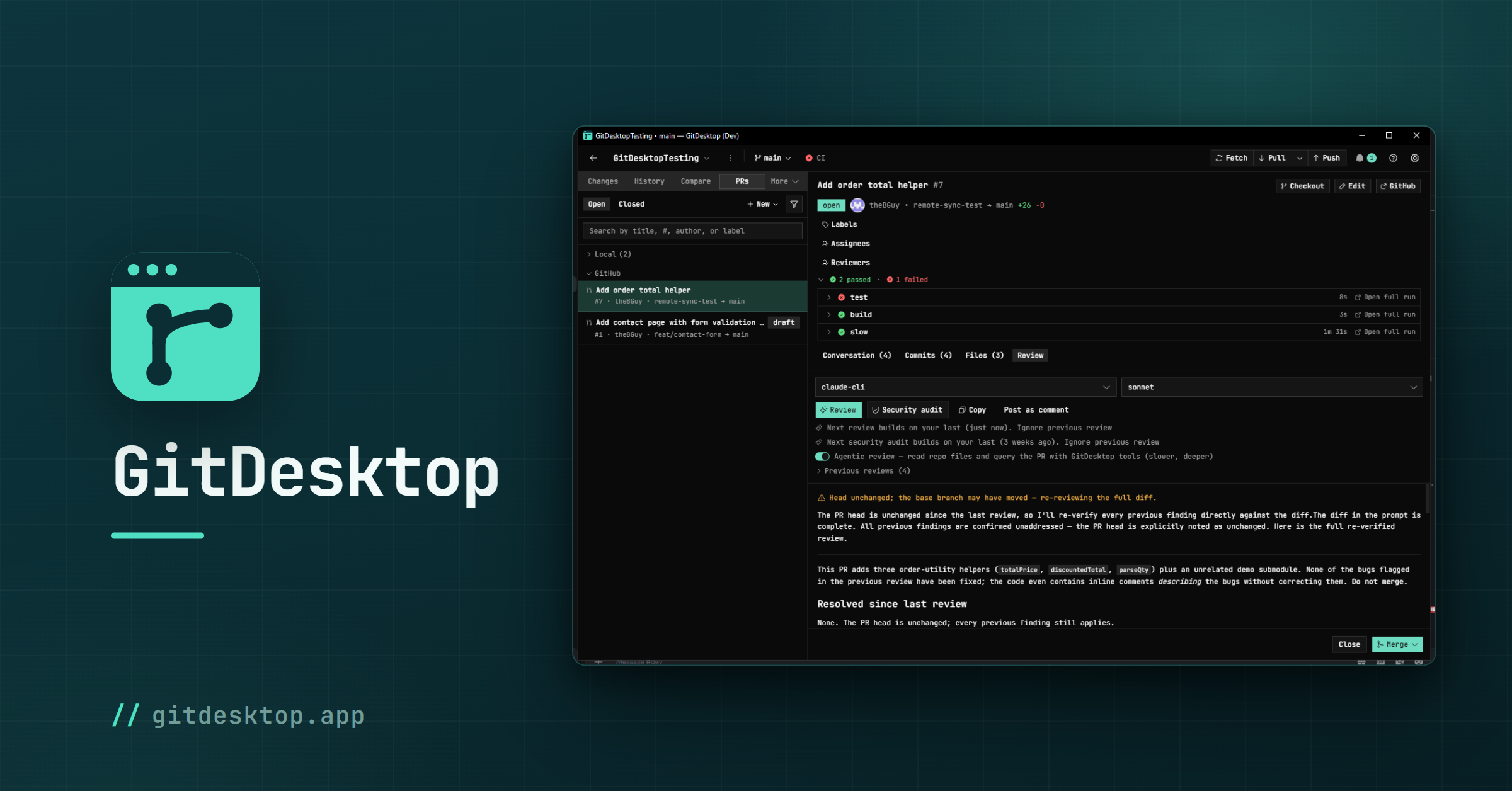
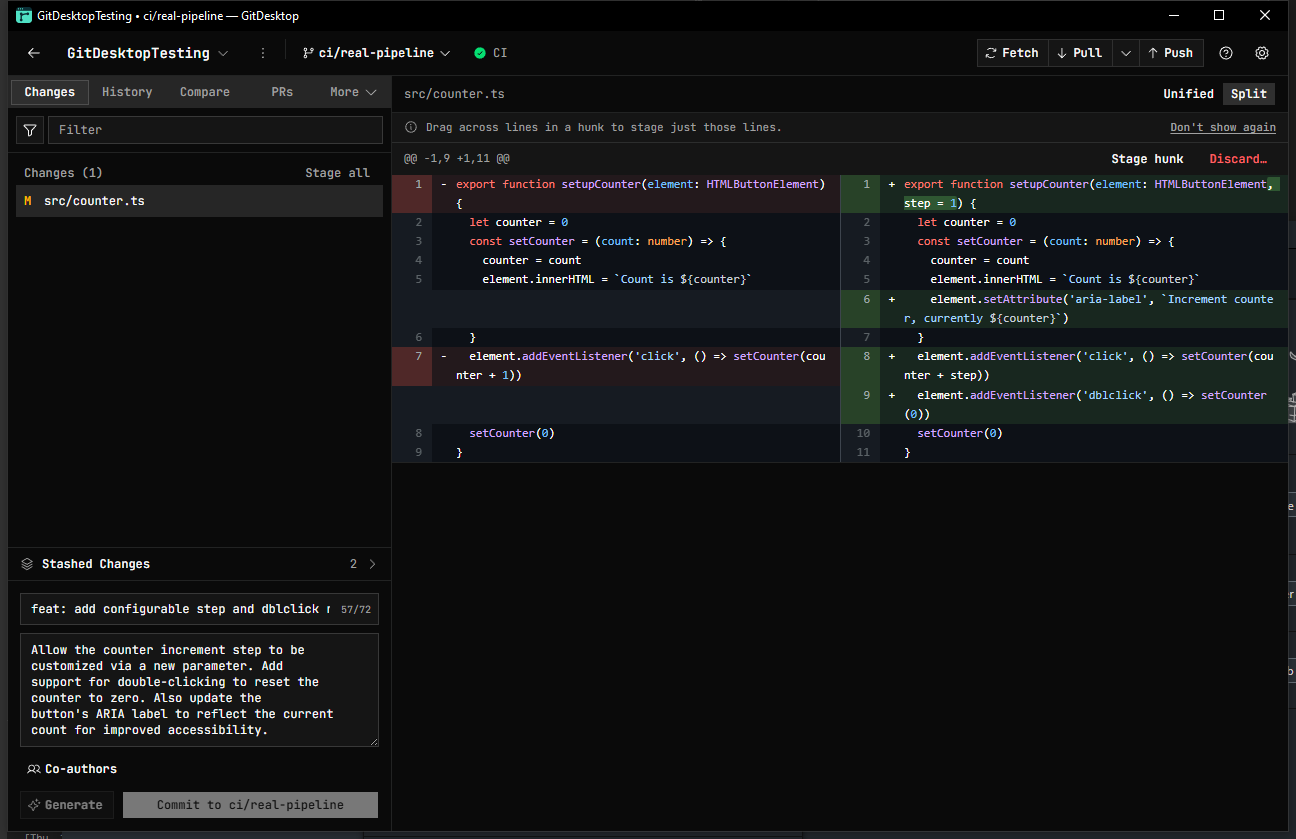
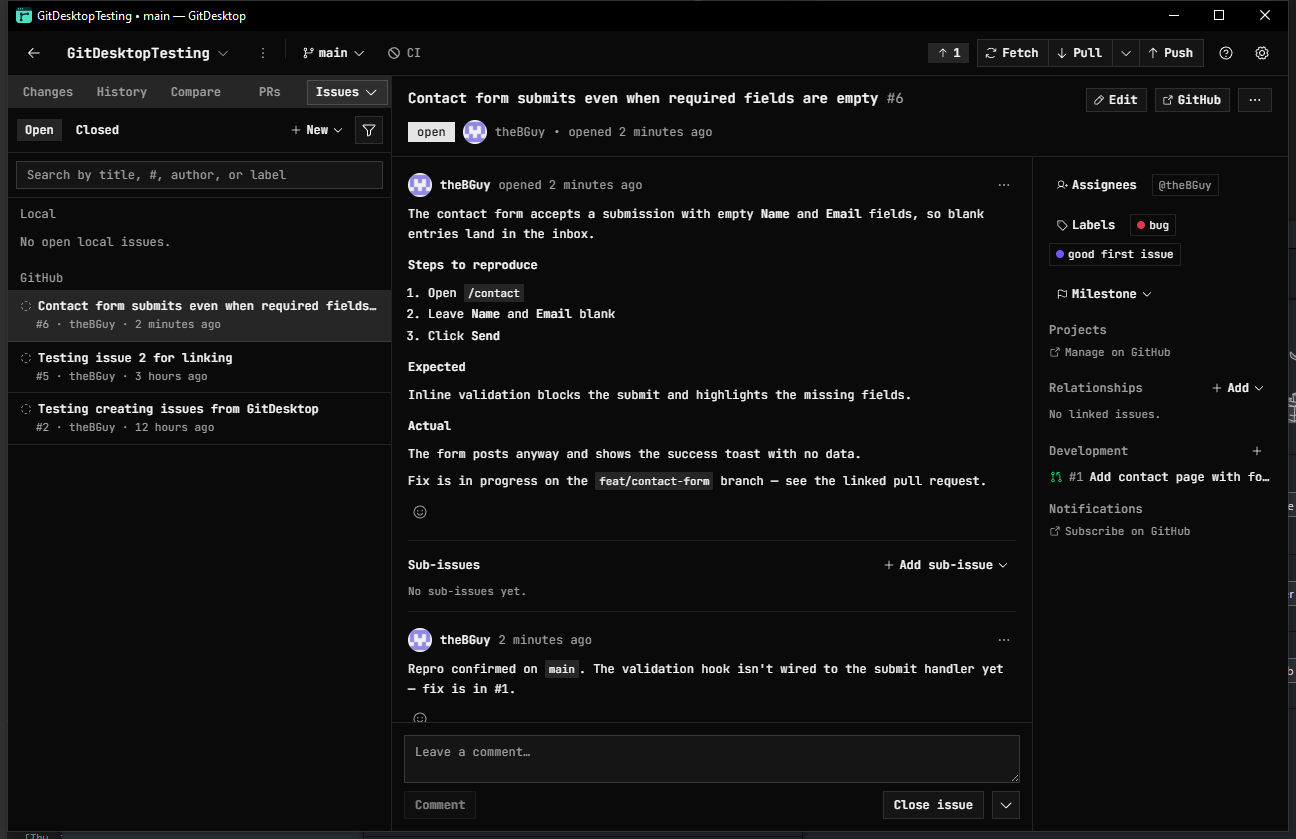
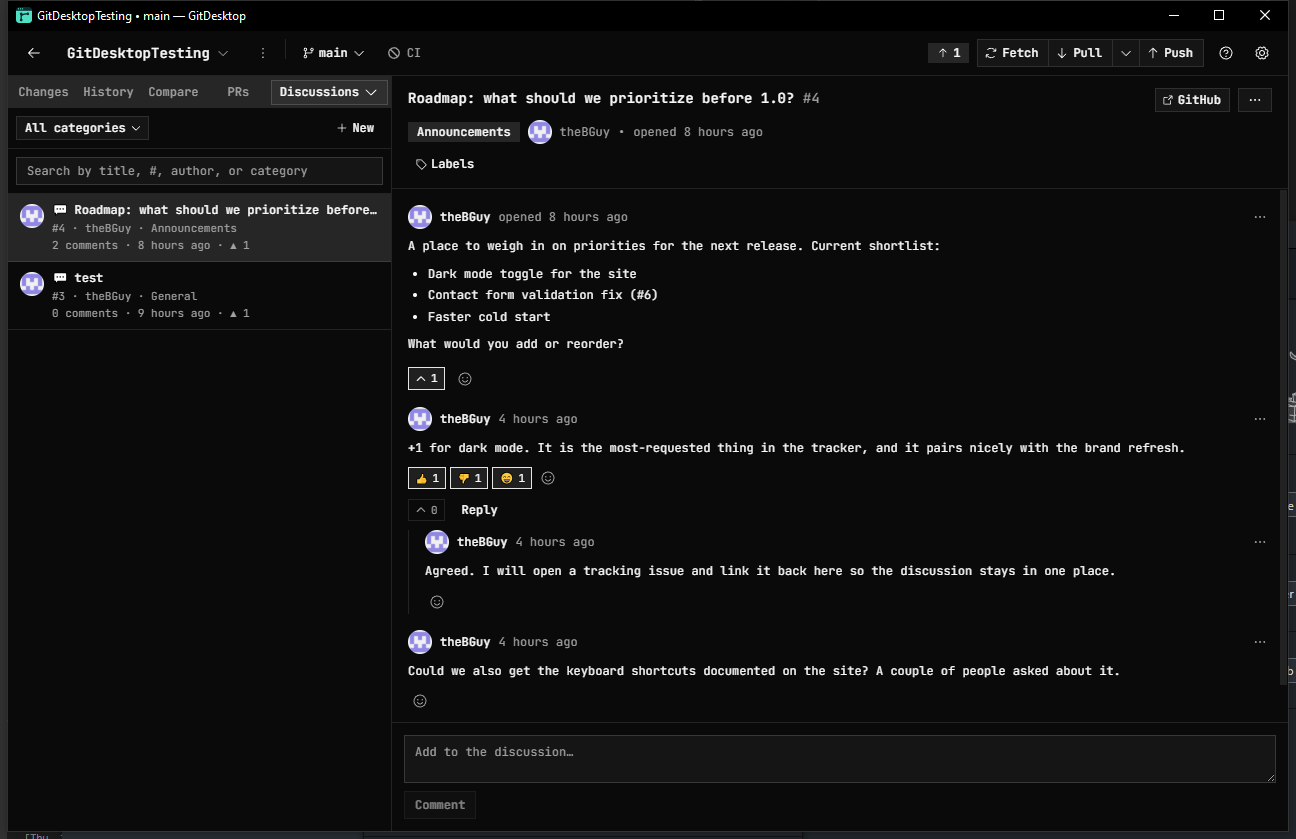
Key Features
- Complete Git Workflow Stage files, hunks, or lines, manage branches and worktrees, edit
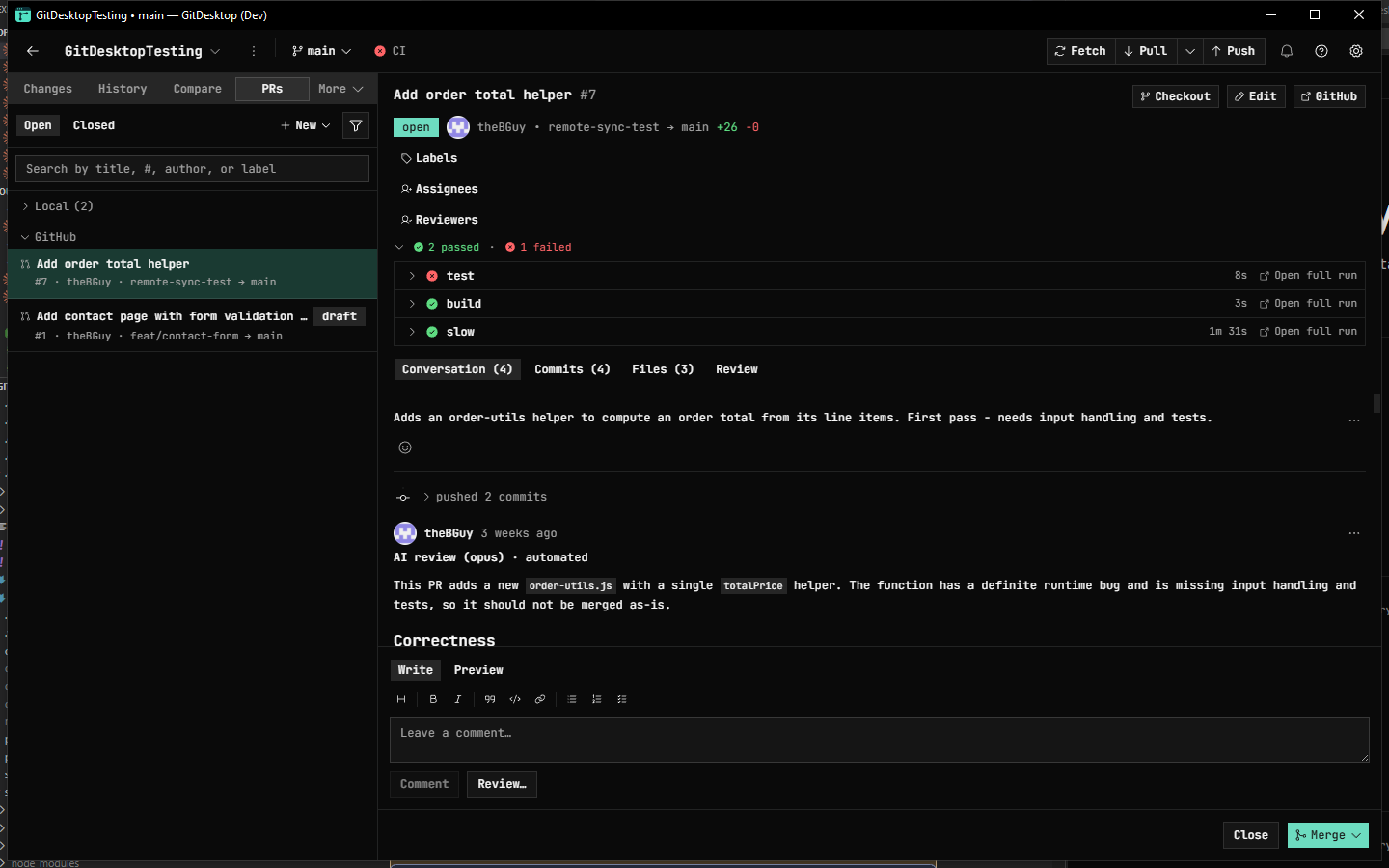
- Pull Requests & Code Review Create, review, comment on, approve, label, assign, and merge pull
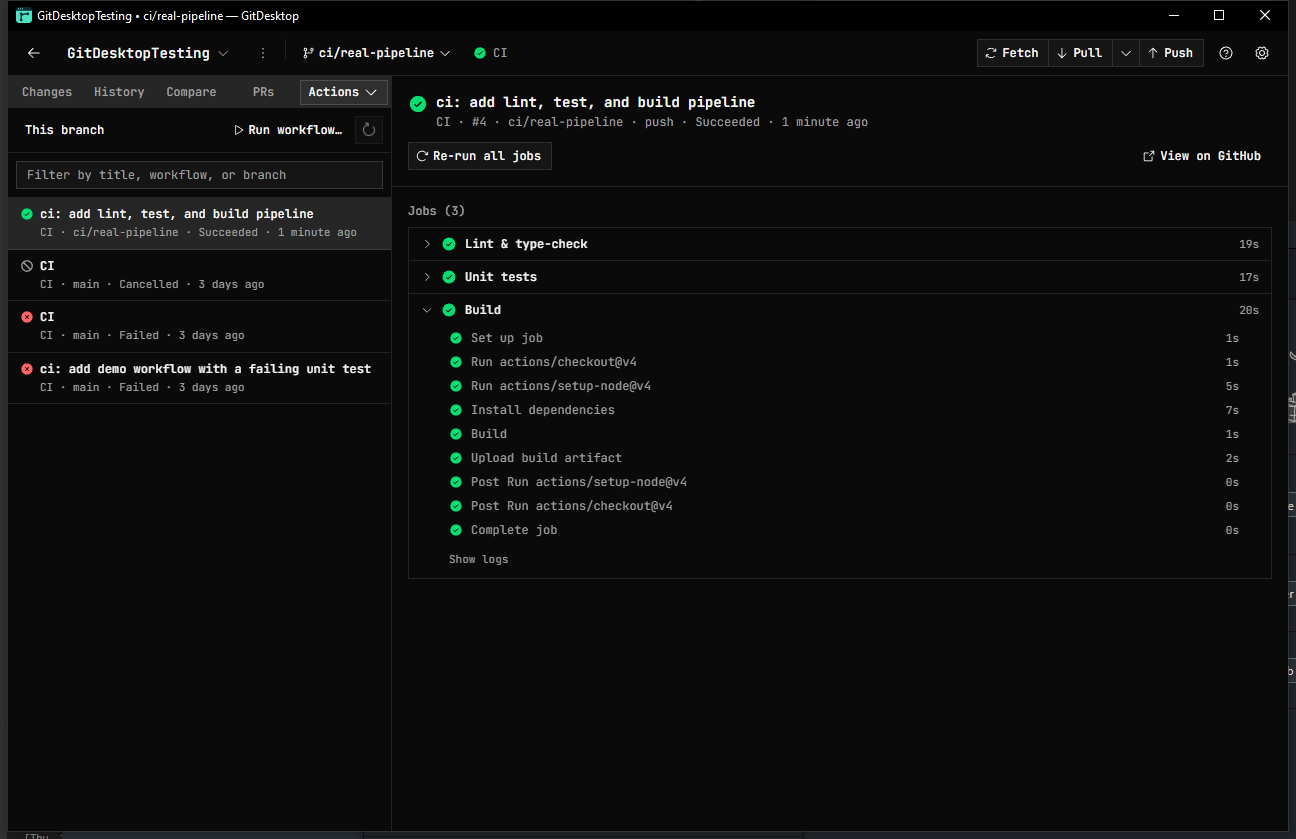
- CI & Repository Management Monitor GitHub Actions and GitLab CI, inspect workflow logs, rerun
- Multi-Forge Support Work with GitHub, GitLab, and Bitbucket from the same client, with support
- & Agent Workflows Generate commits, PR descriptions, branches, and reviews using your
- Local-First & Open Source GitDesktop is Apache-2.0 licensed, stores credentials using OS-level
About
GitDesktop is an open-source, cross-platform Git client built to bring the entire Git workflow into one desktop application. Instead of using a desktop client for local Git and then switching to GitHub, GitLab, or Bitbucket for everything else, GitDesktop brings staging, branches, pull requests, reviews, issues, CI, releases, and repository management together in one place. Built with Tauri 2, Rust, React 19, and TypeScript, GitDesktop is designed as a local-first desktop application rather than a browser-based Git interface. Git operations happen locally, credentials are stored using the operating system's secure credential storage, and the application does not require a hosted GitDesktop account. GitDesktop supports GitHub, GitLab, and Bitbucket, including multiple authenticated identities. Developers can create and manage pull requests, review code, comment, assign reviewers, manage labels, check CI status, inspect workflow logs, manage issues and discussions, and publish releases without constantly returning to a browser. For local Git work, GitDesktop includes detailed staging and diff views, interactive rebase, worktree management, history editing, merge previews, and recovery tools designed to make potentially destructive Git operations easier to understand and recover from. It also supports local pull requests, allowing developers to review work before it is pushed to a remote repository. AI is an optional layer rather than a requirement. GitDesktop can generate commit messages, pull request descriptions, branch names, reviews, and other content using providers such as OpenAI, Anthropic, Google, OpenRouter, and Ollama. Developers can bring their own API keys or run models locally. It also supports CLI-based agents such as Claude, Codex, and Copilot for delegated coding tasks. If AI is not wanted, a single setting hides every AI feature from the application. The project is licensed under Apache-2.0 and is actively developed in public. GitDesktop is intended to be a complete Git client first, with AI and other integrations available when they are useful rather than being required parts of the workflow.
Who it is for
GitDesktop is for developers who want more than a basic Git GUI and would rather manage their local Git work, code review, CI, and repository workflow from one desktop application.
- Developers who want a complete Git workflow For developers tired of switching be
- GitHub, GitLab, and Bitbucket users Particularly useful for developers or teams
- Git power users For developers who want interactive rebase, worktrees, detailed
- Developers who want optional AI assistance For people who want AI-assisted commi
- Developers who prefer local-first and open-source software For people who want a
Use Cases
- Stage, commit, and manage branches without leaving the desktop application
- Review and merge pull requests from GitHub, GitLab, or Bitbucket locally
- Perform interactive rebases and history editing with visual diff previews
- Manage issues, discussions, and CI workflow status from one desktop interface
- Recover from destructive Git operations using built-in recovery tools
Pricing
GitDestktop is free and open source
Verdict
GitDesktop is an ambitious open-source Git client that goes considerably further than traditional staging-and-commit GUIs. Its biggest strength is the breadth of the workflow it brings into one application: local Git operations, pull requests, code review, issues, CI, releases, and repository management can all happen without constantly switching to a browser. The project is particularly compelling for developers who use GitHub, GitLab, or Bitbucket heavily and want a more integrated desktop workflow. Advanced Git functionality such as interactive rebase, worktrees, detailed staging, and recovery tools also make it more interesting to experienced Git users than a simplified Git GUI. AI is handled thoughtfully. Rather than making AI mandatory, GitDesktop lets users choose their provider, use local Ollama models, work with CLI agents, or hide AI completely. That approach makes the AI useful without making it the reason the application exists. As a relatively young project, GitDesktop is still developing and does not have the maturity or ecosystem of long-established Git clients. However, its open-source license, cross-platform support, multi-forge integrations, local-first design, and unusually broad feature set make it worth watching for developers looking for an alternative to GitHub Desktop and other established Git clients. If your ideal Git client is something you can use from the first change through review, CI, and merge without constantly opening the browser
FAQ
What is GitDesktop?
GitDesktop is an open-source, cross-platform Git client built to bring the entire Git workflow into one desktop application. Instead of using a desktop client for local Git and then switching to GitHub, GitLab, or Bitbucket for everything else, GitDesktop brings staging, branches, pull requests, reviews, issues, CI, releases, and repository management together in one place. Built with Tauri 2, Rust, React 19, and TypeScript, GitDesktop is designed as a local-first desktop application rather than a browser-based Git interface. Git operations happen locally, credentials are stored using the operating system's secure credential storage, and the application does not require a hosted GitDesktop account. GitDesktop supports GitHub, GitLab, and Bitbucket, including multiple authenticated identities. Developers can create and manage pull requests, review code, comment, assign reviewers, manage labels, check CI status, inspect workflow logs, manage issues and discussions, and publish releases without constantly returning to a browser. For local Git work, GitDesktop includes detailed staging and diff views, interactive rebase, worktree management, history editing, merge previews, and recovery tools designed to make potentially destructive Git operations easier to understand and recover from. It also supports local pull requests, allowing developers to review work before it is pushed to a remote repository. AI is an optional layer rather than a requirement. GitDesktop can generate commit messages, pull request descriptions, branch names, reviews, and other content using providers such as OpenAI, Anthropic, Google, OpenRouter, and Ollama. Developers can bring their own API keys or run models locally. It also supports CLI-based agents such as Claude, Codex, and Copilot for delegated coding tasks. If AI is not wanted, a single setting hides every AI feature from the application. The project is licensed under Apache-2.0 and is actively developed in public. GitDesktop is intended to be a complete Git client first, with AI and other integrations available when they are useful rather than being required parts of the workflow.
Who is GitDesktop for?
GitDesktop is for developers who want more than a basic Git GUI and would rather manage their local Git work, code review, CI, and repository workflow from one desktop application. • Developers who want a complete Git workflow For developers tired of switching be • GitHub, GitLab, and Bitbucket users Particularly useful for developers or teams • Git power users For developers who want interactive rebase, worktrees, detailed • Developers who want optional AI assistance For people who want AI-assisted commi • Developers who prefer local-first and open-source software For people who want a
What problem does GitDesktop solve?
GitDesktop is built around this outcome: For developers: GitDesktop unifies staging, branches, pull requests, and CI in one desktop app so you stop switching between Git clients. Use the site demo or docs to confirm it matches the bottleneck you are trying to remove.
What are the main features of GitDesktop?
GitDesktop includes: • Complete Git Workflow Stage files, hunks, or lines, manage branches and worktrees, edit history, perform interactive rebases, preview merges, and recover from G • Pull Requests & Code Review Create, review, comment on, approve, label, assign, and merge pull requests directly from GitDesktop across GitHub, GitLab, and Bitb • CI & Repository Management Monitor GitHub Actions and GitLab CI, inspect workflow logs, rerun or cancel jobs, manage issues and discussions, and publish release • Multi-Forge Support Work with GitHub, GitLab, and Bitbucket from the same client, with support for multiple authenticated identities and Jira Cloud integration • AI & Agent Workflows Generate commits, PR descriptions, branches, and reviews using your preferred AI provider or local Ollama models. Delegate coding tasks to • Local-First & Open Source GitDesktop is Apache-2.0 licensed, stores credentials using OS-level secure storage, does not require a GitDesktop account, and lets u
Is GitDesktop free?
GitDestktop is free and open source Confirm on the product site that free usage covers your volume and that there are no surprise limits.
How much does GitDesktop cost?
GitDestktop is free and open source
What are the best alternatives to GitDesktop?
People comparing options often look at GitHub Desktop, GitKraken, Sourcetree, Tower, Fork. Pick based on workflow fit, pricing, and how painful migration would be — not just feature checklists.
Is GitDesktop open source or self-hostable?
GitDesktop mentions open-source or self-hosting in its positioning. Check the repo or docs for license, deployment effort, and what stays cloud-only.
How does GitDesktop use AI?
GitDesktop uses AI as part of its workflow. Before relying on it for customer-facing or confidential work, confirm what data is sent to models, whether outputs are editable, and how you can review results.
Is GitDesktop worth trying?
It promises: For developers: GitDesktop unifies staging, branches, pull requests, and CI in one desktop app so you stop switching between Git clients. A concrete use case founders care about: Stage, commit, and manage branches without leaving the desktop application. It has 20 community upvotes on Launch Llama, which is a signal of interest — not a guarantee it fits you. Worth trying if that problem is painful for you this week; skip it if you only need a one-off workaround you already have.
Alternatives
- GitRacing
For developers: GitRacing gamifies GitHub activity so your team stays motivated through commits, stars, and pull requests.
- git-lrc
For developers: git-lrc runs unlimited AI code reviews on every commit, catching logic breaks, credential leaks, and behavior changes before they land.
- GitSetGo
For developers: Git Set Go teaches Git commands through 30 interactive levels where you type real commands, building muscle memory to master version control.
- Reqit
For developers: Reqit stores API collections as plain JSON files with local-first workflow so you test APIs faster without cloud dependencies.
- Novix
For development teams: Novix analyzes bug reports, tests fixes in sandbox, and opens pull requests so you approve patches without manual work.
- RepoRunner
For solo developers: RepoRunner runs local GitHub repos with buttons instead of terminals so you manage projects faster without command-line friction.
Supporters
11 founders11 founders contributed 20 upvotes to GitDesktop on Launch Llama.






Reviews
1 comment
Hey, love seeing this here! 👋 What inspired you to build this? Would love to hear the story behind it.
Ask AI
ChatGPT Claude Perplexity Grok
For agents
llms.txt · llms-full.txt · ai.txt · Live fact sheet · Full catalog (.md) · Endpoint index · API spec · REST access · Agent server · Server manifest · Server discovery