Fotocaja
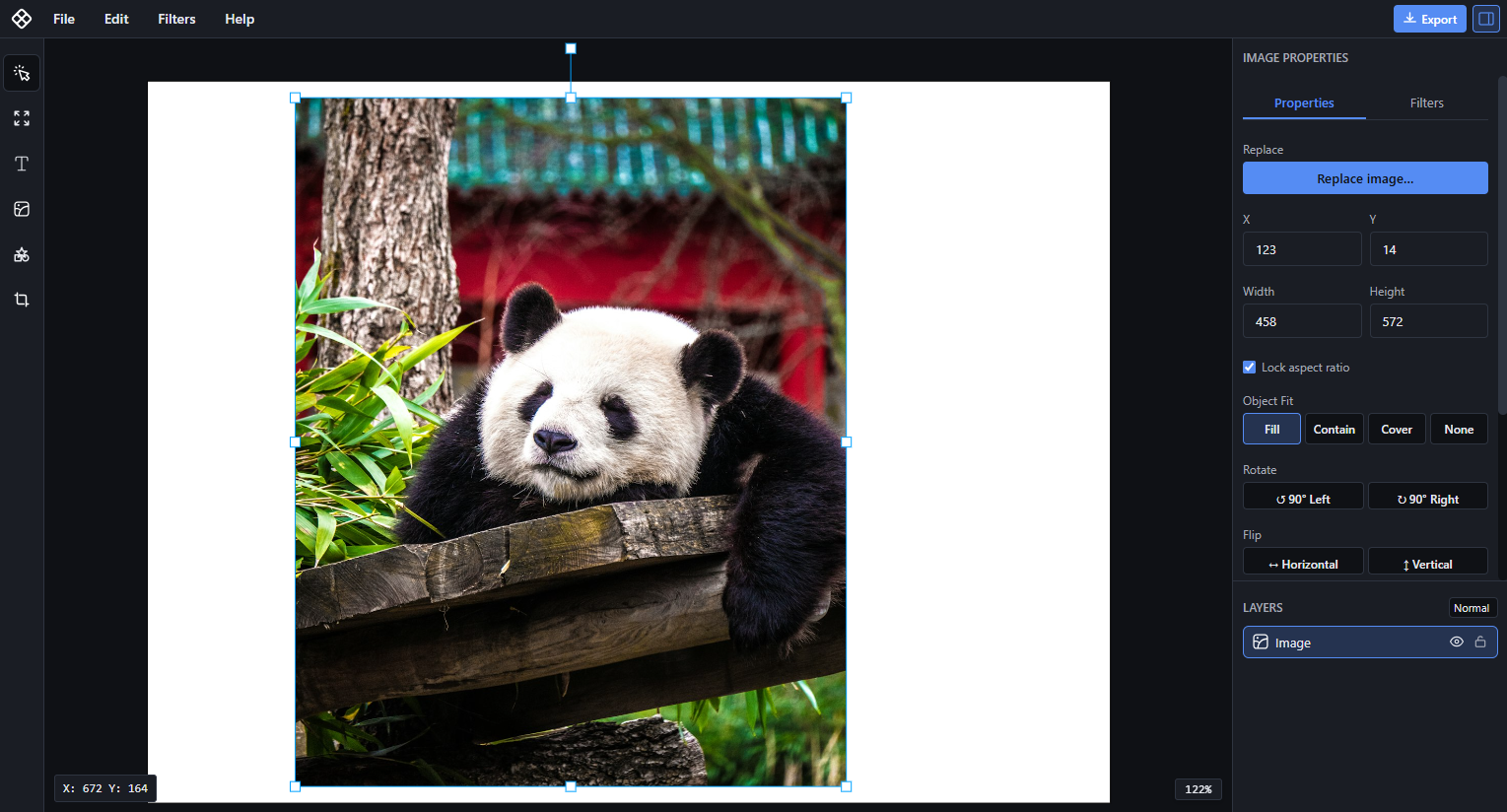
For photographers and designers: Fotocaja is a fast, simple photo editor that runs entirely on your device for full privacy and control.
Built by Ryan · Design Tools · Free
In category: #207 of 447 · Design Tools
Fotocaja is a Community listing on Launch Llama with 13 total upvotes, founded by Ryan who joined in May 2026, compared against 5 alternatives.
Community listing
Listing status
13upvotes
Community score
Ryan (Joined May 2026)
Founder
Compared against 5 alternatives
Market comparison
Launched on Launch Llama May 8, 2026 · #7 of 23 that day
About
Traditional editors are either too complex or depend on cloud processing. Fotocaja focuses on speed, simplicity, and full control by running entirely on your device.
Use Cases
- Quickly resizing, cropping, and adjusting photos without installing heavy design software
- Designing social media posts, thumbnails, posters, and presentations from templates in the browser
- Building multi-page layouts and exporting them as a single PDF for presentations, brochures, or reports
Who it is for
- Developers who need to resize, crop, or adjust images quickly.
- Social content creators preparing visuals for social media.
- Freelancers handling quick client design requests without switching to complex tools.
Pricing
Fotocaja is free to use. See the website for details.
FAQ
Is Fotocaja free to use?
Yes. You can use Fotocaja without subscriptions or installation. Just open the app and start editing.
Do I need to create an account?
No. There is no sign-up required. You can start editing immediately.
Does Fotocaja upload my images?
Only if you want it to. By default, every edit happens right inside your browser, your images never leave your device and are never uploaded to any server. When you sign in, you can unlock secure cloud saving: your projects are stored on Fotocaja's high-security servers, encrypted in transit and at rest, automatically backed up, and ready to reopen or share by link from any device. Local-first for total privacy, cloud-powered when you want it, the choice is always yours.
What file formats are supported?
Fotocaja supports common image formats such as JPG, PNG, and WebP.
Will it work on my device?
Fotocaja works on any modern browsers.
Does it require installation?
No. Fotocaja runs entirely in your browser without any installation or setup.
Can I add text and apply filters?
Yes. You can add text, apply filters, and adjust image settings directly on the canvas.
Is Fotocaja a full design tool like Photoshop or Canva?
Yes. Fotocaja is a full design tool. Beyond quick edits, it handles multi-page layouts, PDF export, templates, typography, masking, and real-time collaboration — so you can take a project from idea to finished, shareable design without leaving your browser.
Is Fotocaja really free?
Yes. The full editor — photo editing, templates, typography, masking, multi-page layouts, and PDF export — is free, with no account and no install. Premium only raises limits like cloud storage, sharing, and the asset library.
Do I need an account to use the free plan?
No. You can open the app and start editing straight away. An account is only needed if you want cloud saving, sharing links, or collaboration.
Alternatives
 Fotools Online ToolsFor developers: Fotools Online Tools provides 200+ free utilities for encoding, encryption, image processing, and data conversion so you skip installation and work instantly online.
 AI Photo EditorFor creators: AI Photo Editor transforms images via text prompts, editing JPG, PNG, WebP instantly without design skills or software.
 RyluxRylux extracts a look from reference photos or a Lightroom Classic catalog and develops your RAW files on your Mac, with no upload or cloud.
More in Design Tools
New on Launch Llama
Launched this week · This month's launches · All products A–Z
Ask AI about Fotocaja
Supporters
2 founders
2 founders supported Fotocaja on Launch Llama.

For bots & AI agents
Machine-readable versions of Fotocaja and Launch Llama. Fetch these instead of parsing this page.
This listing (.md) llms.txt llms-full.txt ai.txt Full catalog (.md) Endpoint index API docs MCP server MCP manifest Developer docs