FontMeter
See the type system of any web page at a glance
Chrome extension for designers and front-end developers that labels each text style, shows which fonts render, finds the type scale and checks WCAG contrast on any site.
Chrome Extensions · Free
In category: #22 of 24 · Chrome Extensions
FontMeter is a Community listing on Launch Llama with 2 total upvotes, +2 in the week of Nov 21–Nov 27, 2026, compared against 1 alternative.
Community listing
Listing status
2upvotes
+2 · Nov 21–Nov 27, 2026
Community score
—
Founder
Compared against 1 alternative
Market comparison
Launched on Launch Llama Nov 23, 2026 · #82 of 107 that day
About
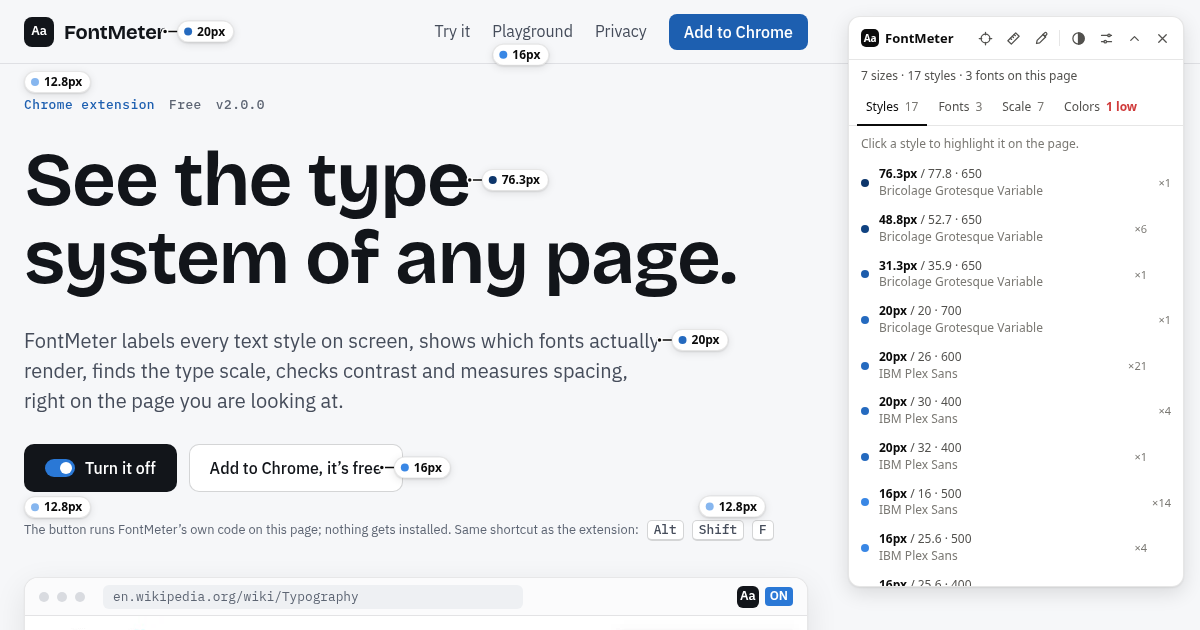
You turn it on from the tab you are viewing with its icon or Alt Shift F, and it reads that page on your device without sending anything out. Its panels include a details card with size in px, rem and em, line height and line length, a palette grouped by how colors look on screen, a DOM inspector, a snapping ruler and a pixel color picker. The site demonstrates the extension on a live Wikipedia page and on an example article with four deliberate typography problems.
Key Features
- Labels every text style on a page with a tag beside the text
- Reports which fonts actually render, including fallbacks and faked bold
- Finds the type scale and exports its tokens to CSS, Tailwind or JSON
- Flags text below WCAG AA contrast and outlines those elements on the page
- Measures spacing with a snapping ruler and inspects margin and padding on hover
- Picks any pixel and reports its HEX, RGB, HSL or OKLCH value
Use Cases
- Checking the font, size and line height of every text style on a live website during a design review
- Finding low-contrast text on a page and outlining every element that uses that color
Who it is for
- Designers reviewing typography in a design review
- Front-end developers checking type and contrast on live pages
Pricing
FontMeter is free to use. See the website for details.
FAQ
Is FontMeter free?
Yes. There is no account and nothing to pay.
Which browsers does it work in?
Chrome 121 or newer, and Chromium browsers that install from the Chrome Web Store, such as Edge, Brave and Arc. Firefox and Safari are not supported yet.
Does it change the page I am looking at?
No. The overlay sits on top in its own isolated layer. While inspect, ruler or picker is on, clicks don’t reach the page, so you don’t trigger anything by accident.
Where doesn’t it work?
Browser pages such as chrome://settings, the Chrome Web Store and the built-in PDF viewer, which no extension may access. Text inside iframes isn’t analyzed yet.
How is this different from DevTools?
DevTools shows one element at a time. FontMeter shows every text style on the page at once, plus what DevTools buries: the font that actually renders, faked bold, the type scale and contrast across the whole page.
What is FontMeter?
Chrome extension for designers and front-end developers that labels each text style, shows which fonts render, finds the type scale and checks WCAG contrast on any site.
Alternatives
More in Chrome Extensions
New on Launch Llama
Launched this week · This month's launches · All products A–Z
Launch Llama stats
- 255views
Views and visits: last 90 days on Launch Llama.
Ask AI about FontMeter
Supporters
1 founder
1 founder supported FontMeter on Launch Llama.
For bots & AI agents
Machine-readable versions of FontMeter and Launch Llama. Fetch these instead of parsing this page.
This listing (.md) llms.txt llms-full.txt ai.txt Full catalog (.md) Endpoint index API docs MCP server MCP manifest Developer docs