Claude Sonnet 5.5
Anthropic's second model in the Claude 5.5 family
Built by Ephraim Tekle, Kevin Garcia, Mike Krieger and 11 others · Freemium
Claude Sonnet 5.5 is a Product Hunt listing on Launch Llama with 239 total upvotes, founded by Ephraim Tekle, Kevin Garcia, Mike Krieger and 11 others who joined in Sep 2026, compared against 4 alternatives.
Product Hunt listing
Listing status
239upvotes
Community score
Ephraim Tekle, Kevin Garcia, Mike Krieger and 11 others (Joined Sep 2026)
Founder
Compared against 4 alternatives
Market comparison
Launched on Launch Llama Sep 30, 2026 · #7 of 45 that day



About
Claude is an AI assistant designed for work tasks, helping users hand off work, create documents and prototypes, and run scheduled tasks. Claude helps users take routine work off their plate by mining data, pulling information together, and creating first drafts they can edit.
Launch Llama's Take
Based on Launch Llama data as of
Claude Sonnet 5.5 has 239 upvotes, including the votes it received on Product Hunt. It has been listed on Launch Llama since September 2026. No Launch Llama members have upvoted it yet and it has no reviews yet.
Claude Sonnet 5.5 vs Claude Duet
This product is an AI assistant designed for work tasks, covering handed-off work, documents, prototypes, and scheduled tasks. Claude Duet runs delegated work on its own cloud computer, while this product centers on creating decks, spreadsheets, and prototypes.
| Claude Sonnet 5.5 | Claude Duet | Claude by Anthropic | Claude Opus 4.7 | |
|---|---|---|---|---|
| What it does | Anthropic's second model in the Claude 5.5 family | Proactive agent that understands what needs your attention | For presenters: Claude in PowerPoint builds, edits, and iterates slides in real time while respecting your layouts, fonts, and brand temp… | For developers and researchers: Claude Opus 4.7 handles complex reasoning, long-running tasks, and agentic coding with precise instructio… |
| Pricing | Freemium | Paid | Freemium | Paid |
| Free plan | Yes, free plan | No free plan listed | Yes, free plan | No free plan listed |
| Category | LLMs | Messaging | Marketing | API |
| Upvotes on Launch Llama | 239 | 375 | 136 | 506 |
| Listed on Launch Llama | September 2026 | November 2026 | February 2026 | April 2026 |
Key Features
- Hand off and schedule tasks across applications
- Create artifacts including decks, spreadsheets, and prototypes
- Search the web and create files with code execution
- Connect your apps and tools through connectors
- Access multiple Claude models with varying capabilities
Use Cases
- Marketing teams who want to share campaign ideas and receive polished drafts for review
- Sales professionals who need more time with customers instead of administrative work
- Finance teams who want to review data and reconcile accounts more efficiently
- Legal professionals who need Claude to draft documents for their review and approval
Who it is for
- Product managers tracking meeting action items and team follow-ups
- Marketing and finance teams building weekly performance reports and budget reforecasts
- Legal and sales teams drafting contracts, research, and customer-facing materials
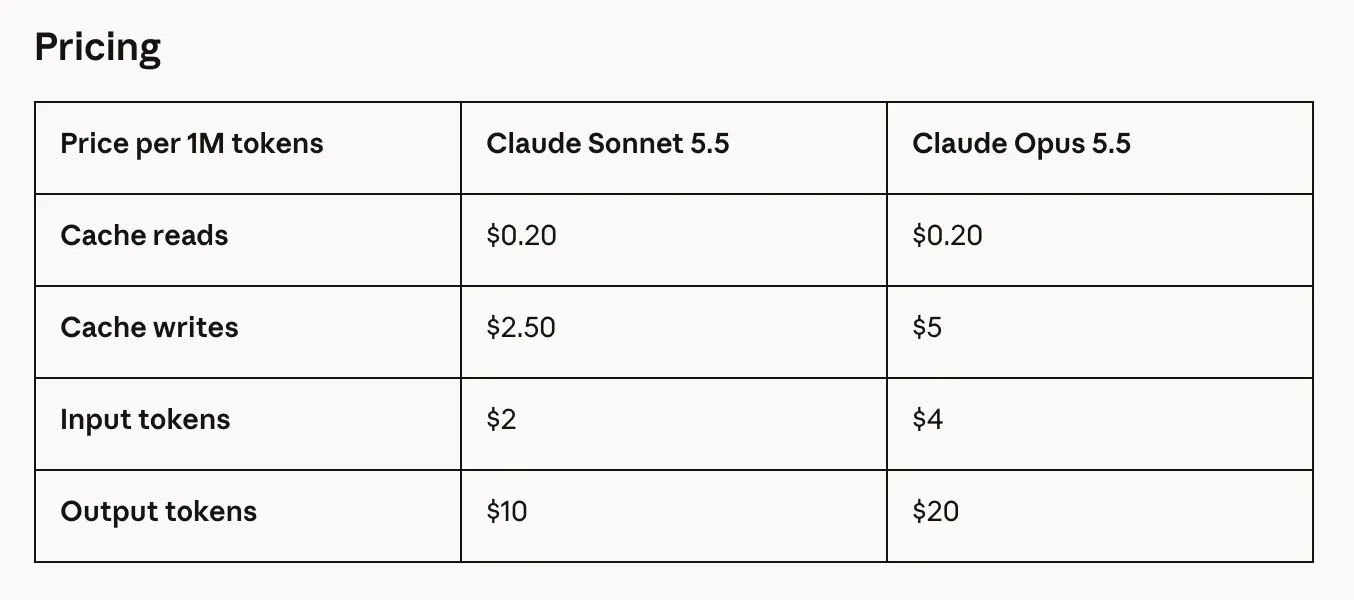
Pricing
Free plan available. Pro costs $20/month (or $17/month with annual subscription). Max starts at $100/month with usage options.
FAQ
What is Claude?
Claude is more than an AI assistant: it’s a helpful, intuitive, and powerful collaborator you can put to work on real tasks, not just questions. Point it to files and tools you want it to access, give it a goal or an outcome you want in plain language, and it gets to work. It can produce real files like documents, spreadsheets, and slides that you review, edit, and sign off on.
What kind of work can I hand off?
Claude can take on anything you want: it can handle routine work like updating metrics, consolidating feedback or data to surface what really needs your opinion, or large projects like audits. Other common use cases include first drafts and editing; creating briefs from meeting notes or account records; reconciling disparate data from different sources and pulling it into a spreadsheet or dashboard; pulling information into slides and presentations, and much more. Not sure where to start or what it can do? Ask Claude. Claude also works directly in other apps like Slack via Claude Tag , Microsoft 365 services, and on the web through Claude in Chrome . For coding, visit Claude Code .
What happened to Claude Cowork?
Claude Cowork and chat are becoming one Claude, rolling out to Pro and Max over the coming weeks. Everything is where you left it: your chats, projects, artifacts, connectors, and skills. Open the app and pick up where you left off.
What apps does Claude work with?
Claude connects with many tools, databases, and applications to do more relevant work through connectors. Visit the Connectors page to see if the service you want to use is available.
What kind of files can Claude read, create, edit, and analyze?
Claude can understand the following file types: Documents and text: Word documents (.docx, .doc), PDF files (.pdf), Plain text (.txt), Markdown (.md), HTML (.html), JSON (.json), CSV (.csv), TSV (.tsv) Spreadsheets: Excel files (.xlsx, .xls, .xlsm) Presentations: PowerPoint files (.pptx, .ppt) Images: Common formats like .png, .jpg, .jpeg, .gif, .svg, .webp Data and config: YAML (.yaml, .yml), XML (.xml), TOML (.toml) Notebooks: Jupyter notebooks (.ipynb) Code files: Pretty much any programming language: Python (.py), JavaScript (.js), TypeScript (.ts), React (.jsx, .tsx), Java, C/C++, Go, Rust, Ruby, PHP, SQL, shell scripts, etc. You can also use Connectors to view additional files.
Do I need the desktop app?
No. Claude runs on web and mobile (iOS and Android). The desktop app is available for macOS, Windows, Windows (arm 64) and adds what web and mobile can’t reach: the folders and applications on your own computer. If that’s where your work lives, start there. To explore all app options, visit the Download page .
Can I assign tasks from my phone?
Yes. Start a task from your phone, and Claude keeps working in the cloud even when your laptop is closed. Check in, redirect, or review the result from anywhere. Available in Pro, Max, and Team plans automatically. Enterprise plans can opt in.
How much does Claude cost?
Claude plans are available for personal, team, and enterprise use and all offer varying usage and cost. To choose a plan that’s right for you, visit the Pricing page .
What do I get with Claude Pro?
The Pro plan gives you everything in a Free plan with more usage and more of Claude's capabilities. That includes Claude Code, along with projects to organize your chats and documents, access to more Claude models, and Claude for Microsoft 365. You can choose a monthly or annual subscription.
How is Claude Max different from Pro?
The Max plan is built for people who work with Claude throughout the day and want longer, uninterrupted sessions. You get everything in Pro, plus more usage: choose from 5x or 20x the usage of Pro per 5-hour session. Max also gives you higher output limits. Both options are billed monthly. See the cards above for current pricing.
Alternatives
 Claude DuetProactive agent that understands what needs your attention
New on Launch Llama
- Ora
- GIS Toolbox
- Starbucks Calorie Calculator
- VideoAny AI
- CleanOps
- EXTREMELY Autonomous Agents
- TariffsChart
- Secondee
Launched this week · This month's launches · All products A–Z
Featured in
- The 13 Best AI Chatbots Tools in 2026 (Compared) — ranked #1
Ask AI about Claude Sonnet 5.5
Third-party sources
- Claude Opus 5.5
Hacker News · September 22, 2026 · 1,806 points
- Claude Fable 5.1 and Claude Mythos 5.1
Hacker News · September 1, 2026 · 1,419 points
- Claude Opus 5
Hacker News · July 24, 2026 · 1,778 points
- Claude Sonnet 5
Hacker News · June 30, 2026 · 1,266 points
- Statement on US government directive to suspend access to Fable 5 and Mythos 5
Hacker News · June 13, 2026 · 3,158 points
- Claude Fable 5
Hacker News · June 9, 2026 · 2,626 points
- Claude Opus 4.8
Hacker News · May 28, 2026 · 1,774 points
- Claude Design
Hacker News · April 17, 2026 · 1,235 points
For bots & AI agents
Machine-readable versions of Claude Sonnet 5.5 and Launch Llama. Fetch these instead of parsing this page.
This listing (.md) llms.txt llms-full.txt ai.txt Full catalog (.md) Endpoint index API docs MCP server MCP manifest Developer docs